❌

Vue normale

Reçu avant avant-hierCloud Blog

Unlock 3x QPS and microsecond latency with Memorystore for Valkey 9.1

25 septembre 2026 à 18:00

At Google Cloud, we are committed to delivering the best managed experience backed by open source software. Today, we’re announcing the general availability of Memorystore for Valkey 9.1, which achieves up to 3x queries per second (QPS) at microsecond latency compared to Memorystore for Redis Cluster.

Our support for Valkey dates back to 2024, when Redis Inc. shifted its licensing away from the permissive open-source BSD license to a dual-license model. In response, Google Cloud, alongside other technology leaders, backed the creation of Valkey, an open-source alternative governed by the Linux Foundation.

Valkey has come a remarkably long way since then, delivering major performance and feature updates that push boundaries far beyond the original fork. Valkey is particularly compelling for organizations scaling AI and microservices to handle millions of concurrent users. Here, backend developers and architects must deliver both massive throughput while also maintaining microsecond latency. 

In this blog, let’s take a look at how Valkey 9.1 achieves its performance, new developer capabilities, how to get started, and how customers are using it.

Under the hood: Rethinking thread communication

In high-throughput, in-memory datastores, efficient I/O offloading is critical to keeping the main execution loop unblocked. Previously, Valkey assigned client sockets to I/O threads statically in a round-robin fashion, requiring the main thread to continuously poll lists of pending clients to detect completed work.

Valkey 9.1 replaces list-polling with a lock-free, multi-queue messaging architecture that eliminates cross-thread CPU waste and unlocks dynamic work balancing. It involves three complimentary queues:

  • Main thread to I/O thread queue: Dispatches read and write jobs to a single-producer multi-consumer (SPMC) queue. Free worker threads pull tasks on demand, enabling dynamic work-stealing that prevents thread starvation or hot-spotting.

  • I/O thread to main thread queue: Worker threads push completed tasks into a multi-producer single-consumer (MPSC) queue. The main thread pops completed work instantly, eliminating busy-wait list iteration.

  • I/O thread-specific queues: Dedicated single-producer single-consumer (SPSC) queues handle thread-affine memory cleanup and high-volume epoll offloading.

Valkey 9.1 also replaces static thread thresholds with a two-phase dynamic scaling engine:

  • CPU-driven "ignition": When main-thread CPU usage crosses 30%, the engine automatically activates the first background I/O thread to absorb incoming traffic before queue bottlenecks form.

  • Queue-depth auto-scaling: Once ignited, Valkey dynamically scales the number of active I/O worker threads up or down based on real-time SPMC queue backlog, ensuring extra cores are used only when needed and parked when idle.

1

New developer capabilities in Valkey 9.1

Beyond raw performance, Valkey 9.1 addresses key feature requests from engineering teams with powerful new commands and enhanced security controls. Here is a look at what you can do with these new capabilities:

1. Granular database-level access control (ACLs)

We recently launched support for access control lists on Memorystore for Valkey to provide more granular key-level and command-level authorization using IAM. This foundational security mechanism is offered at no additional cost and includes the following capabilities:

  • Centralized management: A 1:N mapping approach allows you to define a single ACL policy and attach it across multiple clusters.

  • Secure multi-tenancy: Organizations can easily enforce least privilege and secure multi-tenancy across their database fleets.

  • Enhanced observability: The feature includes versioned policy revisions and comprehensive audit logging.

Previously, ACL rules applied globally across an instance. Valkey 9.1 allows administrators to restrict user access at the specific numeric database level within the ACL framework. 

Real-world example: You can configure a staging or service-specific user and isolate their access strictly to non-production databases:

  • production user: @all ~* db=0

  • staging user: @all ~* db=1

  • dev user: @all ~* db=2

Protect against unauthorized data access and guard against application bugs by leveraging database-level access control across multiple databases, all without needing to prefix your keys.

2

2. CLUSTERSCAN: Efficient cluster-wide key scanning

Previously, scanning keys across a large cluster required querying nodes individually. This approach was not cluster- or failover-aware. Consequently, scans could miss keys, return duplicates, or fail if slot migrations or node failovers occurred during the process.

The CLUSTERSCAN command addresses these limitations by introducing a topology-aware cursor. This cursor encodes the current slot, the fingerprint of the local hashtable, and the local cursor. With this additional encoded information, clients can scan keys across the entire cluster while gracefully handling topology changes and redirections.

CLUSTERSCAN supports two primary scanning strategies:

Use case 1: Sequential full cluster scan (single worker)

This strategy is suitable for simple scripts or background jobs that prioritize simplicity over speed. The client starts with cursor 0 and sequentially traverses all slots in the cluster:

code_block
<ListValue: [StructValue([('code', 'CLUSTERSCAN 0 MATCH "user:*" COUNT 10\r\n1) "0B3a21-{06S}-64"\r\n2) 1) "user:101"\r\n2) 2) ...'), ('language', ''), ('caption', <wagtail.rich_text.RichText object at 0x7f522d356e90>)])]>

To continue the scan, pass the returned cursor to the next call. The cursor automatically transitions to the next slot when the current one is fully scanned.

code_block
<ListValue: [StructValue([('code', 'CLUSTERSCAN 0B3a21-{06S}-64 MATCH "user:*" COUNT 10\r\n1) "0B3a21-{07T}-0"\r\n2) 1) "user:102"\r\n2) 2) ...'), ('language', ''), ('caption', <wagtail.rich_text.RichText object at 0x7f522e15b350>)])]>

The scan is complete when the command returns a cursor of "0".

Use case 2: Parallelized cluster scan (multiple workers)

This strategy is suitable for high-throughput scans. Using the SLOT argument restricts the scan to a specific slot, allowing you to partition the 16,384 slots across multiple parallel workers.

Worker 1 (Scanning Slot 0):

code_block
<ListValue: [StructValue([('code', 'CLUSTERSCAN 0 SLOT 0 MATCH "user:*" COUNT 10\r\n1) "0B3a21-{06S}-64"\r\n2) 1) "user:101"\r\n2) 2) ...'), ('language', ''), ('caption', <wagtail.rich_text.RichText object at 0x7f522ded0e50>)])]>

Worker 2 (Scanning slot 1000 in parallel):

code_block
<ListValue: [StructValue([('code', 'CLUSTERSCAN 0 SLOT 1000 MATCH "user:*" COUNT 10\r\n1) "0B3a21-{08X}-32\r\n2) 1) "user:999"\r\n2) 2) ...'), ('language', ''), ('caption', <wagtail.rich_text.RichText object at 0x7f522ded0750>)])]>

From here, Worker 1 continues to pass SLOT 0 and Worker 2 continues to pass SLOT 1000. Mismatching the slot and the cursor returns an error. Once all 16384 slots have been scanned, the cluster scan is considered complete.

3

3. More commands for atomicity and expirations

HGETDEL: Atomic fetch and delete
A frequent application pattern involves reading a hash field and deleting it immediately (such as consuming single-use authentication tokens or short-lived session states). Valkey 9.1 introduces HGETDEL, which retrieves the value of a hash field and deletes it atomically in a single network round-trip.

Real-world example:
HSET user:1001 temp_token "abcde"
(integer) 1
HGETDEL user:1001 FIELDS 1 temp_token
   1. "abcde"
HGET user:1001 temp_token
(nil)

MSETEX: Shared expiration for multiple keys
To eliminate multi-command pipeline overhead, the new MSETEX command enables setting multiple keys simultaneously with a single, shared expiration time.

Real-world example: Setting up a temporary session state where multiple distinct keys must expire together in 300 seconds:
MSETEX 2 session:auth "ok" session:user_id "1001" EX 300
(integer) 1
TTL session:auth
(integer) 300

Enhanced HSETEX with conditional flags
HSETEX now supports the NX (only set if the field does not exist) and XX (only set if the field exists) conditional flags.

Real-world example: Initializing a rate-limit threshold field with a 1-hour TTL, ensuring you don't overwrite an existing active limit:
HSETEX config:123 NX EX 3600 FIELDS 1 "rate_limit" "100"
(integer) 1

Built on Memorystore for Valkey 9.0

The release of Valkey 9.1 builds upon the major updates we unveiled for Memorystore for Valkey at Google Cloud Next '26:

  • Built-in modules for AI & vector workloads: Native JSON support and Bloom filters enable fast document querying and membership checks.

  • Six new node sizes: To help you manage costs and scale, we added six new node sizes.

    • Small Size Nodes: Custom-Pico (1.25 GB), Custom-Micro (2.5 GB), and Custom-Mini (3.5 GB) for lightweight microservices and dev/test environments. These are only available for cluster mode disabled environments.

    • High CPU and Large SKUs: HighCPU-Medium (8 vCPU/13 GB) and Standard-Large (8 vCPU/26 GB) optimized for CPU-heavy applications.

    • XXL SKU: Highmem-XXLarge with 110 GB RAM and 16 vCPUs per node for massive cluster consolidation to power your most demanding workloads.

(Note: The figures above are based on open-source benchmarks; actual performance improvements will vary depending on your specific workloads.)

Migrating to fully managed Memorystore for Valkey

Having to self-manage your Redis OSS /Valkey caching layers drains valuable engineering bandwidth and creates operational friction during scaling. We are also excited to announce a new migration workflow to Memorystore for Valkey.

With this release, migrating your infrastructure is straightforward, fully managed, and requires a simple configuration change on your application to point to Memorystore for Valkey once your data is migrated. This workflow is generally available.To move off self-managed Redis or Valkey to fully managed Memorystore for Valkey, follow these four steps:

1. Provision the target instance: Deploy a Memorystore for Valkey instance configured with your required shard count, node sizing, and clustered database options.

2. Establish online replication: Initiate continuous, dual-sync online migration directly from your source database to Memorystore.

3. Validate data synchronization: Monitor replication metrics in real time to verify full dataset alignment and low-latency replication health.

4. Execute the cutover: Switch application connection endpoints over to Memorystore for Valkey to start using the new cache.

What Memorystore for Valkey customers are saying

Already, over 95% of the top 100 Google Cloud customers already rely on Google Cloud Memorystore to power demanding, high-throughput workloads, led by increasing numbers of Memorystore for Valkey users.

Consider the fast-paced world of live sports, where delivering a flawless digital experience is of utmost importance. When a game-changing play happens, millions of fans immediately reach for their devices to check real-time stats, watch highlights, and engage with interactive features. These massive, unpredictable traffic spikes require an underlying architecture capable of immense scale. For organizations like Major League Baseball (MLB) , a partner since Valkey’s early days, managing unpredictable traffic spikes without compromising performance is essential. 

"We trust Memorystore for Valkey to power the massive scale of live baseball, delivering real-time stats and uninterrupted digital experiences to millions of fans. As we look ahead, we are incredibly excited about the Memorystore for Valkey 9.1 launch. The engine optimizations and latency enhancements will give us even more horsepower to handle the most unpredictable game-day traffic spikes, ensuring fans get the best technology-powered experience the game has to offer." - Rob Engel, SVP of Software Engineering, Major League Baseball

Beyond the stadium, the retail industry faces its own intense scaling challenges, particularly during major shopping holidays or flash sales. Modern e-commerce platforms rely on real-time personalization, dynamic pricing, and instant inventory updates to keep shoppers engaged. A lag of even a few milliseconds can disrupt the customer journey and impact the bottom line. To maintain a competitive edge, leading retailers such as Target require ultra-responsive caching layers to power their most crucial customer-facing platforms.

"By leveraging Google Cloud Memorystore for Valkey, Target delivers ultra-low-latency, resilient caching for personalization services. We look forward to leveraging the performance enhancements in Valkey 9.1 to make our personalization platform even faster, more scalable, and more resilient during periods of peak demand." - Scott Weide and Sumanth Huddar, Senior Engineering Managers, Target 

The demand for these ultra-low-latency architectures extends far beyond sports and retail. Across the digital landscape, organizations in banking, AI-native development, digital streaming, and telecommunications all share a common mandate: the need for superfast, highly available caches. Whether it is processing high-frequency financial transactions, serving complex machine learning inferences in real time, delivering seamless global video streams, or routing immense volumes of telecom data, microsecond latency is the new baseline for success.

Make the move to Valkey

Stop letting cache bottlenecks slow down your most demanding applications. Experience the performance, dynamic scalability, and enhanced security of Memorystore for Valkey 9.1 today.

AlloyDB delivers PostgreSQL for agents: Real-time data at agent scale, with full workload isolation

24 septembre 2026 à 16:30

Enterprises rely on mission-critical operational databases where performance slowdowns simply aren’t an option. Yet when even a few agents execute dense reasoning loops, the unpredictable surge in queries can easily overwhelm traditional architectures.

Today, we’re announcing that AlloyDB delivers PostgreSQL for agents (in preview), enabling real-time data access without compromising your mission-critical systems. AlloyDB now scales to dynamic agent bursts by provisioning sandboxed database instances in seconds, enabling full workload isolation. You can cost-effectively run your agents at any scale — from a few agents to millions of agents — and the instances automatically spin down when agents finish. With this announcement:

  • AlloyDB now features an agentic database architecture engineered to scale PostgreSQL to thousands of serverless database instances that have up-to-the-second read-only access to production. These instances remain fully separated from the primary, standby, and read replica instances where production workloads run.

  • Each of these instances accesses real-time data in the database backed by a unified storage layer in Colossus, Google’s exabyte-scale distributed storage system. This helps agents achieve sub-millisecond I/O, and terabit-per-second aggregated scan throughput, supporting over 3 million queries per second. 

  • These instances utilize the full AlloyDB PostgreSQL engine, providing access to every index, the full capability of SQL, and comprehensive vector, full-text, and spatial search. Agents can also leverage BigQuery and Spark to run lakehouse analytics without requiring complex ETL pipelines.

  • When agents complete their tasks, these instances scale right back to zero, thus reducing your cloud spend by billing only for active reasoning loops. 

With AlloyDB for PostgreSQL, we pioneered the agentic enterprise relational database by integrating advanced vector operations, machine learning inference, and foundation model integrations directly within a 100% PostgreSQL-compatible engine. It protects your data through deep Google Cloud security integrations — replacing static passwords with IAM authentication, isolating traffic via VPC Service Controls, and providing customer-managed encryption and auditing. This functionality, combined with the scalability now provided by our agentic architecture, makes AlloyDB the premier enterprise-grade agentic PostgreSQL offering. 

To get started, sign up here for the preview.

Why this matters

In today’s agentic era, we’re swiftly moving from single copilot agent interactions to networks of millions of agents collaborating simultaneously. When these agents query and operate all at once, sudden traffic spikes can overwhelm your core databases, competing with the systems that run your business.

Agents require both fast analytics and low-latency access to real-time production data, utilizing B-tree, vector, text, and spatial indexes to efficiently execute their workflows. Emerging architectures rely on page-caching layers that sit above object storage, but they suffer from scaling and cost challenges that can compromise the stability of production systems. 

In addition, they face a challenging trade-off: To unlock production data for analytics, they create performance bottlenecks for operational access, putting mission-critical databases at risk the moment agents are unleashed in production. These approaches attempt to solve the problem using traditional object stores for database storage. While this enables analytical access that can help some agents, the underlying databases are too slow for production workloads, suffering from up to an order of magnitude higher I/O latency. Page caching layers are at best a patch; the caches themselves are often still not fast enough, and they pose a scalability bottleneck that is easily saturated by agentic workloads. 

When active multi-agent systems execute dense reasoning cycles, they trigger highly concurrent, unpredictable bursts of queries that overwhelm these caching layers, leaving mission-critical production systems vulnerable to agent-induced outages. Consequently, an entire class of operational use cases is precluded from running on these architectures, locking businesses out of the transformative power of AI on live enterprise data.

AlloyDB’s unique agentic PostgreSQL architecture

We are taking a different approach. AlloyDB delivers an agentic database architecture purpose-built for the AI era, with four key differentiated capabilities:

  • Sub-millisecond I/O latency, without artificial choke points: Combining AlloyDB’s industry-leading transaction and query processing with low-latency object storage backed by Google’s planet-scale Colossus storage infrastructure, this architecture provides a large-scale, shared storage plane for agents. It achieves sub-millisecond I/O and over a terabit-per-second of aggregate scan bandwidth, allowing agents to execute intensive read queries and vector searches directly against fresh operational data. 
  • Fully isolated from production workloads while scaling to meet demand: AlloyDB scales by dynamically provisioning sandboxed database instances in seconds against fresh production data. Unlike traditional architectures where agents compete for operational resources, agentic database compute remains completely isolated from the primary database clusters — allowing agents to execute dense, unpredictable reasoning loops without degrading performance in production. These robust safety guardrails, coupled with enterprise-grade governance and fine-grained access control, allow you to confidently unleash the full, unconstrained power of PostgreSQL on your production data — seamlessly mixing analytical queries, vector queries, and operational point lookups in active agentic loops.
  • Pay-as-you-go billing: Most agent activity is characterized by sharp spikes of concurrent queries followed by periods of inactivity. Provisioning dedicated read replicas to absorb these bursts forces you to maintain expensive infrastructure around the clock. To support massive groups of agents cost-effectively, and eliminate the idle compute overhead of provisioned systems, these agentic AlloyDB instances can rapidly scale to handle millions of queries per second, and automatically scale to zero with a flexible, pay-as-you-go pricing model. 
  • Native lakehouse integration, without ETL: All production data is natively integrated with Google Cloud’s borderless Lakehouse. This allows agents to run federated queries across BigQuery and Lightning Engine for Apache Spark, joining massive lakehouse datasets with up-to-the-second transactional data in AlloyDB. This eliminates the need to build and maintain fragile batch ETL pipelines, giving autonomous agents instant access to both live operational state and historical lakehouse context.

“As supply chains become increasingly autonomous, our platform relies on real-time transactional intelligence to coordinate complex logistics workflows across thousands of facilities. AlloyDB's new PostgreSQL architecture for agents has been a game changer for us. We can now deploy networks of agents collaborating simultaneously to help us analyze inventory and order data with sub-second freshness, while ensuring our core transactional processing remains entirely untouched. It delivers the isolation, speed, and cost efficiency we need to power the next generation of enterprise supply chain AI.” - Sanjeev Siotia, Executive Vice President & Chief Technology Officer, Manhattan Associates

Availability

PostgreSQL for agents in AlloyDB is now available in preview. 

To learn more, visit the documentation page, and sign up here to get started.

A new, no-compromises database architecture for the agentic era

24 septembre 2026 à 16:30

Entire database engineering careers have been spent on a single question: How do you scale an OLTP workload without compromising the system of record that owns the data?

Exadata answered the question by offloading queries into a scale-out storage tier beneath the database, removing the network as the bottleneck. Azure SQL Hyperscale did it with shared block servers, scaling out to tens of read replicas. Aurora offloaded log application to distributed storage nodes, scaling reads across tens of PostgreSQL nodes. Meanwhile, emerging architectures persist data in traditional object storage with a provisioned cache tier in front, recovering latency for hot data but leaving a high-latency tail on every cache miss.

Each of these architectures is inherently constrained by at least one of these three properties: scale, latency, and isolation — and sometimes even two. For instance, architectures built on shared block servers compromise scalability, because I/O inevitably bottlenecks on the block server. They also sacrifice isolation, as production workloads get throttled whenever replica traffic spikes. 

Some of these trade-offs were actually sound when they were developed; they met the requirements of enterprise database workloads for four decades. However, in the agentic era, these compromises are no longer acceptable. Agentic workloads are generated dynamically and cannot be vetted in advance, making it a business-continuity imperative to isolate them from mission-critical systems. Agentic workloads also require low latency that is only possible with the full power of the database engine and all its indexes, as well as a whole new level of elastic scale that has never been tried with a single database: a burst of agents that demand 1,000 compute nodes over a single database within seconds, and that may finish inside a minute.

Three tenets needed for a truly agentic database architecture

We believe the agentic era demands a new agentic database architecture defined by three fundamental tenets. An agentic database architecture must satisfy all three, or it isn’t really agentic.

  1. Tenet: Isolation — isolation by design, but with real-time data access. Agents must read live production data with sub-second freshness over a data path that does not share database components with the primary cluster. Real-time means up-to-the-second, not a stale copy or branch. This is physical separation, not a quota — because shared allocations mean shared fate. The boundary extends straight through the storage layer, eliminating resource contention by design. 

  2. Tenet: Latency — sub-millisecond baseline I/O. Operational workloads demand sub-millisecond block I/O, and that bar does not drop for agents. While compute nodes leverage DRAM and local SSD for acceleration, cache misses that reach remote storage — whether application or agentic — must complete in under a millisecond. An architecture that degrades into an order-of-magnitude performance cliff is fundamentally unusable by agents.

  3. Tenet: Scale — agent-scale compute and I/O. Agent scale is simultaneously instantaneous, volatile, and massive: Database compute nodes must spin up in seconds, scale to thousands, run for short bursts, and automatically spin down to zero when agents are done with them. No one has thus far ever dreamed of expecting a database to scale compute and I/O dynamically to thousands of nodes while leaving production untouched. Due to the dynamic nature of agents, pre-provisioning is a non-starter across the entire stack, whether it’s compute, storage I/O, or any caching tier in between.

Crucially, an agentic architecture must uphold all three tenets at once. And by doing so, the architecture allows agents to work directly against live operational data, i.e., enterprise truth, without compromising production stability. The outcome is transformative:

  • No correlated failures: Total decoupling between the engines running the business and the fleets of agents reasoning over it removes a path for agents to affect production.

  • No capacity guesswork: True elasticity that eliminates the friction of pre-provisioning for unforecastable agent scale.

  • No semantic compromises: Nothing is withheld from agents — they get access to the full power of relational SQL, hybrid search (vector, full-text, spatial), and indexes within every single reasoning step.

AlloyDB's agentic architecture

AlloyDB’s new agentic database architecture is the first system that satisfies all three tenets. We engineered this from the ground up across storage, network, compute and databases to deliver:

  • Isolation, avoiding shared fate by design: The transactional production cluster runs on dedicated, pre-provisioned infrastructure, completely isolated from agent workloads. Agents interface via the Model Context Protocol (MCP) to an independent, ephemeral pool of microVM-based AlloyDB nodes that read directly from dedicated Colossus storage segments, separate from those for production.

  • Predictable sub-millisecond storage I/O: Every storage read is served directly by Google’s Colossus storage system inheriting its baseline sub-millisecond latency, eliminating performance cliffs on cold cache misses. 

  • True zero-to-thousands compute scaling: The agent pool scales rapidly from zero to thousands of nodes for bursty agentic activity, and scales back to zero the moment tasks complete.

1

Agents query production data with sub-second freshness, with the complete PostgreSQL engine — point lookups, index traversals, vector, full-text and spatial search, columnar scans, and federated queries across the lakehouse — at their disposal to power their reasoning loops.

Run agents against production data at any scale by joining the preview of AlloyDB PostgreSQL for agents. You can learn more about its full capabilities in the companion announcement blog.

Why existing architectures can’t satisfy all three tenets

Traditional and emerging operational databases attempt to scale using one of three architectural paradigms. When assessed against the demands of autonomous AI agents, each paradigm exhibits a fundamental structural compromise — none satisfies all three tenets simultaneously.

Independent replicas (shared-nothing storage)

Traditional relational architectures scale reads by streaming replication logs from a primary instance to dedicated replica databases, each with its own local or attached block storage. They meet Tenet: Isolation – replicas share no physical resources with the primary cluster, and continuous log replication maintains near-real-time currency. They meet Tenet: Latency – dedicated local storage guarantees predictable, sub-millisecond read latency. However, they fail Tenet: Scale – scaling requires provisioning a new replica and rehydrating hundreds of gigabytes or terabytes of storage. All this takes hours — an impossible mismatch for agent-reasoning bursts measured in seconds. Furthermore, statically provisioned compute and storage continue to incur idle costs long after the agent completes its run. 

Disaggregated shared-storage servers 

A second approach decouples stateless compute nodes from a shared, multi-tenant tier of custom storage servers that manage persistence, replication, and that may offload block writes. This approach meets the Tenet: Latency – reads hitting the optimized storage servers resolve with consistent, low operational latency. However, it fails the Tenet: Isolation – because every replica reads from the same servers as the primary, so agent I/O contends directly with production I/O, creating shared fate. It also fails the Tenet: Scale – stateless compute replicas spin up quickly because no data is copied, but total storage I/O bandwidth is fixed to the pre-provisioned storage tier. Adding compute nodes without scaling underlying I/O capacity simply accelerates storage saturation and throttling.

Object storage with shared-block servers

A third emerging approach keeps data durable in general-purpose object storage and serves block reads from a shared tier of block servers. Because a random read from object storage takes tens of milliseconds — an order of magnitude slower than traditional database storage, and slower than an enterprise disk array has been for at least 25 years — the block servers hold hot data in order to serve it at low latency. This approach meets the Tenet: Latency — with one caveat: A block server miss still falls through to object storage at unacceptably high latency. It fails the Tenet: Isolation — because replicas share the block servers with production: Agent I/O and production I/O draw on the same capacity, so when that capacity is exhausted or throttled, production is affected along with the agents. It also fails the Tenet: Scale, for the same reason as shared storage servers: Replicas start quickly, but the block servers do not scale their I/O with the burst.

Some architectures in this family also allow analytical engines like Apache Spark to read the underlying object storage directly, bypassing the database engine. For analytics workloads, that is a valuable and viable path. However, since agents need low-latency retrieval, stripping away indexes, point lookups, and vector search forces brute-force table scans, exploding latency, and therefore breaks the ability for agents to execute their retrieval-reasoning loops. 

Evaluating existing architectures

We evaluated a commercially available service that uses the object storage architecture with shared block servers by running concurrent index lookups over a dataset larger than available DRAM, testing both scaling limits and production isolation. Starting with a single reader instance, we scaled the workload by adding up to eight read replicas.

In architectures with shared physical resources, scaling agents via read replicas quickly degrades both replica and primary performance. In our tests as seen in the chart below, adding replicas provided less than a 2x throughput increase, peaking at four replicas before dropping off as the shared block-server bandwidth saturated.

2

The impact on the primary database was immediate and severe: Primary throughput plummeted by more than 75% as replicas were added.

3

In short, neither traditional nor emerging architectures can meet the scale that agents demand, and certainly not without jeopardizing the stability of production systems.

Assessing against the Tenets

4

* Partially meets: Hot data is served at low latency from the block servers, but a block server miss falls through to object storage at tens of milliseconds.

In each case the gap is structural, not just a matter of tuning. Replication isolates by giving each replica its own storage, so it cannot add a replica faster than it can populate that storage. Shared storage servers add compute quickly by sharing storage, so they can neither isolate nor scale I/O. Block servers over object storage recover latency with a provisioned tier, so they can neither isolate nor burst, and every miss still reaches object storage. Each approach solves the problem at one layer and pays for it at another. Meeting all three tenets at once requires rethinking the database architecture across compute, network and storage together.

How we engineered AlloyDB across the stack

AlloyDB's agentic database architecture is vertically integrated across Google's data, AI and infrastructure stack: AI models, the database engine and analytical engines, but also storage, networking and compute infrastructure.

image4

Storage: Colossus as the foundation

At the persistence layer, AlloyDB builds on Colossus, Google's exabyte-scale distributed storage system that underpins Google Search, YouTube, Gmail, Google Drive, Spanner, and Bigtable. A single Colossus cluster scales to exabytes of storage and tens of thousands of machines. With Spanner, we demonstrated that a transactional database engineered directly on Colossus can scale to thousands of nodes. The new AlloyDB architecture applies the same foundation to a new problem: agents.

Colossus has three properties that enable AlloyDB to satisfy the three tenets.

  1. Direct, sub-millisecond I/O: Colossus is engineered to minimize read latency. A database node opening a Colossus stream receives a handle that describes where data physically resides. Authorization and metadata resolution happen once, when the stream is created; every subsequent read goes directly to the disks holding the data, over an optimized network protocol. The result is sub-millisecond latency across all of the database's data, with no intermediary to warm and no tier to miss.

  2. Massive throughput: Colossus delivers up to 15 TB/s of aggregate throughput and 20 million queries per second to a single AlloyDB database without needing to provision bandwidth and with an unlimited number of concurrent hosts. At Colossus scale, a fleet of AlloyDB agent nodes is not a load the storage must be sized for; it is a fraction of the load the storage already serves!

  3. Physical segment partitioning: AlloyDB serves agents from a separate set of Colossus segments, so agent I/O is deliberately spread away from the production data path rather than contending with it. 

At no point along the data path — compute, network or storage — can an agent ever share a database component with production.

Network: Scalable bandwidth with Jupiter

Compute and storage are bound together by Jupiter, Google's high-capacity data center network. A single Jupiter fabric connects more than 100,000 servers with 13 petabits per second of bisection bandwidth — enough to carry a video call for every person on Earth.

Because Jupiter provides high bisection bandwidth with predictable low latency across the networking fabric, agent nodes can be scheduled flexibly anywhere in the cluster with consistent access to centralized storage. As the agent pool scales from zero to thousands, the underlying interconnect capacity absorbs the expanding traffic without creating placement bottlenecks.

Compute: Elastic and serverless PostgreSQL and analytics

At the compute layer, agents connect to AlloyDB's agent pool through MCP. The agent pool consists of AlloyDB agent nodes with read-only access to the up-to-the-second state of the database. This layer provides:

  • MicroVM isolation: Each agent node is a fully functional AlloyDB for PostgreSQL database engine running inside a lightweight, secure microVM. These instances are fully isolated from each other and from the dedicated primary cluster.

  • Rapid spin-up and scaling: Agent nodes are provisioned in response to requests from agents and stop automatically when the agents finish. In response to a burst, AlloyDB rapidly provisions thousands of agent nodes, serving millions of concurrent agents, and releases them as the agents finish. Because billing is per second of agent-node activity, a burst that uses a thousand nodes for tens of seconds will only be charged for the resources that the job consumed, and nothing more.

Meanwhile, the production cluster remains as it is today: pre-provisioned, on dedicated infrastructure, sized for the system of record. Agent nodes read from Colossus directly and see a consistent production state with sub-second freshness.

Beyond the agent pool, BigQuery and Spark can read AlloyDB data from Colossus with the same isolation from the production cluster, so agents can use lakehouse federation to join real-time operational data with large-scale lakehouse datasets.

By building on these Google-scale storage, network, and compute layers, AlloyDB’s new agentic database architecture achieves a remarkable goal: Share the data. Share nothing else.

Evaluating AlloyDB’s agentic database architecture

We tested AlloyDB by running concurrent index lookups over a dataset larger than available DRAM, testing scalability across the full stack. We ran the agentic workload starting with a single agent node — an independent database instance in the agent pool, rather than a traditional read replica — and scaled dynamically to thousands of nodes over a single database, measuring both the aggregate agentic throughput as well as any impact on production.

In this test, throughput scaled linearly from 3.9K to 41K QPS when expanding from one to 10 agent nodes. Scaling by two additional orders of magnitude yielded near-linear performance up to 1,000 nodes. We observed: 

  • Zero primary degradation: Scaling from 1 to 1,000 agent nodes produced no measurable impact on primary cluster performance.

  • Massive throughput: Aggregate throughput dynamically scaled 773x to 3 million QPS, driving over 8 million IOPS in Colossus across 1,000 compute nodes.

7

In a similar benchmark running concurrent full table scans across 2,100 agent nodes, aggregate scan throughput exceeded 1 terabit per second.

Because the agent pool shares no physical infrastructure with the production cluster, teams can scale reasoning fleets to thousands of nodes without placing production systems at risk.

Engineering all three tenets by design

The table below shows how AlloyDB’s architecture satisfies each of the three tenets:

8

Every agentic database architecture will require these three foundational elements: storage with the properties of Colossus, a network that connects compute to that storage without constraint, and compute that can be provisioned and released at agent scale. 

Google has spent more than two decades building exactly that, to run Google Search, YouTube, and Gmail. Now it underpins our agentic database architecture.

Give agents live data without impacting production

Every organization building with AI faces the same core dilemma: how to give agents full access to live operational data without putting the systems running the business at risk. Until now, architecture — not application needs — dictated that choice. Giving agents direct access to the database meant exposing mission-critical systems to unforecastable load, severe resource contention, and production outages.

An architecture built on these three tenets removes these compromises entirely. Agents reason over live production data with sub-second freshness. They have the complete engine at their disposal — every index, vector, full-text and spatial search, and the full capability of SQL — at sub-millisecond I/O. The architecture scales dynamically to thousands of isolated nodes when agents need it, then to zero when agents finish. Throughout, core transactional workloads remain untouched: no shared components, no shared quota, no correlated failures. Agents can deliver innovation without conflicting with business continuity.

The same property extends to every other reader of production data. Reporting, analytics and applications can freely read live data without putting production at risk, ending a constraint that has shaped operational databases for five decades.

The data in an enterprise's systems of record is its crown jewels. Built on this foundation, that data can finally be put to work in full.

Databases, unfettered.

To learn more, visit the documentation page, and sign up here to get started.

Announcing Native BM25 Ranking in AlloyDB and Cloud SQL

18 septembre 2026 à 18:30

Vector search is a critical component of generative AI, retrieval-augmented generation (RAG), and data agent architectures, but sometimes vector search alone isn't enough. While vector embeddings are incredible at understanding conceptual meaning, they stumble on specific alphanumeric IDs and exact product SKU numbers. To build truly robust search and AI applications, you may need the combination of semantic vector search and traditional exact keyword full-text search — what we call hybrid search.

In search, Best Matching 25, or BM25, is a key algorithm used to estimate how relevant a document is to a given query. Until today, if you wanted BM25 ranking with AlloyDB or Cloud SQL, you needed to add an additional full-text search backend. This introduced data silos, sync lags, and operational complexity. Today, we are eliminating the friction of maintaining a separate full-text search backend altogether, with the preview of the native BM25 index in AlloyDB and Cloud SQL for PostgreSQL 17+, made possible through the open-source pg_textsearch extension created by Tiger Data.

Now, with a unified hybrid search backend, you no longer need to provision, manage, or pay for separate systems to get state-of-the-art full-text retrieval. It all happens directly inside your database, where your operational data lives, delivering: 

  • Industry-standard keyword ranking: Powered by Tiger Data's pg_textsearch, bring lightning-fast, C-optimized BM25 scoring directly to your Postgres tables.

  • No complexity, total consistency: Eliminate the data duplication, ETL pipelines, and synchronization lag that you get when you maintain multiple backends for vector and full-text retrieval.

  • Supercharged semantic search (AlloyDB exclusive): Get up to 6x and 10x faster vector search queries (when compared to standard PostgreSQL) with ScaNN and HNSW index types.

Why pg_textsearch?

If you’ve used PostgreSQL's built-in ts_rank for full-text search at any meaningful scale, you already know its limitations. Ranking quality degrades as your corpus grows. There’s no support for inverse document frequency, so common words carry the same weight as rare ones. There’s no term-frequency saturation, so a document that mentions "database" 50 times outranks one that mentions it once. 

BM25 is the information retrieval gold standard, providing inverse document frequency (rarer terms matter more), term frequency saturation (repetition doesn't dominate), and document length normalization. You can learn more in this blog post by Tiger Data about how they built a BM25 search engine on PostgreSQL pages. 

Full-text search example

Here’s how to get started with BM25 full-text search on both AlloyDB and Cloud SQL. Consider a sample table, cymbal_products, that contains the unique identifier uniq_id, a product_name column, a product_description column containing a text description of each product, and a generated product_embedding column. cymbal_products contains information on various retail products, including indoor and outdoor plants.

Index creation

To use BM25, enable the pg_textsearch extension.

code_block
<ListValue: [StructValue([('code', '-- Install pg_textsearch extension\r\nCREATE EXTENSION pg_textsearch;'), ('language', ''), ('caption', <wagtail.rich_text.RichText object at 0x7f15a7c5b810>)])]>

Create the index on the product_description column from the cymbal_products table.

code_block
<ListValue: [StructValue([('code', "-- Create the native BM25 index on the content column\r\nCREATE INDEX idx_docs_bm25 \r\nON cymbal_products \r\nUSING bm25 (product_description) \r\nWITH (text_config='english');"), ('language', ''), ('caption', <wagtail.rich_text.RichText object at 0x7f15a7c58fd0>)])]>

A BM25 full-text search query can be executed using the <@> special operator.  In the snippet below, we search for  ‘cherry tree’.

code_block
<ListValue: [StructValue([('code', "-- Full text search query\r\nSELECT product_name, product_description <@> 'cherry tree' AS bm25_score \r\nFROM cymbal_products\r\nORDER BY bm25_score \r\nLIMIT 5;"), ('language', ''), ('caption', <wagtail.rich_text.RichText object at 0x7f15a7c5a850>)])]>

Sample output is shown below. A more negative score indicates a stronger relevance match.

1

AlloyDB hybrid search example

Setting up a hybrid search system in AlloyDB is simple. You can create both your vector and keyword indexes on the same table and merge the results seamlessly using the hybrid search user-defined function (UDF).

Vector index creation

Here is how to create a ScaNN vector search index:

code_block
<ListValue: [StructValue([('code', '-- Install vector extension\r\nCREATE EXTENSION vector;\r\n\r\n-- Install scann extension\r\nCREATE EXTENSION IF NOT EXISTS alloydb_scann;\r\n\r\n-- Create scann vector search index \r\nCREATE INDEX cymbal_products_embeddings_scann ON cymbal_products USING scann(product_embedding cosine);'), ('language', ''), ('caption', <wagtail.rich_text.RichText object at 0x7f15a7c590d0>)])]>

Hybrid search

AlloyDB provides an out-of-the-box hybrid search UDF that makes it very simple to run hybrid search queries. The UDF merges the ranked results from each search component into a single, unified list using the Reciprocal Rank Fusion (RRF) algorithm. This query utilizes the UDF to perform a vector search for ‘trees that grow taller than houses’ and a keyword search for ‘California’ in the product description.

code_block
<ListValue: [StructValue([('code', 'CREATE EXTENSION google_ml_integration;\r\n\r\nSELECT *\r\nFROM ai.hybrid_search(\r\n search_inputs => ARRAY[\r\n \'{\r\n "data_type": "vector",\r\n "weight": 0.5,\r\n "table_name": "cymbal_products",\r\n "key_column": "uniq_id",\r\n "vec_column": "product_embedding",\r\n "distance_operator": "public.<=>",\r\n "limit": 10,\r\n "query_vector": "ai.embedding(\'\'text-embedding-005\'\', \'\'trees that grow taller than houses\'\')::vector"\r\n }\'::JSONB,\r\n \'{\r\n "data_type": "text",\r\n "weight": 0.5,\r\n "table_name": "cymbal_products",\r\n "key_column": "uniq_id",\r\n "text_column": "product_description",\r\n "limit": 10,\r\n "ranking_function": "<@>",\r\n "query_text_input": "California"\r\n }\'::JSONB\r\n ],\r\n);'), ('language', ''), ('caption', <wagtail.rich_text.RichText object at 0x7f15a7c5b850>)])]>

As shown in the sample output below, results are ranked in descending order of their RRF scores.

2

Here, hybrid search bridges the gap between semantic intuition and exact keyword matching. While vector embeddings excel at grasping conceptual queries, like "trees that grow taller than houses", traditional full-text search provides the pinpoint precision needed for strict identifiers like "California." By fusing the two, AlloyDB helps ensure your application prioritizes highly specific, locally relevant results like ‘California Sycamore’ right at the top of the list.

Cloud SQL hybrid search example

In Cloud SQL, you can create both your vector and keyword indexes on the same table and merge the results seamlessly using Common Table Expressions (CTEs) and coalescing the RRF score, as shown below. 

Vector index creation 

Here is how to create an HNSW index in Cloud SQL.

code_block
<ListValue: [StructValue([('code', '-- Install vector extension\r\nCREATE EXTENSION vector;\r\n\r\n-- Create an HNSW index on the embedding column for fast approximate nearest neighbor search\r\nCREATE INDEX product_hnsw_idx ON cymbal_products USING hnsw(product_embedding vector_cosine_ops);'), ('language', ''), ('caption', <wagtail.rich_text.RichText object at 0x7f15a7c5ac50>)])]>

Hybrid search

Here is the hybrid search query.

code_block
<ListValue: [StructValue([('code', "CREATE EXTENSION google_ml_integration;\r\n\r\n-- BM25 keyword results\r\nWITH keyword_results AS (\r\n SELECT uniq_id, product_name, \r\n ROW_NUMBER() OVER (ORDER BY product_description <@> 'California') AS rank_kw\r\n FROM cymbal_products\r\n ORDER BY product_description <@> 'California'\r\n LIMIT 10\r\n),\r\n-- Semantic vector results\r\nsemantic_results AS (\r\n SELECT uniq_id, product_name, \r\n ROW_NUMBER() OVER (ORDER BY product_embedding <=> google_ml.embedding('text-embedding-005', 'trees that grow taller than houses')::vector) AS rank_vec\r\n FROM cymbal_products\r\n ORDER BY product_embedding <=> google_ml.embedding('text-embedding-005', 'trees that grow taller than houses')::vector\r\n LIMIT 10\r\n)\r\n-- Reciprocal Rank Fusion (RRF) to merge and score both lists\r\nSELECT COALESCE(k.uniq_id, s.uniq_id) AS uniq_id,\r\n COALESCE(k.product_name, s.product_name) AS product_name,\r\n COALESCE(1.0 / (60 + k.rank_kw), 0) + COALESCE(1.0 / (60 + s.rank_vec), 0) AS rrf_score\r\nFROM keyword_results k\r\nFULL OUTER JOIN semantic_results s ON k.uniq_id = s.uniq_id\r\nORDER BY rrf_score DESC\r\nLIMIT 5;"), ('language', ''), ('caption', <wagtail.rich_text.RichText object at 0x7f15a7c5b150>)])]>

The resulting output is identical to the AlloyDB hybrid search results shown above.

Watch it in action

Watch how this all comes together in this demo video.

Relevant resources 

We are incredibly excited to work with Tiger Data and cannot wait to see how you leverage native BM25 support to build faster, smarter, and simpler AI applications. Turn on the pg_textsearch extension today, and experience the ultimate hybrid search engine experience with AlloyDB and Cloud SQL.

Want to get started? Check out” 

How a solo founder runs a five-continent tender platform on AlloyDB and MCP

17 septembre 2026 à 18:00

Editor's note: Lucius AI, a tender-intelligence startup covering markets across five continents, runs its entire data platform on AlloyDB for PostgreSQL with a single operator. By migrating semantic search to a ScaNN index and managing database operations through Model Context Protocol (MCP), query latency dropped by 47x while automating day-to-day administrative tasks via MCP.


Executive summary

  • Lucius AI runs a global tender platform spanning more than 210,000 tenders across the UK, EU, India, and Australia, requiring minimal operational overhead for a solo founder.

  • Lucius AI deployed AlloyDB for PostgreSQL to consolidate its relational catalog, audit logs, and vector embeddings into a single managed database engine.

  • Migrating semantic search to a ScaNN index lowered query latency from 1.14 seconds to 24 milliseconds — a 47x speedup on a representative production query.

  • Connecting an AI agent to AlloyDB using the Model Context Protocol (MCP) helps Lucius AI automate query analysis, data freshness checks, and incident forensics under strict least-privilege permissions.

Making tender intelligence work as a company of one

Lucius AI helps businesses bidding on public contracts evaluate opportunities across global markets. The platform ingests public procurement notices from the UK, the EU, the US and Canada, Australia and New Zealand, India and Singapore, alongside World Bank donor-funded notices across Africa and Asia. Lucius AI analyzes tender documents using Gemini to generate compliance matrices, bid recommendations, and draft responses citing original source pages. For small and mid-sized suppliers, this replaces days of manual document reviews and costly external consulting.

Running a platform of this scope requires extensive operational coordination:

  • Nightly ingestion from thirteen public procurement sources

  • A catalog of more than 210,000 tenders, including tens of thousands open for active bidding

  • Two production regions on Cloud Run: Europe, and an Australian deployment on its own AlloyDB cluster with customer-managed encryption keys (CMEK) for defense-adjacent customers

  • Ongoing analytics, performance tuning, data validation, and incident response

Managing these responsibilities without dedicated data engineering or database administration teams requires offloading operational maintenance. Lucius AI addressed this challenge on two fronts: using AlloyDB for PostgreSQL as the core system of record, and connecting an AI agent through the Model Context Protocol (MCP) to safely execute database operations.

1

Consolidating systems into AlloyDB

Rather than deploying separate relational databases, vector databases, and log stores, Lucius AI houses all core data in AlloyDB for PostgreSQL. The relational tender catalog, document metadata, audit logs, and vector embeddings reside in the same database engine. Storing vector embeddings alongside relational rows avoids managing separate vector stores, establishes a unified backup schedule, and centralizes identity management.

Authentication relies strictly on Cloud IAM. Services connect using dedicated Google Cloud service accounts mapped to database roles scoped to specific access requirements, without storing database passwords in application environments. Database reliability is managed natively by AlloyDB through automated backups and point-in-time recovery, avoiding custom disaster recovery procedures.

In production, this consolidated architecture supports:

  • More than 210,000 tenders in the catalog, with embeddings stored directly alongside them

  • Rebuilding the semantic index embedded 115,820 records in 10.6 minutes with the Gemini embedding model, for around three dollars in API spend; AlloyDB auto embeddings now keep those vectors current.

  • Retrieval reranking executed directly inside the database using the ai.rank function — with mean latency of 77-milliseconds - returning the most relevant results for search queries without requiring a standalone reranking microservice

Accelerating semantic search by 47x

Semantic search across the tender catalog initially relied on unindexed vector comparisons, where a representative query took 1.14 seconds. Migrating this workload to a ScaNN index in AlloyDB reduced query latency to 24 milliseconds — a 47x improvement.

The index recommendation originated from the AI agent during an automated performance audit, where it benchmarked the query plan before preparing the index migration.

2

Automating database operations with MCP

To delegate routine administrative tasks, Lucius AI configured the open-source MCP Toolbox for Databases using the prebuilt alloydb-postgres server.

Operational delegation requires strict access controls. The agent connects using a dedicated PostgreSQL role granted SELECT across the schema and UPDATE on a single operational table. Destructive commands (DROP, DELETE, TRUNCATE) are omitted, restricting agent actions to authorized operational boundaries.

Under this configuration, the AI agent performs regular database operations across four key areas:

  • On-demand analytics: Compiles retention cohorts, activation funnels, and catalog coverage by country via ad hoc SQL queries, removing the need to build and maintain manual dashboards or complex analytical pipelines.

  • Performance optimization: Performs query-plan inspections and index analysis, such as identifying the ScaNN indexing strategy.

  • Incident forensics: In response to an external security probe, the agent parsed audit logs to reconstruct the request timeline in minutes, verifying that tenant isolation remained intact.

  • Automated data-quality checks: Evaluates ingestion watermarks and freshness across all thirteen procurement sources every morning.

3

For teams adopting this architecture, establishing a progressive permission structure provides clear guardrails: start with read-only access, expand permissions as requirements dictate, and keep destructive operations restricted to human administrators.

Looking ahead

Lucius AI is planning three technical initiatives to further reduce operational overhead:

  1. Automated vector embeddings in AlloyDB AI: After validating ai.initialize_embeddings across the full catalog, a weekly maintenance job uses ai.refresh_embeddings to update vectors.

  2. Columnar engine acceleration: Having enabled AlloyDB’s columnar engine with auto-columnarization, the database identified and stored 40 frequently queried columns across four tables in memory within a day, accelerating reporting queries without a separate analytical store.

  3. Managed Remote MCP Server: Transitioning from self-hosted Toolbox processes to Google Cloud's fully managed Remote MCP Server for AlloyDB will offload MCP server hosting and maintenance.

By anchoring core data in AlloyDB and managing routine operations through MCP, Lucius AI demonstrates how a single engineer can build and operate a resilient, multi-region procurement platform.

To explore Lucius AI, visit ailucius.com. To evaluate AlloyDB for PostgreSQL, deploy an AlloyDB cluster to test performance against your own workloads.

M4N VM family, now GA: Highest per-core IOPS and throughput for I/O and memory-bound workloads

16 septembre 2026 à 18:00

As enterprise organizations scale mission-critical applications, storage I/O and memory access can become severe operational bottlenecks. Whether its Oracle databases, in-memory databases like SAP HANA, or high-throughput SQL Server clusters, EHR systems, and real-time big data analytics, memory-bound databases often force enterprises to over-provision compute cores (vCPUs) to get the RAM capacity and storage bandwidth they need, driving up costly third-party software licensing fees.

Today, we are thrilled to announce the general availability of the M4N machine series in Google Compute Engine, purpose-built for I/O intensive, high-memory workloads, the second offering in our network- and block-storage optimized VM family. Compared to similar offerings from other hyperscalers M4N provides the highest per-core IOPS and throughput for high-memory instances, and over 20% TCO reduction for Oracle databases.

image4

M4N is also the industry’s first instance of network and block storage optimized with higher memory ratios (up to 26:1) and size (6TB). Powered by 5th Gen Intel® Xeon® Scalable processors and built on Google Cloud's custom Titanium offload architecture, M4N instances deliver up to 25,000 MiB/s (25 GiB/s) of aggregate host storage performance and up to 1 million IOPS when paired with Hyperdisk Extreme — doubling the block storage performance of current M4 instances.

M4N targets workloads that demand both extreme high-density RAM and uncompromising I/O performance, complementing our existing memory-optimized families (such as M1, M2, M3, M4, and X4) by solving specific storage and network bottlenecks for high-throughput enterprise applications.

Built for demanding workloads

Workload Category

Typical Applications

Why M4N Wins

Mission-critical enterprise DBs

Oracle, SAP HANA, SQL Server, IBM DB2, MySQL, PostgreSQL

Memory-to-core ratios (up to 26.57 GB/vCPU) paired with 25 GiB/s storage for rapid data ingestion, transaction logging, and zero-stall backup cycles.

Generative AI and RAG data layers

Milvus, Pinecone, Qdrant, Vespa, Redis, In-Memory Context Caching

Sub-millisecond similarity search across massive vector indexes in RAM, combined with 400 Gbps network bandwidth for distributed model retrieval.

Enterprise healthcare and ERP

Epic Systems (Operational Database), SAP ECC, SAP S/4HANA

Sustained I/O headroom that prevents query latency spikes during peak clinical/transactional hours.

Real-time analytics and EDA

Electronic Design Automation, Genomic Modeling, In-Memory OLAP

High memory capacity to load massive datasets entirely in RAM with maximum storage bandwidth for checkpoint dumps.

Optimizing Oracle licensing costs

Enterprise IT departments struggle with the rising cost of core-based software licensing. For workloads like Oracle database, licensing fees are typically calculated based on the number of vCPUs or physical cores assigned to the instance. Historically, this has forced a difficult trade-off: paying for more compute cores than necessary just to obtain the required amount of RAM and storage performance.

M4N changes this paradigm with its industry-leading high memory-to-vCPU ratio. By providing the highest per-core IOPS and throughput for high-memory instances of all the leading hyperscalers, M4N allows database administrators to:

  • Reduce TCO and licensing overhead: Stop over-provisioning of cores while meeting Oracle database performance density requirements, resulting in over 20% TCO reduction compared to similar offerings from leading hyperscalers.

  • Right-size infrastructure: Allocate the exact amount of compute power needed for the workload while still accessing massive memory pools.

  • Improve cache-hit ratios: With more memory available per core, larger portions of the database can reside in the system global area (SGA), reducing expensive I/O operations and further boosting efficiency.

What customers are saying

Early experiences with M4N show that workload-optimized infrastructure is the engine for transformation. 

“Before M4N, meeting our demanding I/O requirements on Google Cloud often required over-provisioning our compute to achieve the necessary performance density. The new M4N instances solve this by delivering high throughput across the smaller to larger shapes.” - Sherri Trojan, Sr Principal Solution Architect, Sabre

sabre

"We are delighted to see Google Cloud introduce this next-generation high-performance infrastructure for mission-critical database workloads. The new compute platform demonstrates tremendous potential for enterprise Oracle deployments requiring scalability, resiliency, and performance. We are excited about what this innovation means for customers running Oracle workloads on Google Cloud.” - Bala Kuchibhotla, Co-Founder and CEO, Tessell

tessel

"With M4N, Google Cloud continues to push the boundaries of platform co-design. By combining 5th Gen Intel Xeon Scalable processors with Google's custom Titanium offload architecture, M4N delivers the extreme memory capacity, high memory bandwidth, and uncompromising I/O throughput required for the world’s most demanding mission-critical data environments." -  Intel

intel

What’s new: Scaling extreme data layers with M4N

M4N bridges two previously separate paradigms in cloud infrastructure: large memory footprints and extreme I/O performance. Engineered with custom Titanium offloads, M4N minimizes I/O bottlenecks without requiring infrastructure add-ons or compromises on memory density. Let’s take a look at how M4N fits into these environments. 

1. Enabling high bandwidth data transfer

For workloads with large memory footprints, M4N provides: 

  • Superior VM-to-VM bandwidth: Delivers up to 400 Gbps aggregate VM-to-VM network bandwidth and up to 50 Gbps single-flow bandwidth within the same VPC, unlocking non-blocking data exchange for distributed database clusters and real-time streaming data layers.

  • Enhanced internet and egress throughput: Enjoy up to 200 Gbps internet egress bandwidth and up to 48 MPPS packet processing performance.

  • High bandwidth out-of-the-box: Achieve full performance without needing to purchase or configure premium Tier_1 networking add-ons.

2. Dynamic storage performance with Hyperdisk

Paired with Google Cloud's next-generation storage portfolio, M4N with Hyperdisk lets you independently tune IOPS, throughput, and capacity:

  • Hyperdisk Extreme (HdX): Delivers up to 25 GiB/s aggregate block storage throughput and 1,000,000 IOPS—double the storage performance of standard M4. This is great for rapid database recovery, transactional checkpointing, and instant in-memory index reloads.

  • Hyperdisk Balanced (HdB): Scales up to 20 GiB/s throughput and 640,000 IOPS for cost-effective enterprise storage at scale.

M4N machine types and specifications

M4N instances are offered across three distinct memory-to-vCPU ratio tiers, scaling from 16 to 224 vCPUs and up to 5,952 GB of DDR5 RAM. M4N also offers predefined VM shapes across three distinct memory-to-vCPU ratios to match specific workload requirements, with support for Resource-based Committed Use Discounts (CUDs).  Details here.

Get started today

The M4N instances are now available in select regions around the globe. To learn more about how the M4N family can enhance your memory- and I/O-bound applications and reduce your licensing costs, contact your account representative or explore the documentation.

Scaling Telco Autonomy: Leveraging GNNs with Distributed GraphFlow

15 septembre 2026 à 18:00

The telecommunications industry is currently undergoing a paradigm shift, moving from traditional manual human-driven operations to fully Autonomous Network Operations. Modern networks have grown increasingly complex, heterogeneous, and large-scale, making handcrafted rules-based methods and traditional Machine Learning (ML) approaches alone insufficient to automate network operations. While ML methods can identify subtle patterns and make fine predictions from large amounts of structured data, they lack the ability to understand, reason about the data and the system it represents, and ultimately make the kind of decision a human operator would.

The growth of AI agents and their ability to reason is a promising solution to this shortcoming. However, in the same way a human operator is not capable of directly ingesting the statistical information spread across the billions of data points created in a large network, AI agents also lack the ability to operate at this scale. To address this challenge, telecommunications companies are adopting Graph Neural Networks (GNNs), a modern form of machine learning designed to operate natively on massive volumes of temporal and relational data. By integrating GNNs with AI agents, operators can combine advanced diagnostics such as root cause analysis, capacity planning, traffic forecasting, what-if simulations, and real-time anomaly detection with the reasoning power required to interpret these insights and execute justified actions. This powerful combination enables networks to safely move towards Level 5 Autonomy as defined by TM Forum, where the system operates autonomously. 

In this post, we present the three components (Data, ML, and AI) that will power Google Cloud’s Autonomous Network Operations framework.

1
2

Google Autonomous Network Operations framework architecture

Foundation: Digital Twin on Spanner Graph

At the heart of Google Cloud’s Autonomous Network Operations framework is the network digital twin: a highly detailed, virtual replica that continuously mirrors its living telecommunications network in real time. Rather than being a static model, it is represented as a dynamic, temporal network graph that captures the evolving state and relations of its components over time. This architectural approach allows operators to "go back" in time to train and evaluate ML models on historical data, while providing AI agents with the foundational operational knowledge required to achieve Level 5 Autonomy. By simulating the impact of proposed network changes within this digital environment, the Digital Twin establishes a critical layer of trust, enabling AI agents to confidently design future states and automatically resolve network issues.

Google Cloud’s Spanner Graph is well suited to host this digital twin:

  • Scalability and Availability: Spanner Graph provides a no compromise foundation for modern applications, offering virtually unlimited scaling that grows as the network grows, along with 0-RPO/0-RTO and five 9s of availability.

  • Multi-Model Support: Supports multiple data models (Relational, Graph, Vector, and Full-Text Search) in a single platform allowing developers to build complex compositions such as graph transversals combined with nearest neighbor vector search.

  • Global Consistency: Spanner provides a globally consistent view of the network, simplifying system development.

The next figure illustrates a network topology with four node types: routers, interfaces (the physical ports), VPNs (L3VPN service instances), and flows (active traffic sessions). These are connected by directed edge types capturing the full network stack: physical containment (router-interface), physical links (interface-interface), control-plane peering (router-router via OSPF/iBGP), service membership (router-VPN), and traffic anchoring (flow-interface, flow-VPN).

3

High Level network topology

The ML layer: Distributed Graph Flow (DGF)

To predict how a network will behave and react, the digital twin leverages an ML layer powered by Distributed Graph Flow (DGF). By training on the vast volumes of structured historical data hosted within Spanner Graph, this layer uncovers critical predictive insights that enable human operators and AI agents to manage networks proactively rather than reactively.

DGF is a recently open-sourced Python library designed to manage the entire end-to-end lifecycle of GNN modeling. Developed by Google CoreML and Google Research, it brings a decade of internal Google-scale tools and expertise directly to Google Cloud enterprise clients. To accommodate different engineering needs, the library offers high-performance, composable, low-level primitives for advanced teams, alongside a simple API for rapid development that requires no prior GNN expertise.

For instance, training and evaluate a GNN model in GraphFlow with the high level API can be as simple as writing 5 lines of code:

code_block
<ListValue: [StructValue([('code', 'import dgf\r\n\r\n# Fetch the data from Spanner Graph\r\ngraph, schema = dgf.io.read_spanner_graph(...)\r\n\r\n# Train a node attribute prediction model\r\nmodel = dgf.learning.train_node_model(graph, schema, target_column="risk_score")\r\n\r\n# Evaluate the model\r\nmodel.evaluate()\r\n# Make predictions\r\nmodel.predict(graph, seed_node_idxs=[0, 1, 2])\r\n\r\n# Save the model for later\r\nmodel.save("/tmp/model")'), ('language', ''), ('caption', <wagtail.rich_text.RichText object at 0x7fce29db6350>)])]>

The DGF provides high-level concepts that map directly to Autonomous Network Operations requirements:

4

Use cases

By leveraging DGF and GNNs, telcos can move from reactive maintenance to proactive prevention through several advanced use cases:

  • Anomaly detection: GNNs generate node and edge embeddings that encapsulate historical patterns and current health. Any anomalous embeddings are flagged for review before they lead to service degradation.

  • Root cause analysis (RCA): DGF can output specific subgraphs containing only the relevant network instances related to an incident, such as "Attach Failures" in a specific ZIP code. This allows troubleshooting agents to perform high-speed analysis without scanning the entire global network.

  • Predictive maintenance: The system can predict the likelihood of device failures or edge breaks, such as "handover failures" for fast-moving equipment, enabling proactive load balancing or rerouting. Furthermore, by combining agents, remedial actions can be automated by adopting a ‘human-on-the-loop’/’human-in-the-loop’.

  • What-if analysis: GNNs enable Telcos to simulate scenarios like fiber cuts,  or traffic surges or device configuration changes. By modeling topological dependencies, GNNs can predict how these local changes propagate across the entire network, allowing engineers to test resilience and evaluate mitigation strategies in a risk-free digital environment.

Scenario: Root cause analysis with GNNs and DGF

Once you have created a digital twin (example code), a straight-forward 5-step process can be used to implement Root Cause Analysis(RCA) detection using GNNs and DGF. 

  1. Connect to the Digital Twin: Use the DGF Spanner Graph connector (dgf.io.read_spanner_graph) to load the network topology directly from Spanner Graph's Digital Twin into the DGF environment.

  2. Train a Supervised Node (or Edge) Prediction model: Depending on the training data and objective, you will train a supervised node prediction model to predict a target node feature or an edge prediction model to predict an edge between the root cause entity node and the affected entity node. For the given sample data you will use the high-level dgf.learning.train_node_model API to train a supervised node prediction model.

  3. Use the node prediction model to predict root cause node: The node prediction model can be directly used to predict the impact score on the node with the anomaly. Entity nodes affected by the anomaly with highest predicted impact score will be the top candidates for root cause.

  4. Deploy to Gemini Enterprise Agent Platform (formerly Vertex AI): Export the model and host it on a Gemini Enterprise endpoint to enable scalable, low-latency predictions.

  5. Real-time Inference: Make prediction calls to the inference endpoint with the anomaly date as input. The endpoint will return the predicted root cause Entity nodes. 

Get started today

The integration of GNN using Distributed Graph Flow into network operations is more than just a technical upgrade; it is a critical evolution for the telco industry. By moving towards a GNN-powered autonomous framework, operators can significantly shorten outage times, optimize capacity in real-time, and ultimately deliver a superior customer experience through improved operational efficiency. 

To start building your own intelligent network applications, check out the Distributed GraphFlow (DGF) library, which provides the essential primitives for scalable GNN training and inference. For a hands-on experience, follow our step-by-step code sample. You can also explore our recent award-winning Moonshot project on Business-aware GNN-healing networks, and dive deeper into our approach on self-optimizing autonomous networks by reviewing this whitepaper.

How to migrate from Apache HBase to Cloud Bigtable with Live Migrations

7 avril 2022 à 18:00

Cloud Bigtable is a natural destination for Apache HBase workloads, as it is a fully managed service that is compatible with the HBase API. As a result, many customers running business-critical applications with large-scale data and low-latency needs consider migrating to Bigtable.

However, migrating from HBase to Bigtable can still be challenging since you typically have to pause your applications for migration downtime. In addition, some companies choose to write custom tools, which require extensive resources to build and test, adding months to the migration process.

Today, we’re announcing that Live Migrations from Apache HBase to Cloud Bigtable are now generally available. This enables faster and simpler migrations from HBase to Bigtable to ensure accurate data migration, reduce migration effort, and provide a better overall developer experience.

HBase to Bigtable migrations just got easier 

Historically, you would need to manually create tables in Bigtable from your existing HBase tables and execute several steps to export and import data, define target tables, and validate data integrity. This process can be tedious, especially if the migration requires moving multiple tables or pre-splitting tables. 

At Google Cloud, we’re always trying to find ways to make migrations from HBase to Bigtable even easier for our customers. Our latest Live Migration features aim to provide a more straightforward, more efficient, and proven way to migrate data from HBase to Bigtable with minimal downtime. All together, they provide the necessary components to complete a seamless live migration.

We have built four new features:

Now, you can automate the migration process and facilitate end-to-end data pipelines. The Schema Translation Tool fully automates table conversion by connecting to HBase, copying the table schema, and creating similar tables in Bigtable. You can also import HBase snapshots and validate data migration for a more seamless migration process with our Snapshot Import and Migration Validation tools. 

The HBase Bigtable Replication Library, which becomes available today, removes the need for building custom migration tools. It allows you to use HBase replication to sequence bulk imports and live writes correctly, ensuring consistent performance during migration of large workloads.

How live migrations from HBase to Bigtable works

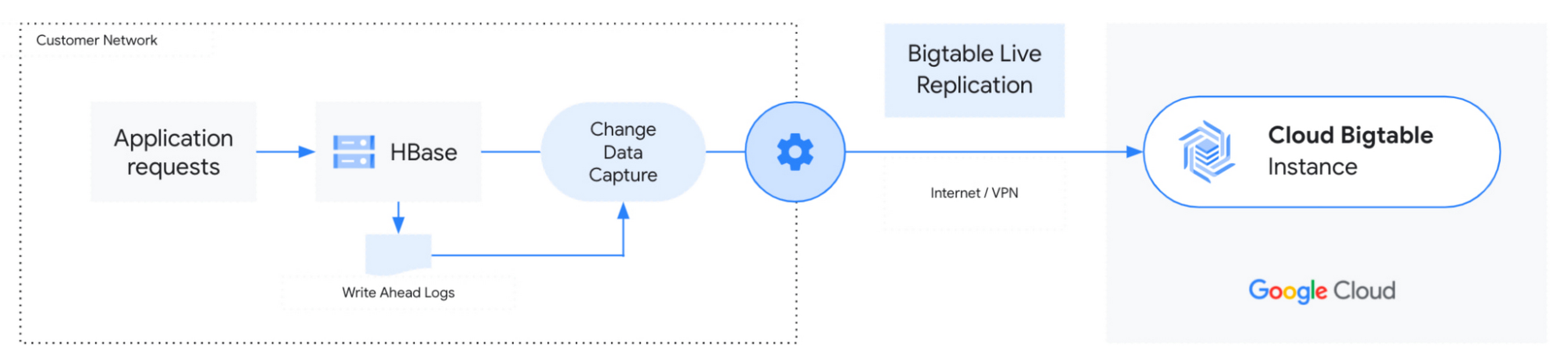
HBase provides asynchronous replication between clusters for various use cases like disaster recovery and data aggregation workloads. The HBase Bigtable Replication Library enables Bigtable to be added as an HBase cluster replication target. HBase to Bigtable replication enables customers to sync mutations happening on their HBase cluster to Bigtable, providing near-zero downtime migrations from HBase to Cloud Bigtable. 

The following diagram shows a live replication from HBase to Bigtable:

The HBase Cluster is the source database, which can be located in an on-premises network, another cloud provider, or managed data services. Once enabled, live replication allows all the writes happening on the source cluster to be replicated to the target Bigtable Instance.

Before enabling replication, you will need to create all the tables from HBase with the same column families in Bigtable. You can use the Schema Translation Tool to create target tables in Bigtable based on your existing HBase schema. To enable replication, the source cluster must be able to connect to the target Bigtable instance.

Get started with HBase to Bigtable live migrations

To learn more about HBase to Bigtable Live Migrations and how to get started, please visit our documentation page.

To learn more about Bigtable:

Accelerate your move to the cloud with the new Database Migration Program

6 avril 2022 à 18:00

Today, we’re announcing the Database Migration Program, a new and stress-free approach to migrating existing open source and proprietary databases, whether on-premises or in the cloud, to Google Cloud’s industry-leading, managed database services. With the Database Migration Program, you benefit from assessments, tooling, best practices, and resources from our network of specialized database technology partners. The program also offers special incentive funding to offset migration costs, helping you to quickly and cost-effectively migrate your databases to Google Cloud. Get started today with the Database Migration Program.

Over the past decade, companies big and small have realized the benefits of the cloud for their application modernization journey, helping them become more efficient, scalable, agile, and innovative. Furthermore, managed cloud databases typically result in an overall lower cost of ownership while upskilling database administrators to focus on higher-value work like data modeling and deriving additional value from data with AI and machine learning.

Since modernizing to GKE, Istio and Cloud SQL, Auto Trader’s release cadence has improved by over 140% (year over year), enabling an impressive peak of 458 releases to production in a single day. Auto Trader’s fast-paced delivery platform managed over 36,000 releases in a year with an improved success rate of 99.87%, and it continues to grow Mohsin Patel
Principal Database Engineer, Auto Trader UK

Still, many companies continue to self-manage databases on cloud instances or leave databases on premises even when the application is running in the cloud. The primary reason is the complexity of database migrations. Databases are at the core of every enterprise’s day-to-day operations, making them more challenging to move without careful planning and execution. In addition, migrations can be expensive, time-consuming, and risky. Timelines can drag on and scope regularly increases, leaving customers frustrated. 

Our new Database Migration Program seeks to address database migration complexity by providing comprehensive guidance and support for your migrations. Our assessments help you understand the footprint of your database fleet, its dependencies and architecture, and our specialized database partners can help with their expert knowledge of tooling and resources to move data and code without disrupting your business. Additionally, Google Cloud offers special incentive funding to offset migration costs, helping you to quickly and cost-effectively migrate your databases with the minimum amount of financial risk.

The secret to stress-free database migrations

What’s unique about this program is that you have access to a one-stop shop for all things database migrations. You can break your migrations into smaller sprints and execute one migration after another, allowing you to achieve business outcomes faster. With the Database Migration Program, you can accelerate your move from on-premises, other clouds, or self-managed databases over to Cloud SQL, Cloud Spanner, Memorystore, Firestore, and Cloud Bigtable.

Already, the Database Migration Program is transforming the way our customers and partners approach their database migrations to the cloud, allowing them to reimagine the time and resources required to deliver on their digital transformation goals without the burden of uncertain timelines and high costs.

Google Cloud’s new Database Migration Program provides a streamlined approach to seamlessly and efficiently migrate on-premise or in-cloud databases to Google’s industry-leading managed databases. This innovative program helps customers fast-track their database migration by leveraging Google Cloud’s assessments, tools, best practices, and resources. Shiwanand Pathak
Global Practice Head of Data & AI Services, Google Cloud Business, Tata Consultancy Services
Cloud and digital transformation continues to shape the strategic agenda for our clients. Data estate modernization is a key enabler for this transformation journey and clients that choose Google Cloud products typically utilize Cloud SQL for operational application databases and BigQuery for analytics. We collaborate with Google Cloud and provide strategy, implementation and operate services that enable our clients to achieve tangible business outcomes from their transformation journey using Google Cloud products. Navin Warerkar
Managing Director, US Google Cloud Data & Analytics GTM Leader, Deloitte Consulting

Three steps for a successful database migration

The Database Migration Program guides you from the initial assessment and planning phase to eventual migration with the expert assistance of qualified database partners. 

Here’s how Google Cloud helps at each stage of the database migration journey: 

  1. Assess: Request a database assessment to discover and analyze your existing databases and applications. Leverage specialized tools and resources, along with assistance from Google Cloud database experts who provide guidance based on your specific needs and requirements.

  2. Plan: Connect with specialized database partners who can help you create a migration plan, including engineering resources and cost estimates, and identify the right workload to kick off your migration. 

  3. Execute: Get special incentive funding to offset some of your migration costs by helping to pay for the specialist technology partner who performs your migration. There’s no need to move everything over at once—you can move one department or database at a time and use the program again as many times as you need.

Interested in learning more? Complete this form to get started.

Modernize your Oracle workloads to PostgreSQL with Database Migration Service, now in preview

6 avril 2022 à 18:00

Many organizations have been struggling with the complexity of their legacy databases. Unfortunately, they often find themselves locked into expensive licenses and restrictive contracts, which can limit their ability to modernize and introduce new functionality. Migrating to open-source databases, especially in the cloud, can solve many of these issues and help build modern, scalable, cost-effective applications.

However, database migrations are often highly complex and may require you to convert your schema and code to the new database engine, migrate your data, and switch over your applications, all while guaranteeing minimal downtime and disruption to the business.

Last year, we announced the general availability of Database Migration Service in our mission to help migrate your databases to the cloud with a simple and secure migration path. We launched support for homogeneous migrations, where the source and target databases use the same database engine (PostgreSQL, MySQL, or SQL Server). We saw adoption by customers migrating their workloads to Cloud SQL, Google Cloud’s fully managed relational database for PostgreSQL, MySQL, and SQL Server. More than 85% of the migrations using Database Migration Service are created and started underway in less than an hour.

Announcing Oracle to PostgreSQL support

Our customers shared that they’d like a similarly simple, easy-to-use experience for Oracle to PostgreSQL migrations. Today, we’re excited to announce the preview of Database Migration Service support for Oracle to PostgreSQL schema and data migrations.

Database Migration Service can integrate with the Ora2Pg open-source tool for schema conversion so you can migrate the schema and data of your Oracle workload from on-premises or other clouds to Cloud SQL for PostgreSQL. Ora2pg allows us to map the source to the target, and then our serverless change data capture-based mechanism can move your data securely and with minimal downtime. Database Migration Service can make database migrations fast, cost-effective, and reliable, and you can now use it to modernize from legacy databases to fully managed cloud databases.

Database Migration Service has you covered

Adopting a new database technology might appear to be a challenging task at first, but we can make the migration journey easier. We understand that effective and successful modernization can require a well-rounded approach: not only differentiated tooling but also integrated support and expert services you can trust.

Database Migration Service is highly reliable and serverless, meaning you don’t need to assign resources to the migration job or predict how many resources it will need. It can move your data from Oracle databases to Cloud SQL for PostgreSQL at scale and with low latency, which can mean minimal downtime at switchover and minimal disruption to your applications and customers.

Our integration with the proven Ora2Pg tool for schema migration means you can convert your Oracle schema to PostgreSQL with this popular open-source tool. You simply feed the configuration file after configuring, converting, and applying your converted schema with Ora2pg. Database Migration Service then creates the mapping and moves the data between the source and the target. Stay tuned for enhanced, built-in schema and code conversion capabilities in DMS to create an upgraded schema, code, and data migration experience.

“At MLB, we’re on a multi-year journey to modernize our applications with PostgreSQL as the database foundation,” says Shawn O’Rourke, manager of technology at MLB. “A key step in this journey is to reliably migrate our Oracle databases to Cloud SQL for PostgreSQL securely and without any disruption to our services. We’re excited to incorporate Database Migration Service, with its simple, serverless design, into our Oracle migration toolset.”

Expert services to help accelerate your migration

By working closely with experts from Google Professional Services and experienced migration partners, we help make sure you have access to the expertise and experience you need to facilitate successful migrations across your database fleet. From guidance on migration planning to turnkey end-to-end migrations, the combination of Database Migration Service and partner services can ensure a smooth transition to the cloud.

“We see tremendous demand from our customers for migrating away from proprietary databases onto cloud database technologies”, says David Yahalom, Managing Principal, Cloud Data Solutions at EPAM Systems. “One of the key success factors in application modernization is real-time continuous data replication within a heterogeneous database environment. Real-time data replication enables near-zero and zero downtime production switchovers while maintaining data integrity. We are very excited about the addition of Oracle to PostgreSQL migration support in Database Migration Service and believe it will be of great value to our customers. It will enable us to streamline database cloud migration initiatives to Google Cloud.”

Getting started with Database Migration Service

You can start migrating your Oracle workloads today using Database Migration Service:

  1. Navigate to the Database Migration area of your Google Cloud console, under Databases, and click Create Conversion Workspace.

  2. Use the Conversion Workspace creation wizard to upload your Ora2PG configuration file.

  3. Create your source and destination connection profiles. You can use this profile again later for additional migrations.

  4. Create a migration job to connect the Cloud SQL destination Connection Profile, Oracle Connection Profile, and Conversion Workspace.

  5. Test your migration job and make sure the test was successful as displayed below, and start it whenever you're ready.

Once the initial snapshot of data has been migrated to the new destination, Database Migration Service will keep up and replicate new changes as they happen. You can then finalize the migration job, and your new Cloud SQL instance will be ready to go. You can monitor your migration jobs on the migration jobs list, as shown in the image below:

Learn more and start your database journey 

Database Migration Service schema and data migration from Oracle to Cloud SQL for PostgreSQL are available in preview in addition to the previously-announced SQL Server migration preview. If you’re interested in seeing it in action, you can request access now.

For more information to help get you started on your migration journey, head over to the documentation or start training with this Database Migration Service Qwiklab.

Boost the power of your transactional data with Cloud Spanner change streams

6 avril 2022 à 18:00

Data is one of the most valuable assets in today’s digital economy. One way to unlock the value of your data is to give it life after it’s first collected. A transactional database, like Cloud Spanner, captures incremental changes to your data in real time, at scale, so you can leverage it in more powerful ways. Cloud Spanner is our fully managed relational database that offers near unlimited scale, strong consistency, and industry-leading high availability of up to 99.999%. 

The traditional way for downstream systems to use incremental data that’s been captured in a transactional database is through change data capture (CDC), which allows you to trigger behavior based on changes to your database, such as a deleted account or an updated inventory count.

Today, we are announcing Spanner change streams, coming soon, that lets you capture change data from  Spanner databases and easily integrate it with other systems to unlock new value. 

Change streams for Spanner goes above and beyond the traditional CDC capabilities of tracking inserts, updates, and deletes. Change streams are highly flexible and configurable, letting you track changes on exact tables and columns or across an entire database. You can replicate changes from Spanner to BigQuery for real-time analytics, trigger downstream application behavior using Pub/Sub, and store changes in Google Cloud Storage (GCS) for compliance. This ensures you have the freshest data to optimize business outcomes. 

Change streams provides a wide range of options to integrate change data with other Google Cloud services and partner applications through turnkey connectors, including custom Dataflow processing pipelines or the change streams read API.

Spanner consistently processes over 1.2 billion requests per second. Since change streams are built right into Spanner, you not only get industry-leading availability and global scale—you also don’t have to spin up any additional resources. The same IAM permissions that already protect your Spanner databases can be used to access change streams queries.Change stream queries are protected by spanner.databases.select, and change stream DDL operations are protected by spanner.databases.updateDdl.

Change streams in action

In this section, we’ll look at how to set up a change stream that sends change data from Spanner to an analytic data warehouse in BigQuery.

Creating a change stream 

As discussed above, a change stream tracks changes on an entire database, a set of tables, or a set of columns in a database. Each change stream can have a retention period of anywhere from one day to seven days, and you can set up multiple change streams to track exactly what you need for your specific business objectives. 

First, we’ll create a change stream on a table called InventoryLedger. This table tracks inventory changes on two columns: InventoryLedgerProductSku and InventoryLedgerChangedUnits with a 7-day retention period.

Change records

Each change record contains a wealth of information, including primary key, the commit timestamp, transaction ID, and of course, the old and new values of the changed data, wherever applicable. This makes it easy to process change records as an entire transaction, in sequence based on their commit timestamp, or individually as they arrive, depending on your business needs. 

Back to the inventory example, now that we’ve created a change stream on the InventoryLedger table, all inserts, updates, and deletes on this table will be published to the InventoryStream change stream. These changes are strongly consistent with the commits on the InventoryLedger table: When a transaction commit succeeds, the relevant changes will automatically persist in the change stream. You never have to worry about missing a change record.

Processing a change stream

There are numerous ways that you can process change streams depending on the use case:

  • Analytics: You can send the change records to BigQuery, either as a set of change logs or by updating the tables.  

  • Event triggering: You can send change logs to Pub/Sub for further processing by downstream systems. 

  • Compliance: You can retain the change log to Google Cloud Storage for archiving purposes. 

The easiest way to process change stream data is to use our Spanner connector for Dataflow, where you can take advantage of Dataflow’s built-in pipelines to BigQuery, Pub/Sub, and Google Cloud Storage. The diagram below shows a Dataflow pipeline that processes this change stream and imports change data directly into BigQuery.

Alternatively, you can build a custom Dataflow pipeline to process change data with Apache Beam. In this case, we provide a Dataflow connector that outputs change data as an Apache Beam PCollection of DataChangeRecord objects. 

For even more flexibility, you can use the underlying change streams query API. The query API is a powerful interface that lets you read directly from a change stream to implement your own connector and stream changes to the pipeline of your choice. On the query API side, a change stream is divided into multiple partitions, which can be used to query a change stream in parallel for higher throughput. Spanner dynamically creates these partitions based on load and size. Partitions are associated with a Spanner database split, allowing change streams to scale as effortlessly as the rest of Spanner.

Get started with change streams

With change streams, your Spanner data follows you wherever you need it, whether that’s for analytics with BigQuery, for triggering events in downstream applications, or for compliance and archiving. Change streams are highly flexible and configurable —allowing you to capture change data for the exact data you care about, and for the exact period of time that matters for your business. And because change streams are built into  Spanner, there’s no software to install, and you get external consistency, high scale, and up to 99.999% availability.

There’s no extra charge for using change streams, and you’ll pay only for extra compute and storage of the change data at the regular Spanner rates.

To get started with Spanner, create an instance, or try it out with a Spanner Qwiklab.

We’re excited to see how Spanner change streams will help you unlock more value out of your data!

Limitless Data. All Workloads. For Everyone

6 avril 2022 à 07:00

Today, data exists in many formats, is provided in real-time streams, and stretches across many different data centers and clouds, all over the world. From analytics, to data engineering, to AI/ML, to data-driven applications, the ways in which we leverage and share data continues to expand. Data has moved beyond the analyst and now impacts every employee, every customer, and every partner. With the dramatic growth in the amount and types of data, workloads, and users, we are at a tipping point where traditional data architectures – even when deployed in the cloud – are unable to unlock its full potential. As a result, the data-to-value gap is growing. 

To address these challenges, we are unveiling several data cloud innovations today that allow our customers to work with limitless data, across all workloads, and extend access to everyone. These announcements include BigLake and Spanner change streams to further unify customer data while ensuring it’s delivered in real-time, as well as Vertex AI Workbench and Model Registry to close the data to AI value gap. And to bring data within reach for anyone, we are announcing a unified business intelligence (BI) experience that includes a new Workspace integration, along with new programs that further enable our data cloud partner ecosystem. 

Removing all data limits 

Today, we are announcing the preview of BigLake, a data lake storage engine, to remove data limits by unifying data lakes and warehouses. Managing data across disparate lakes and warehouses creates silos and increases risk and cost, especially when data needs to be moved. BigLake allows companies to unify their data warehouses and lakes to analyze data without worrying about the underlying storage format or system, which eliminates the need to duplicate or move data from a source and reduces cost and inefficiencies. 

With BigLake, customers gain fine-grained access controls, with an API interface spanning Google Cloud and open file formats like Parquet, along with open-source processing engines like Apache Spark. These capabilities extend a decade’s worth of innovations with BigQuery to data lakes on Google Cloud Storage to enable a flexible and cost-effective open lake house architecture. 

Twitter already uses storage capabilities with BigQuery to remove the limits of data to better understand how people use their platform, and what types of content they might be interested in. As a result, they are able to serve content across trillions of events per day with an ads pipeline that runs more than 3M aggregations per second. 

Another major innovation we’re announcing today is Spanner change streams. Coming soon, this new product will further remove data limits for our customers, allowing them to track changes within their Spanner database in real time in order to unlock new value. Spanner change streams tracks Spanner inserts, updates, and deletes to stream the changes in real time across a customer’s entire Spanner database. This ensures customers always have access to the freshest data as they can easily replicate changes from Spanner to BigQuery for real-time analytics, trigger downstream application behavior using Pub/Sub, or store changes in Google Cloud Storage (GCS) for compliance. With the addition of change streams, Spanner, which currently processes over 2 billion requests per second at peak with up to 99.999% availability, now gives customers endless possibilities to process their data. 

Remove the limits of your data workloads

Our AI portfolio is powered by Vertex AI, a managed platform with every ML tool needed to build, deploy and scale models, and is optimized to work seamlessly with data workloads in BigQuery and beyond. Today, we're announcing new Vertex AI innovations that will provide customers with an even more streamlined experience to get AI models into production faster and make maintenance even easier.

Vertex AI Workbench, which is now generally available, brings data and ML systems into a single interface so that teams have a common toolset across data analytics, data science, and machine learning. With native integrations across BigQuery, Serverless Spark, and Dataproc, Vertex AI Workbench enables teams to build, train and deploy ML models 5X faster than traditional notebooks. In fact, a global retailer was able to drive millions of dollars in incremental sales and deliver 15% faster speed to market with Vertex AI Workbench.

With Vertex AI, customers have the ability to regularly update their models. But managing the sheer number of artifacts involved can quickly get out of hand. To make it easier to manage the overhead of model maintenance, we are announcing new MLOps capabilities with Vertex AI Model Registry. Now in preview, Vertex AI Model Registry provides a central repository for discovering, using, and governing machine learning models, including those in BigQuery ML. This makes it easy for data scientists to share models and application developers to use them, ultimately enabling teams to turn data into real-time decisions, and be more agile in the face of shifting market dynamics.

Extending the reach of your data

Today, we are launching Connected Sheets for Looker, and the ability to access Looker data models within Data Studio. Customers now have the ability to interact with data however they choose, whether it be through Looker Explore, from Google Sheets, or using the drag-and-drop Data Studio interface. This will make it easier for everyone to access and unlock insights from data in order to drive innovation, and to make data-driven decisions with this new unified Google Cloud business intelligence (BI) platform. This unified BI experience makes it easy to tap into governed, trusted enterprise data, to incorporate new data sets and calculations, and to collaborate with peers.

Mercado Libre, the largest online commerce and payments ecosystem in Latin America, has been an early adopter of Connected Sheets for Looker. Using this integration, they have been able to provide broader access to data through a spreadsheet interface that their employees are already familiar with. By lowering the barrier to entry, they have been able to build a data-driven culture in which everyone can inform their decisions with data. 

Doubling down on the data cloud partner ecosystem

Closing the data-to-value gap with these data innovations would not be possible without our incredible partner ecosystem. Today, there are more than 700 software partners powering their applications using Google’s data cloud. Many partners like Bloomreach, Equifax, Exabeam, Quantum Metric, and ZoomInfo, have started using our data cloud capabilities with the Built with BigQuery initiative, which provides access to dedicated engineering teams, co-marketing, and go-to-market support. 

Our customers want partner solutions that are tightly integrated and optimized with products like BigQuery. So today, we’re announcing Google Cloud Ready - BigQuery, a new validation that recognizes partner solutions like those from Fivetran, Informatica and Tableau that meet a core set of functional and interoperability requirements. Today, we already recognize more than 25 partners in this new Google Cloud Ready - BigQuery program that reduces costs for customers associated with evaluating new tools while also adding support for new customer use cases. 

We're also announcing a new Database Migration Program to help our customers efficiently and effectively accelerate the move from on-premise and other clouds to Google’s industry-leading managed database services. This includes tooling, resources, and knowledgeable experience from alliances like Deloitte, as well as incentives from Google to offset the cost of migrating databases.

We remain committed to continued innovation with the leading data and analytics companies where our customers are investing. This week Databricks, Fivetran, MongoDB, Neo4j, and Redis are all announcing significant new capabilities for customers on Google Cloud.

All of these announcements and more will be shared in detail at our Data Cloud Summit. Be sure to watch the data cloud strategy sessions, breakouts, and get access to hands on content. There is no doubt the future of data holds limitless possibilities, and we are thrilled to be on this data cloud journey.

Investing in our data cloud partner ecosystem to accelerate data-driven transformations

6 avril 2022 à 07:00

By 2023, 60% of organizations will use three or more analytics solutions to build business applications to connect insights to actions. These multiple implementations add complexity and challenges with multiple data models, disparate toolsets, and lack of integration and governance. To provide organizations the flexibility, interoperability and agility to accelerate data-driven transformations, we have significantly expanded our data cloud partner ecosystem, and are increasing our partner investment across a number of new areas. 

This week at the Data Cloud Summit, we are announcing a new Data Cloud Alliance, along with the founding partners Accenture, Confluent, Databricks, Dataiku, Deloitte, Elastic, Fivetran, MongoDB, Neo4j, Redis, and Starburst, to make data more portable and accessible across disparate business systems, platforms, and environments—with a goal of ensuring that access to data is never a barrier to digital transformation.

We are also rolling out updates to ensure that organizations can effectively utilize the expertise and power of our data cloud partners, including our new Google Cloud Ready - BigQuery initiative to help customers identify validated partner integrations with BigQuery; a public preview of our Analytics Hub to help partners share and monetize their data; a new Built with BigQuery initiative to highlight partner products that utilize our data cloud capabilities; and several new innovations and launches from our partners.

Helping customers identify validated partner integrations with the Google Cloud Ready - BigQuery initiative 

We strive to give customers the best experience when using partner solutions together with Google’s data cloud products. And as more and more customers deploy partner solutions alongside BigQuery, it’s critical that they are able to identify highly effective, validated, and trusted integrations to get the most out of their data. 

To enable this, we are launching a new Google Cloud Ready - BigQuery initiative. Google Cloud Ready - BigQuery is a validation program whereby Google Cloud engineering teams evaluate and validate BigQuery integrations and connectors using a series of data integration tests and benchmarks. Today, we’re announcing 25 launch partners whose integrations and connectors are validated as Google Cloud Ready - BigQuery:

BigQuery partners.jpg
Google Cloud Ready - BigQuery partners

For example, Google Cloud-validated connectors from Informatica help customers streamline data transformations and rapidly move data from any SaaS application, on-premises database, or big data source into Google BigQuery.

“Google Cloud and Informatica have been strategic cloud partners for the last five years, providing end-to-end, scalable enterprise-class data migration, integration and management solutions for customers. Being recognized as a Google Cloud Ready - BigQuery partner further validates Informatica's ability to help customers be successful in their journey to cloud with Google” said Jitesh Ghai, Chief Product Officer at Informatica.

Google Cloud-validated Fivetran connectors continuously replicate data from key applications, event streams, file stores, and more into BigQuery, helping turn big data into informed business decisions. Customers can keep up-to-date with the performance and health of the connectors through logs and metrics available through Google Cloud Monitoring. 

"Customers are looking to move data reliably and securely into Google BigQuery to meet the needs of their business," said Fraser Harris, VP of Product at Fivetran. "We are proud to announce that we have achieved Google Cloud Ready - BigQuery Designation. This marks another milestone in our long-standing partnership with Google Cloud that provides our customers with further assurance that Fivetran products work seamlessly with BigQuery - today and into the future."

Similarly, Google Cloud-validated BigQuery and Tableau integrations allow customers to analyze billions of rows in seconds without writing a single line of code and with zero server-side management. Organizations can create dashboards in minutes and share insights with users instantaneously.

“Tableau strives to meet customers where they are and for many organizations with large complex data problems, that’s on the Google Cloud Platform,” said Brian Matsubara, Vice President, Global Technology Alliances at Tableau. “Partnering with Google empowers our customers to explore their data in real-time to unlock actionable insights that can transform a business."

If you are already a Google Cloud partner, sign up to get your product integration validated by our experts. To become a Google Cloud partner, click here to enroll.

Helping ISVs build and grow their applications with BigQuery

More than 700 partners power their applications with Google’s data cloud - including companies like ZoomInfo, Equifax, Exabeam, Bloomreach, and Quantum Metric. We’re committed to helping these partners both build effective products and go to market, and this week we’re excited to launch the Built with BigQuery initiative, which helps ISVs get started building applications using data and machine learning products like BigQuery, Looker, Spanner, and VertexAI. The program provides dedicated access to Google Cloud expertise, training and co-marketing support to help partners build capacity and go to market. Furthermore, Google Cloud engineering teams work closely with our partners on product design and optimization, to share architecture patterns and best practices. This allows SaaS companies to harness the full potential of data to drive innovation at scale.

“Built with Google’s data cloud, Exabeam’s limitless-scale cybersecurity platform helps enterprises respond to security threats faster and more accurately” said Sanjay Chaudhary, VP of Products at Exabeam. “We are able to ingest data from over 500 security vendors, convert unstructured data into security events, and create a common platform to store them in a cost effective way. The scale and power of Google’s data cloud enables our customers to search multi-year data and detect threats in seconds”

Click here to learn more about the Built with BigQuery initiative.

Enhancing secure data sharing with Analytics Hub

We are also launching a public preview of Analytics Hub, a fully-managed service built on BigQuery that allows our data sharing partners to efficiently and securely exchange valuable data and analytics assets across any organizational boundary. With unique datasets that are always-synchronized, and bi-directional sharing, partners can create a rich and trusted data ecosystem

“As external data becomes more critical to organizations across industries, the need for a unified experience between data integration and analytics has never been more important. We are proud to be working with Google Cloud to power the launch of Analytics Hub, feeding hundreds of pre-engineered data pipelines from hundreds of external datasets,” said Dan Lynn, SVP Product at Crux. “The sharing capabilities that Analytics Hub delivers will significantly enhance the data mobility requirements of practitioners.”

Click here to join the public preview of Analytics Hub.

New launches from our data cloud partners

We’re excited to highlight several important launches from our partners themselves. At Google Cloud, we’re proud to support the fastest-growing and most innovative data and analytics companies, whether they’re running applications on Google Cloud, launching new integrations or connectors, co-creating entirely new capabilities with BigQuery, or continually tweaking and updating their platforms to provide the best experience for customers.

This week our partners Databricks, Fivetran, MongoDB, Neo4j, and Starburst Data are all announcing new capabilities for customers, including:

  • Databricks SQL will be publicly available for all customers on Google Cloud this month, enabling customers to operate multi cloud lakehouse architectures with performant query execution. Learn more, here.

  • Fivetran, in addition to joining the Cloud Ready - BigQuery initiative, is now a partner for the Google Cloud Cortex Framework. With deep experience in moving data from a variety of SaaS and database sources - including SAP, Fivetran offers Google Cloud customers accelerated time to value in unlocking the Google Cloud Cortex Framework data models, driving real-time analytics and business insights.

  • MongoDB is working to launch real-time integration of operational data from Atlas to Google BigQuery (and vice versa) via Dataflow Templates. This enables customers to cross-reference operational data and leverage BigQuery and it’s Analytics, as well as AI/ML tools to support use cases such as anomaly detection in IoT, product recommendations in Retail and fault detection in Manufacturing and feed these insights back to MongoDB Atlas to power the modern real-time enabled enterprise for Continuous Intelligence. This is targeted to be available in Q3/22. 

  • Neo4j is launching a fully-managed graph technology service for data scientists and developers to build intelligent, algorithm-powered applications with Neo4j Graph Data Science on Google Cloud.

  • Starburst is announcing a packaged offer for customers to enrich their BigQuery data foundation with hybrid, cross-cloud data stores.

The depth and breadth of innovation and support from the Google Cloud ecosystem is a tremendous asset for customers as they accelerate their data-driven digital transformations. Our community of expert services partners and systems integrators are heavily engaged, too - to date, our partners have earned more than 80 Specializations and more than 200 Expertises pertaining to data cloud technologies on Google Cloud. Visit our partner directory to find partners specialized in Google’s data cloud.

If you are already a Google Cloud partner, sign up to get your product integration validated by our experts. If you are looking to build your applications on Google’s data cloud, apply for the Built with BigQuery initiative. To become a Google Cloud partner, click here to enroll.

Enterprise-grade PostgreSQL with AlloyDB Omni RPM Orchestrator is generally available

9 septembre 2026 à 21:00

We are thrilled to announce the general availability of the AlloyDB Omni Red Hat RPM orchestrator, that brings production-ready security, resiliency, and low-downtime operations to PostgreSQL workloads in your enterprise environments. This GA milestone builds on the foundation laid during our preview release and launches alongside AlloyDB Omni version 18.3.0 to bring cloud-like database automation directly to your virtual machines and bare-metal servers with Google’s AI capabilities.

As of this GA release, AlloyDB Omni can be deployed in four modes to suit your requirements. Visit AlloyDB Omni documentation for more information.

  1. Standalone container (Debian / UBI)

  2. Container with Kubernetes operator for Highly Available enterprise deployment

  3. Standalone RPM

  4. With RPM orchestrator for Highly Available enterprise deployment

Why run a self-managed database?

For many use cases, a managed cloud database service is the simplest and most cost-effective option. However, there are scenarios where you may choose to run a PostgreSQL database yourself, on or off the cloud. The AlloyDB Omni RPM deployment is built for organizations that need the performance of the cloud with the control of local, non-containerized infrastructure, with use cases including:

  • Workload Modernization: AlloyDB Omni is more than 2X faster for transactional workloads and can deliver up to 100X faster analytical queries than standard PostgreSQL L , revitalizing existing infrastructure without a full migration.

  • Regulated Environments: For industries with strict data residency and security requirements, the RPM orchestrator provides the necessary tools like SELinux and local audit logging to stay compliant.

  • Edge and On-Premises Deployment: Deploying at the edge or on bare-metal servers allows for low-latency processing and disconnected operation.

  • AI-Ready Infrastructure: You can provision database clusters for AI integrations, using AlloyDB AI capabilities such as vector search for modern generative AI applications directly on-premises.

Flexible Reference Architectures

The AlloyDB Omni RPM orchestrator offers flexible deployment models tailored to your organization's specific operational requirements—whether your focus is maximizing performance, scaling read throughput, or ensuring robust high availability (HA). For more details, refer to the AlloyDB Omni availability reference architecture overview. The orchestrator simplifies cluster provisioning and lifecycle management by allowing you to define reference architecture specifications, customizable by adjusting instance parameters, node configurations, and networking options. Here is an example deployment view of scalable AlloyDB Omni HA reference architecture.

1

High availability reference architecture for AlloyDB Omni clusters with RPM Orchestrator

The diagram illustrates a highly available, distributed database reference architecture for AlloyDB Omni managed by the RPM Orchestrator. It shows that the client applications connect to a robust load-balancing tier and the load balancer routes read-write traffic directly to the active primary database node, while read-only traffic is routed to the replica nodes. The load balancer uses a Virtual IP (VIP) and is highly available itself, with Keepalived (for VIP failover), PgBouncer (for PostgreSQL connection pooling), and Haproxy (for routing and load balancing). The AlloyDB Omni Primary instance database nodes achieve high availability by replicating data synchronously across multiple zones. To scale out read-heavy workloads without impacting the primary HA cluster, separate Read Pool instances are deployed. These receive Async Replication (asynchronous) from the active node and can be scaled out. 

It shows how an independent control plane manages the entire configuration and health of the clusters. The administrator interacts with the RPM Orchestrator, to oversee the lifecycle of the databases. The control plane includes redundant Cluster Managers and a 3-node etcd based Distributed Configuration Store to reliably maintain cluster state, and manage configurations.  The controllers directly interface with the Node Manager running on each individual database node. For deploying only a single cluster, you may run control and data plane components on the same set of nodes.

High Availability and Read Scalability

Maintaining uptime and scaling reads for demanding workloads is simpler with the RPM orchestrator. It provides a resilient architecture capable of automatically handling failures across the stack, including the ability to handle failure of all Data / Control Path components, Readable Standby, as well as mitigating any network disruptions between the nodes.

The orchestrator now supports read pools for scaling out your read workloads and gives you the ability to create or add read pools to a cluster dynamically to meet the needs of analytical queries or similar workloads. The system also configures dedicated read endpoints for both standby nodes and readpools.

We are continuously expanding the capabilities of the AlloyDB Omni RPM orchestrator. Stay tuned for upcoming features, including advanced enterprise-grade capabilities to further strengthen business continuity and cross-region resiliency.

Data Protection and Security

Data security and recovery are at the core of the RPM Orchestrator. In this release, we have integrated automated backup and restore capabilities that enable you to configure a backup schedule and manage fully automated backup to GCS or S3-compatible storage automatically. The orchestrator allows you to execute backups to S3 or GCS buckets, or locally. Additionally, point-in-time recovery and fully automated in-place PIT restore are natively supported.

The RPM orchestrator supports SELinux enforcement at or after bootstrap to satisfy strict enterprise compliance and security standards and ensure mandatory access control and strong process isolation.

 Database Operations

We’ve reduced the operational overhead associated with managing database fleets:

  • Zero-Hassle Low-Downtime Maintenance: Managing lifecycle updates and scaling operations is easier with the new, fully automated Low Downtime Maintenance (LDTM). Minor version upgrades as well as CPU and memory resource adjustments are executed with minimized downtime and automatic rollback support for maximum availability.

  • Dynamic Configuration: Database administrators can dynamically tune settings without hassle, including the ability to Modify GUCs/configs at or after bootstrap. You can also provision a cluster for AI integrations.

  • Simplified Cluster Maintenance: Managing your cluster footprint is straightforward, with native operational capabilities to add or remove database nodes as your workload demands shift.

Observability, AI, and Extensions

Monitoring and tuning your fleet requires deep visibility and the right set of tools:

  • Advanced Logging: The orchestrator simplifies auditability and debugging by providing Data and Control Path log direction to log disk.

  • Rich Observability: Custom metrics support allows you to fine-tune observability to suit your monitoring ecosystem. With custom metrics, you can track business-level events directly from the database, such as the number of new user registrations per minute, active sessions for a specific tenant, or the volume of orders processed, and export these to your company's central observability platform.

  • AI & Extensions: In addition to the list of extensions supported with AlloyDB Omni, the orchestrator includes support for all AlloyDB Omni's AI features such as query using natural language, AI-powered searches, AI functions, etc. 

Get Started Today

The AlloyDB Omni Red Hat RPM orchestrator offers a new way to manage PostgreSQL-compatible workloads on bare metal or VM platforms, combining the high performance of AlloyDB, access to generative AI features and Gemini models to build AI agents and applications, and full automation.

Ready to elevate your on-premises database operations? Dive into our AlloyDB documentation to get started with the GA release today. Sign-up today !!

You can also try our new codelab to deploy a highly available AlloyDB Omni cluster using the RPM Orchestrator.

Beyond DMS: Accelerating Migrations SQL Server Logins and Users to Cloud SQL

9 septembre 2026 à 18:30

So, you’ve planned your database modernization journey. You’ve set up Google Cloud’s Database Migration Service (DMS), configured replication, and successfully synchronized your application databases from your on-premises or cloud systems to a fully managed Cloud SQL for SQL Server instance.

The replication is complete, the data is up to date, and you’re ready for cutover. But when your application attempts to connect to the newly migrated database, you’re hit with a frustrating roadblock:

Msg 18456, Level 14, State 1, Line 1: Login failed for user 'app_user.

The culprit is simple: your SQL Server logins didn't migrate with your database. In this post, we’ll look at why this gap exists, why it actually protects your organization's security posture, and how easy it is to bridge using standard, time-tested SQL Server tools. 

Why DMS doesn't migrate logins: Security and compliance

Database Migration Service (DMS) is highly efficient at replicating database-level schemas and transactional data. However, it purposefully doesn’t migrate instance-level objects, such as the system master database or server logins and permissions.

While this might feel like a missing feature, it is actually a deliberate design choice built around three core pillars:

  1. Security Isolation and Privilege Boundaries: The source environment and the destination Cloud SQL environment operate under different security paradigms. Replicating the master system database directly could lead to unauthorized privilege escalation. For example, an on-premises login with sysadmin privileges shouldn’t have unrestricted sysadmin access to a fully managed Google Cloud database. When the cloud provider manages physical backups, patching, and security, it needs to limit underlying operating system access to ensure correct operation.

  2. Compliance and Audit Governance: Automated migration of encrypted password hashes and server-level security credentials without explicit administrator oversight frequently violates enterprise compliance frameworks such as PCI-DSS or SOC 2. By keeping security object migration as a deliberate, administrator-driven step, organizations can guarantee that only approved identities are provisioned in the cloud landing zone.

  3. The Need for Identity Modernization: Migrating to the cloud is the perfect opportunity to update and prune stale credentials. Frequently, on-premises instances carry legacy SQL logins that are no longer used. Replicating them blindly to a cloud-managed service is a security anti-pattern. Furthermore, moving to Cloud SQL is often the catalyst for shifting away from legacy SQL authentication toward modern, cloud-native identity solutions like Customer-Managed Active Directory (CMAD).

Understanding logins vs. users: The SID connection

To migrate logins successfully, let’s briefly revisit how SQL Server manages security. SQL Server separates identity into two distinct layers:

  • Logins (server-level): Stored in the master database. These authenticate a client connection to the SQL Server instance.

  • Users (database-level): Stored inside individual user databases. These authorize what actions a connection can perform within that specific database.

The bridge between a server login and a database user is a unique Security Identifier (SID).

When you backup and restore a database (or use DMS to replicate it), the database-level users (and their corresponding SIDs) are migrated inside the database files. However, if the corresponding server-level login does not exist in the destination master database—or exists but has a different SID—the mapping breaks. This results in "orphaned users" who have database access permissions but no way to authenticate at the server level.

SQL Server Logins 1

Figure 1: How migrating databases without corresponding logins or with mismatched security identifiers (SIDs) results in orphaned users on the destination instance.

The recommended solution: Replicating logins using sp_help_revlogin

Instead of manually recreating every login and guessing password hashes, we can rely on a classic Microsoft-provided script: sp_help_revlogin.

This script generates a T-SQL query containing the CREATE LOGIN statement for every SQL Server authentication login on your source instance, complete with its original, encrypted password hash and its exact Security Identifier (SID).

Step 1: Create the helper procedures on your source instance

Connect to your source SQL Server instance using SQL Server Management Studio (SSMS). Copy and execute the official Microsoft script to create the two required stored procedures in your source master database: sp_hexadecimal and sp_help_revlogin.

Step 2: Generate the migration script

Once the procedures are created, run the following statement in your SSMS query window. Make sure to toggle your output settings to Results to Text (Ctrl + T) to copy the output cleanly:

code_block
<ListValue: [StructValue([('code', 'EXEC master.dbo.sp_help_revlogin;'), ('language', ''), ('caption', <wagtail.rich_text.RichText object at 0x7ff1186be4d0>)])]>

The output will contain auto-generated T-SQL statements that look similar to this:

code_block
<ListValue: [StructValue([('code', 'CREATE LOGIN [app_user] WITH PASSWORD = 0x01004F3D... HASHED, SID = 0x8D2F..., DEFAULT_DATABASE = [CustomerDB]'), ('language', ''), ('caption', <wagtail.rich_text.RichText object at 0x7ff118a3ba10>)])]>

By scripting out the login with the HASHED password option and the original SID, SQL Server allows us to safely recreate the login with its original password and secure link intact.

Step 3: Apply the script to Cloud SQL

Copy the generated script, connect to your destination Cloud SQL for SQL Server instance, and execute the query. Your logins are instantly created in the cloud with their correct passwords.

By running the script generated by sp_help_revlogin, we replicate the logins onto the destination Cloud SQL instance with their exact security identifiers (SIDs) and password hashes intact. As shown below, this ensures that the database-level users automatically map to their server-level logins upon database migration, avoiding “orphaned users” entirely.

SQL Server Logins 2

Figure 2: The unified migration process using the sp_help_revlogin script to preserve password hashes and original SIDs, resolving user mapping on Cloud SQL for SQL Server.

Note: 
sp_help_revlogin is a stored procedure that was created and is maintained by Microsoft. Make sure to download the latest version and read the documentation. 

Troubleshooting orphaned users

If you had created a login on the target Cloud SQL instance manually before running sp_help_revlogin, the SIDs might not match, causing the user to become "orphaned."

If you find an orphaned user (say, app_user), you can easily remap it to the newly created server login with a single command:

code_block
<ListValue: [StructValue([('code', 'ALTER USER [app_user] WITH LOGIN = [app_user];'), ('language', ''), ('caption', <wagtail.rich_text.RichText object at 0x7ff118a39490>)])]>

With that command, the database user and the server login are immediately reunited via their SIDs, and application connectivity is fully restored.

Take your security a step further

While migrating SQL logins using sp_help_revlogin is the easiest path for a lift-and-shift migration, consider utilizing your cloud migration to modernize your authentication. Cloud SQL for SQL Server supports robust integrations with Customer-Managed Active Directory (CMAD). Integrating your destination instance with Active Directory allows you to deprecate legacy SQL logins in favor of centralized, enterprise-grade Kerberos authentication.

Wrap up

Database migration is more than just shifting rows of data—it’s about ensuring your applications remain secure, compliant, and operational from day one. While Google Cloud’s DMS handles the heavy lifting of data replication, migrating your logins is a straightforward, three-step process that guarantees a seamless cutover.

To learn more about optimizing your migration strategy, check out the Cloud SQL for SQL Server Migration Guide and explore how Database Migration Service can streamline your move to Google Cloud.

Spanner: Removing cumulative mutation limits for DML transactions

9 septembre 2026 à 18:00

Spanner is Google Cloud’s no-compromise operational database that gives you the horizontal scale and always-on availability of a modern distributed system along with the rich feature set and familiar ecosystem of a relational database. Innovators in industries like banking, retail, media and entertainment, and AI infrastructure rely on Spanner today for their most critical workloads. We’re excited to announce a new, flexible way to handle larger, more complex transactions in Spanner, simplifying applications that need the highest levels of data consistency.

Operational workloads typically combine real-time decision making with granular updates: Think: identifying fraud as part of a multi-step checkout process in an ecommerce app. These changes must be transactional; either all of them succeed or none of them do and subsequent requests see the correct data. This update to Spanner’s ACID transactions allows applications to handle more data in an update without compromising on consistency, scalability, or availability using familiar DML. 

Higher ceiling, more flexibility

Previously, Spanner capped the changes a query could perform in a transaction, for example using DML, at 80,000. That was roughly computed as the product of the number of rows and number of columns updated, plus any dependent indexes. Applications evolve over time to handle more data and provide new functionality. These changes increase the size of transactions, potentially causing previously small transactions to hit this limit. 

This update shifts the 80,000 mutation mod limit from the transaction to individual DML statements. DML statements no longer contribute to an overall transaction-level mutation limit. A single transaction can now contain any number of DML statements, such as INSERT, UPDATE, or DELETE, provided that each individual statement generates fewer than 80,000 mutation mods.

Key benefits

  1. Larger transactions: Group DML statements logically based on business requirements rather than artificially splitting them to comply with cumulative mutation limits.

  2. Seamless transition: This change is compatible with all existing Spanner client libraries and requires no updates to application code.

Technical considerations

Locking and aborts

While you can now include more DML statements in a single transaction, be aware that larger and longer-running transactions hold locks for a greater duration. This may increase the likelihood of lock contention and transaction aborts. Keeping transactions concise helps maintain high performance and minimize resource contention.

DML vs. Mutation API

The application of limits depends on the method used to modify data:

  • DML Statements: Each statement (e.g., executeUpdate) is evaluated independently against the 80,000 mod limit.

  • Mutation API: When using client library methods like insert() or update(), mutations are provided during the Commit call. The 80,000 limit continues to apply to the entire set of mutations included in that single call.

Understanding mutation mods

Spanner counts "mods" based on the complexity of changes, including modified cells, primary keys, and secondary index updates. Please look at this blog for more details on how mutations are counted. You can monitor the total mods for a committed transaction via the mutation_count in the CommitStats. Note that the mutation_count will include all the mutations that are part of the transaction, across all DML statements and commit calls. 

Java implementation example

The following example demonstrates how multiple DML statements can be executed within a single transaction under the new limit logic.

code_block
<ListValue: [StructValue([('code', 'import com.google.cloud.spanner.DatabaseClient;\r\nimport com.google.cloud.spanner.Statement;\r\nimport com.google.cloud.spanner.TransactionContext;\r\nimport com.google.cloud.spanner.TransactionRunner.Work;\r\n\r\n// Assuming dbClient is your initialized DatabaseClient\r\ndbClient\r\n .readWriteTransaction()\r\n .run(\r\n new Work<Void>() {\r\n @Override\r\n public Void doWork(TransactionContext transaction) throws Exception {\r\n // Each executeUpdate call is evaluated separately against the 80k mod limit.\r\n\r\n // Example 1: Updating specific products\r\n Statement stmt1 = Statement.newBuilder(\r\n "UPDATE Products SET InStock = FALSE WHERE ProductId = @productId")\r\n .bind("productId").to(1L)\r\n .build();\r\n transaction.executeUpdate(stmt1); // Verified against 80k limit\r\n\r\n Statement stmt2 = Statement.newBuilder(\r\n "UPDATE Products SET InStock = FALSE WHERE ProductId = @productId")\r\n .bind("productId").to(2L)\r\n .build();\r\n transaction.executeUpdate(stmt2); // Verified against 80k limit separately\r\n\r\n // Example 2: Inserting related order data\r\n Statement stmt3 = Statement.newBuilder(\r\n "INSERT INTO OrderItems (OrderId, ItemId, Quantity) VALUES (@orderId, @itemId, @qty)")\r\n .bind("orderId").to(100L)\r\n .bind("itemId").to(1L)\r\n .bind("qty").to(2)\r\n .build();\r\n transaction.executeUpdate(stmt3); \r\n\r\n Statement stmt4 = Statement.newBuilder(\r\n "UPDATE Orders SET LastUpdated = PENDING_COMMIT_TIMESTAMP() WHERE OrderId = @orderId")\r\n .bind("orderId").to(100L)\r\n .build();\r\n transaction.executeUpdate(stmt4); \r\n\r\n return null;\r\n }\r\n });'), ('language', ''), ('caption', <wagtail.rich_text.RichText object at 0x7fc79c8978d0>)])]>

What has not changed

  • Individual statement limit: Any single DML statement that generates more than 80,000 mods on its own will still return the same error as we do today. 

  • Other transaction limits: Other constraints such as the maximum transaction size in bytes remain in effect. They are documented here.

Best practices

  • Monitor CommitStats: Utilize the mutation_count returned in CommitStats to understand the load generated by your operations.

  • Optimize large operations: If a single statement (like a bulk update) exceeds the limit, consider using Partitioned DML or paginating through keys.

Spanner is the trusted choice for operational applications that need to scale without downtime. This increase to the mutation limit provides developers new flexibility to run larger transactions that leverage Spanner’s global consistency. Learn how Spanner can help your teams innovate faster with less risk, or try it on your own, with a free trial or production instances starting as low as $54/month.

External references

What’s new with Google Data Cloud

10 septembre 2026 à 18:00

September 7 - September 10

  • Pub/Sub SMTs can now AI Inference your Gemini Enterprise Agent Platform models!
    Pub/Sub AI Inference SMTs allow you to apply inference on an incoming stream of events using models hosted in Gemini Enterprise Agent Platform. The model’s prediction is appended to your event, making it available for downstream processing in your data warehouse (like BigQuery) or operational database (like BigTable). This feature, now generally available, can dramatically simplify or enhance anomaly detection systems you are operating. 

  • PostgreSQL Source Connector is now generally available in Managed Service for Apache Kafka!
    Managed Service for Apache Kafka’s PostgreSQL connector allows customers to capture changes from their PostgreSQL database and ingest them into their Kafka infrastructure with low latency. This source connector is compatible with Cloud SQL for Postgres, AlloyDB, and self-managed PostgreSQL databases. Try this along with our entire portfolio of managed connectors, including MirrorMaker 2.0, BigQuery, Cloud Storage, and Pub/Sub! E-mail kafka-hotline@google.com if you have questions or feedback!
  • Pause-on-failure for Dataflow batch jobs is GA
    Dataflow pause-on-failure enables you to preserve the state of a batch Dataflow job before it fails. By pausing your Dataflow job, you can address issues that are external to the pipeline and resume processing without losing completed work. This helps you better manage resource costs and improve job reliability when you face temporary outages or capacity constraints.

  • The insertAll API is now the BigQuery Storage Write API (REST)
    The legacy insertAll streaming API is now rebranded as the BigQuery Storage Write API (REST). By dropping the "legacy" label, developers can confidently build long-term HTTP-based streaming workflows. This stateless JSON-over-HTTPS endpoint offers a lightweight alternative to heavy gRPC libraries—ideal for serverless web apps, IoT telemetry, and AI logging. The transition is seamless for existing users, requiring zero code changes and offering 100% backward compatibility. However, the Storage Write API (gRPC) version remains the recommended standard for high-throughput, continuous pipelines.

August 31 - September 4

  • Stateful processing is available in BigQuery continuous queries in Preview
    Stateful operations significantly expand what’s possible with BigQuery continuous queries. This feature allows users to leverage functions like JOINs, aggregations, and windowing functions directly in their streaming queries. Now you can calculate metrics over time (for example, a 30-minute average) to power your downstream applications and AI agents with much richer, real-time signals.

    Try out our feature here and share your feedback with bq-continuous-queries-feedback@google.com!
  • Synthetic data generator tool is available for Managed Service for Kafka
    You’ve launched your first Kafka cluster. Now what? The next thing to do is to produce some data to the cluster, but that involves modifying a client application somewhere or spinning up a virtual machine. The synthetic data generator tool, now generally available, can start sending mock data to your cluster in 3 clicks, and will get data streaming into your cluster in less than two minutes. The perfect utility for those moments you just want to test your cluster and new features. Try our quickstart today!

  • Dataflow pipeline updates are faster & more flexible
    Dataflow pipeline updates can now stop-and-replace pipelines, a major addition to the existing in-place-update feature. The new parallel pipeline option accelerates the migration between the old & new pipeline, resulting in reduced disruption to your business. You can also set a timeout on drains that prevents runaway costs for your pipeliness in the event of stuck processing. This feature is generally available. Try it here!

July 6 - July 10

  • New Lakehouse managed tables now in preview
    Lakehouse tables for Apache Iceberg are now in preview and available in the console. By using Google-managed Apache Iceberg tables in Lakehouse, you can eliminate the overhead of maintaining duplicate data pipelines and complex synchronization logic between BigQuery and open-source engines. This unified table format delivers native, multi-engine read and write interoperability, allowing you to run concurrent DML/DDL operations across diverse analytics tools on a single, shared storage layer.  Built-in automated table management handles painful background optimization tasks like compaction and partition tuning, freeing up your team to focus on building rather than managing storage maintenance.

June 1 - June 5

  • Beyond the Query: Powering AI Agents with Bigtable, Firestore & Memorystore
    Discover the latest advancements in Google Cloud's NoSQL Database portfolio, including Bigtable, Firestore, and Memorystore. This series is designed for a broad audience: whether you are exploring these databases for the first time or are an existing user looking to leverage the new capabilities announced at Next '26.

    Register here to secure your spot!

  • Cloud Engineer's AI Toolkit Workshops: Solve data-driven challenges with BigQuery, AlloyDB, Gemini and more. Hosted by Google Cloud Labs, this highly technical event is built specifically for Platform Engineers, SREs, and cloud infrastructure teams ready to bridge the gap between AI prototypes and production-grade deployments. Look out for more locations coming soon

    Toronto - June 25 (Data Cloud) | RSVP Here
    Chicago - June 30 (Data Cloud) | RSVP Here

  • Start a 10-day Bigtable free trial with a 1 node SSD cluster and up to 500GB of storage capacity. With no credit card required to start, you can easily ingest workloads and manage workloads that require low-latency, high-throughput, and predictable access. Plus, new Google Cloud customers get $300 in free credits on signup.

May 11 - May 15

  • Managed Service for Apache Airflow has launched a wave of new features, including the general availability of Airflow 3.1, AI-powered agentic troubleshooting, a new managed Airflow MCP Server for custom agent integration, and declarative YAML-based orchestration pipelines—discover all the details in the full blog post.

April 20 - April 24

  • Google-built ODBC Driver for BigQuery is now available in Preview
    We are excited to announce the launch of the new, Google-built ODBC driver for BigQuery. This new open-source driver provides a direct, high-performance connection for applications to BigQuery and is developed entirely in-house by Google. Download a new driver and connect your application to BigQuery.

April 13 - April 17

  • We announced we are reintroducing Data Studio to play a significant role in the AI era, expanding from data visualizations and reports to host BigQuery conversational agents and data apps built in Colab notebooks.
  • We announced BigQuery Graph is now available in preview, offering an easy-to-use, highly scalable graph analytics solution, empowering data professionals to model, analyze and visualize massive-scale relationships in an entirely new way.

April 6 - April 10

March 23 - March 27

  • We showed you how you can scale your reads with Cloud SQL autoscaling read pools. This feature allows you to provision multiple read replicas that are accessible via a single read endpoint and to dynamically adjust your read capability based on real-time application needs. 
  • Our customers are leveraging the full power of Conversational Analytics and Looker to drive major business and technical breakthroughs in the AI era. Companies like Telenor, Pet Circle, Fluent Commerce, Lighthouse Intelligence, Wego, and ROLLER are turning data into insights and actions, grounded by Looker’s semantic layer.

March 16 - March 20

February 23 - February 27

February 16 - February 20

  • Our customers are leveraging the full power of Looker to drive major business and technical breakthroughs. Companies like Arrive, Audika, Carousell, Framebridge, GumGum, Intel, Overdose Digital, Ocean Network Express, Subskribe and Promevo are leveraging Looker’s newest AI-driven capabilities, including Conversational Analytics, to transform data to insights and actions, and empower their entire organization with a single source of truth, powered by Looker’s semantic layer.

February 2 - February 6

  • Join us on March 4 for our webinar, Win Your AI Strategy with Cloud SQL Enterprise Plus, to learn how to power your generative AI workloads with 3x higher performance and 99.99% availability. Register today to discover how to build a scalable, enterprise-grade foundation for your most demanding AI applications.

January 26 - January 30

January 19 - January 23

  • We have fundamentally reimagined Firestore with pipeline operations for Enterprise edition. Experience a powerful new engine featuring over a hundred new query features, index-less queries, new index types, and observability tooling to improve query performance. Seamlessly migrate using built-in tools and leverage Firestore’s existing differentiated serverless foundation, virtually unlimited scale, and industry-leading SLA. Join a community of 600K developers to craft expressive applications that maximize the benefits of rich queryability, real-time listen queries, robust offline caching, and cutting-edge AI-assistive coding integrations.

  • Introducing Google Cloud SQL on MSSQLTips: We are highlighting a new technical guide published on MSSQLTips titled "Introducing Google Cloud SQL." This article serves as an essential resource for SQL Server administrators and developers exploring Google Cloud's fully managed database service. It provides a detailed overview of Cloud SQL capabilities, including high availability, security integration, and the seamless transition of on-premises SQL Server workloads to the cloud, making it an ideal resource for those planning their migration strategy.

  • We are excited to announce the Public Preview of Microsoft Entra ID (formerly Azure Active Directory) integration with Cloud SQL for SQL Server. Designed to tackle the challenge of identity sprawl in multi-cloud environments, this integration allows organizations to govern database access using their existing Microsoft identity infrastructure. Key benefits include centralized identity management, enhanced security features like Multi-Factor Authentication (MFA), and simplified user administration through direct group mapping. This feature is available for SQL Server 2022 and supports both public and private IP configurations.

January 12 - January 16

  • Google-built JDBC Driver for BigQuery is now available in Preview
    We are excited to announce the launch of the new, Google-built JDBC driver for BigQuery. This new open-source driver provides a direct, high-performance connection for Java applications to BigQuery and is developed entirely in-house by Google. Download a new driver and connect your Java application to BigQuery.
  • Troubleshoot Airflow tasks instantly with Gemini Cloud Assist investigations: Cloud Composer just got smarter. We are excited to announce that Gemini Cloud Assist investigations are now available directly within Cloud Composer 3. Instead of manually sifting through raw logs, you can now simply click "Investigate" on a failed Airflow task. Gemini analyzes logs and task metadata to identify failure patterns—such as resource exhaustion or timeouts—and provides actionable recommendations driven by Gemini Cloud Assist to resolve the issue. This integration shifts the debugging experience from manual toil to automated root cause analysis, significantly reducing the time required to restore your pipelines. Learn more about AI-assisted troubleshooting.

How AlloyDB ScaNN scales vector search to 10 billion vectors

20 août 2026 à 18:00

To satisfy the demands of enterprise-grade agentic AI applications, underlying vector databases often struggle to scale effectively as modern use cases can scale to billions of vectors.

As a fully managed PostgreSQL-compatible database service, AlloyDB is engineered to handle demanding enterprise workloads. Combining Google's infrastructure with the reliability of commercial databases, it delivers high availability, scalability, and includes a cutting-edge analytical engine, optimal for agentic AI use cases. A key part of this is its ScaNN index, which now operates efficiently at a scale of 10 billion vectors. This was achieved through a major architectural enhancement: an innovative four-level tree (preview) paired with efficient memory usage.

The 10 billion vector scale challenge

Scaling to a 10 billion vector workload presents significant memory and computational challenges. Previous AlloyDB ScaNN tree-based index was limited to two- or three-level tree configurations, and attempting to scale those structures led to several bottlenecks:

  • Increased compute intensity: Larger tree structures demand significantly more operations for both index construction and query traversal.

  • Memory constraints: The sampling processes required for 10 billion vectors can easily exceed the system's available memory capacity.

Solution: Four-level architecture

The introduction of a four-level tree (preview) is the primary innovation in the recent AlloyDB ScaNN release. This architecture, illustrated in Figure 1, employs a top-down strategy to optimize the balance between accuracy and build efficiency. To maintain high performance and mitigate recall loss, the system integrates key enhancements such as Top-K branch, SOAR, centroid adjustment and balanced tree shape.

1

Figure 1. AlloyDB ScaNN four-level tree architecture

This design has two primary benefits:

1. Reduced compute intensity via hierarchical partitioning

The four-level architecture drastically reduces compute intensity by using hierarchical partitioning to restrict the volume of vectors scanned during a query. Instead of traversing a flat or poorly segmented space, the multi-layered hierarchy narrows down the search path exponentially. Figure 2 illustrates the search spaces across different tree levels, demonstrating how structural layering optimizes traversal efficiency:

2

Figure 2. Search space for two-, three- and four-level trees

  • Two-level: Utilizes coarse partitioning to guide queries, resulting in a basic search complexity of O(N1/2).

  • Three-level: Introduces an intermediate layer to further subdivide clusters, narrowing exploration to O(N1/3).

  • Four-level: Implements refined, highly granular partitions that optimize traversal efficiency down to O(N1/4), sufficiently allowing for more than 10-billion vectors.

By dynamically expanding hierarchical layers as the dataset expands, AlloyDB ScaNN maintains ultra-low query latency and avoids computational scale walls from impacting performance.

2. Efficient memory usage

Achieving a 10 billion vector scale requires high memory efficiency. AlloyDB ScaNN uses these strategies to maximize memory management performance:

  • Balanced tree shape construction: The four-level tree utilizes a balanced configuration to circumvent memory limitations that restrict the size of training datasets. This balanced architecture effectively leverages reduced sampling sizes to construct high-fidelity tree partitions.

  • Sampling optimization: When the system encounters memory limitations, it generates a condensed sampling set that considers performance and accuracy. 

Performance test results

By leveraging the innovative four-level tree architecture in our internal tests, we are able to achieve the following performance results:

  • AlloyDB can scale to over 10 billion vectors with its ScaNN index.

  • AlloyDB can deliver <= 51 ms p95 latency and 95% recall at 10 billion vectors with its ScaNN index.

Get started today

Experience AlloyDB ScaNN's four-level tree (preview) architecture today. You can deploy ScaNN for AlloyDB by following our quickstart guide to set up an instance. For optimized, high-speed vector search, refer to the official ScaNN documentation. New users can also explore AlloyDB through our 30-day free trial program. We can’t wait to hear about what you build!

Using BigQuery Graphs with measures for trusted agentic workloads

13 août 2026 à 19:00

When enterprises transition from using simple chat assistants to autonomous, agentic workloads, they quickly run into a hard truth: Agents are prone to inaccurate insights when working with directly raw tables. 

BigQuery Graph helps organizations move beyond flat, static tables to represent enterprises exactly how they exist in the physical world: as interconnected business entities with real-world dependencies. With the support of measures in BigQuery Graph (preview), we are unifying governed metrics with relationship mapping. This allows your agents to reason across complex dependencies captured in graphs with precision of measures.

Why relationships matter

Traditional data structures are blind to multi-hop business context, causing AI agents to make incorrect operational decisions:

  • The concrete problem: If a retailer has an agent who is asked why winter jacket sales dropped 12% in Seattle, it can query flat tables to report the what (the 12% dip). But it fails at the why because it cannot trace the relational path: Seattle orders ➔ distribution centers ➔ suppliers delayed by regional storms.

  • The risk of disjointed systems: Lacking relationship context, the agent suggests an irrelevant 15% markdown campaign, needlessly eroding margins. Furthermore, maintaining separate systems - where one team maps supplier relationships in a separate graph database while another maintains SQL metrics - forces your agent to stitch these stacks together at runtime. This process is slow, expensive, and leads to inconsistent KPI calculations.

Measures in BigQuery Graph solves this by letting you map existing tables to a property graph in-place with zero ETL. This unified setup enables a logical evolution of inquiry:

  1. Metadata grounding establishes what data you have.

  2. Business metrics (measures) calculate how your business performed.

  3. Relationship mapping (graph) uncovers why it happened.

Under the hood

Historically, standard SQL joins during graph traversals duplicate rows, leading to incorrect aggregation calculations. BigQuery Graph solves this natively.

Data modelers define a MEASURE (like SUM or AVG) directly within the Property Graph DDL. Using standard SQL via the GRAPH_EXPAND function and the AGG aggregator, the engine resolves the structural graph paths before evaluating metrics. This ensures your agent is smart enough to know when it needs a calculator (SQL) and when it needs a map (graph).

Because public projects like bigquery-public-data are strictly read-only, you must map the logical property graph inside your own project using a placeholder variable (YOUR_PROJECT_ID), while directly referencing the read-only public tables as nodes and edges.

code_block
<ListValue: [StructValue([('code', '-- 1. Map the graph inside YOUR project \r\n\r\n\r\nCREATE OR REPLACE PROPERTY GRAPH `YOUR_PROJECT_ID.YOUR_DATASET.thelook_ecommerce_graph`\r\nNODE TABLES(\r\n `bigquery-public-data.thelook_ecommerce.users` AS User\r\n KEY(id)\r\n LABEL User PROPERTIES(id, city, country),\r\n `bigquery-public-data.thelook_ecommerce.orders` AS Order\r\n KEY(order_id)\r\n LABEL Order PROPERTIES(\r\n order_id, \r\n MEASURE(AVG(num_of_item)) AS avg_items_per_order,\r\n MEASURE(SUM(num_of_item)) AS total_items\r\n )\r\n)\r\nEDGE TABLES(\r\n `bigquery-public-data.thelook_ecommerce.orders` AS OrderedBy\r\n SOURCE KEY(order_id) REFERENCES Order(order_id)\r\n DESTINATION KEY(user_id) REFERENCES User(id)\r\n LABEL ORDERED_BY\r\n);\r\n\r\n-- 2. Query your new graph with standard SQL—using standard {Label}_{Property} column outputs\r\nSELECT\r\n User_city AS city,\r\n ROUND(AGG(Order_avg_items_per_order), 2) AS agg_avg_items,\r\n ROUND(AGG(Order_total_items), 2) AS agg_total_items\r\nFROM GRAPH_EXPAND("YOUR_PROJECT_ID.YOUR_DATASET.thelook_ecommerce_graph")\r\nGROUP BY User_city\r\nORDER BY agg_total_items DESC\r\nLIMIT 10;'), ('language', ''), ('caption', <wagtail.rich_text.RichText object at 0x7fecb8fd6f90>)])]>

Democratizing graph intelligence in BigQuery Studio

To make managing and deploying these relationship networks frictionless for both developers and business users, we have built native, intuitive operational tools directly into BigQuery Studio:

  • Visual graph modeler: A no-code, drag-and-drop interface inside BigQuery Studio that lets you visually build, edit, and map property graphs, nodes, and edges without writing complex DDL scripts manually.

1
  • Conversational Analytics (CA) integration: Users can interact with the graph naturally. Instead of guessing table joins, Conversational Analytics agents navigate the deterministic, relationship-aware map of the graph, converting natural language questions into precise, boundary-constrained GoogleSQL or ISO GQL queries. This prevents model hallucinations and enforces semantic consistency.
2

Unified semantics: Native Looker integration

To avoid maintaining fragmented logic stacks, business metrics must live at the data layer. By integrating Looker (LookML) natively with BigQuery Graphs as in-database analytic models, you define logic once at the core:

  • Database-managed models (sql_analytic_model_name): Point Looker directly to your database-defined BigQuery Graph using sql_analytic_model_name to map standard LookML dimensions and measures directly to your graph properties.
  • Looker-managed models (derived_analytic_model): Define your BigQuery Graph schema directly inside your LookML view using derived_analytic_model. Looker will dynamically generate and execute the SQL DDL statements to maintain the graph inside BigQuery.
  • Enterprise DevOps workflows: Manage your graph's entire lifecycle using the Looker IDE, Git-based version control, and Continuous Integration (CI). Core KPIs (like Churn Rate) remain completely identical, verified, and trusted.

Accelerate PostgreSQL migrations using Gemini in Database Migration Service

11 août 2026 à 18:00

Imagine this scenario: Your team decides to migrate a core application from an existing commercial database like Oracle or SQL Server to open source PostgreSQL or a fully managed service such as AlloyDB for PostgreSQL.

The initial phase goes smoothly. Schemas convert, tables populate, and data migration pipelines transfer terabytes of data in hours. The project looks ahead of schedule.

Then your team hits the bottleneck.

Buried inside the existing databases are hundreds of stored procedures, complex triggers, and custom functions written in proprietary SQL dialects like PL/SQL or T-SQL. These routines contain years of critical business logic handling transaction validation, order processing, and custom reporting.

Suddenly, your modernization project halts. Translating thousands of lines of procedural logic demands specialized dual-dialect expertise, months of manual rewriting, and high risk of conversion errors. This code translation represents the "last mile" bottleneck of database migration and is the most complex part of migrations.

Thankfully, recent advancements in AI provide a solution to the last mile problem. Database Migration Service (DMS) includes AI-assisted code conversion powered by Gemini. By bringing generative AI directly into your migration workflow, you can convert stored procedures, triggers, and custom functions into PostgreSQL PL/pgSQL code faster and with higher accuracy.

The stored procedure conversion challenge

Commercial database engines rely on vendor-specific syntax for stored procedures, user-defined functions, package bodies, and conditional logic. Converting this logic to PostgreSQL PL/pgSQL requires mapping variable definitions, exception handling blocks, cursor loops, and built-in functions.

When migrating complex enterprise schemas with hundreds of stored procedures, manual code conversion often demands months of engineering effort. Database teams must parse legacy logic line by line, re-implement conditional branches, and verify data type conversions between engines.

AI-assisted code conversion in DMS

Gemini in Database Migration Service accelerates this conversion work directly inside the Google Cloud console. DMS provides automated schema conversion alongside AI-generated code suggestions that explain structural differences between the source dialect and PostgreSQL.

The service presents converted PL/pgSQL code side-by-side with original source code, allowing database teams to review, edit, and validate suggestions in real time.

1 - DMS_Code_Conversion_Console

Figure 1: Database Migration Service interface displaying side-by-side code conversion and Gemini inline explanation.

Why integrated AI matters

Most AI apps and tools from major vendors have the ability to generate and convert code, including SQL code. However, converting enterprise databases demands far more than snippet translation offered by generic AI chat tools. Gemini in Database Migration Service offers several key advantages:

  • Full schema context: Rather than evaluating code snippets in isolation, Gemini in DMS analyzes your entire database context, including table relationships, data types, dependent views, and cross-procedure references across the whole migration project.

  • Enterprise security and privacy: Code conversion runs strictly within your Google Cloud project boundaries and IAM governance, protecting proprietary business logic and intellectual property.

  • Integrated execution workspace: DMS eliminates manual copy-pasting across hundreds of files. You can review side-by-side diffs, inspect inline AI explanations, edit code, and deploy validated PL/pgSQL routines directly to target databases within a single console.

  • Deterministic accuracy and AI compilation: DMS pairs deterministic compiler rules for 1:1 mappings (such as standard DDL transformations, scalar functions, and well-defined syntax conversions) with Gemini contextual synthesis for complex procedural blocks—guaranteeing exact, predictable translation without model drift.

Converting Oracle PL/SQL to PostgreSQL

Consider an Oracle PL/SQL stored procedure that calculates customer order totals and applies tier-based discounts using proprietary NVL and DECODE functions. In the original workflow, you must manually map NVL to COALESCE, rewrite DECODE statements as standard CASE expressions, and adjust exception blocks like WHEN NO_DATA_FOUND THEN.

When you run a migration assessment in DMS, Gemini analyzes the source procedure and produces native PostgreSQL PL/pgSQL code:

Source: Oracle PL/SQL

code_block
<ListValue: [StructValue([('code', 'CREATE OR REPLACE PROCEDURE calculate_discount (\r\n p_customer_id IN NUMBER,\r\n p_discount OUT NUMBER\r\n) AS\r\n v_total NUMBER := 0;\r\nBEGIN\r\n SELECT NVL(SUM(amount), 0) INTO v_total\r\n FROM orders WHERE customer_id = p_customer_id;\r\n \r\n p_discount := DECODE(TRUE, v_total > 10000, 0.15, v_total > 5000, 0.10, 0.05);\r\nEXCEPTION\r\n WHEN NO_DATA_FOUND THEN\r\n p_discount := 0;\r\nEND;\r\n/'), ('language', ''), ('caption', <wagtail.rich_text.RichText object at 0x7ff25a0d9890>)])]>

Target: PostgreSQL PL/pgSQL (Converted by Gemini in DMS)

code_block
<ListValue: [StructValue([('code', 'CREATE OR REPLACE FUNCTION calculate_discount (\r\n p_customer_id NUMERIC,\r\n OUT p_discount NUMERIC\r\n) RETURNS NUMERIC AS $$\r\nDECLARE\r\n v_total NUMERIC := 0;\r\nBEGIN\r\n SELECT COALESCE(SUM(amount), 0) INTO v_total\r\n FROM orders WHERE customer_id = p_customer_id;\r\n\r\n p_discount := CASE\r\n WHEN v_total > 10000 THEN 0.15\r\n WHEN v_total > 5000 THEN 0.10\r\n ELSE 0.05\r\n END;\r\nEND;\r\n$$ LANGUAGE plpgsql;'), ('language', ''), ('caption', <wagtail.rich_text.RichText object at 0x7ff2591bba90>)])]>

Along with the generated SQL, Gemini provides an inline explanation detailing why NVL was converted to COALESCE and how the Oracle DECODE function was converted into an explicit CASE block in PostgreSQL.

2 - Migration_Workflow_Diagram

Figure 2: End-to-end database code conversion pipeline powered by Gemini in DMS.

Maintain full schema control and validation

Security, transparency, and code accuracy remain central to database modernization. Gemini in DMS operates strictly within your established Google Cloud security boundaries, keeping your code private to your project.

To ensure reliability, the conversion and validation process follows a structured workflow:

  • Automatic schema context pulling: When you set up a DMS conversion workspace, the service automatically parses your entire source database metadata—including table schemas, data types, foreign key constraints, and cross-procedure dependencies. Gemini references this project-wide context during code generation, eliminating the need to manually supply dependent object definitions.

  • Automated syntax and dependency validation: As code is generated, DMS runs a validation parser against target PostgreSQL syntax rules. Objects are assigned validation status indicators (e.g. Converted, Warning, or Action Required) to quickly highlight routines requiring manual review.

  • Interactive evaluation state: You maintain full control over every schema change. Within the conversion workspace, you can inspect side-by-side diffs, review inline AI explanations, and edit PL/pgSQL code directly before applying changes to your target database.

  • Staging deployment and verification: Once code passes workspace validation, you can apply the converted schema and functions to a target staging instance (e.g. Cloud SQL or AlloyDB) for functional execution and performance testing prior to production cutover.

Streamlining database modernization

AI-assisted code conversion in Database Migration Service helps database teams convert legacy database logic in days rather than months. Instead of spending precious time rewriting code from scratch, database administrators and application developers can shift their focus to adding new functionality, testing performance, and modernizing applications.

If you’d like some good examples of common Oracle and SQL Server conversion scenarios and how DMS converts them to PostgreSQL, check out our recent video series, Gemini taught me PostgreSQL.

Converting SQL Server code to PostgreSQL

Say goodbye to database migration headaches and let Gemini teach you how to seamlessly convert legacy database logic.

Get started with Database Migration Service

To start your database conversion, launch a migration assessment in the Database Migration Service console (https://console.cloud.google.com/dms) or read our heterogeneous migration guide (https://cloud.google.com/database-migration).

❌