❌

Vue lecture

Why your startup needs open models alongside frontier APIs

Every week, I talk with founders who are building at an unbelievable pace. Teams are moving from inception to product-market fit faster than ever, with foundation models wired deeply into their core product workflows.

Yet as startup architectures mature, a clear divide has emerged between teams struggling with margins and those scaling sustainably. The most effective engineering teams have abandoned the one-size-fits-all model strategy.

In the early days of LLMs the default architecture was simple: send every interaction to the largest model available. But as applications move into production, serving millions of people and running autonomous multi-agent workflows, relying on a single frontier model starts to strain in three places:

  • Latency penalties: Relying entirely on cloud round trips makes it difficult to deliver the sub-second responsiveness that interactive mobile and desktop apps require.

  • Infrastructure overhead: Self-hosting large open models with more than 70 billion parameters forces early-stage teams to act like infrastructure providers, pulling senior engineers on cluster provisioning and multi-GPU orchestration.

  • Margin erosion: Sending high-frequency, structured tasks (like intent routing, JSON extraction, or status validation) to general-purpose frontier endpoints spends capital that could be funding product differentiation.

Great engineering teams pick the right tool for each job. Most production requests don’t require a frontier generalist, and routing every call to one can actually slow your product down. Instead, the winning pattern is a compound AI stack: pairing frontier models for complex synthesis with compact, open-weight models that you can tune, control, and run anywhere. 

It’s for these reasons that an open model like Gemma belongs in your model lineup. With more than one billion downloads across the developer community, Gemma 4 is our most capable open model family to date, using the same foundational research and technology behind the Gemini models.

Built under one roof

Gemma is built by Google DeepMind using the same foundational research and architecture advances behind the Gemini models. Because they share common DNA and developer tooling, your team can prototype in Google AI Studio and design hybrid architectures where Gemini and Gemma work together.

Released under a commercially permissive Apache 2.0 license, Gemma 4 is engineered for parameter and token efficiency. Rather than forcing a single model architecture onto every hardware target, Gemma 4 spans five sizes across four specialized architectures: compact E2B and E4B models with native audio and vision for mobile and edge devices; an encoder-free 12B Unified multimodal model; a 26B A4B Mixture-of-Experts (MoE) model that activates only 4B parameters per token for high-throughput serving; and a dense 31B model that fits on a single GPU for maximum reasoning quality and fine-tuning. Every model includes configurable thinking modes, native function calling, up to 256K context, and built-in Multi-Token Prediction (MTP) draft models for speculative decoding. 

Real proof: How startups are winning with Gemma

Founders are using Gemma to solve urgent problems around unit economics, output accuracy, and responsiveness.

  • Flipping the architecture: Cue is a voice-activated desktop assistant that runs natively on a user's machine to automate everyday tasks. They integrated Gemma 4 E4B via Ollama on local hardware to handle real-time transcript formatting. While they originally planned for Gemma to be a weak offline fallback, benchmarking proved it was so fast and precise that they made it their default engine—driving a 44% latency drop (from 876 ms to 488 ms).

  • True edge independence: Mobile development studio HubX built BetterSpeak, a voice-based interactive mobile English-learning tutor that simulates immersive, real-time voice conversations. To bypass cellular network lag and avoid charging users expensive subscription fees to cover cloud hosting, they packaged a 4-bit quantized Gemma 4 E2B model (~2.9 GB) natively on-device. The result is an offline, speech-to-speech mobile tutor that costs them $0 in server bills.

  • Scientific discovery and air-gapped security: K-Dense has built Faraday, an AI-powered scientific collaborator optimized end-to-end across hardware, software, and sensor suites, powered by Gemma 4 together with K-Dense's Scientific Agent Skills. Faraday runs fully air-gapped, making it suitable for secure, proprietary scientific work in pharma and biotech. Deployed on an NVIDIA DGX Spark, Gemma 4 can also be fine-tuned locally on a user's own proprietary datasets.

  • Unlocking infinite gameplay and retention: Gaming company Latitude integrated Gemma across their AI-native game products. By swapping in Gemma for AI Dungeon, they significantly improved player retention, while their new AI RPG platform Voyage leverages Gemma to deliver high intelligence at a cost that enables unlimited user gameplay with ultra-fast latency.

Four workloads where Gemma wins for startups

If you’re evaluating where Gemma fits into your stack today, start with these four jobs:

1. Edge and local execution (low latency, true privacy)

If you’re building mobile apps, developer desktop tools, robotics, or offline-first experiences, every cloud round-trip adds latency that people can feel. Gemma can run directly on laptops (including Apple silicon), smartphones, and local appliances. Your users get immediate feedback, and sensitive data never has to leave their device.

You can handle many local interactions on-device for zero incremental cost, and keep a bridge to frontier models in the cloud for the requests that need it. When a local workflow calls for large-scale multimodal reasoning, long-context data synthesis, or complex planning, your application can route that specific request to Gemini.

2. High-throughput triage and agent routing

In multi-agent architectures, agents spend a surprising amount of tokens on simple tasks like checking statuses, classifying intent, and routing tickets. With Gemma as your front-line gatekeeper, those high-volume background tasks run on a compact model and your team can save frontier reasoning for the requests where it creates product value.

3. Task-specific fine-tuning for real moats

Adapting a model to your proprietary data is one way to build a competitive moat. Because Gemma gives you full access to model weights and has a compact memory footprint, your team can run parameter-efficient fine-tuning (LoRA or QLoRA) on a single GPU in hours rather than days.

4. Turnkey vertical starting lines

DeepMind releases domain-specific variants of Gemma, so you don’t have to start from scratch. One example is MedGemma. MedGemma scores 87.7% on the MedQA benchmark, matching the clinical accuracy of frontier models at roughly one-tenth the inference cost. In a blind clinical study, board-certified radiologists judged that 81% of chest X-ray reports generated by the lightweight MedGemma 1.5 4B were accurate enough to result in equivalent patient management compared to reports written by human experts.

Beyond healthcare, biotech startups use C2S Scale to model virtual cellular responses and accelerate oncology research. Meanwhile, DataGemma cross-references more than 240 billion public data points to help reduce numerical hallucinations. If you’re operating in a specialized market, starting with a model that already speaks your industry's language can save you engineering time and compute budget.

Deploy wherever your business lives

Gemma is designed to fit into your existing engineering stack without lock-in:

  • Apache 2.0 licensing: Gemma 4 ships under the Apache 2.0 license, giving startups the freedom to fine-tune, quantize, redistribute, and deploy commercial products on-premises or at the edge with full ownership of their custom weights.

  • Day-zero open tooling: Run and fine-tune Gemma with the tools your engineers already use, including vLLM, Ollama, llama.cpp, LM Studio, MLX, Unsloth, Hugging Face, Kaggle, Keras, PyTorch, JAX, and LiteRT-LM.

  • Serverless and managed cloud deployment: Prototype immediately in Google AI Studio, scale to zero on serverless GPUs with Cloud Run, or deploy dedicated endpoints from Model Garden on Gemini Enterprise Agent Platform when traffic surges and you don’t want to manage GPU clusters.

  • Enterprise-ready safety: Gemma undergoes rigorous pre-release safety evaluations, data filtering, and red-teaming, and pairs with ShieldGemma 2 to help you meet enterprise compliance requirements.

Build with Gemma: What to do this week

Great technical architecture isn't about finding one model to do everything. It’s about assembling the right tool for each job so you can move faster, protect your runway, and ship a superior product.

Here’s my challenge to your engineering team this week:

  1. Audit your model calls: Look at your logging dashboard and identify three high-volume, deterministic tasks (such as intent classification, JSON validation, or summarization) currently running on your most expensive models.

  2. Benchmark Gemma: Run a quick test with a compact Gemma model locally or on a single endpoint. Measure the latency and calculate what happens to your gross margins when that workload runs with lower inference cost.

  3. Redirect your runway: Take the capital and engineering hours you save on compute and invest them back into your core differentiators.

You can download the Gemma weights directly or deploy them through Model Garden. If you need compute credits and technical architecture reviews to get up and running, the Google for Startups team is ready to help you build - learn more.

  •  

The three things today's hottest startups are looking for in their AI stack

Google Cloud has become the platform of choice for startups building AI. 

Our uniquely complete stack — including a choice of first- and third-party compute and models; our platform for building and managing agents; and our products for securing AI workloads — has emerged as the single most important driver of this growth and it is powering AI development for many of the most exciting and innovative startups in the world.

As a result, startups are choosing to build and run on Google Cloud at a higher rate than they were three years ago, at the start of the AI era.

Given how quickly the technology industry moves in the AI era, the choices startups make can be notable. As we’ve worked together and watch many of these leaders scale, we’ve observed  a few important trends emerging over the past several months. We expect these decisions will continue to shape the choices startups make about the platforms and technology they use: 

  1. Gemini Enterprise, which includes our tools for managing TPU and GPU clusters, services for building and managing agents, and APIs to access both first- and third-party models, is growing significantly with startups. And when startups use Gemini Enterprise, they also tend to use our “core cloud” services like Storage, BigQuery, or GKE.

  2. Gemini models — as well as several of the third-party models available through Gemini Enterprise — are providing very strong price-performance for startups. These customers are increasingly deploying both our frontier models and “workhorse” models as their AI to power workloads as diverse as scientific research, generative media creation, and financial analysis.

  3. Access to compute on GPUs and TPUs is critical for AI and the ability to choose one — or both — is unique to Google Cloud. But importantly, startups almost always use additional products from our stack alongside these chips, like models, tools for building agents, or services like BigQuery or GKE. These additional technologies illustrate how the needs of startups are rarely singular, and just how much value they find in having ready access to a strong suite of second-, third-, and fourth-level technologies beyond just compute.

We can see the demand for these technologies first-hand in some of the recent deals we have struck in the past 60 days with a number of leading startups across sectors:

  • Artificial Agency, a startup focused on generative behavior in games, is running critical AI workloads and research on Google Cloud, where it is using NVIDIA GPUs for model training and inference, as well as Gemini models and Cloud Storage.
  • Arya Health is building the AI workforce for healthcare, deploying agentic AI to perform the non-clinical administrative work that limits providers’ ability to deliver and expand care. Arya’s AI agents work across scheduling, intake, recruiting, onboarding, compliance, after-hours operations, and other critical workflows, interacting through voice, text, email, and providers’ existing systems. Arya uses a range of Gemini models across its agentic infrastructure, including Gemini 2.5 Pro, 3.1 Flash, and 3.5 Flash Lite, selecting models based on the reasoning, speed, and cost requirements of each workflow.
  • Casco is a cybersecurity startup whose autonomous agent swarms execute sophisticated, multi-step attacks to uncover vulnerabilities across enterprise applications, cloud environments, and infrastructure. Its architecture combines advanced reasoning models for complex, long-running tasks with fast models such as Gemini 3.5 Flash for focused subagent work. Google Cloud’s model portfolio and infrastructure, including Provisioned Throughput, help Casco match each workload with the right combination of intelligence, speed, and capacity.
  • CodeRabbit has been a pioneer in independent AI code review and has expanded that layer into Agentic Change Management, the control plane for agentic software development. They use our Cloud Run and Storage products to underpin their application, and are now beginning to leverage Gemini 3.1 Pro and other Gemini models to power use cases like analyzing how a single code change impacts an entire project, writing clear and contextual review comments to explain logic bugs, and instantly generating one-click fixes for developers.
  • Comfy offers a platform for creatives to build brand-consistent content and media with generative AI. They are utilizing a mix of NVIDIA systems and Google media generation models, like Veo and Nano Banana, in their platform.
  • MicroAGI, a German AI robotics startup, recently announced they would access NVIDIA Blackwell systems for model training through Google Cloud. They will also use Gemini Enterprise Agent Platform and AI models on Google Cloud to help robotics process multimodal information like video.
  • Ineffable Intelligence, the London-based superintelligence startup, recently announced a partnership with Google Cloud to access NVIDIA Vera Rubin systems as well as high-efficiency AI networking and storage.
  • PEAR Health Labs built and runs its AI health and fitness companion and agentic health platform entirely on Google Cloud, using our Gemini 3.5 Flash model as well as our data cloud products.
  • Roboforce is a physical AI company building scalable robots for industrial environments. They recently signed a new agreement with Google Cloud to utilize our GPU-powered VMs, which will be used to train and serve their custom and post-trained physical AI models.
  • xFigura offers a platform that gives architecture teams a single, secure canvas that brings generative models into one place for AI-driven design. Built on Google Cloud, xFigura uses models like Nano Banana and Omni to help designers generate and refine concepts in plain language, with authorship staying with the architect.
  • SciFin is a startup that helps revenue teams uncover "revenue reality" by converging fragmented sales context across CRM systems, documents, emails, and other sources. They are utilizing Gemini models, infrastructure, and Gemini Enterprise to build and run their platform.

These new and expanding customers represent some of the most exciting names in AI and are demonstrative of the type of successes that startups are having with Google Cloud’s uniquely complete stack for building AI.

To learn more about Google Cloud’s work with leading AI startups, or to get started building with us, visit here.

  •  

How a solo founder runs a five-continent tender platform on AlloyDB and MCP

Editor's note: Lucius AI, a tender-intelligence startup covering markets across five continents, runs its entire data platform on AlloyDB for PostgreSQL with a single operator. By migrating semantic search to a ScaNN index and managing database operations through Model Context Protocol (MCP), query latency dropped by 47x while automating day-to-day administrative tasks via MCP.


Executive summary

  • Lucius AI runs a global tender platform spanning more than 210,000 tenders across the UK, EU, India, and Australia, requiring minimal operational overhead for a solo founder.

  • Lucius AI deployed AlloyDB for PostgreSQL to consolidate its relational catalog, audit logs, and vector embeddings into a single managed database engine.

  • Migrating semantic search to a ScaNN index lowered query latency from 1.14 seconds to 24 milliseconds — a 47x speedup on a representative production query.

  • Connecting an AI agent to AlloyDB using the Model Context Protocol (MCP) helps Lucius AI automate query analysis, data freshness checks, and incident forensics under strict least-privilege permissions.

Making tender intelligence work as a company of one

Lucius AI helps businesses bidding on public contracts evaluate opportunities across global markets. The platform ingests public procurement notices from the UK, the EU, the US and Canada, Australia and New Zealand, India and Singapore, alongside World Bank donor-funded notices across Africa and Asia. Lucius AI analyzes tender documents using Gemini to generate compliance matrices, bid recommendations, and draft responses citing original source pages. For small and mid-sized suppliers, this replaces days of manual document reviews and costly external consulting.

Running a platform of this scope requires extensive operational coordination:

  • Nightly ingestion from thirteen public procurement sources

  • A catalog of more than 210,000 tenders, including tens of thousands open for active bidding

  • Two production regions on Cloud Run: Europe, and an Australian deployment on its own AlloyDB cluster with customer-managed encryption keys (CMEK) for defense-adjacent customers

  • Ongoing analytics, performance tuning, data validation, and incident response

Managing these responsibilities without dedicated data engineering or database administration teams requires offloading operational maintenance. Lucius AI addressed this challenge on two fronts: using AlloyDB for PostgreSQL as the core system of record, and connecting an AI agent through the Model Context Protocol (MCP) to safely execute database operations.

1

Consolidating systems into AlloyDB

Rather than deploying separate relational databases, vector databases, and log stores, Lucius AI houses all core data in AlloyDB for PostgreSQL. The relational tender catalog, document metadata, audit logs, and vector embeddings reside in the same database engine. Storing vector embeddings alongside relational rows avoids managing separate vector stores, establishes a unified backup schedule, and centralizes identity management.

Authentication relies strictly on Cloud IAM. Services connect using dedicated Google Cloud service accounts mapped to database roles scoped to specific access requirements, without storing database passwords in application environments. Database reliability is managed natively by AlloyDB through automated backups and point-in-time recovery, avoiding custom disaster recovery procedures.

In production, this consolidated architecture supports:

  • More than 210,000 tenders in the catalog, with embeddings stored directly alongside them

  • Rebuilding the semantic index embedded 115,820 records in 10.6 minutes with the Gemini embedding model, for around three dollars in API spend; AlloyDB auto embeddings now keep those vectors current.

  • Retrieval reranking executed directly inside the database using the ai.rank function — with mean latency of 77-milliseconds - returning the most relevant results for search queries without requiring a standalone reranking microservice

Accelerating semantic search by 47x

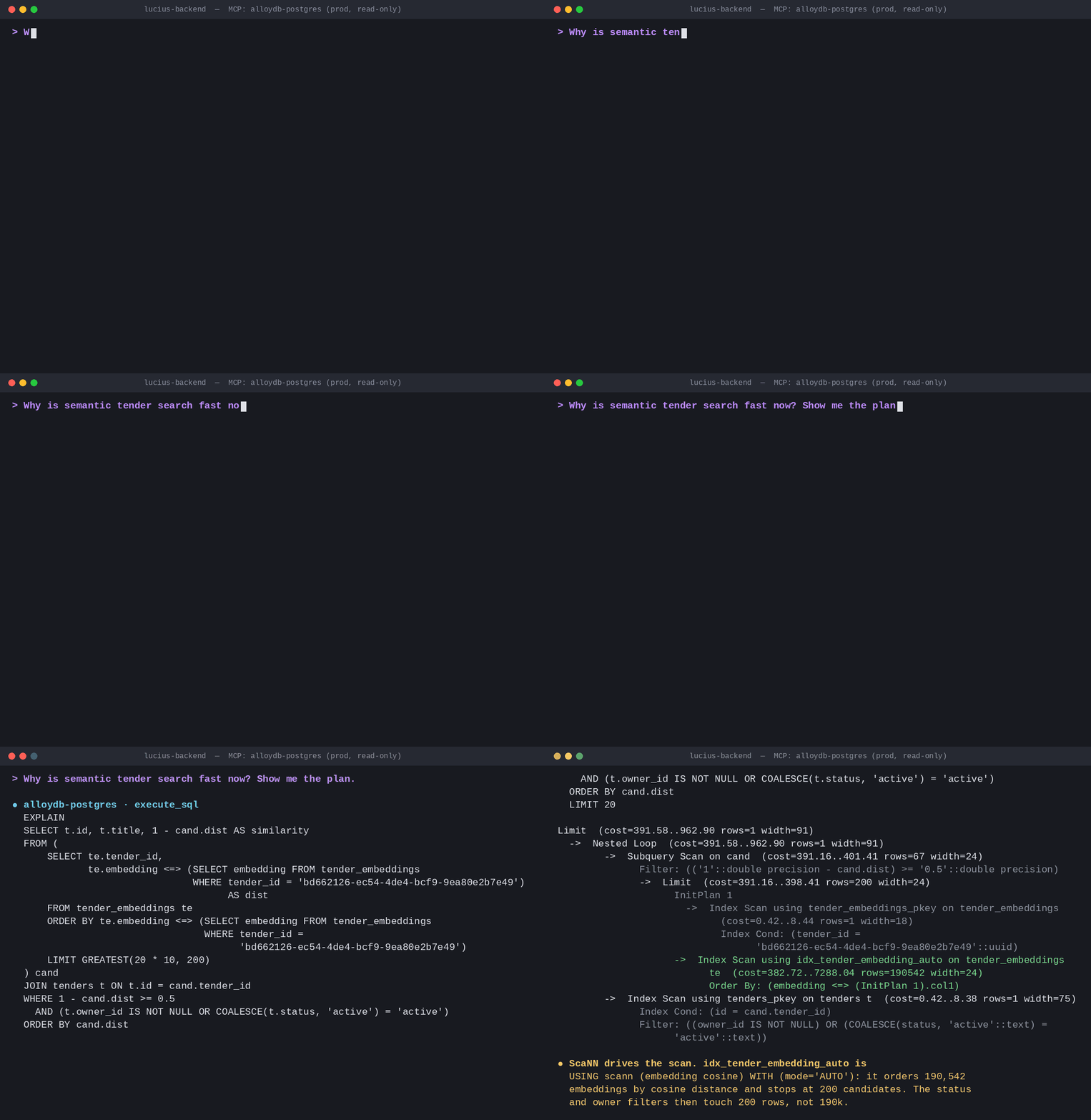
Semantic search across the tender catalog initially relied on unindexed vector comparisons, where a representative query took 1.14 seconds. Migrating this workload to a ScaNN index in AlloyDB reduced query latency to 24 milliseconds — a 47x improvement.

The index recommendation originated from the AI agent during an automated performance audit, where it benchmarked the query plan before preparing the index migration.

2

Automating database operations with MCP

To delegate routine administrative tasks, Lucius AI configured the open-source MCP Toolbox for Databases using the prebuilt alloydb-postgres server.

Operational delegation requires strict access controls. The agent connects using a dedicated PostgreSQL role granted SELECT across the schema and UPDATE on a single operational table. Destructive commands (DROP, DELETE, TRUNCATE) are omitted, restricting agent actions to authorized operational boundaries.

Under this configuration, the AI agent performs regular database operations across four key areas:

  • On-demand analytics: Compiles retention cohorts, activation funnels, and catalog coverage by country via ad hoc SQL queries, removing the need to build and maintain manual dashboards or complex analytical pipelines.

  • Performance optimization: Performs query-plan inspections and index analysis, such as identifying the ScaNN indexing strategy.

  • Incident forensics: In response to an external security probe, the agent parsed audit logs to reconstruct the request timeline in minutes, verifying that tenant isolation remained intact.

  • Automated data-quality checks: Evaluates ingestion watermarks and freshness across all thirteen procurement sources every morning.

3

For teams adopting this architecture, establishing a progressive permission structure provides clear guardrails: start with read-only access, expand permissions as requirements dictate, and keep destructive operations restricted to human administrators.

Looking ahead

Lucius AI is planning three technical initiatives to further reduce operational overhead:

  1. Automated vector embeddings in AlloyDB AI: After validating ai.initialize_embeddings across the full catalog, a weekly maintenance job uses ai.refresh_embeddings to update vectors.

  2. Columnar engine acceleration: Having enabled AlloyDB’s columnar engine with auto-columnarization, the database identified and stored 40 frequently queried columns across four tables in memory within a day, accelerating reporting queries without a separate analytical store.

  3. Managed Remote MCP Server: Transitioning from self-hosted Toolbox processes to Google Cloud's fully managed Remote MCP Server for AlloyDB will offload MCP server hosting and maintenance.

By anchoring core data in AlloyDB and managing routine operations through MCP, Lucius AI demonstrates how a single engineer can build and operate a resilient, multi-region procurement platform.

To explore Lucius AI, visit ailucius.com. To evaluate AlloyDB for PostgreSQL, deploy an AlloyDB cluster to test performance against your own workloads.

  •  

Celebrating our tech and startup customers

Our tech and startup customers are disrupting industries, driving innovation and changing how people do things. We’re proud of their success and want to showcase what they’re up to! You’ll hear about their new products, their businesses reaching new milestones and their ability to get things done faster and easier using Google Cloud’s app development, data analytics and AI/ML services.

Congrats to Impact Analytics for Closing PVH
With the COVID-19 pandemic, the rise of e-commerce, and supply chain crisis, Impact Analytics had to quickly offer enhancements on their platform that gave retailers access to intelligent, automated, and edge-aware solutions. Google Cloud's best in class AI and ML solutions and highly performant infrastructure gave Impact Analytics the scalability and building blocks to create Ada, a robust predictive algorithm to give PVH and other retailers the tools to enhance their inventory planning capabilities. And now, Impact Analytics just closed a strategic deal with PVH (parent company of luxury brands Tommy Hilfiger, Calvin Klein, True & Co) to build out AI solutions for assortment planning and pricing optimization. Impact Analytics' cutting edge AI and ML guided forecasting engine is built entirely on Google Cloud! Read more

Podimetrics raises $45M Series C round
Podimetrics, creator of the FDA-cleared SmartMat and integrated clinical care services team, is dedicated to early detection and prevention of diabetic amputations, one of the most debilitating and costly complications of diabetes. Its clinical care services platform leverages Google Cloud services to engage with patients, by helping save limbs, lives, and money - all while keeping vulnerable populations healthy in their own homes. Read more about their Series C funding round.

Anvyl raises +$15M in an oversubscribed Series B funding round
Congrats to Anvyl for raising a hugely successful Series B as they modernize & transform the supply chain technology market and more than doubled revenue in the last year. Read more.

Helios has kicked off 2022 in a big way
The audio tone analysis platform, Comprehend: Elite, that they provide to Wall Street quantitative hedge funds now covers all US equities and is fully available here. It’s entirely powered by Google Cloud!

Dapper Labs uses Google Cloud for performance, reliability and decentralization
In case you missed it before the holidays, Dapper Labs is working with Google Cloud as its hyperscale cloud partner to ensure performance, reliability and decentralization for the next wave of mainstream users on Flow, without needing to compromise on decentralization or sustainability. Find out more.

Geotab’s Intelligent Transportation Systems (Geotab ITS) is built on Google Cloud.
Geotab uses GKE, BigQuery, Dataflow and Cloud Composer to build an innovative solution combining analytics and access to massive data volumes so municipalities can make better transportation planning decisions. The sheer volume of information that it handles, along with a need for highly scalable and flexible tools to manage, store, and analyze that data, led Geotab to invest in Google Cloud technology. Read more.

Mux CEO shares advice for getting started with video
Mux CEO, Jon Dahl, sat down with Google Cloud Director, Nirav Sheth, to share best practices and strategies for getting started with video, along with insights and advice from his learnings as a startup founder. Listen to what he has to say.

Google Cloud is proud to support Unstoppable Women of Web3
Unstoppable Women of Web3 (UWOW3) is an action oriented community made of industry leaders supporting education & opportunities for girls, women, and minorities in this burgeoning industry. This International Women’s Day, March 8th, you can catch live interviews with Tech and Web3 leaders from all over the world, covering topics such as how to build communities, how to learn more about Web3, developing technology on the blockchain, how to talk about complex ideas with kids, and more! How you can engage:

Puppet CTO increases development speed
Hear Puppet CTO Deepak Giridharagopal discuss how they managed to build Puppet's first Saas product, Relay, fast while also ensuring they would be able to remain agile if growth was to happen quickly. Watch video.

Vimeo builds a fully responsive video platform on Google Cloud
The video platform @Vimeo leverages managed database services from Google Cloud to serve up billions of views around the world each day. Read how it uses Cloud Spanner to deliver a consistent and reliable experience to its users no matter where they are. Find out more. 

Nylas improved price-performance by 40%
You don't have to choose between price-performance and x86 compatibility. Hear from David Ting, SVP of Engineering and CISO at @nylas, to learn how Google's x86-based Tau VMs delivered 40% better price-performance than competing Arm-based VMs. Watch now.

Optimizely partners with Google Cloud on experimentation solutions 
Build the next big thing with @Optimizely Experimentation on Google Cloud - driving innovation and next-gen experimentation for enterprise companies and marketers. Check it out.

  •  

Reimagining work: How Pythian’s internal AI playbook delivers customer ROI

When Pythian rolled out Google Cloud’s Gemini Enterprise across our 500-person company in 27 countries, the goal was simple: use our own company as a proving ground to discover how enterprise AI actually delivers ROI.

What we found changed our strategy entirely.

Since the rollout of Gemini Enterprise and our previous enterprise AI deployments, Pythian observed firsthand why so many enterprise AI initiatives stall out or fail. 

Most organizations trap themselves in a tool-centric mindset — buying licenses, making tools broadly available, and assuming value will naturally follow. They get stuck chasing "nickel and dime" micro-efficiencies (like saving 5 minutes per user) while missing structural, high-ROI workflow transformations. Compounding the problem, even when custom agents are built, they frequently stall in pilot mode or break down in production because teams lack the operational capability to manage AI model drift, agent lifecycles, and ongoing observability.

To solve this, we engineered the Pythian AI Operating Model — a multifaceted, end-to-end framework designed to take enterprise AI from high-level strategy all the way into sustained production. While our dual center of excellence (COE) serves as the core execution muscle, it is the application of the entire framework, from Field CTO strategy and tooling deployment to the dual COE and XOps, that consistently unlocks million-dollar outcomes.

By proving this complete model internally first, Pythian drove a 3x surge in active user engagement and cut our database incident resolution times by 80%.

The four pillars of the Pythian AI operating model

To move past the common failure points of enterprise AI, our framework consolidates strategy, execution, and operations into a single continuous loop:

Field CTO strategy  ──>  tooling deployment  ──>  dual COE execution  ──>  production XOps

  1. Field CTO strategy and governance: Generative AI is arguably the most academically challenging architectural shift in IT history. Led by former C-suite tech leaders, our Field CTO practice provides executive advisory to establish steering committees and clear value metrics. The team audits operations using 16 horizontal agentic patterns (like automated document processing and runbook creation) to build a prioritized backlog of high-ROI use cases before development starts.

  2. Tooling and platform deployment: The team establishes a secure, production-grade foundation on platforms like Gemini Enterprise and connects AI directly into CRMs, ERPs, and database estates to ground models in real corporate context.

  3. The dualCOE: This execution muscle is split into two specialized engines:

  • People productivity COE: This group handles adoption and change management. Instead of expecting non-technical teams (like HR or Procurement) to build its own agents, this COE builds no-code agents for them, focusing entirely on enablement.

  • Process productivity COE: This team engineers deep, custom-coded AI agents and complex agentic workflows that integrate into core data platforms for autonomous operations.

  • XOps (AI production management): While deploying an agent is 20% of the journey,  maintaining accuracy in production is 80%. Because AI models and prompt structures naturally drift over time, this XOps practice provides the continuous monitoring, prompt tuning, and model observability needed to keep agents performing without breaking core workflows.

  • The difference between chasing minor, scattered efficiencies and driving structural enterprise ROI comes down to how you align your operating strategy:

    Alignment element

    Tool-centric approach

    Pythian AI operating model

    Primary metric

    Individual minutes saved per user

    High-impact workflow reimagination and ROI

    Operational focus

    Broad, unguided tool availability

    Prioritized backlog via 16 agentic patterns

    Execution muscle

    Ad-hoc user experimentation

    Dual COE (people and process productivity)

    Production lifecycle

    Unmonitored static deployments

    Active XOps (Continuous accuracy and drift management)

    Real-world impact: from database ops to global supply chains

    Whether managing 70 manufacturing plants or 30,000 enterprise databases, AI succeeds when tied to structural, high-value workflows:

    • Pythian “as a customer:” Across 15,000 monthly database tickets, our Process COE deployed an agentic workflow that reads tickets, searches knowledge bases, and auto-generates mini runbooks before an engineer touches them. The result was slashed mean time to resolution by 80% and tripled active user engagement.

    • Knowledge management customer: We deployed autonomous IT support agents across 10,000 consultants. As a result, we were able to automate 10% of 20,000 annual IT tickets into "no-touch" resolutions, saving 1,000,000+ operational hours.

    • Supply chain customer: By building custom agentic supply chain tools on Gemini Enterprise, we compressed forecast-matching cycles from weeks down to 2–3 days across 70 global manufacturing sites.

    • Retail customer: We combined Gemini Agentic AI and computer vision to automate store product onboarding. As a result, we transformed a 20-minute manual task into a multi-second flow.

    Ready to build your AI operating model?

    Scaling AI demands more than tool-level experimentation. It also requires an end-to-end AI operating model. Learn how Pythian pairs with Google Cloud to operationalize strategy, streamline XOps, and fast-track your Gemini Enterprise journey.

    •  

    10 questions every startup should answer before moving to production with their AI prototype

    It’s never been easier to start an AI-powered startup on Google Cloud. 

    You grab an API key from Google AI Studio at breakfast, paste it into Antigravity, and by lunch you’ll have a nascent prototype of your product.

    But it’s not all one straight line to progress. It's common to bump into these three challenges as you build out your stack:

    • A leaked API key racks up a large bill in 48 hours.

    • A "quick" migration from AI Studio to Gemini Enterprise Agent Platform stalls the roadmap for weeks because nobody on the team owns Identity and Access Management (IAM).

    • The launch works, until the app starts returning HTTP 429 Too Many Requests because of default per-project quotas, and there's no clean path to more capacity without paying a premium.

    None of these are unique edge cases. . They're  default failure modes of moving fast without a plan, and we've all done it at least once.

    Below are the 10 questions every startup should be ready to answer before they scale,  grouped into the three phases where decisions can shape your future: 

    1. Onboard (setting up your own projects and identities right)

    2. Scale (getting more throughput without breaking the bank) 

    3. Govern (keeping costs, keys, and agents from running away).

    These ten are scoped to the prototype-to-production transition itself. Each question ends with a short, runnable snippet you can copy into your own project today. Adjacent decisions that matter just as much but aren't specific to that move, your data layer and RAG architecture, CI/CD, network design, are deliberately out of frame here.

    Onboard: get the foundation right (in the first hour).

    #1 Where should I start: Google AI Studio or Gemini Enterprise Agent Platform?

    Both surfaces expose the same Gemini family of models, but they solve different problems.

    • Google AI Studio (with the Gemini Developer API) is the fastest path from an idea to working code. A browser IDE, an API key, a generous free tier, and no cloud project to configure. It's where most ideas should start, and Google's own guidance says as much.

    • Gemini Enterprise Agent Platform (formerly Vertex AI) has the same Gemini models (plus 3rd party and OSS ones)  with enterprise controls around them: IAM and service-account auth instead of raw keys, VPC Service Controls, Cloud Logging and Monitoring, reserved capacity, regional endpoints, and the compliance surface your first enterprise customer's security review will ask about.

    The right answer for most startups is both, sequenced deliberately: first prototype in AI Studio, then migrate before you have real users. The danger for startups is treating them as interchangeable solutions, AI Studio's simple key model does not translate to enterprise controls, and Agent Platform's IAM model might look like overkill until the day it saves you from a stolen-credential incident.

    It's less work than it sounds like.

    The unified google-genai SDK targets both:

    code_block
    <ListValue: [StructValue([('code', '# Prototype: Google AI Studio, raw API key\r\nfrom google import genai\r\nclient = genai.Client(api_key="YOUR_AI_STUDIO_KEY")\r\n\r\n# Production: GEAP, no key — uses Application Default Credentials (ADC)\r\nfrom google import genai\r\nclient = genai.Client(\r\n vertexai=True,\r\n project="my-startup-prod",\r\n location="us-central1",\r\n)\r\n\r\nresp = client.models.generate_content(\r\n model="gemini-2.5-pro",\r\n contents="Summarize this contract in three bullets.",\r\n)\r\nprint(resp.text)'), ('language', ''), ('caption', <wagtail.rich_text.RichText object at 0x7f7dba9f2d90>)])]>

    #2  How do I set up a Google Cloud project without becoming an IAM expert?

    The biggest reason startups stall on the migration to Agent Platform isn't the code, it's the operational leap from "here's an API key" to a cloud project with folders, service accounts, org policies, logging, and IAM bindings. If your team doesn't have a dedicated cloud admin, that first project setup can eat a week of engineering time. 

    Three moves cut that dramatically:

    1. Use an opinionated project template instead of clicking through the console. The Cloud Setup checklist and the Google Cloud Architecture Framework give you a production-grade folder hierarchy (prod / non-prod / dev), a central logging + monitoring project, Security Command Center turned on, and baseline org policies, without you having to design them from scratch.

    2. Enable the APIs you'll actually use, once. Batch it so you're not doing it project-by-project when you need it. The billing-link step is not optional. Every paid API you're about to enable will refuse to activate on a project with no billing account attached, so we handle that first.

    3. Let Gemini pick the roles, but ask it for the narrow ones. You don't have to memorize the roles reference. In the Grant access dialog, Help me choose roles lets you describe the task in plain language, "this service account needs to call Gemini models and read one Cloud Storage bucket", and get predefined roles back with the reasoning shown. One catch worth knowing on day one: by default it suggests roles that cover common journeys, which usually means a service's Admin, Editor, or Viewer. Those are broader than you want. Say "least privileged" or "narrowest access" in the prompt and it returns granular roles instead. Same amount of typing, considerably smaller blast radius when a credential leaks.

      Sources: Get predefined role suggestions with Gemini assistance

    code_block
    <ListValue: [StructValue([('code', '# One-shot: create a Vertex-ready project and turn on the services a\r\n# typical AI startup uses.\r\ngcloud projects create my-startup-prod --name="My Startup (prod)"\r\ngcloud config set project my-startup-prod\r\n\r\n# REQUIRED before enabling billing-dependent APIs (aiplatform, run, etc.).\r\n# Use `gcloud billing accounts list` to find your billing account ID.\r\ngcloud billing projects link my-startup-prod --billing-account=012345-6789AB-CDEF01\r\n\r\ngcloud services enable \\\r\n aiplatform.googleapis.com \\\r\n run.googleapis.com \\\r\n artifactregistry.googleapis.com \\\r\n logging.googleapis.com \\\r\n monitoring.googleapis.com \\\r\n secretmanager.googleapis.com \\\r\n cloudbilling.googleapis.com'), ('language', ''), ('caption', <wagtail.rich_text.RichText object at 0x7f7dba9f2af0>)])]>

    Sources: gcloud services enable reference, · gcloud billing projects link (GA),  GE Agent Platform environment setup.

    If you're a solo founder, resist the urge to build in your personal GCP account. Create a proper organization or self-owned org first, then create the project inside it. That single decision can make everything else, fromIAM to billing and audit, dramatically easier.

    #3 I'm on Google Cloud, how should my code actually authenticate: API keys, service accounts, or user credentials?

    There's a hierarchy of safety here, and the easiest option is rarely the right one in production.

    • Raw API keys are fine for local prototyping. They are dangerous in production because they are long-lived, easy to leak into a client bundle or a public repo, and grant unbounded access until you notice.

    • User credentials via OAuth (application default credentials) are best for interactive tools, CLIs, and any code that runs on a developer's laptop.

    • Service accounts with least-privilege IAM roles are the right answer for anything running on a server, in a container, or in a scheduled job.

    The pattern you're aiming for is one where your code never sees a key at all. It just calls the Google Auth library, which quietly reads Application Default Credentials (ADC) from the environment,  a short-lived token minted for whichever service account is attached to your Cloud Run service, GKE workload, or Compute Engine VM. You get enterprise-grade auth without writing any auth code.

    code_block
    <ListValue: [StructValue([('code', '# On a developer laptop\r\ngcloud auth application-default login\r\n\r\n# On a server (Cloud Run, GKE, etc.) — no login, no key file.\r\n# Attach a service account with just the roles the app needs.\r\ngcloud run deploy my-agent \\\r\n --image=us-docker.pkg.dev/my-startup-prod/agents/api:v1 \\\r\n --service-account=agent-runtime@my-startup-prod.iam.gserviceaccount.com \\\r\n --region=us-central1'), ('language', ''), ('caption', <wagtail.rich_text.RichText object at 0x7f7dba9f2970>)])]>
    code_block
    <ListValue: [StructValue([('code', '# Application code — notice: no keys, no secrets.\r\nfrom google import genai\r\n\r\nclient = genai.Client(\r\n vertexai=True,\r\n project="my-startup-prod",\r\n location="us-central1",\r\n)'), ('language', ''), ('caption', <wagtail.rich_text.RichText object at 0x7f7dba9f28e0>)])]>

    Do one last favor to your future self: give that service account the minimum IAM role your workload actually needs,  usually roles/aiplatform.user for calling models, not the broader admin roles. It takes an extra 30 seconds and prevents the credential from becoming a master key if it leaks.

    #4 When should I actually stop procrastinating and migrate from AI Studio's API key to Agent Platform's IAM model?

    Sooner than you'd like,  and the correct trigger is not when it breaks. It's when any of these is true:

    • Your key has left your laptop (checked into a repo, pasted into a Slack, shipped in a mobile app).

    • You have more than one person on the team who needs to call the API.

    • You're spending more than a few hundred dollars a month.

    • You're about to onboard paying customers.

    A potential pitfall that can catch growing startups off guard is simple: a leaked Gemini API key on an account that normally spends $180 a month gets scraped from a public repo and used to run distillation attacks,  accumulating tens of thousands of dollars in charges before the owner even sees the first billing alert. The Google Cloud Shared Responsibility Model is unambiguous: the customer is liable for charges incurred with their own valid credentials.

    The migration itself is genuinely smaller than the anxiety around it. In google-genai it's the two-line change shown in #1. What takes real time is the project setup around it, which is exactly why #2 exists.

    Practical checklist for cutover day:

    code_block
    <ListValue: [StructValue([('code', '# 1. Revoke every existing AI Studio key that has ever left a laptop.\r\n# (Go to https://aistudio.google.com/apikey and delete them.)\r\n\r\n# 2. Confirm your production code has no api_key= arguments.\r\ngrep -rn "api_key" src/\r\n\r\n# 3. Enable GEAP and confirm ADC works locally.\r\ngcloud services enable aiplatform.googleapis.com\r\ngcloud auth application-default login\r\npython -c "\r\nfrom google import genai\r\nc = genai.Client(vertexai=True, project=\'my-startup-prod\', location=\'us-central1\')\r\nprint(c.models.generate_content(model=\'gemini-2.5-flash\', contents=\'ping\').text)\r\n"'), ('language', ''), ('caption', <wagtail.rich_text.RichText object at 0x7f7dba9f2640>)])]>

    If step 3 prints a response, you're on Agent Platform.

    Scale: get more capacity without paying a premium.

    #5 Now that I'm shipping, why on earth am I getting all these HTTP 429 errors, and how do I make them stop?

    429 Too Many Requests from Agent Platform almost always means one of two things:

    1. You've hit the Dynamic Shared Quota (DSQ) ceiling for your project's tier. DSQ is a shared pool sized against your project's history,  new projects start with modest limits by design, to prevent abuse across the platform.

    2. You're calling a global endpoint during a global demand spike, competing with worldwide traffic for shared capacity.

    The instinctive reaction is to file a quota-increase ticket. You can do that if you must,  but two architectural moves usually solve the problem faster and cheaper.

    Pin to a regional endpoint. Over half of startup traffic on Agent Platform defaults to global routing. Pinning to a specific region (say us-central1) sidesteps global contention and typically improves latency at the same time. (One narrow exception, which we'll get to in the next question: if you specifically want Priority PayGo, that feature currently only ships on the `global` endpoint. For everything else, pin regionally.):

    code_block
    <ListValue: [StructValue([('code', 'from google import genai\r\n\r\n# Global (default): competes against worldwide demand.\r\n# Regional: routes only to the regional cluster, less contention.\r\nclient = genai.Client(\r\n vertexai=True,\r\n project="my-startup-prod",\r\n location="us-central1", # <-- this is the one-line fix\r\n)'), ('language', ''), ('caption', <wagtail.rich_text.RichText object at 0x7f7dba9f2850>)])]>

    Add real retry and backoff. A 429 is a retryable signal, not a fatal error. Any production client should have exponential backoff with jitter. The modern google-genai SDK ships this behavior built in, but only if you actually enable it. This is easy to overlook. Don't reach for the classic `google.api_core.retry.if_transient_error` decorator you may have seen on older Vertex code. It's designed for the legacy exception classes and does not recognize the new `google.genai.errors.APIError,  so it will silently pass 429s through without retrying. Use the SDK's built-in retry options instead:

    code_block
    <ListValue: [StructValue([('code', 'from google import genai\r\nfrom google.genai import types\r\n\r\nclient = genai.Client(\r\n vertexai=True, project="my-startup-prod", location="us-central1",\r\n http_options=types.HttpOptions(retry_options=types.HttpRetryOptions(\r\n attempts=5, initial_delay=1.0, max_delay=60.0, exp_base=2.0, jitter=1.0,\r\n http_status_codes=[408, 429, 500, 502, 503, 504],\r\n ))\r\n)'), ('language', ''), ('caption', <wagtail.rich_text.RichText object at 0x7f7dba9f2280>)])]>

    How do you see this coming?  Preferably not from a user telling you. Agent Platform publishes serving metrics to Cloud Monitoring, and there is a prebuilt dashboard you don't have to assemble: Console → Agent Platform → Dashboard → Model observability. It gives you requests per second, token throughput, first-token latency, and error rates out of the box.

    The metric to actually alert on is aiplatform.googleapis.com/publisher/online_serving/model_invocation_count. It carries an error_category label with values of user, system, or capacity. Alerting on capacity isolates genuine throttling from your own bad requests, which a raw 429 count won't do.

    One thing worth internalizing, because it trips people up: you cannot build a "warn me at 80% of my quota" alert for Standard PayGo. Under Dynamic Shared Quota there is no fixed per-project number to be at 80% of. A 429 means transient contention for shared capacity, not that you crossed a line. Percent-of-limit alerting only becomes meaningful once you're on Provisioned Throughput, which does expose real limit metrics.

    code_block
    <ListValue: [StructValue([('code', 'gcloud monitoring policies create --policy-from-file=capacity-alert.yaml'), ('language', ''), ('caption', <wagtail.rich_text.RichText object at 0x7f7dba9f2f40>)])]>

    Sources: Agent Platform metrics list, Model observability dashboard, RetryOptions source,  core retry_base.py, genai errors.py,  reduce 429 errors, gcloud monitoring policies create, Dynamic Shared Quota.

    Follow the Agent Platform rate limits documentation to understand what your project's current ceiling actually is before you assume you've outgrown it. 

    #6 Which consumption mode do I pay for: Standard PayGo, Priority PayGo, or Provisioned Throughput? 

    Three consumption models, three completely different workload shapes, and three completely different ways to proceed. Picking the right one can help startups see meaningful savings on AI bills. First let’s define them and then see when they are, or aren’t, a good fit:

    Standard PayGo (DSQ): Pay per token from a shared pool; cheap, no guarantees.
    Priority PayGo: Pay per token at a premium to jump the queue.
    Provisioned Throughput (PT): Prepay for reserved capacity; predictable, use it or lose it.

    Consumption type

    Best for

    Watch out for

    Standard PayGo (DSQ)

    Early-stage, low-QPS, spiky prototype traffic

    429s during spikes; no reliability SLO

    Priority PayGo

    Bursty, revenue-critical traffic that can't tolerate 429s

    Roughly 1.8x the standard token price

    Provisioned Throughput (PT)

    Steady, predictable, high-volume production traffic

    Wasted spend if utilization is under ~40%; overflow to PayGo on spikes

    The dominant startup mistake is buying PT too early. Usually  this happens the  week after a big launch when it feels like traffic will only ever go up. PT is reserved capacity. You  pay whether you use it or not, and it only starts paying you back once your baseline is genuinely predictable, not just aspirational.

    Here’s a pragmatic sequence:

    1. Weeks one through four on Standard PayGo. Use it to measure your real request shape (tokens per minute at p50 and p99, request bursts, batchable vs. real-time split).

    2. When you get your first bad 429 storm, flip on Priority PayGo for the traffic that actually matters. It's a config change, not a purchase order,  nobody in procurement needs to be involved:

    code_block
    <ListValue: [StructValue([('code', '# Priority PayGo request: use the global endpoint + two extra headers.\r\nfrom google import genai\r\nfrom google.genai import types\r\n\r\nclient = genai.Client(vertexai=True, project="my-startup-prod", location="global")\r\nresp = client.models.generate_content(\r\n model="gemini-2.5-pro",\r\n contents="Rank these support tickets by urgency: ...",\r\n config=types.GenerateContentConfig(\r\n # Priority PayGo headers, per current GEAP docs.\r\n http_options=types.HttpOptions(headers={"X-Vertex-AI-LLM-Request-Type": "shared", "X-Vertex-AI-LLM-Shared-Request-Type": "priority"}),\r\n ),\r\n)'), ('language', ''), ('caption', <wagtail.rich_text.RichText object at 0x7f7dba9f2130>)])]>

    3. Once you can predict your baseline TPM, buy PT to cover the flat baseline and let anything above it overflow to PayGo. That's the combined pattern Google recommends for exactly this reason. Best of both worlds, not marketing spin.

     Sources: Priority PayGo docs, google-genai HttpOptions source, GEAP REST reference. 

    #7 Which of my requests actually need to be live, and which should be batch jobs?

    Most startup workloads are secretly batch jobs pretending to be real-time. Every one you move off the interactive path frees up DSQ headroom for the traffic that genuinely needs to be fast,  the traffic where a user is actually watching a spinner.

    Three questions to help you sort your traffic:

    • Does a human have to see the result within a second? That means:  Live inference.

    • Can the user wait a few seconds and see a spinner? That means:  Still live, but a candidate for streaming.

    • Would the user tolerate "we'll email you when it's ready" or "check back in a bit"?  That means: Batch prediction.

    Batch prediction on Agent Platform runs in a completely separate queue, does not consume your interactive DSQ, and is typically about half the price of on-demand inference. That's a rare double win: faster live traffic and a lower bill.

    code_block
    <ListValue: [StructValue([('code', '# Kick off a batch prediction job from a JSONL file in Cloud Storage.\r\n# Each line is one prompt; results land in another Cloud Storage prefix.\r\nfrom google import genai\r\nfrom google.genai import types\r\n\r\nclient = genai.Client(vertexai=True, project="my-startup-prod", location="us-central1")\r\n\r\njob = client.batches.create(\r\n model="gemini-2.5-flash",\r\n src="gs://my-startup-prod-batch/inputs/nightly-summaries.jsonl",\r\n config=types.CreateBatchJobConfig(\r\n dest="gs://my-startup-prod-batch/outputs/",\r\n ),\r\n)\r\nprint(job.name, job.state)'), ('language', ''), ('caption', <wagtail.rich_text.RichText object at 0x7f7dba9f2730>)])]>

    Common candidates: nightly document summarization, background classification of new signups, bulk translation, embedding backfills, evaluation runs against your test set. If any of those are on your live path today, moving them is often the single highest-leverage change you can make this week.

    Govern: Keep costs, keys, and agents under control.

    #8 How do I set spend caps that actually reduce cost, and not just send me polite emails while my bill triples?

    Until recently the honest answer was that budgets only notify, and you had to build your own brake pedal. That changed in July. There are now three mechanisms, and you should think of them as layers.

    1. A spend cap budget (Preview). Cloud Billing budgets can now enforce rather than just email. Set a spend cap on a project and, when usage costs cross 100% of the budget, Google pauses the service until you manually lift it. Agent Platform is explicitly on the eligible list, alongside the Gemini API, Cloud Run, and Cloud Run functions. Alerts still fire at 50% and 80%, so the pause isn't a surprise.

    Three things to know before you rely on it:

    • Each cap covers one project and one eligible service. It is not account-wide protection. If you want Agent Platform and Cloud Run both capped, that's two caps. 

    • Enforcement is not instant and is based on estimated costs. Overages past the cap are billed as normal, so set the number below your real ceiling. Lifting it is manual, and service resumption can take up to an hour. It also pauses Provisioned Throughput usage, so if you've prepaid for capacity, a cap hit stops that too.

    • It's in Preview as of publication, and the eligible-service list is documented as growing. Check the current list before you design around it.

    2. A billing budget with a Pub/Sub trigger that disables billing. Still the right tool when you need blast radius the spend cap can't give you: multiple services at once, an entire project, or a service that isn't eligible yet. When the budget hits a threshold, Pub/Sub fires a Cloud Function that detaches the billing account, which stops all billable activity within minutes. Blunter and more dangerous than the native cap — it can leave resources unrecoverable — so reach for it second, not first. Full walkthrough: Automatically respond to budget notifications.

    code_block
    <ListValue: [StructValue([('code', '# Sketch: create a budget SCOPED TO ONE PROJECT that publishes to Pub/Sub at 50%, 90%, 100%.\r\ngcloud billing budgets create \\\r\n --billing-account=012345-6789AB-CDEF01 \\\r\n --display-name="my-startup-prod hard stop" \\\r\n --budget-amount=2000USD \\\r\n --filter-projects=projects/my-startup-prod \\\r\n --threshold-rule=percent=0.5 \\\r\n --threshold-rule=percent=0.9 \\\r\n --threshold-rule=percent=1.0,basis=current-spend \\\r\n --notifications-rule-pubsub-topic=projects/my-startup-prod/topics/budget-alerts'), ('language', ''), ('caption', <wagtail.rich_text.RichText object at 0x7f7dba9f28b0>)])]>

    Sources:  Manage spend cap budgets, Set up programmatic notifications gcloud billing budgets create reference, Cloud Billing budgets concepts, Disable billing with notifications walkthrough, Programmatic notification payload schema.

    Two things to get ahead of  for, as the defaults can cause unexpected issues: 

    1. Limit your budget scope: Without --filter-projects, your budget applies to your entire billing account. A spike in any project will trigger the kill switch for everything. 

    2. Deploy locally: The budget notification doesn't specify which project is affected. To ensure the kill switch only affects the intended project, deploy your Cloud Function in the same project you're protecting (e.g., my-startup-prod).

    Then wire up a tiny Cloud Function to that topic that calls projects.updateBillingInfo to unlink the billing account when the 100% threshold fires. That is your circuit breaker.

    Mechanical ceilings via quota overrides. Even if you never set up the above kill switch, you can cap the rate at which cost can accumulate by setting explicit per-model, per-region quotas below the platform default. If your app never legitimately needs more than 500 requests per minute for gemini-2.5-pro, cap it there in the Cloud Quotas console; a leaked key can't burn what the quota flatly refuses to serve.

    #9 Where should I actually keep secrets? (Not in .env files!)

    The short answer is: Secret Manager. Not  in environment variables, not in .env files, and never in your repo. Grant read access via IAM only to the service account that needs it.

    code_block
    <ListValue: [StructValue([('code', '# Store a third-party API key (Stripe, OpenAI, whatever).\r\necho -n "sk_live_xxx" | gcloud secrets create stripe-live-key --data-file=-\r\n\r\n# Grant only the runtime service account access to read it.\r\ngcloud secrets add-iam-policy-binding stripe-live-key \\\r\n --member=serviceAccount:agent-runtime@my-startup-prod.iam.gserviceaccount.com \\\r\n --role=roles/secretmanager.secretAccessor'), ('language', ''), ('caption', <wagtail.rich_text.RichText object at 0x7f7dba9f2760>)])]>
    code_block
    <ListValue: [StructValue([('code', '# Application code fetches it at startup; nothing lives on disk.\r\nfrom google.cloud import secretmanager\r\nsm = secretmanager.SecretManagerServiceClient()\r\nresp = sm.access_secret_version(\r\n name="projects/my-startup-prod/secrets/stripe-live-key/versions/latest"\r\n)\r\nstripe_key = resp.payload.data.decode("utf-8")'), ('language', ''), ('caption', <wagtail.rich_text.RichText object at 0x7f7dba9f2100>)])]>

    Then two little disciplines that pay for themselves the first time you need them:

    • Rotation on a schedule and on suspicion. Secret Manager versions are cheap; treat them as immutable and roll forward. 

    • Detection when a secret leaks. Secret Manager notifications and Google Cloud's Sensitive Data Protection can catch keys checked into a repo or pasted into a log stream,  before an attacker does.

    For any AI application that acts on a user's behalf, calls Gmail on their behalf, reads a Drive folder, hits a third-party SaaS with the user's credentials, do not store a long-lived token. Use OAuth 2.0 with short-lived access tokens and a refresh flow, so that when a user rage-quits or a compromised account gets revoked, the agent loses access at the same time. 

    #10  How do I stop my brand new AI agent from doing something it absolutely shouldn't?

    An agent that can call tools, browse the web, or execute code needs the same defense-in-depth thinking as any other production service, arguably more, because it makes decisions that neither you nor the model can fully predict in advance.

    Four layers, none optional once you have real users:

    1. Identity for the agent itself. Give the agent its own service account, scoped only to the resources and tools it genuinely needs,  the exact same least-privilege principle as any other workload. Agent Engine supports first-class agent identity so every action can be attributed to a specific agent instance in your audit logs.

    2. Sandboxed code execution. If your agent runs generated code,  a common pattern for data-analysis or "run this Python for me" flows, do not run it in your application process. Use an isolated sandbox so a bad combination can't touch your production data.

    code_block
    <ListValue: [StructValue([('code', '# Enable server-side code execution inside a sandbox for a request.\r\nfrom google import genai\r\nfrom google.genai import types\r\n\r\nclient = genai.Client(vertexai=True, project="my-startup-prod", location="us-central1")\r\nresp = client.models.generate_content(\r\n model="gemini-2.5-pro",\r\n contents="Compute the correlation between these two columns: ...",\r\n config=types.GenerateContentConfig(\r\n tools=[types.Tool(code_execution=types.ToolCodeExecution())],\r\n ),\r\n)'), ('language', ''), ('caption', <wagtail.rich_text.RichText object at 0x7f7dba9f20a0>)])]>

    3. Prompt and response filtering. Model Armor sits in front of your model calls and screens for prompt injection, jailbreaks, sensitive-data exfiltration, and off-brand output,  all of which are essentially guaranteed the moment you have real users being real users.

    4. Behavioral monitoring. Security Command Center with threat detection flags anomalies in agent behavior,  a service account suddenly calling an API it's never touched before, an agent reaching out to an unfamiliar external host, an unexpected spike in privileged operations. In near-real-time.

    None of these are optional once your agent is acting on behalf of a real user or handling real money.

    Your homework, so to speak:

    1. Audit for raw API keys in your repo, your notebooks, and your production runtime. Rotate anything that shouldn't be there.

    2. Move any workload that doesn't need a synchronous response to the Batch API.

    3. Turn on the Model observability dashboard and put one alert on capacity errors, so the next 429 reaches you before it reaches a customer.

    4. Set a spend cap on the project, and keep an eye out for 50% and 80% alerts. If usage crosses 100% of the budget, Google will pause the service until you manually lift it.

    Do those four things this week and you're already ahead of most startups shipping AI features. 

    Have a scenario you'd like us to cover next? Reach us at Google Cloud for Startups.

    •  

    Mirendil taps AI Hypercomputer TPUs and GPUs for pre- and post-training applications

    Nearly every major AI lab uses Google Cloud infrastructure, including for training of models, inference for agents, and new frontier research. Google Cloud also continues to be the platform of choice for new, high-growth AI startups who are driving much of the industry’s research and innovation.

    Today, we’re announcing that Mirendil, an exciting frontier AI lab focused on accelerating AI development, will also utilize Google Cloud’s AI Hypercomputer. This includes using a mix of Google’s TPU AI accelerators and full-stack NVIDIA AI infrastructure running on Google Cloud; this purpose-built AI infrastructure will support model pre-training and post-training applications for Mirendil. 

    The Mirendil team is building new AI systems that can help accelerate and democratize AI research and development. This means managing complex, end-to-end training workflows from initial model pre-training through post-training, and powering reinforcement learning on a massive scale. The ability to choose a mix of both TPU and NVIDIA’s full-stack accelerated computing platform through Google Cloud meant that Mirendil could access critical compute very quickly, and continue to match its workloads to the architecture best-suited to it over time.

    We closely partnered with Mirendil on end-to-end design and deployment of combined TPU and NVIDIA AI infrastructure across compute, storage, networking, and control planes. We also collaborated on a system that uses managed training clusters running in Gemini Enterprise Agent Platform, which effectively streamlines the provisioning and management of both TPU and GPU environments for Mirendil. Mirendil is already live with a cluster of TPU v5P chips, with NVIDIA AI accelerated computing systems coming online soon.

    "Progress in AI has been bounded by how fast humans can run the research loop - designing experiments, evaluating results, and iterating," said Behnam Neyshabur, cofounder and CEO of Mirendil. "We're building AI systems that can accelerate and improve that loop itself. Expanding on Google Cloud gives us the scale and flexibility to push those systems further and put frontier AI research capabilities in the hands of many more scientists and engineers to run that loop faster and at a greater scale."

    You can read more about our partnership on Mirendil’s blog.

    •