❌

Vue lecture

New low-cost burstable Amazon EC2 T8i instances are generally available

Today, we’re announcing the general availability of new low-cost burstable Amazon EC2 T8i instances powered by custom sixth generation Intel Xeon Scalable Processors (Granite Rapids), available only on AWS. T8i instances are among the lowest-cost EC2 instances and deliver up to 30% better price performance over previous generation T3 instances. These instances are designed to run a variety of low-to-moderate CPU utilization workloads such as freemium services, training and demo environments, staging and development, data processing, microservices, low-traffic websites, and login gateways.

T8i instances
Thousands and thousands of customers run various lightweight workloads on T3 instances that require small, cost-effective compute configurations. These include microservices architectures, low-traffic websites, development and testing environments, small databases, data processing jobs, and short-duration compute tasks. Many of these customers like T family’s burstable performance model, which provides a baseline level of CPU performance with the ability to burst above the baseline when needed using CPU credits.

As customers modernize their infrastructure, migrate from on-premises environments, adopt event-driven and microservices architectures, and experiment with AI inference workloads, they have asked for newer generation cost-optimized small instances, better price performance to reduce their total cost of ownership, and a seamless migration path that leverages their existing knowledge and tooling.

T8i instances address each of these requests:

  • Up to 30% better price performance. Powered by the AWS Nitro System and custom sixth generation Intel Xeon Scalable Processors (Granite Rapids), T8i instances enable customers to lower their total cost of ownership with up to 30% better price performance.
  • Up to 70% higher compute performance. T8i instances deliver up to 70% higher compute performance, up to 1.25x higher network bandwidth, and up to 2.4x higher EBS bandwidth compared to T3 instances.
  • Seamless upgrade from T3. For existing T3 customers, upgrading to T8i is straightforward. The instances offer the same CPU credit system and the same familiar lightweight compute options customers already know. Customers simply select T8i instead of T3 and immediately benefit from improved price performance.
  • Cost-effective entry point for new customers. For customers new to AWS or migrating from on-premises, T8i instances provide one of the most cost-effective entry points to run workloads that need low-to-moderate CPU utilization or for running short-duration compute tasks such as batch processing, event-driven functions, or CI/CD pipelines.

Instance specifications
T8i instances offer four sizes, each with two vCPU offered as a single core. The following table summarizes the specifications.

Instance size vCPUs Memory (GiB) Baseline Performance /vCPU (%) CPU credits earned / hour Network burst bandwidth (Gbps)
t8i.nano 2 0.5 5 3 Up to 6.25
t8i.micro 2 1 10 6 Up to 6.25
t8i.small 2 2 20 12 Up to 6.25
t8i.medium 2 4 20 12 Up to 6.25

Like T3, T8i instances offer unique vCPU-to-memory ratios such as 1:0.25, 1:0.5, and 1:1 that are not offered by other EC2 instances. Like T3, T8i instances utilize the CPU credit system along with the Standard and Unlimited credit configuration modes. Unlimited mode is the default on T8i.

For workloads that need larger instance sizes above T8i offerings (nano, micro, small, and medium), I recommend M8i Flex instances that offer up to 30% better price performance than equivalent previous generation T3 instances along with the flexibility to scale up to 16xlarge.

Now available
Amazon EC2 T8i instances are available today in the following AWS Regions: US East (N. Virginia, Ohio), US West (Oregon, N. California), Asia Pacific (Hyderabad, Malaysia, Mumbai, Seoul, Singapore, Sydney, Tokyo), Canada (Central), and Europe (Frankfurt, Ireland, London, Paris). For Regional availability and upcoming Region expansion, search the instance type in the CloudFormation resources tab of AWS Capabilities by Region.

You can purchase T8i instances via On-Demand instances, and Spot instances with Savings Plan option coming soon. T8i instances support shared tenancy only and do not support Dedicated tenancy or Dedicated Hosts. t8i.micro and t8i.small instances are also available under the AWS Free Tier. To learn more, visit the Amazon EC2 Pricing page.

Try T8i instances in the Amazon EC2 console and send feedback to AWS re:Post for EC2 or through your usual AWS Support contacts.

— Channy

Updated on September 18 — Corrected the memory size for each instance type.

  •  

AWS Elastic Beanstalk introduces Cluster Mode

Since the first launch of AWS Elastic Beanstalk in 2011, customers have deployed full-stack applications in Java, .NET, Python, Node.js, PHP, Ruby, and Go, trusting Elastic Beanstalk to manage deployment and infrastructure operations so they could focus on business logic. Fifteen years later, that trust has only deepened, and the service has been rebuilt to match it. Now, AWS Elastic Beanstalk is the application management service on AWS that takes full operational responsibility for your production environments. Bring applications however they exist today: source code, Dockerfiles, or container images. Elastic Beanstalk creates and manages the production environment underneath. You manage your application. AWS manages everything else, deploying, scaling, patching, monitoring, and maintaining it continuously. That operational responsibility stays with AWS, for the life of the application.

We have been rebuilding the operational engine underneath and delivering a series of capabilities that make it more powerful than ever. Elastic Beanstalk now uses AI-powered environment analysis to diagnose health issues and recommend fixes automatically. A new official GitHub Action lets teams deploy directly from their existing CI/CD workflows with a single YAML configuration. And we rebuilt the infrastructure foundation to deliver OpenTelemetry-based observability, traffic-splitting deployments with automatic rollback, event-driven autoscaling, secrets management through AWS Secrets Manager, and HTTPS by default via AWS Certificate Manager.

Today, we’re announcing the next chapter of AWS Elastic Beanstalk: a new fully-managed Cluster Mode that deploys, scales, patches, monitors, and upgrades your applications continuously for the life of the workload. You bring your application. AWS runs it.

A new Cluster Mode is built for teams running a portfolio of applications. Instead of operating each application in isolation, you run multiple applications that share infrastructure powered by Amazon Elastic Kubernetes Service (Amazon EKS), fully managed with a single operational baseline. Multiple applications share resources, so per-application cost decreases as your portfolio grows without adding operational complexity. Whether you run ten applications or a hundred, you manage them through one experience, with the same operational guarantees across every stack.

Elastic Beanstalk Cluster Mode benefits for your workloads:

  • Source code to production, any runtime. Upload source code in Java, .NET, Python, Node.js, PHP, Ruby, or Go. Elastic Beanstalk handles containerization automatically through Cloud Native Buildpacks when needed. No Dockerfile and no rearchitecting required. You can bring legacy applications from on-premises or deploy new services in any supported language.
  • Enterprise compliance built in. Elastic Beanstalk is HIPAA eligible, PCI DSS compliant, and aligned to SOC 1/2/3 with no additional configuration, so teams in regulated industries can deploy production workloads with the compliance posture they already require.
  • Production-grade deployment strategies. All-at-once, rolling, immutable, and traffic-splitting deployments with automatic rollback on failure. Event-driven autoscaling. AWS Secrets Manager integration. All native OpenTelemetry enabling easy integration with most observability backends, including Amazon CloudWatch.
  • AI-powered troubleshooting. When something goes wrong, Elastic Beanstalk collects service-side logs and provides AI-generated recommendations to help you resolve issues faster without digging through infrastructure.

A first look of Elastic Beanstalk Cluster Mode
To get started, go to the Elastic Beanstalk console, create a new environment, and choose the Cluster in the Deployment type.

Elastic Beanstalk accepts source code, docker file, or container image to deploy your application. For example, you can provide the application code for your environment by selecting Local file and specifying container image build options. For the rest of the sections, the default values should be good for most scenarios.

Choose Create button and the deployment will begin! Note that the first deployment for a given set of subnets triggers EKS cluster creation, which takes about ten-ish minutes. Subsequent deployments are faster because they reuse an existing EKS cluster.

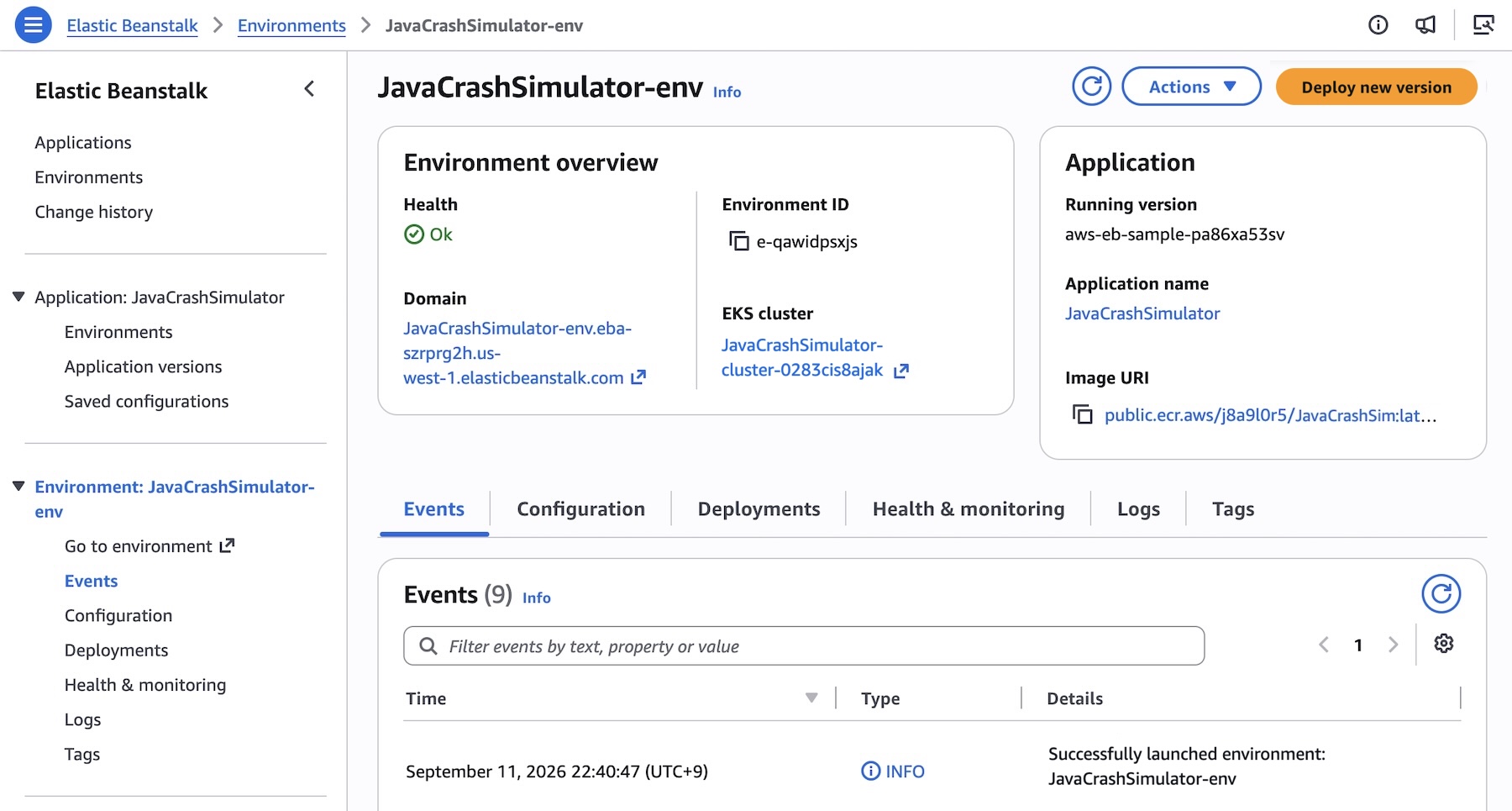
Here’s what it looks like when deployment is successful:

You can also use AWS Command Line Interface (AWS CLI), the EB CLI, or AWS SDKs. For example, consider deploying an application made up of several microservices to Kubernetes. Create an application first.

aws elasticbeanstalk create-application \
    --application-name "my-microservice" \
    --description "Multi-services demo" \

Each microservice may have pre-built images in Amazon Elastic Container Registry (Amazon ECR). Register them as application versions:

IMAGES=(
    "frontend-v1|public.ecr.aws/my-microservices/frontend:v1"
    "cartservice-v1|public.ecr.aws/my-microservices/cart:v1"
    "paymentservice-v1|public.ecr.aws/my-microservices/payment:v1"
    "shippingservice-v1|public.ecr.aws/my-microservices/shipping:v1"
)

for entry in "${IMAGES[@]}"; do
    IFS='|' read -r label uri <<< "$entry"
    aws elasticbeanstalk create-application-version \
        --application-name $APP_NAME \
        --version-label "$label" \
        --image-configuration Source="{Uri=$uri}" \
	--region "us-west-2
    echo "Registered: $label"
done

You can set and deploy the corresponding service options for each service. For example, the frontend service is the only service that needs a public internet interface such as Application Load Balancer and also sets a health check path since it’s an HTTP service:

[
    {"Namespace": "aws:elasticbeanstalk:eks", "OptionName": "cluster-role", "Value": "arn:aws:iam::0123456789012:rol<...>"},
    {"Namespace": "aws:elasticbeanstalk:eks", "OptionName": "node-role", "Value": "arn:aws:iam::0123456789012:role/E<...>"},
    {"Namespace": "aws:elasticbeanstalk:eks:environment", "OptionName": "observability-role", "Value": "arn:aws:iam::0123456<...>"},
    {"Namespace": "aws:elasticbeanstalk:eks:environment", "OptionName": "subnets", "Value": "subnet-1,subnet-2,subnet-3,<...>"},
    {"Namespace": "aws:elasticbeanstalk:eks:environment:autoscaling", "OptionName": "min-replica", "Value": "1"},
    {"Namespace": "aws:elasticbeanstalk:eks:environment:autoscaling", "OptionName": "max-replica", "Value": "2"},
    {"Namespace": "aws:elasticbeanstalk:eks:environment", "OptionName": "cpu", "Value": "0.5"},
    {"Namespace": "aws:elasticbeanstalk:eks:environment", "OptionName": "memory", "Value": "256Mi"},
    {"Namespace": "aws:elasticbeanstalk:eks:environment", "OptionName": "memory-limit", "Value": "512Mi"},
    {"Namespace": "aws:elasticbeanstalk:eks:environment", "OptionName": "service-port", "Value": "8080"},
    {"Namespace": "aws:elasticbeanstalk:eks:alb", "OptionName": "scheme", "Value": "internet-facing"},
    {"Namespace": "aws:elasticbeanstalk:eks:alb", "OptionName": "healthcheck-path", "Value": "/_healthz"}
] #frontend-options.json namespaces

Now, create the frontend service environment with these options. You can continue to deploy each service environment in a similar manner.

aws elasticbeanstalk create-environment \
    --application-name my-microservice \
    --environment-name frontend \
    --version-label frontend-v1 \
    --tier Name=Cluster,Type=EKS \
    --option-settings file:///tmp/frontend-options.json \

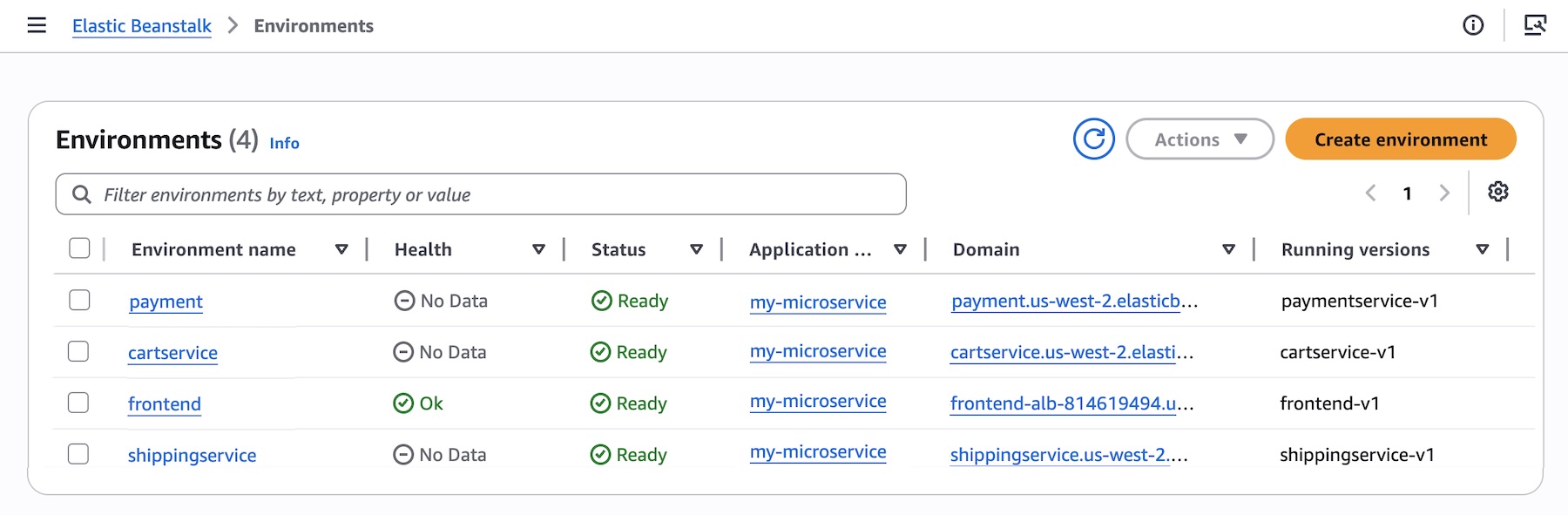
Here’s a look at the console once all services are deployed:

Elastic Beanstalk Standard powered by Amazon Elastic Compute Cloud (EC2) continues to be fully supported. Standard and Cluster Mode environments run side by side within the same Elastic Beanstalk application, enabling teams to migrate one environment at a time at their own pace. Validation checks confirm compatibility before any changes are made, so no environment is forced to move.

Elastic Beanstalk Standard Mode remains the best fit for:

  • Single applications or single-environment use cases
  • Windows/.NET Framework workloads on IIS
  • Applications that cannot be containerized
  • Workloads spending under $500/month where the EKS control plane fee and EKS Auto Mode premium add overhead that a single application cannot offset through bin-packing

To learn more about how to deploy and manage your applications in the Cluster Mode, visit the Elastic Beanstalk Cluster Mode documentation.

Now available
AWS Elastic Beanstalk Cluster Mode is generally available today in all AWS Regions that Elastic Beanstalk is available. For Regional availability and a future roadmap, visit the AWS Capabilities by Region. If you want to call APIs, search documentation, find regional availability, and troubleshooting about this new feature, try using the AWS MCP Server and plugins with your preferred AI tool.

There is no additional charge for Elastic Beanstalk Cluster Mode. You pay only for the underlying AWS resources your applications consume, including the EKS control plane fee, EKS Auto Mode compute, Amazon ECR, and Amazon CloudWatch. Note Elastic Beanstalk Cluster Mode is not AWS Free Tier eligible. To learn more, visit the AWS Elastic Beanstalk Pricing page.

Give it a try in the Elastic Beanstalk console and send feedback to AWS re:Post for AWS Elastic Beanstalk or through your usual AWS Support contacts.

— Channy

  •  

Upgrade Amazon EKS clusters with confidence using Kubernetes version rollbacks

Upgrading a Kubernetes control plane has long been a one way door. Open source Kubernetes doesn’t support control plane rollback, so once you upgrade, there’s no going back. The community is making real progress here, and KEP-4330 introduces emulated versions to ease rollback. But in practice this constraint has pushed organizations to build elaborate compensating mechanisms like bake periods, stagger groups, automated sign offs, and months long upgrade cycles. With Kubernetes releasing three minor versions per year, teams managing hundreds of clusters, especially in regulated environments, often delay upgrades entirely because they aren’t confident they can recover if something goes wrong. The result is clusters stuck on older versions, missing security patches, and eventually running up against extended support timelines.

Today, we’re announcing Kubernetes version rollbacks for Amazon Elastic Kubernetes Service (Amazon EKS), a new feature that gives cluster administrators a safety net when performing cluster upgrades. With version rollbacks, you can reverse a Kubernetes version upgrade within seven days if you encounter issues after upgrading, returning your cluster to its previous working state.

Where approaches like emulated versions keep a cluster in a transitional holding state, EKS version rollback returns your cluster to a fully validated previous version that ran in production, not an emulation of it. Now, if you upgrade a cluster from, say, Kubernetes 1.34 to 1.35 and discover a compatibility issue, you can roll back to 1.34 within seven days. There’s no need to rebuild your cluster or scramble to troubleshoot under pressure. Think of it as an undo button for Kubernetes version upgrades.

The feature supports rolling back one minor version at a time, matching the same incremental approach EKS uses for upgrades. And to help you roll back safely, EKS automatically evaluates your cluster’s rollback readiness through cluster insights, flagging items like node version compatibility or add-on dependencies before you proceed. If you’ve already assessed the situation and want to move quickly, you can use the --force flag to bypass those checks. The above applies to all EKS clusters, whether you manage your own nodes or let AWS handle them. But for customers who have embraced fully managed infrastructure, rollback goes a step further.

Rollback for EKS Auto Mode
EKS Auto Mode gives you one click deployment of production ready Kubernetes clusters, automating compute, networking, and storage management so you can focus on your applications rather than infrastructure. EKS Auto Mode introduces additional considerations for version rollbacks because both the control plane and managed nodes need to be rolled back together. Since node rollbacks respect your pod disruption budgets, the process can take time depending on your configuration.

To give you control over this process, we’ve introduced a cancel API that lets you stop a node rollback at any point. If you decide the rollback is taking too long or you want to change your approach, you can cancel and adjust your disruption budgets to accelerate things, or choose a different path forward.

By default, EKS never bypasses your disruption budgets during a rollback because we prioritize workload stability. You can always choose to modify or remove disruption budgets yourself to speed up the process if needed.

Let’s try it out
To try version rollbacks, I navigated to the Amazon EKS console and selected one of my clusters that I had recently upgraded.

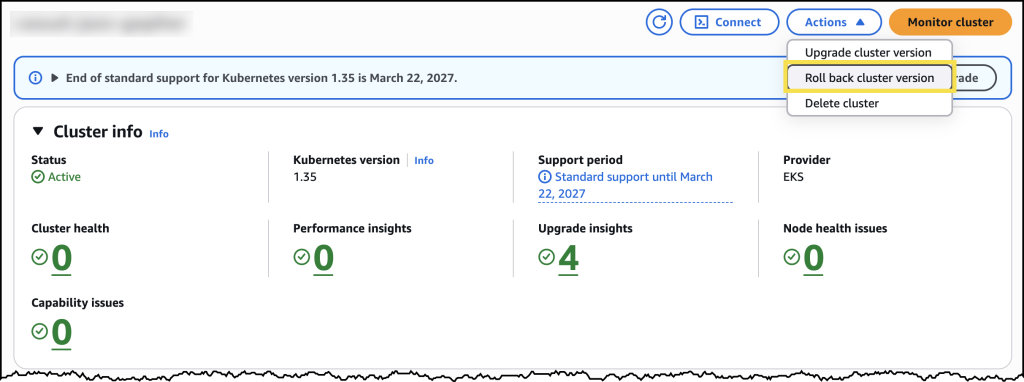
From the cluster’s configuration page, I can see the option to initiate a version rollback, along with information about my current rollback window.

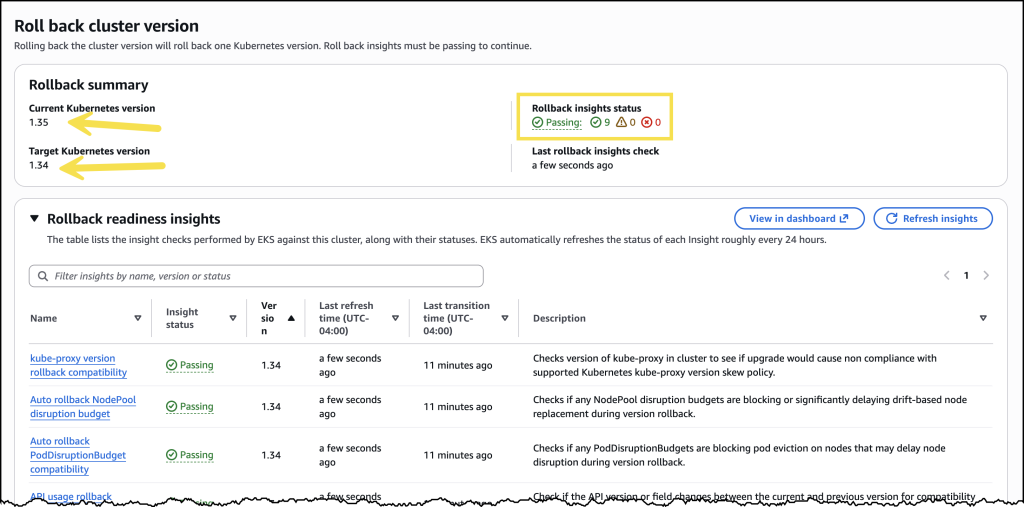
Before initiating the rollback, I reviewed the rollback insights to check for any potential issues. The insights showed me the status of my nodes and flagged anything I should address before proceeding.

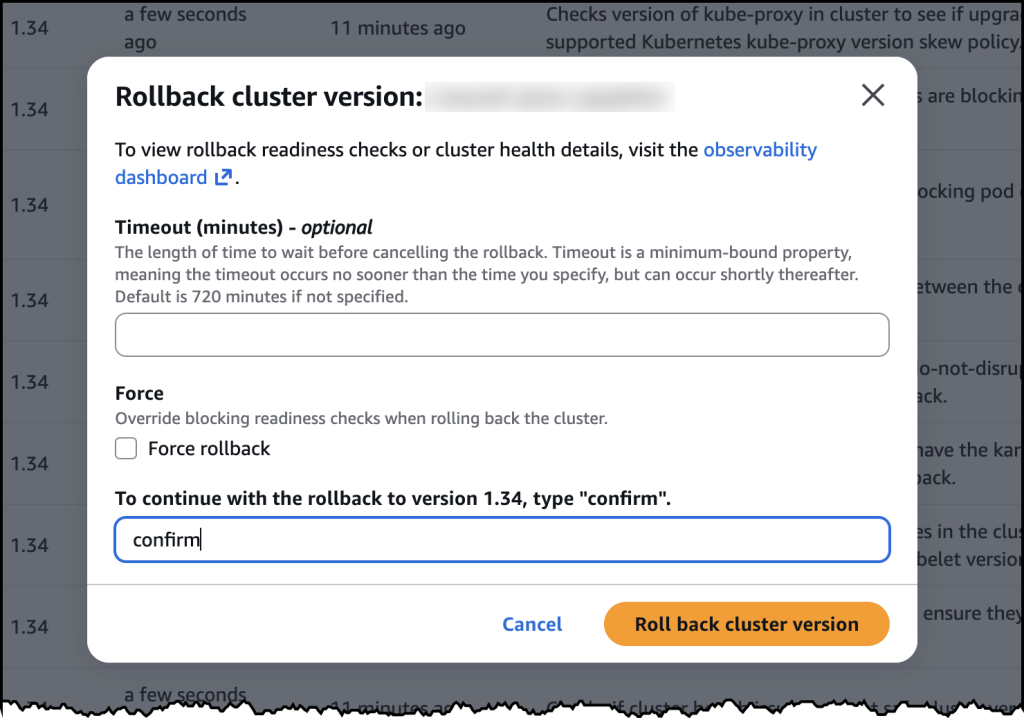
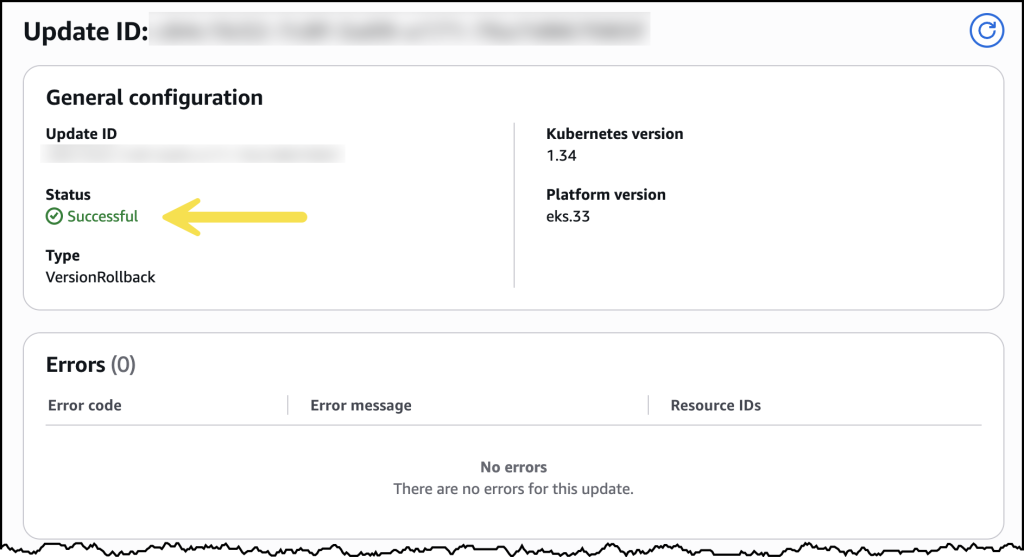
After confirming, the rollback began. My cluster remained functional throughout the process. The control plane rollback took about 20 minutes, similar to a standard upgrade. For my EKS Auto Mode cluster, the nodes rolled back gracefully according to my disruption budget settings.

Once complete, my cluster was back on the previous Kubernetes version, running as expected.

Now available
Kubernetes version rollbacks for Amazon EKS are available today at no additional cost in all commercial AWS Regions where Amazon EKS is available. You pay only for the standard EKS and compute costs you would normally incur. There are no extra charges for using the rollback capability.

Control plane rollbacks are available for all EKS clusters, and node rollbacks are available for clusters running EKS Auto Mode. Version rollbacks support clusters running Kubernetes versions available in EKS standard support and extended support.

To get started, visit the Amazon EKS documentation or try it out directly in the Amazon EKS console.

  •  

Run isolated sandboxes with full lifecycle control: AWS Lambda introduces MicroVMs

Today, we are announcing AWS Lambda MicroVMs, a new serverless compute primitive within AWS Lambda that lets you run code generated by users or AI in isolated, stateful execution environments. You get virtual machine level isolation, near-instant launch and resume, and direct control over environment lifecycle and state, all without managing infrastructure or building expertise in complex virtualization technologies. Lambda MicroVMs are powered by Firecracker, the same lightweight virtualization technology that has powered over 15 trillions of monthly Lambda function invocations.

Why customers need this
Over the past few years a new class of multi-tenant applications has emerged that all share the need to hand each end user their own dedicated execution environment in which to safely run code that the application developer did not write. AI coding assistants, interactive code environments, data analytics platforms, vulnerability scanners, and game servers that run user-supplied scripts all fit this pattern. Building that capability today means making a difficult choice. Virtual machines deliver strong isolation but take minutes to start. Containers launch in seconds, yet their shared-kernel architecture requires significant custom hardening to safely contain untrusted code. Functions as a service are optimized for event-driven, request-response workloads, but are not designed for long-running interactive sessions that need to retain environment state across user interactions. That leaves developers either accepting tradeoffs between performance and isolation, or investing significant engineering resources to build and operate custom virtualization infrastructure to achieve isolated execution while delivering low-latency experiences to end-users. This presents an effort that demands deep expertise and pulls engineering time away from the product they are actually trying to build.

Lambda MicroVMs is purpose-built for exactly this gap. Each MicroVM gives a single end user or session its own isolated environment that launches rapidly, retains memory and disk state for the length of the session, and pauses to a low idle cost when the user steps away. Because the same Firecracker technology already underpins AWS Lambda Functions, you inherit the operational maturity of a service that has been running this stack at scale.

Let’s try it out
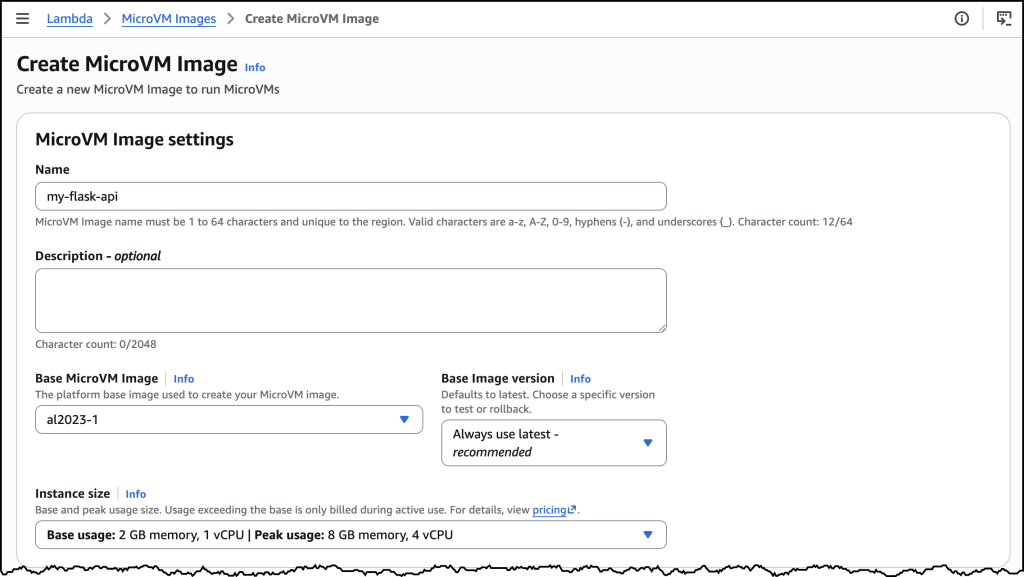
To get started, I navigated to the AWS Lambda console, where Lambda MicroVMs now appears in the left-hand navigation menu. I first need to create a MicroVM Image.

I packaged a Flask web app and its Dockerfile into a zip file, uploaded it to an Amazon Simple Storage Service (Amazon S3) bucket.

My Flask API – app.py

import logging

from flask import Flask, jsonify

app = Flask(__name__)
logging.basicConfig(level=logging.INFO)


@app.route("/")
def hello():
    app.logger.info("Received request to hello world endpoint")
    return jsonify(message="Hello, World!")


if __name__ == "__main__":
    app.run(host="0.0.0.0", port=5000)

My Dockerfile


FROM public.ecr.aws/lambda/microvms:al2023-minimal
RUN dnf install -y python3 python3-pip && dnf clean all

WORKDIR /app

COPY requirements.txt .
RUN pip install --no-cache-dir -r requirements.txt

COPY app.py .

EXPOSE 5000

CMD ["gunicorn", "--bind", "0.0.0.0:5000", "app:app"]

I used the following command to create my MicroVM Image.

aws lambda-microvms create-microvm-image \
--code-artifact uri=<path/to/s3/artifact.zip> --name <VM_image_name> \
--base-image-arn arn:aws:lambda:us-east-1:aws:microvm-image:al2023-1 \
--build-role-arn <IAM role ARN>

You can also create the MicroVM Image in the AWS Console as in the image above. Once I ran the command, Lambda retrieved the zip, ran the Dockerfile, initialized the application, and took a Firecracker snapshot of the running disk and memory state. Build logs streamed in real time to Amazon CloudWatch under /aws/lambda/microvms/<image-name>, and when the image was ready it appeared in the console with its Amazon Resource Name (ARN) and version number.

aws lambda-microvms run-microvm \
--image-identifier arn:aws:lambda:<region>:<acct>:microvm-image:my-image \
--execution-role-arn arn:aws:iam::<acct>:role/MicroVMExecutionRole \
--idle-policy '{"maxIdleDurationSeconds":900,"suspendedDurationSeconds":300,"autoResumeEnabled":true}'

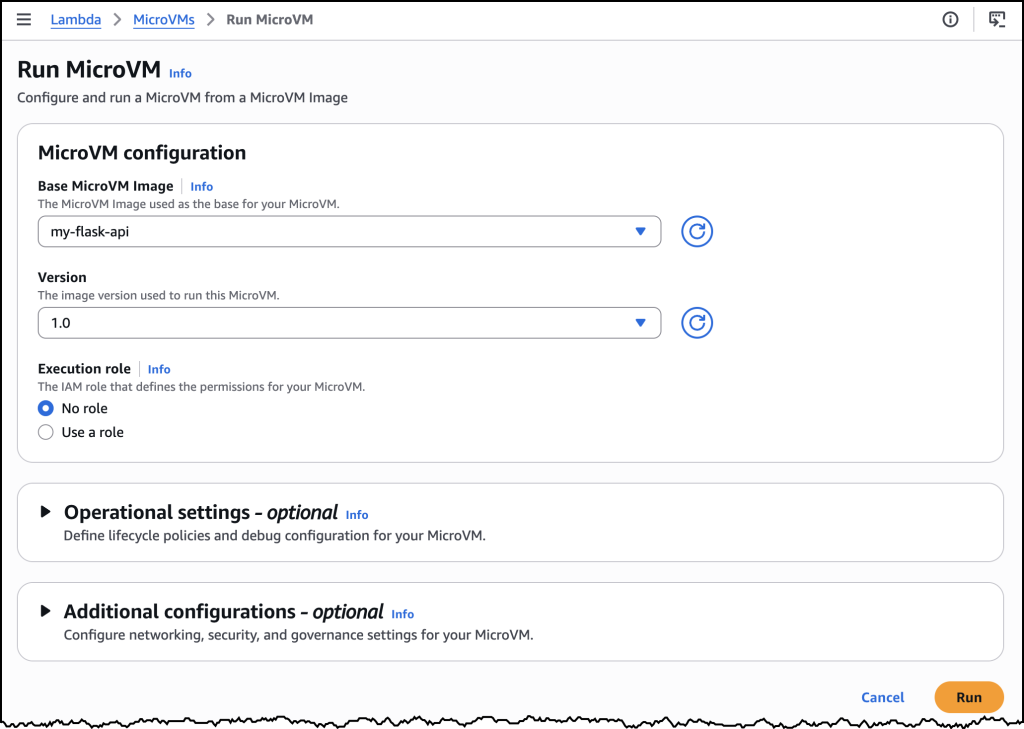
Launching can also be done via the AWS Console or the CLI. I passed the image ARN and an idle policy configured to auto-suspend after 15 minutes of inactivity and auto-resume on the next incoming request. No networking setup was required. Lambda assigned the MicroVM a unique ID, returned a dedicated endpoint URL, and started a new MicroVM with my Flask app already running, since it was resumed from a snapshot. My Flask app was already running the moment the launch completed. One API call to get a fully initialized, bootstrapped compute environment.

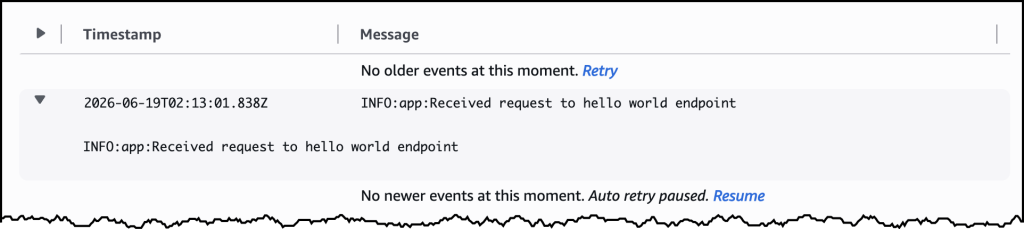
To send traffic, I generated a short-lived auth token with the CLI and attached it to a plain HTTPS request using the X-aws-proxy-auth header. The request landed on my Flask app immediately. I then let the MicroVM sit idle past the suspend threshold, at which point the MicroVM was suspended, with its memory and disk state snapshotted and stored. I then sent another request, and it resumed with the application state fully intact. From the client side, the pause never happened.

How it works
Under the covers, Lambda MicroVMs delivers three capabilities that, until today, no single AWS compute service offered together. The first is virtual machine level isolation, which comes from Firecracker. Each session runs in its own dedicated MicroVM with no shared kernel and no shared resources between users, so untrusted code supplied by one user is contained to their execution environment, without access to other environments or the underlying system. The second is rapid launch and resume. The model is image-then-launch: you create a MicroVM Image by supplying a Dockerfile and code packaged as a zip artifact in Amazon S3, and Lambda runs your Dockerfile, initializes your application, and takes a Firecracker snapshot of the running environment’s memory and disk state. Every subsequent MicroVM launched from that image resumes from the pre-initialized snapshot rather than booting cold, which means launches and idle resumes both achieve near-instant startup latency. Even a multi-gigabyte interactive session comes back online quickly enough to feel responsive to the end user. The third is stateful execution. A running MicroVM retains memory, disk, and running processes across the user’s session. During idle periods, a MicroVM can be suspended – with memory and disk state intact – and resumed when traffic arrives. Installed packages, loaded models, and working filesets are readily available when the user resumes their session. MicroVMs support up to 8 hours of total runtime and can be suspended automatically after a configurable idle window, which makes it straightforward to build products as varied as software vulnerability scans that complete in minutes, data analytics applications that run for hours, and interactive coding sessions with extended idle periods. As Lambda MicroVMs are started from pre-initialized snapshots, applications generating unique content, establishing network connections, or loading ephemeral data during initialization may need to integrate with service-provided hooks for compatibility.

Lambda MicroVMs is a new resource within AWS Lambda, with a distinct API surface. Lambda Functions remain the right choice for event-driven, request-response workloads, and Lambda MicroVMs is purpose-built for multi-tenant applications that need to hand each end user or session their own isolated environment to execute user- or AI-generated code. The two complement each other. An application using Lambda Functions for its event-driven backbone can call into Lambda MicroVMs for the steps that need to run untrusted code in isolation. You bring the application, and the service delivers the execution environment.

Now available
AWS Lambda MicroVMs is available today in the US East (N. Virginia, Ohio), US West (Oregon), Europe (Ireland) and Asia Pacific (Tokyo) Regions, on the ARM64 architecture, with up to 16 vCPUs, 32 GB of memory, and 32 GB of disk per MicroVM. Idle MicroVMs can be suspended explicitly through an API call or automatically through a lifecycle policy, which reduces the running cost while preserving full state for fast resume. Pricing details can be found on the AWS Lambda pricing page.

To get started, visit the AWS Lambda console, or learn more on the Lambda MicroVMs product page. For documentation, see the Lambda MicroVMs Developer Guide.

  •  

Announcing Amazon EC2 G7 instances accelerated by NVIDIA RTX PRO 4500 Blackwell Server Edition GPUs

Today, we’re announcing the general availability of Amazon Elastic Compute Cloud (Amazon EC2) G7 instances, delivering high performance GPU acceleration for AI inference, graphics, and data analytics workloads.

AWS is the first major cloud provider to support NVIDIA RTX PRO 4500 Blackwell Server Edition GPUs. G7 instances are accelerated by these GPUs with custom sixth-generation Intel Xeon Scalable processors, delivering up to 4.6x AI inference performance and up to 2.1x graphics performance compared to G6 instances. G7 instances also deliver faster performance for GPU-accelerated analytics on Amazon EMR on Amazon Elastic Kubernetes Service (Amazon EKS). G7 instances are well suited for a broad range of GPU-enabled workloads including AI inference, graphics rendering, video transcoding and analytics, spatial computing, virtual desktop infrastructure (VDI), and data analytics.

Here are improvements of G7 instances compared to previous generation:

  • Faster GPU memory: NVIDIA RTX PRO 4500 Blackwell Server Edition GPUs offer 1.33 times the GPU memory capacity and 2.45 times the GPU memory bandwidth compared to G6 instances. With 32 GB of GPU memory per GPU, 5th Gen Tensor Cores, and 4th Gen RT Cores, G7 instances deliver enhanced AI inference and graphics performance.
  • High performance networking and storage: G7 instances come with 700 Gbps of EFA-enabled networking throughput (7x compared to G6) enabling the low-latency, high-bandwidth connectivity that AI inference, graphics-intensive applications, and GPU-accelerated data analytics workloads need to perform at their best. G7 instances support up to 7.6 TB local NVMe SSD storage, enabling you to keep large models and datasets close to compute, reduce data transfer overhead, and improve throughput.
  • Advanced video encoding and decoding engines: Ninth-generation NVENC and sixth-generation NVDEC engines support 4:2:2 encoding and decoding for high-resolution video workflows, delivering 1.5x concurrent video streams compared to previous-generation G6 instances.

EC2 G7 instance specifications
G7 instances feature up to 8 NVIDIA RTX PRO 4500 Blackwell Server Edition GPUs with up to 256 GB of total GPU memory (32 GB of memory per GPU) and custom Intel Xeon Scalable processors. They also are available in 7 sizes and support up to 192 vCPUs, up to 700 Gbps of network bandwidth, up to 768 GiB of system memory, and up to 7.6 TB of local NVMe SSD storage.

Here are the specs:

Instance name GPUs GPU memory (GB) vCPUs Memory (GiB) Storage EBS bandwidth (Gbps) Network bandwidth (Gbps)
g7.2xlarge 1 32 8 32 1 x 600 Up to 8 Up to 60
g7.4xlarge 1 32 16 64 1 x 600 8 Up to 100
g7.8xlarge 1 32 32 128 1 x 950 16 Up to 100
g7.12xlarge 2 64 48 192 1 x 1900 20 175
g7.24xlarge 4 128 96 384 1 x 3800 40 350
g7.48xlarge 8 256 192 768 2 x 3800 80 700
g7.metal* 8 256 192 768 2 x 3800 80 700

* Coming soon

G7 instances support NVIDIA GPUDirect P2P for multi-GPU sizes, NVIDIA GPUDirect RDMA with EFA, and GPUDirect RDMA with EFA for Amazon FSx for Lustre, enabling low-latency GPU-to-GPU communication for multi-GPU and multi-node workloads.

To get started with G7 instances, you can use the AWS Deep Learning AMIs (DLAMI) or NVIDIA Workstation AMIs with prepackaged GPU drivers for your AI inference and graphics workloads. To use G7 instances with Amazon EKS, build EKS AMIs with NVIDIA driver version R595 with EKS-provided automation. G7 instances support multiple operating systems including Amazon Linux, Ubuntu, RHEL, and Windows Server, with comprehensive NVIDIA driver integration providing compatibility with industry-standard graphics libraries including DirectX, Vulkan, and OpenGL.

Get started today
You can start using Amazon EC2 G7 instances today in two AWS regions: US East (Ohio) and US West (Oregon). To check future Regional expansion plans, look up the instance type in the CloudFormation resources tab on the AWS Capabilities by Region page.

G7 instances are offered through multiple purchasing options, including On-Demand, Savings Plans, and Spot Instances. Dedicated Instances are also supported for the 12xlarge, 24xlarge, and 48xlarge sizes. For detailed pricing, visit the Amazon EC2 Pricing page.

Ready to get started? Launch G7 instances from the Amazon EC2 console. For more details, head over to the Amazon EC2 G7 instances page. We’d love to hear your feedback. Share it on AWS re:Post for EC2 or reach out through your usual AWS Support contacts.

– Daniel Abib

  •  

Amazon ECS introduces new high-resolution metrics for faster service auto scaling

Amazon Elastic Container Service (Amazon ECS) service auto scaling automatically adjusts task counts to meet workload demand with comprehensive scaling policies, including predictive scaling for recurring traffic patterns, scheduled scaling for planned events, and target tracking to scale dynamically on real-time metrics.

You can choose proactive scaling by using predictive scaling (automatic) and scheduled scaling (customer-defined), or reactive scaling by using target tracking with just a target to scale on. Amazon ECS service auto scaling adjusts the number of tasks in an ECS service based on Amazon CloudWatch metrics, such as average CPU/Memory usage, request count per target, a custom metric such as queue depth, or demand surges by using advanced machine learning (ML) algorithms.

With today’s launch, Amazon ECS service auto scaling now detects and responds to load changes faster with support for high resolution (20-second) metrics and metric publishing optimizations. In AWS benchmarking tests, time to trigger scale-out improved from 363 seconds to 86 seconds (76% faster, 4.2x), and total time to scale and provision new tasks improved from 386 seconds to 109 seconds (72% faster, 3.5x)

This launch delivers three key benefits for your applications:

  • Improved performance and reliability: Faster scaling means, your application responds faster to demand surges, reducing latencies or failures for end users during demand surges.
  • Right-size without compromise: Depending on the workload, you can reduce baseline task counts because scale-out now happens fast enough to handle traffic spikes without preemptive capacity padding. This directly reduces compute costs while maintaining application performance and availability.
  • Simpler scaling configuration: Target tracking with high-resolution metrics delivers the aggressive scaling behavior that previously required custom scaling configurations, such as usage of step-scaling policies. One configuration change replaces custom engineering work.

How it works
To use ECS faster service auto scaling, first enable high-resolution metrics for your ECS service, and then configure a target tracking scaling policy which uses high-resolution metrics. ECS faster service autoscaling works across all compute options on ECS: AWS Fargate, ECS Managed Instances, and Amazon Elastic Compute Cloud (Amazon EC2). You can enable these metrics when you create or update your ECS service in the Amazon ECS console, or using AWS SDKs and tools, and AWS CloudFormation.

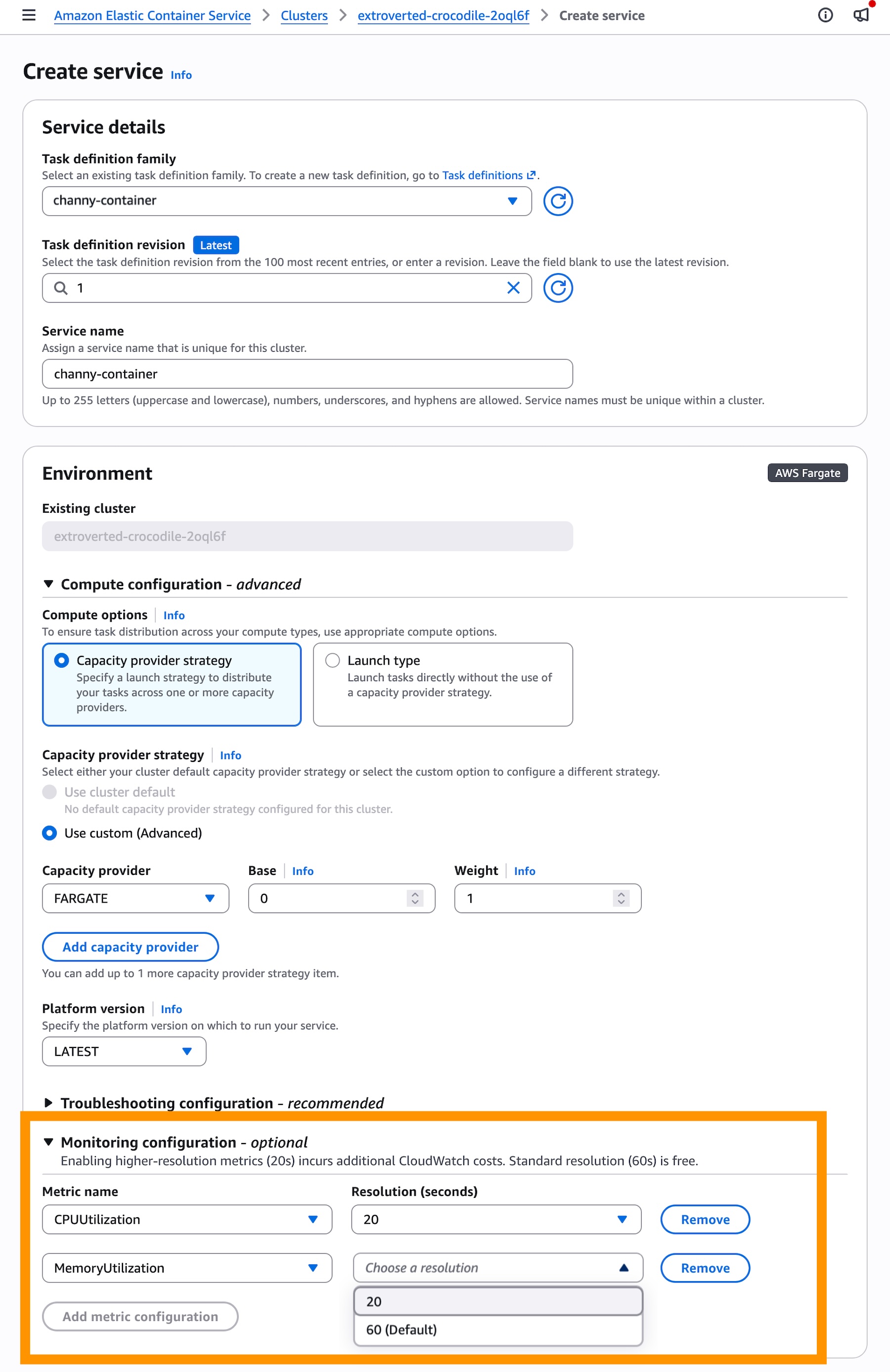
When you create a service in the console, add 20-seconds resolution metrics in the Monitoring configuration section. These metrics incur additional CloudWatch costs while the standard resolution (60-seconds) is free.

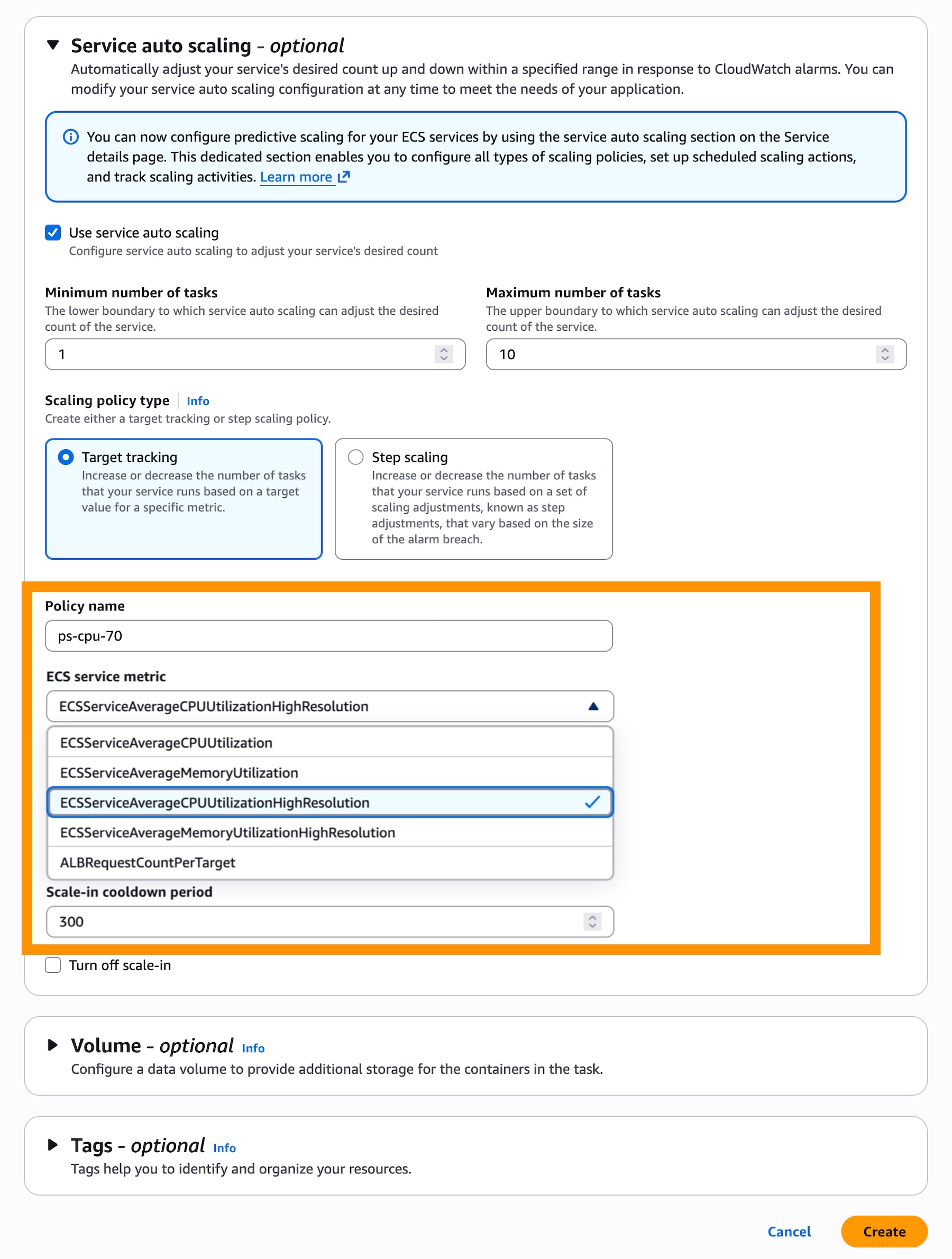
In the Service auto scaling section, check Use service auto scaling and choose Target Tracking for the scaling policy type to use real-time data to scale the number of tasks that your service runs based on demand.

Then, choose a Scaling policy type for the target tracking. You can select ECSServiceAverageCPUUtilizationHighResolution or ECSServiceAverageMemoryUtilizationHighResolution as new metrics.

That’s it. Your ECS service will use high resolution metrics for auto scaling.

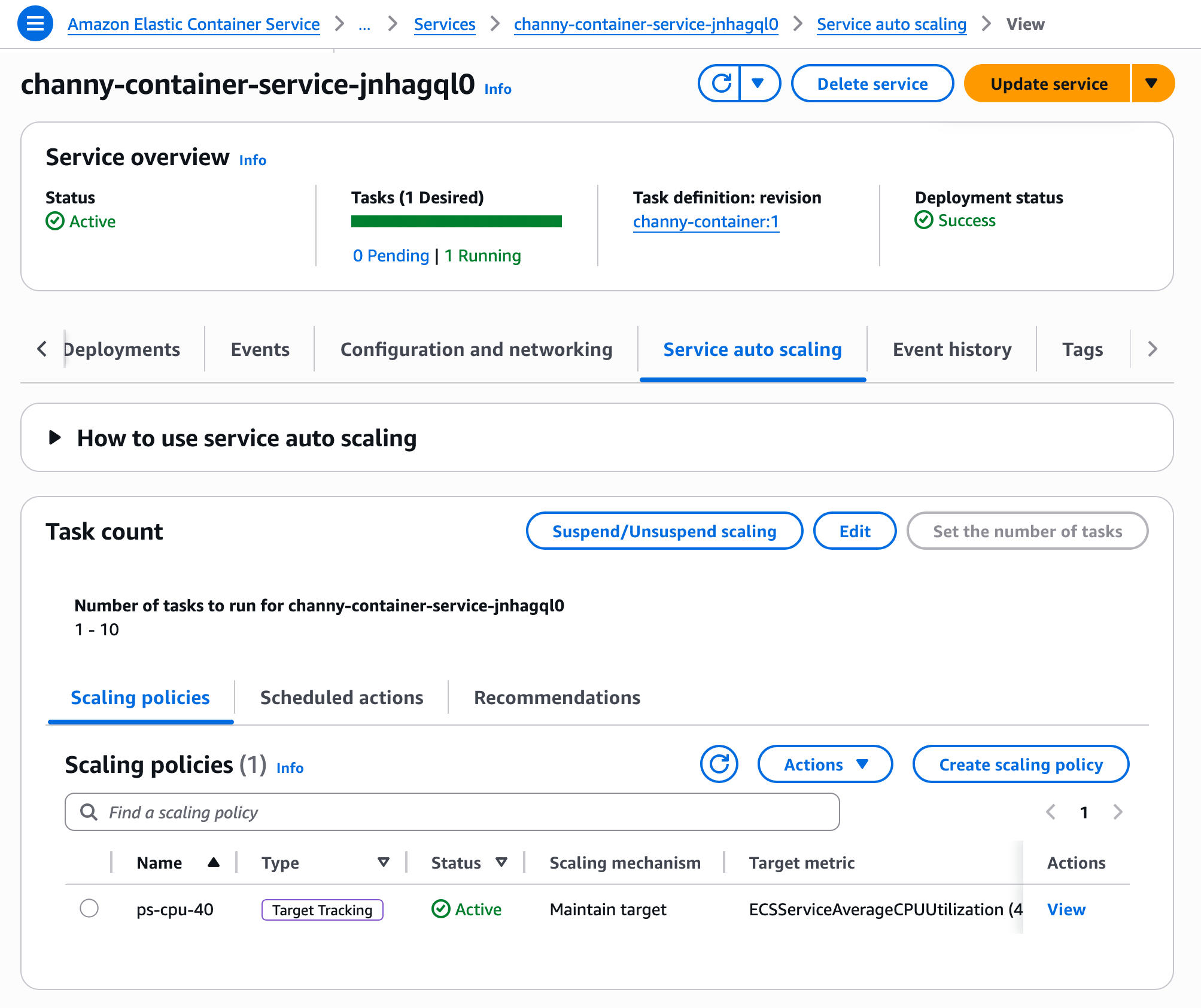
To update an existing ECS service to use faster auto scaling, you first need to configure high resolution metrics via Update Service. Once deployment completes, your service will generate high-resolution metrics. You can then go to the Service and auto scaling tab from your service details to update scaling policy to use higher resolution metrics.

That’s all you need. Your ECS service now evaluates scaling decisions at 20-second intervals.

You can also use the AWS Command Line Interface (AWS CLI) to enable new metrics in your ECS service through Application Auto Scaling. To learn more, visit the faster auto scaling documentation.

Now available
Faster service autoscaling with high-resolution metrics for Amazon ECS is available today. The feature itself has no additional cost, but high-resolution CloudWatch metrics introduce a new pricing dimension. For details, see the CloudWatch pricing page.

Give it a try today and send feedback to AWS re:Post for ECS or through your usual AWS Support contacts.

— Channy

  •  

Now available: Amazon EC2 M9g and M9gd instances powered by new AWS Graviton5 processors

AWS Graviton processors have improved steadily across generations, with each iteration delivering advances in compute performance, price-performance, and energy efficiency. At re:Invent 2025, we announced Amazon EC2 M9g, the first Graviton5-powered instances, in preview. Since then, customers have tested M9g across a wide range of workloads and shared their results. ClickHouse saw a 36% performance boost compared to M8g, with zero code changes. Honeycomb achieved 36% better throughput per core compared to Graviton4, across a 6-month A/B test of production observability workloads. HubSpot deployed M9g for MySQL databases and saw query duration drop by up to 60%.

Today, M9g instances are generally available, alongside the new M9gd instances for customers who need high-speed, low-latency local NVMe SSD storage. Both are powered by Graviton5, the most powerful and most energy efficient processor AWS has ever built.

While many Arm-based instances have been introduced across the industry, no one comes close to the breadth and depth of the AWS Graviton footprint. After five generations of custom silicon and eight years of continuous investment, Graviton powers over 350 instance types serving more than 120,000 customers, from startups to large enterprises, a robust ISV partner ecosystem, and a broad set of managed services.

You can use Graviton for a broad variety of workloads, including web applications, microservices, analytics, databases, machine learning (ML) inference, electronic design automation (EDA), gaming, and video encoding. As workloads grow more compute-intensive and data-driven, many have asked for more processing power, along with greater network and storage bandwidth to move more data and complete workloads faster. We’ve also designed these instances to efficiently package compute, memory, and I/O to maximize energy utilization.

As AI shifts from answering questions to taking actions, running code, using tools, evaluating results, and orchestrating multi-step tasks, the demand for CPU compute is growing rapidly. Graviton5 is built for this shift. With 192 cores, a 5x larger L3 cache, up to 33% lower inter-core latency, and DDR5 memory delivering high bandwidth, Graviton5 helps agents spend less time waiting on CPU-bound steps, processing more instructions, handling large numbers of concurrent environments, and keeping accelerators moving.

Meta is deploying Graviton at scale starting with tens of millions of cores to support its agentic AI efforts, making Meta one of the largest Graviton customers in the world. Agentic AI workloads, including real-time reasoning, code generation, and the orchestration of multi-step tasks, are CPU-intensive and benefit from the higher compute performance, larger caches, higher memory bandwidth, and core density in Graviton5.

What’s new in M9g and M9gd
Built on the sixth-generation AWS Nitro System, M9g instances are powered by AWS Graviton5 processors that deliver higher compute performance, larger caches, and improved memory and I/O scalability compared to Graviton4 processors. Graviton5 offers up to 25% better compute performance compared to Graviton4-based instances, with up to 35% faster performance for web applications, up to 35% for machine learning inference, and up to 30% for databases. As the first CPU in the AWS fleet to support the latest generation of PCIe Gen6 and DDR5-8800 memory, AWS Graviton5 instances deliver the fastest memory of any processor instances in the cloud, and 5 times more L3 cache compared to the previous generation. These improvements also come with better energy efficiency, helping you meet sustainability targets without compromising capability.

Networking and storage bandwidth have been expanded to keep pace with compute growth. M9g and M9gd instances offer up to 15% higher network bandwidth and 20% higher Amazon Elastic Block Store (Amazon EBS) bandwidth on average across sizes, with up to twice the network bandwidth for the largest instance size. M9g and M9gd instances also support Instance Bandwidth Configuration (IBC), a feature that helps you adjust the allocation of bandwidth between Amazon EBS and Amazon Virtual Private Cloud (Amazon VPC) networking for an Amazon EC2 instance by up to 25%. IBC can help optimize performance for workloads with specific bandwidth requirements, such as database read and write performance, query processing, and logging. These enhancements support faster data movement and improved throughput for workloads that rely on high I/O performance.

Security and isolation are foundational requirements for running workloads in the cloud. Within the Nitro System, the AWS Nitro Hypervisor is designed to isolate instances from each other as well as AWS operators. With M9g and M9gd instances we are raising the bar on security even further with the introduction of Nitro Isolation Engine. Nitro Isolation Engine is an enhancement to the Nitro System, which enforces isolation of instances and harnesses formal verification to provide assurances of isolation with mathematical precision. Nitro Isolation Engine is a purpose-built component that is responsible for enforcing isolation between virtual machines, including mediation of all access to virtual machine memory, CPU register state, and I/O devices through a minimal set of APIs. Nitro Isolation Engine leverages formal verification, a technique to mathematically demonstrate that the hardware or software behaves as intended, and not just in specific test cases. This intensive verification technique establishes Nitro as the first formally verified cloud hypervisor, pioneering a new standard for mathematically proven cloud security. To learn more about the Nitro Isolation Engine, visit the blog post here. For details on the formal verification results, including scope and assumptions, see our technical white paper.

M9g instances provide one vCPU for every four GiB of memory and are well suited for a broad range of general-purpose workloads, including application servers, microservices, midsize data stores, gaming servers, caching fleets, containerized applications, large-scale Java applications, code repositories, web applications, and agentic AI.

For workloads that need high-speed, low-latency local storage, M9gd instances provide up to 11.4 TB of NVMe SSD storage and 30% higher IOPS and storage performance compared to Graviton4-based M8gd instances. M9gd instances are well suited for general-purpose workloads that require a balance of compute and memory with high-speed, low-latency local storage, including application servers, microservices, gaming servers, midsize key-value data stores, caching fleets, data logging, media processing, batch and log processing, and applications that need temporary storage such as caches and scratch files.

Here are the key specifications across the family:

M9g vCPUs Memory (GiB) Network bandwidth (Gbps) EBS bandwidth (Gbps)
medium 1 4 Up to 15 Up to 12
large 2 8 Up to 15 Up to 12
xlarge 4 16 Up to 15 Up to 12
2xlarge 8 32 Up to 17 Up to 12
4xlarge 16 64 Up to 17 Up to 12
8xlarge 32 128 17 12
12xlarge 48 192 25 18
16xlarge 64 256 34 24
24xlarge 96 384 50 36
48xlarge 192 768 100 72
metal-48xl 192 768 100 72

M9gd instances include local NVMe SSD storage. The table below shows the instance storage for each size. Compute, memory, network, and EBS bandwidth specifications are the same as M9g.

M9gd vCPUs Memory (GiB) Instance storage (GB) Network bandwidth (Gbps) EBS bandwidth (Gbps)
medium 1 4 1 x 59 NVMe SSD Up to 15 Up to 12
large 2 8 1 x 118 NVMe SSD Up to 15 Up to 12
xlarge 4 16 1 x 237 NVMe SSD Up to 15 Up to 12
2xlarge 8 32 1 x 475 NVMe SSD Up to 17 Up to 12
4xlarge 16 64 1 x 950 NVMe SSD Up to 17 Up to 12
8xlarge 32 128 1 x 1900 NVMe SSD 17 12
12xlarge 48 192 3 x 950 NVMe SSD 25 18
16xlarge 64 256 1 x 3800 NVMe SSD 34 24
24xlarge 96 384 3 x 1900 NVMe SSD 50 36
48xlarge 192 768 3 x 3800 NVMe SSD 100 72
metal-48xl 192 768 3 x 3800 NVMe SSD 100 72

Now available
M9g and M9gd instances are available in the US East (N. Virginia), US East (Ohio), US West (Oregon), and Europe (Frankfurt) Regions. M9g and M9gd instances are available for purchase through Savings Plans, On-Demand, Spot Instances, Dedicated Instances, or Dedicated Hosts. For more information, visit Amazon EC2 pricing.

To get started with M9g and M9gd instances, several resources are available. The AWS Graviton Getting Started Guide is a technical guide covering how to build, run, and optimize workloads on Graviton-based instances. The Graviton Savings Dashboard helps you track and measure the cost savings from running workloads on Graviton-based instances. AWS Transform is an AI-powered service that automates code transformations for migrating Java applications from x86 to Graviton-based Amazon EC2 instances, handling compatibility analysis, automated recompilation, dependency updates, and validation.

To learn more about Graviton-based instances, visit AWS Graviton Processors or Level up your compute with AWS Graviton.

— Esra

Editor’s Note 6/12/26: Added information about Nitro Isolation Engine

  •