❌

Vue lecture

Boost the power of your transactional data with Cloud Spanner change streams

Data is one of the most valuable assets in today’s digital economy. One way to unlock the value of your data is to give it life after it’s first collected. A transactional database, like Cloud Spanner, captures incremental changes to your data in real time, at scale, so you can leverage it in more powerful ways. Cloud Spanner is our fully managed relational database that offers near unlimited scale, strong consistency, and industry-leading high availability of up to 99.999%. 

The traditional way for downstream systems to use incremental data that’s been captured in a transactional database is through change data capture (CDC), which allows you to trigger behavior based on changes to your database, such as a deleted account or an updated inventory count.

Today, we are announcing Spanner change streams, coming soon, that lets you capture change data from  Spanner databases and easily integrate it with other systems to unlock new value. 

Change streams for Spanner goes above and beyond the traditional CDC capabilities of tracking inserts, updates, and deletes. Change streams are highly flexible and configurable, letting you track changes on exact tables and columns or across an entire database. You can replicate changes from Spanner to BigQuery for real-time analytics, trigger downstream application behavior using Pub/Sub, and store changes in Google Cloud Storage (GCS) for compliance. This ensures you have the freshest data to optimize business outcomes. 

Change streams provides a wide range of options to integrate change data with other Google Cloud services and partner applications through turnkey connectors, including custom Dataflow processing pipelines or the change streams read API.

Spanner consistently processes over 1.2 billion requests per second. Since change streams are built right into Spanner, you not only get industry-leading availability and global scale—you also don’t have to spin up any additional resources. The same IAM permissions that already protect your Spanner databases can be used to access change streams queries.Change stream queries are protected by spanner.databases.select, and change stream DDL operations are protected by spanner.databases.updateDdl.

Change streams in action

In this section, we’ll look at how to set up a change stream that sends change data from Spanner to an analytic data warehouse in BigQuery.

Creating a change stream 

As discussed above, a change stream tracks changes on an entire database, a set of tables, or a set of columns in a database. Each change stream can have a retention period of anywhere from one day to seven days, and you can set up multiple change streams to track exactly what you need for your specific business objectives. 

First, we’ll create a change stream on a table called InventoryLedger. This table tracks inventory changes on two columns: InventoryLedgerProductSku and InventoryLedgerChangedUnits with a 7-day retention period.

Change records

Each change record contains a wealth of information, including primary key, the commit timestamp, transaction ID, and of course, the old and new values of the changed data, wherever applicable. This makes it easy to process change records as an entire transaction, in sequence based on their commit timestamp, or individually as they arrive, depending on your business needs. 

Back to the inventory example, now that we’ve created a change stream on the InventoryLedger table, all inserts, updates, and deletes on this table will be published to the InventoryStream change stream. These changes are strongly consistent with the commits on the InventoryLedger table: When a transaction commit succeeds, the relevant changes will automatically persist in the change stream. You never have to worry about missing a change record.

Processing a change stream

There are numerous ways that you can process change streams depending on the use case:

  • Analytics: You can send the change records to BigQuery, either as a set of change logs or by updating the tables.  

  • Event triggering: You can send change logs to Pub/Sub for further processing by downstream systems. 

  • Compliance: You can retain the change log to Google Cloud Storage for archiving purposes. 

The easiest way to process change stream data is to use our Spanner connector for Dataflow, where you can take advantage of Dataflow’s built-in pipelines to BigQuery, Pub/Sub, and Google Cloud Storage. The diagram below shows a Dataflow pipeline that processes this change stream and imports change data directly into BigQuery.

Alternatively, you can build a custom Dataflow pipeline to process change data with Apache Beam. In this case, we provide a Dataflow connector that outputs change data as an Apache Beam PCollection of DataChangeRecord objects. 

For even more flexibility, you can use the underlying change streams query API. The query API is a powerful interface that lets you read directly from a change stream to implement your own connector and stream changes to the pipeline of your choice. On the query API side, a change stream is divided into multiple partitions, which can be used to query a change stream in parallel for higher throughput. Spanner dynamically creates these partitions based on load and size. Partitions are associated with a Spanner database split, allowing change streams to scale as effortlessly as the rest of Spanner.

Get started with change streams

With change streams, your Spanner data follows you wherever you need it, whether that’s for analytics with BigQuery, for triggering events in downstream applications, or for compliance and archiving. Change streams are highly flexible and configurable —allowing you to capture change data for the exact data you care about, and for the exact period of time that matters for your business. And because change streams are built into  Spanner, there’s no software to install, and you get external consistency, high scale, and up to 99.999% availability.

There’s no extra charge for using change streams, and you’ll pay only for extra compute and storage of the change data at the regular Spanner rates.

To get started with Spanner, create an instance, or try it out with a Spanner Qwiklab.

We’re excited to see how Spanner change streams will help you unlock more value out of your data!

  •  

Spanner: Removing cumulative mutation limits for DML transactions

Spanner is Google Cloud’s no-compromise operational database that gives you the horizontal scale and always-on availability of a modern distributed system along with the rich feature set and familiar ecosystem of a relational database. Innovators in industries like banking, retail, media and entertainment, and AI infrastructure rely on Spanner today for their most critical workloads. We’re excited to announce a new, flexible way to handle larger, more complex transactions in Spanner, simplifying applications that need the highest levels of data consistency.

Operational workloads typically combine real-time decision making with granular updates: Think: identifying fraud as part of a multi-step checkout process in an ecommerce app. These changes must be transactional; either all of them succeed or none of them do and subsequent requests see the correct data. This update to Spanner’s ACID transactions allows applications to handle more data in an update without compromising on consistency, scalability, or availability using familiar DML. 

Higher ceiling, more flexibility

Previously, Spanner capped the changes a query could perform in a transaction, for example using DML, at 80,000. That was roughly computed as the product of the number of rows and number of columns updated, plus any dependent indexes. Applications evolve over time to handle more data and provide new functionality. These changes increase the size of transactions, potentially causing previously small transactions to hit this limit. 

This update shifts the 80,000 mutation mod limit from the transaction to individual DML statements. DML statements no longer contribute to an overall transaction-level mutation limit. A single transaction can now contain any number of DML statements, such as INSERT, UPDATE, or DELETE, provided that each individual statement generates fewer than 80,000 mutation mods.

Key benefits

  1. Larger transactions: Group DML statements logically based on business requirements rather than artificially splitting them to comply with cumulative mutation limits.

  2. Seamless transition: This change is compatible with all existing Spanner client libraries and requires no updates to application code.

Technical considerations

Locking and aborts

While you can now include more DML statements in a single transaction, be aware that larger and longer-running transactions hold locks for a greater duration. This may increase the likelihood of lock contention and transaction aborts. Keeping transactions concise helps maintain high performance and minimize resource contention.

DML vs. Mutation API

The application of limits depends on the method used to modify data:

  • DML Statements: Each statement (e.g., executeUpdate) is evaluated independently against the 80,000 mod limit.

  • Mutation API: When using client library methods like insert() or update(), mutations are provided during the Commit call. The 80,000 limit continues to apply to the entire set of mutations included in that single call.

Understanding mutation mods

Spanner counts "mods" based on the complexity of changes, including modified cells, primary keys, and secondary index updates. Please look at this blog for more details on how mutations are counted. You can monitor the total mods for a committed transaction via the mutation_count in the CommitStats. Note that the mutation_count will include all the mutations that are part of the transaction, across all DML statements and commit calls. 

Java implementation example

The following example demonstrates how multiple DML statements can be executed within a single transaction under the new limit logic.

code_block
<ListValue: [StructValue([('code', 'import com.google.cloud.spanner.DatabaseClient;\r\nimport com.google.cloud.spanner.Statement;\r\nimport com.google.cloud.spanner.TransactionContext;\r\nimport com.google.cloud.spanner.TransactionRunner.Work;\r\n\r\n// Assuming dbClient is your initialized DatabaseClient\r\ndbClient\r\n .readWriteTransaction()\r\n .run(\r\n new Work<Void>() {\r\n @Override\r\n public Void doWork(TransactionContext transaction) throws Exception {\r\n // Each executeUpdate call is evaluated separately against the 80k mod limit.\r\n\r\n // Example 1: Updating specific products\r\n Statement stmt1 = Statement.newBuilder(\r\n "UPDATE Products SET InStock = FALSE WHERE ProductId = @productId")\r\n .bind("productId").to(1L)\r\n .build();\r\n transaction.executeUpdate(stmt1); // Verified against 80k limit\r\n\r\n Statement stmt2 = Statement.newBuilder(\r\n "UPDATE Products SET InStock = FALSE WHERE ProductId = @productId")\r\n .bind("productId").to(2L)\r\n .build();\r\n transaction.executeUpdate(stmt2); // Verified against 80k limit separately\r\n\r\n // Example 2: Inserting related order data\r\n Statement stmt3 = Statement.newBuilder(\r\n "INSERT INTO OrderItems (OrderId, ItemId, Quantity) VALUES (@orderId, @itemId, @qty)")\r\n .bind("orderId").to(100L)\r\n .bind("itemId").to(1L)\r\n .bind("qty").to(2)\r\n .build();\r\n transaction.executeUpdate(stmt3); \r\n\r\n Statement stmt4 = Statement.newBuilder(\r\n "UPDATE Orders SET LastUpdated = PENDING_COMMIT_TIMESTAMP() WHERE OrderId = @orderId")\r\n .bind("orderId").to(100L)\r\n .build();\r\n transaction.executeUpdate(stmt4); \r\n\r\n return null;\r\n }\r\n });'), ('language', ''), ('caption', <wagtail.rich_text.RichText object at 0x7fc79c8978d0>)])]>

What has not changed

  • Individual statement limit: Any single DML statement that generates more than 80,000 mods on its own will still return the same error as we do today. 

  • Other transaction limits: Other constraints such as the maximum transaction size in bytes remain in effect. They are documented here.

Best practices

  • Monitor CommitStats: Utilize the mutation_count returned in CommitStats to understand the load generated by your operations.

  • Optimize large operations: If a single statement (like a bulk update) exceeds the limit, consider using Partitioned DML or paginating through keys.

Spanner is the trusted choice for operational applications that need to scale without downtime. This increase to the mutation limit provides developers new flexibility to run larger transactions that leverage Spanner’s global consistency. Learn how Spanner can help your teams innovate faster with less risk, or try it on your own, with a free trial or production instances starting as low as $54/month.

External references

  •  

Unifying public and private data: Scale knowledge graphs with Data Commons on Spanner

To make informed decisions, businesses often need to connect their internal data with public reference data, to create a knowledge graph that connects real-world things and their relationships. However, bridging data from public and private worlds has traditionally been complex. Today, we are streamlining these connections with the general availability of Data Commons on Spanner Graph and the preview of the new Data Commons Platform to unify your private knowledge with knowledge graphs from public datasets. 

The overarching Data Commons project supports Google’s mission to organize the world's information and make it universally accessible and useful. Data Commons unifies fragmented public datasets from over 100 authoritative providers, including the United Nations, World Bank, US Census Bureau, Eurostat, WHO, and NOAA, with over 400 billion data points structured using standardized Schema.org definitions. Data Commons provides data exploration tools, MCP tools, and cloud-based APIs to access and integrate the clean datasets. 

Data Commons integrates public information across multiple domains, including agriculture, demographics, economy, environment, and health. This standardized approach unlocks powerful use cases, for instance, letting you analyze national GDP trends, map regional smoke pollution levels, track local health equity, or demographic distributions over time, all using data that has already been preprocessed and normalized for you.

Data Commons knowledge graph dimensions

Dimension

Size

Technical description

Statistical observations

400+ billion

Individual metric data points

Graph edges

2.6+ billion

Relationships

Knowledge graph nodes

1.7+ billion

Standardized entities

Data sources

100+ providers

Authoritative institutions

Data Commons makes meaningful quantities of public administrative data available to users on readily consumable cloud-based infrastructure.

A modern infrastructure powered by Spanner Graph

When we first built Data Commons, our goal was to aggregate massive, disparate public datasets using the tools available at the time. The platform relied on Bigtable as a caching layer, which was an effective strategy for handling large-scale lookups in the absence of native graph database technology.

Today, we have transitioned our architecture to a native graph model with Spanner Graph, which brings the convenience of a SQL-like interface and graph expressiveness to Spanner, with its high availability, horizontal scale-out, multi-region transactional consistency, and native ISO/IEC 39075 Graph Query Language (GQL) support.

By adopting a multi-entity Spanner Graph schema, we represent entities as nodes and their domain links as dynamic graph edges, allowing us to move away from pre-computed cache structures and perform complex relationship queries directly within the database using GQL.

This architecture also simplifies our pipelines by removing the need for complex, pre-computed indices that require costly in-memory rebuilds and multiple snapshots. Spanner Graph enables incremental updates to specific datasets without refreshing the entire database, while stale reads maintain consistent data snapshots during ingestion.

Key benefits by moving to Spanner Graph

  • Unified storage and incremental updates: By utilizing Spanner Graph’s multi-entity schema, the platform replaces complex caches with a model that supports incremental data imports, allowing for targeted updates to specific datasets.

  • Dynamic graph traversals via GraphRAG: The system executes multi-hop queries such as navigating hierarchies like continent → country → state → county → city on the fly. This removes reliance on static caches and enables GraphRAG workflows, where the database maps natural language queries directly to structured path-matching traversals.

  • Consistent data snapshots: Leveraging Spanner TrueTime and stale reads, the platform provides you with a version-consistent snapshot of data, maintaining integrity across distributed nodes following batch ingestion cycles.

  • Operational analytics at scale: Spanner’s columnar engine efficiently scans massive time-series datasets by reading only the necessary fields, while BigQuery federation that leverages Spanner’s Data Boost technology performs complex aggregations via EXTERNAL_QUERY in an isolated environment, helping isolate production traffic.

Bridging systems with SDMX 3.0 interoperability

To facilitate the use of complex statistical data, Data Commons adopts a lean implementation of Statistical Data and Metadata eXchange (SDMX) technical standard. As an ISO specification, SDMX provides a consistent approach for describing and exchanging statistical data along with descriptive statistical meta-information.

In this Data Commons Platform update we added support for the SDMX technical standard version 3.0, providing out-of-the-box integration with third-party tools like Tableau, Flourish, and Observable for multi-dimensional datasets. This is made possible using the API standard SDMX-JSON and SDMX-CSV 2.0 formats across two high-value endpoints:

  • The availability API: A programmatic discovery mechanism to identify existing dimensions, variables, and date ranges without reading raw values.

  • The data API: Retrieves actual observations and metadata, using named parameters to help prevent code from breaking when dimensions are added.

Transforming private instances of Data Commons Platform

For organizations that want to build private instances of the Data Commons Platform, this new modern architecture resolves legacy scaling limits and simplifies data schematization. Developers can instantiate a private instance of the Data Commons Platform leveraging the same scalable technology that powers Google’s Data Commons instance. As a private instance, users retain full control of their own data and have the ability to limit access, while enabling natural language queries to blend results from their private data with Google’s public data that is hosted on the Google Data Commons instance. By federating across our public knowledge graph and a private knowledge graph containing your own data, you can light up exciting new use cases, while maintaining data isolation and ensuring no data duplication. 

For instance, a retail enterprise can combine public data such as national GDP trends, regional demographic breakdowns, and employment statistics, with their own enterprise data, including sales histories, store performance metrics, and supply chain logistics. This allows analysts to contrast public macroeconomic indicators against their own company transactions to optimize merchandise distribution and identify untapped markets.

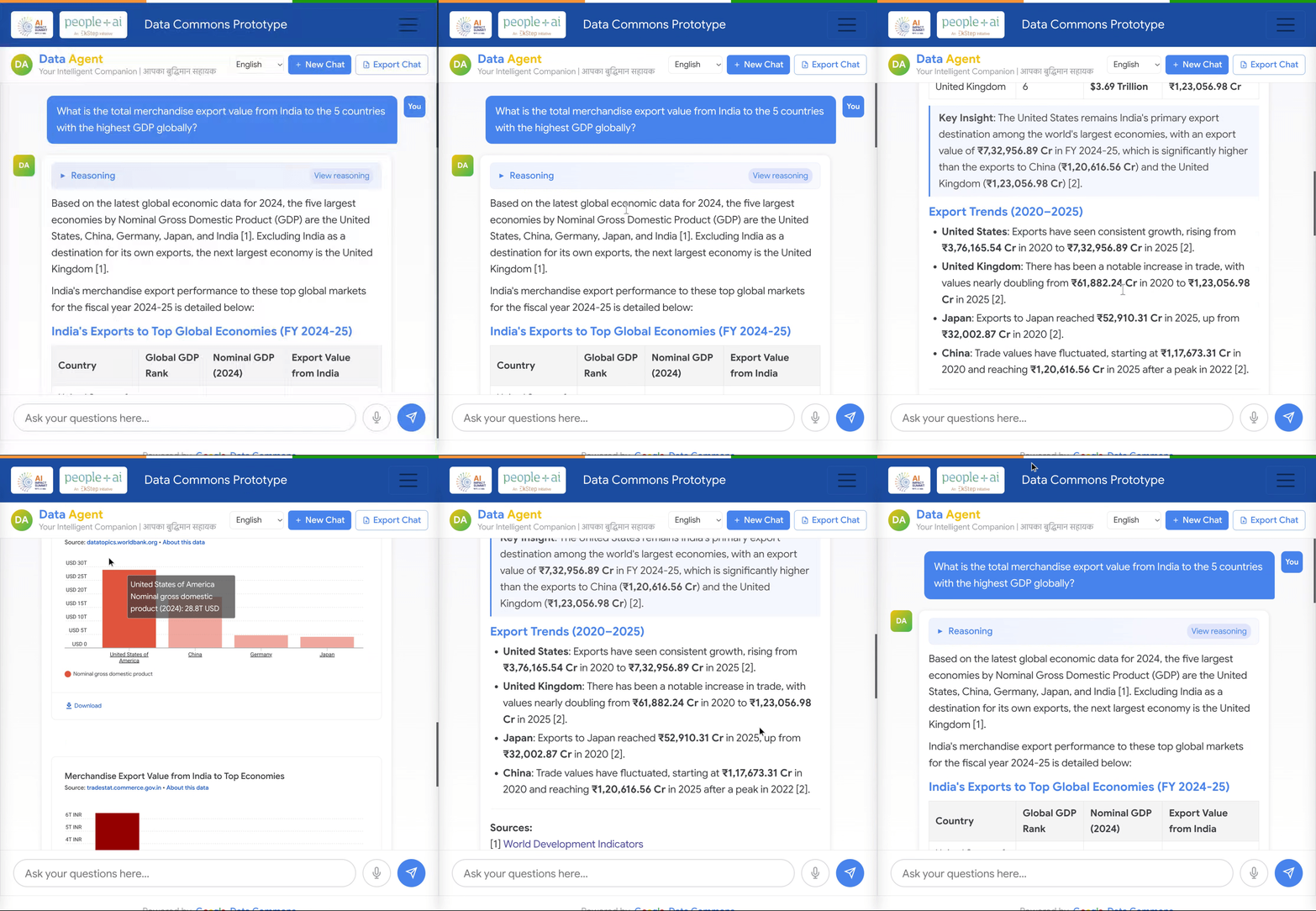
1

Example of a natural language query combining statistical data from the Directorate General of Commercial Intelligence and Statistics (DGCIS) stored in a Data Commons Platform private instance with World Development Indicators from the World Bank stored in the Google Data Commons public instance.

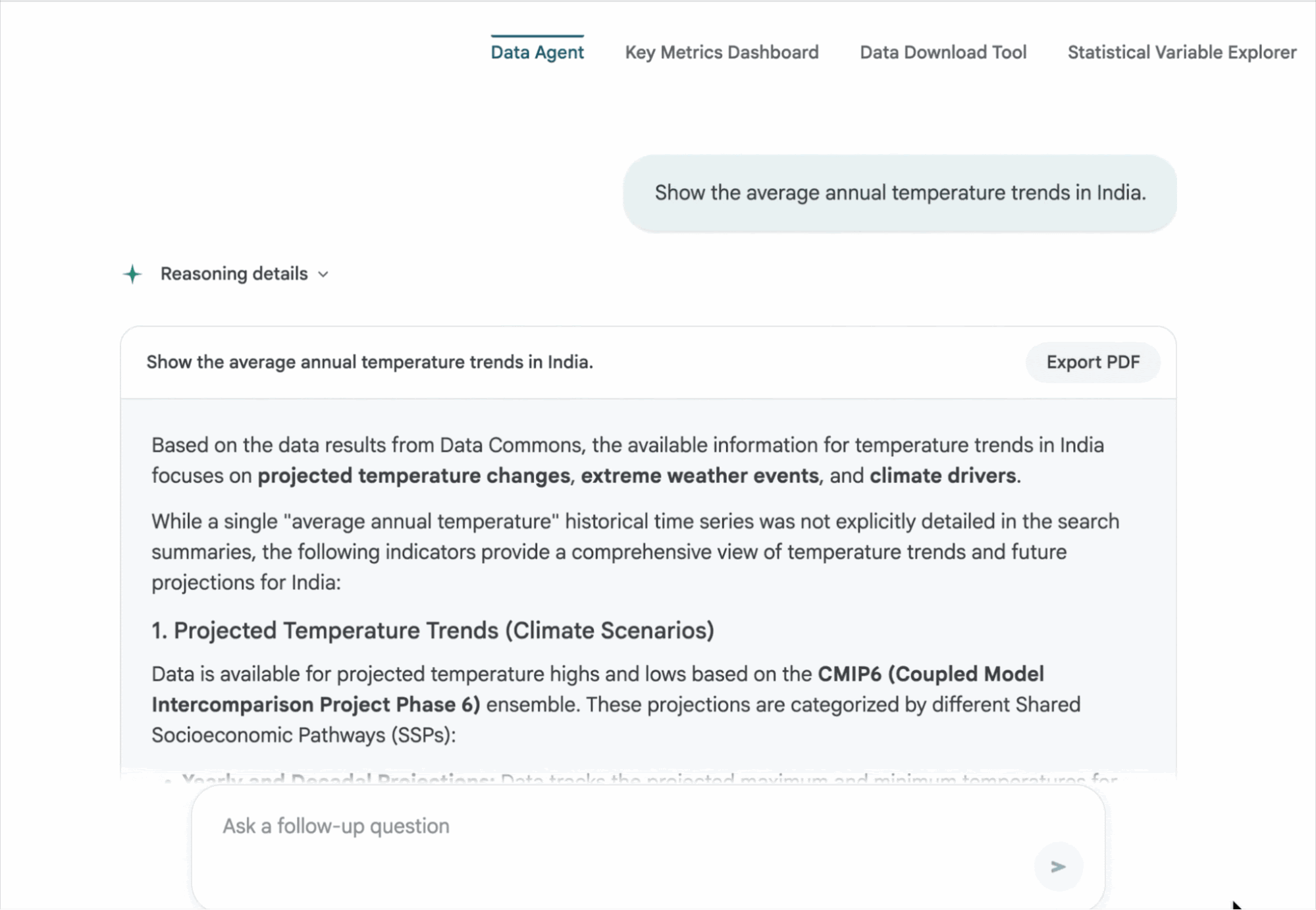
2

A user is querying a Data Agent for average annual temperature trends in the country. The agent retrieves information from Data Commons, explaining that while historical data is available, it provides projected temperature changes, climate drivers, and CMIP6 climate model scenarios (SSPs), with options to export the generated report.

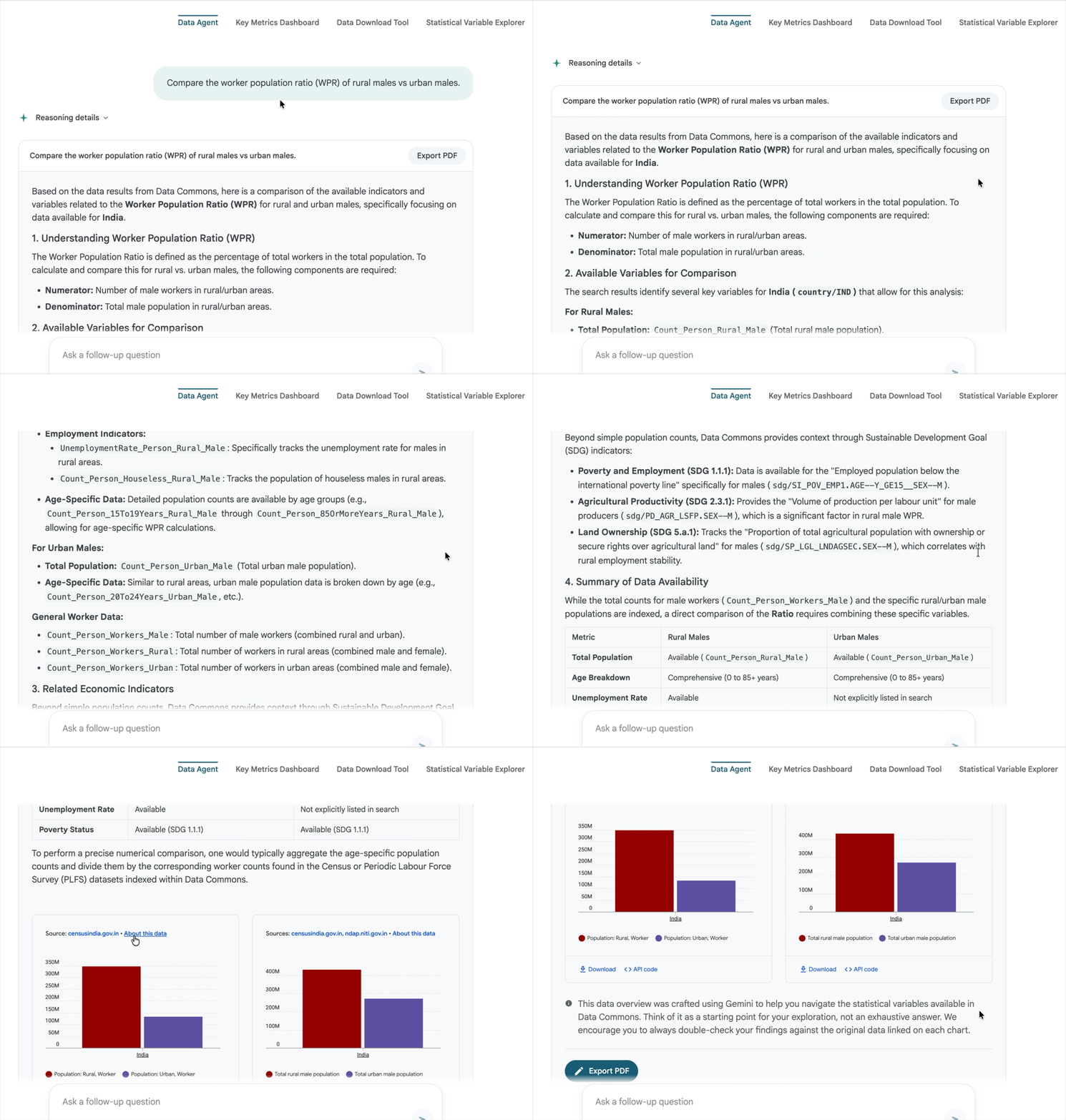
3

A user asks the Data Agent to compare the Worker Population Ratio (WPR) of rural versus urban males in a country. Fetching data from Data Commons, the agent defines WPR—the percentage of workers relative to the total population—and outlines the available demographic variables to analyze and compare both groups.

4

Get started today

  • Explore Data Commons: Visit datacommons.org to query global statistical knowledge.

  • Explore Spanner Graph's use cases and setup guide for your knowledge graphs.

  • Deploy Data Commons Platform: contact support@datacommons.org to request preview access and to review the developer tools.

  •