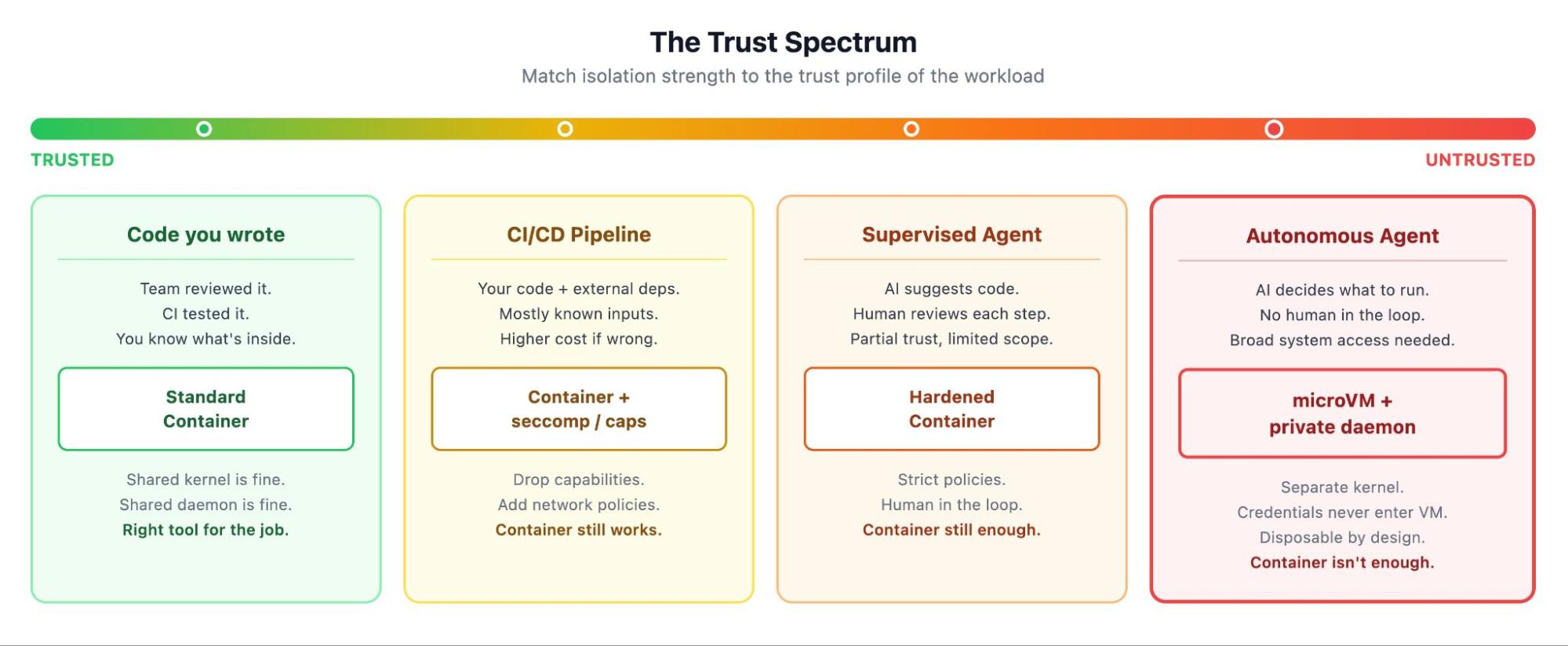
❌

Vue lecture

6 Benefits of Sandbox Environments (and How Docker Sandboxes Delivers Them)

In our State of Agentic AI report, 60% of organizations reported having AI agents running in production. Those agents install packages, run scripts, and call external services on their own, and much of that work now happens on developer laptops, with developer credentials. Running untrusted or experimental code directly on your machine has always carried risk, and handing that same machine to an autonomous agent raises the stakes.

A sandbox environment gives code a separate, controlled space to run in, with limited access to the machine underneath and external systems. How strictly it holds that line depends on how the sandbox is built, which is where the differences between them start to matter.

The benefits of sandbox environments are worth understanding on their own, and they compound when the thing running inside is an agent working unattended with permissions auto-approved. Below are six, from isolation and credential handling to the policy you enforce at runtime, and how Docker Sandboxes delivers each one.

Key takeaways

  • A sandbox gives you a hard isolation boundary, so untrusted code or autonomous agents run without access to the host machine.
  • Docker’s sandbox environments offer benefits like isolation, policy you control, safe credentials, disposability, a real Linux dev environment, and the same sandbox technology for every agent.
  • A sandbox enforces the network and filesystem policy you define at runtime, which is what makes it the enforcement point for governance.
  • For AI agents, these benefits combine into full autonomy inside a boundary that allows them to get work done, safely.
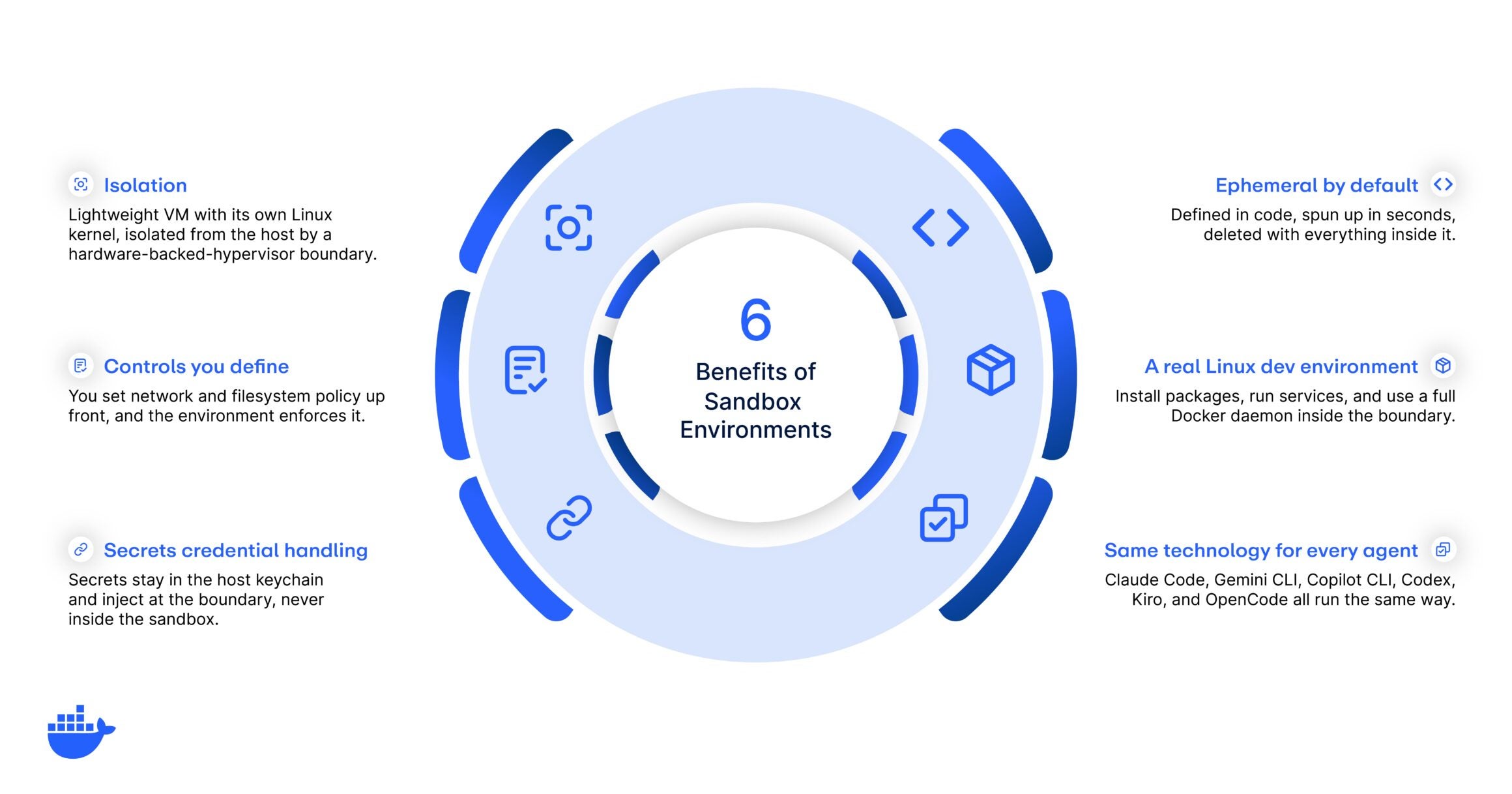
docker 6 Benefits of Sandbox Environments

1. Isolation

Everything in this list builds on isolation, and the strength of that boundary is what makes a sandbox trustworthy. For Docker Sandboxes, each sandbox runs in its own microVM: a lightweight virtual machine with its own Linux kernel, isolated from the host by a hardware-backed hypervisor boundary. 

That boundary is the same kind of isolation a full virtual machine gives you, and it’s what lets you hand an agent real freedom. Because a Docker sandbox runs its own kernel, a compromised or runaway agent can’t reach the host, other sandboxes, or anything outside its environment. If it tries to escape, it hits a wall. So an agent can install packages, pull untrusted dependencies, and run code unattended. But when something inside goes wrong, the damage stays in the sandbox and disappears when you discard it. That containment is what makes it safe to let an agent run at full speed.

ⓘ MicroVM vs. container isolation: A (Linux) container shares the host’s kernel, so its isolation depends on kernel-level controls. Note that when using Docker Desktop, in order to provide an environment for running Linux containers, you’re already using a VM for hosting containers, so they are isolated from the host OS. However, all containers still share the same kernel (the one of the Linux VM). Hence, you won’t have strong isolation between containers.

2. Network and filesystem controls you define

Isolation sets the outer wall. The controls you define decide what the workload can reach while inside it. Most sandboxes let you scope network and filesystem access to some degree: which domains and IP ranges the workload can reach, and which paths on the host, if any, it can read or write. How precisely you can express that policy varies between tools, and it’s worth checking before you commit, because broad-strokes rules leave gaps that an agent will eventually find.

Docker Sandboxes lets you set that policy per sandbox and enforces it at the boundary at runtime, so the rules hold even when the code inside tries something you didn’t anticipate. The same controls that keep an experiment from making unauthorized outbound connections also shut down data exfiltration and block access to untrusted or malicious services. Restricting the filesystem keeps sensitive host paths, like SSH keys and cloud credentials, out of reach.

3. Secure credential handling

Agents need credentials to do useful work: a token to push to a repo, an API key to call a service. The risk is that a credential sitting inside the environment can be read, logged, or leaked by whatever runs there. Most sandboxes pass secrets in as environment variables or mounted files, which puts the value inside the boundary where the workload can read it, and so can anything the workload runs.

Docker Sandboxes keeps credentials out of the environment entirely. They stay in the host keychain, and the sandbox injects them into outbound network requests at the boundary, so the workload gets the benefit of the credential while the value itself stays on the host. An agent that can’t read a secret also can’t exfiltrate it, write it to a log, or hand it off to a prompt-injected instruction. The credential does its job on the request path while the sensitive material stays under your control.

4. Ephemeral, disposable environments you can recreate fast

A sandbox is quick to create and easy to throw away, so you can treat every one as disposable. When a task finishes, or when an agent goes off the rails, you can delete the environment and everything inside goes with it, from installed packages to running processes to any changes the agent made to the system. But if your working directory is mounted from the host, the files the agent creates or edits there stay on your machine even after the environment is gone.

The recreation side is just as valuable. Because a sandbox is defined in code, you can spin up an identical environment on demand, configured the same way every time, down to the packages and settings. This is the infrastructure-as-code approach applied to your workspace: reproducible, versionable, and consistent across a team. For agents, disposability also unlocks parallelism. You can run several agents at once, each in its own fresh environment, and tear them all down when the work is done.

5. A real Linux dev environment with a full Docker daemon

Isolation doesn’t have to mean a stripped-down box. A sandbox worth using gives the workload a real Linux environment with the tools a developer or an agent actually needs, so you can install packages, run services, start databases, and compile code inside the boundary. Environments vary widely in how complete they are, and a thin one pushes work back onto the host, which defeats the point of having a boundary at all.

Docker Sandboxes includes a full Docker daemon, isolated within the sandbox, so an agent can build and run containers as part of its work with no path back to the host daemon. That’s a meaningful capability for agentic workflows, where a single task might involve building an image, running a test suite in a container, and tearing it all down. The environment behaves like a genuine machine, which is what makes it a viable place to do real work.

6. The same sandbox technology for every agent

Developers will often move between agents. One task suits Claude Code, another suits Gemini CLI, Copilot CLI, Codex, Kiro, or OpenCode. If each agent brought its own isolation model, you’d be securing a different environment for every tool, and each vendor’s model could shift with a version bump.

A single sandbox technology solves this by running every agent the same way, inside the same kind of isolated environment with the same policy engine. You define network, filesystem, and credential policy once, and it applies no matter which agent is doing the work. For a platform or security team, that consistency is what makes governance enforceable at scale: one boundary to reason about, one set of controls to audit, across every agent your developers adopt.

Who gets the most from sandbox environments

The same six benefits pay off differently depending on your role.

  • Individual developers
    • You get freedom to experiment. You can try a risky dependency, run an unfamiliar tool, or let an agent work unattended, knowing the environment is contained and disposable. When something breaks, you delete it and start clean, and your machine is never in the blast radius.
  • Platform teams
    • You get consistency and control. A sandbox defined once gives every developer the same environment and the same policy, across whichever agents they use. That means less setup for your developers to think about and a single standard you can maintain centrally.
  • Security teams
    • You get containment and oversight. A sandbox limits what an agent can reach and gives you one boundary to monitor across every tool. You can approve agent adoption because the environment enforces your policy at runtime, which is the heart of securing AI agents in production. Every environment is disposable, so there’s nothing persistent to compromise.

Why this matters for AI agents

Put the six together and you get the reason why sandboxes might become the standard way to run agents. An agent needs autonomy to be useful. It has to install things, run code, and call services without a human approving each step. Autonomy on your host machine is dangerous, but put it inside a sandbox and it’s safe.

Isolation contains what the agent can do, and the controls you define scope what it can reach. Credentials stay out of its hands, so a compromised agent has nothing to leak. When a run goes sideways, disposability lets you throw the environment out and start over in seconds. And a real Linux dev environment means the agent can do genuine work, and running every agent on one sandbox technology keeps all of this consistent no matter which tool your team reaches for. Together, these benefits let an agent operate at full speed while keeping the blast radius of any mistake close to zero.

Run agents safely with Docker Sandboxes

These benefits depend on each other, and a gap in any one becomes the weak point a runaway agent finds first. Isolation without credential handling still leaks your secrets, and a dev environment you can’t tear down cleanly turns into a liability the first time an agent misbehaves.

Running agents safely means delivering all six together, and that’s what Docker Sandboxes is built to do. Containment comes from microVM isolation, the controls are the network and filesystem policy you set, and credentials stay in the host keychain, injecting at the boundary so the agent never sees them. Environments are disposable and defined in code, the workspace is a real Linux system with a full Docker daemon, and the same sandbox technology runs every major coding agent the same way.

And when you’re ready to run agents safely across a team, Docker AI Governance extends the same boundary into org-wide policy. You define network, filesystem, and tool-access rules once, govern which credentials a session can use, and apply it on every developer’s machine, with an audit trail security can defend.

Get started with Docker Sandboxes → 

Explore Docker AI Governance →

Frequently asked questions

What is a sandbox environment used for?

Sandboxes give coding agents and the code they run an isolated, disposable place to execute, fully separated from the host. The main use is running AI coding agents like Claude Code, Codex, or Gemini CLI unattended, letting them install packages, run services, and even run Docker inside the sandbox, and trying risky changes you’d rather keep off your machine.

What is the main benefit of a sandbox environment?

Isolation. A sandbox keeps whatever runs inside from reaching the host, so a mistake, a malicious package, or a misbehaving agent stays contained.

Are sandbox environments only for security?

No. Security is a major benefit, but sandboxes also improve reproducibility, speed up onboarding, and let developers and agents experiment freely, because the environment is disposable and defined in code.

Do sandbox environments slow developers down?

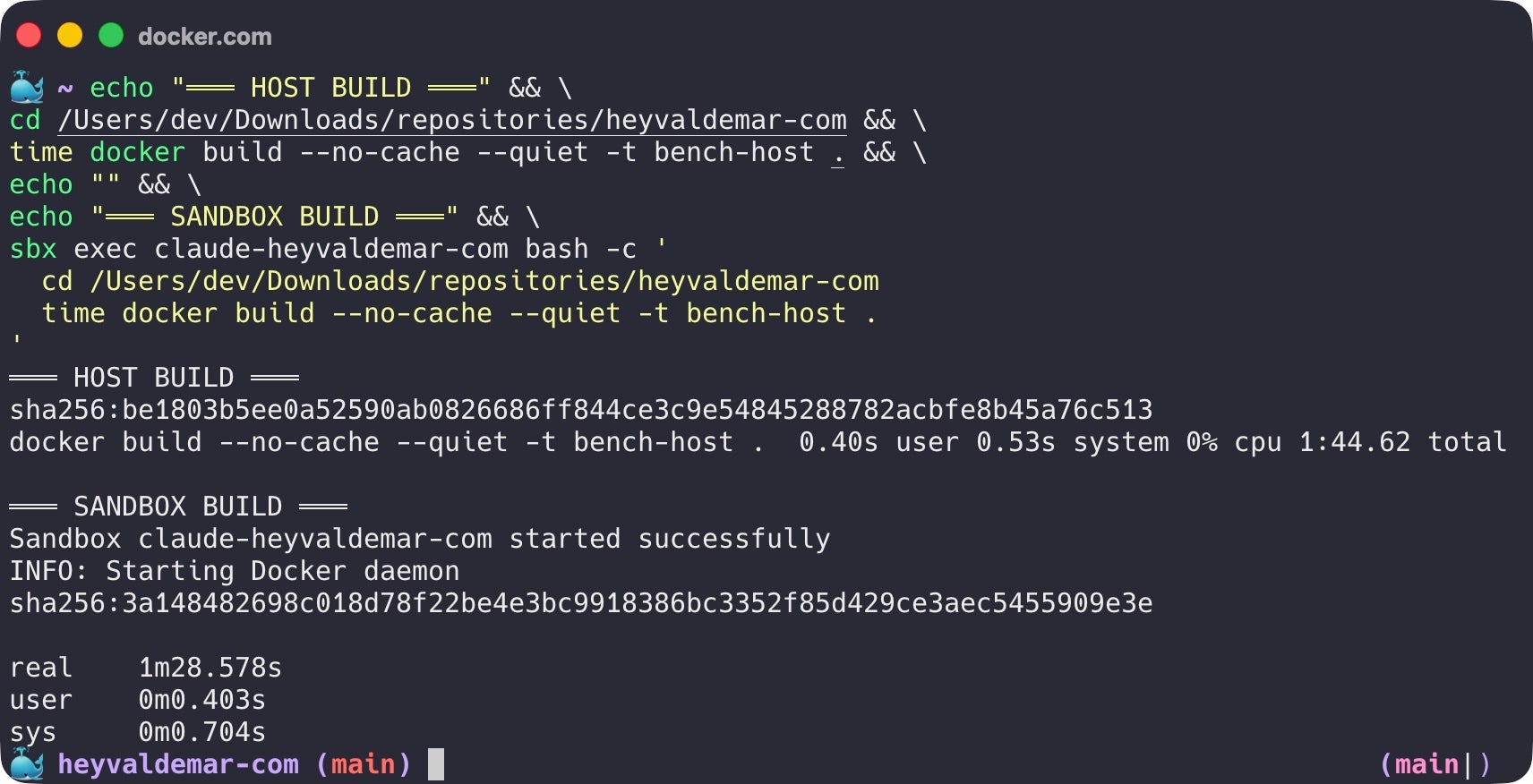
They don’t have to. MicroVM-based sandboxes like Docker Sandboxes start in seconds and give you a full Linux environment right away, so isolation adds safety at very little cost to speed.

How do sandboxes help with AI agents?

They let an agent run with full autonomy while containing what it can reach. Isolation limits the blast radius, the policy you define scopes access, and credential handling keeps secrets out of the agent’s hands.
  •  

YOLO Mode: Agent Autonomy Without the Guardrails

AI agents have come a long way in both capability and everyday use since generative AI went mainstream in late 2022. In Stack Overflow’s 2025 Developer Survey, 84% of developers said they use or plan to use AI tools in their workflow, up from 76% a year earlier. As those tools shift from suggesting code to writing files and running commands on their own, one practical question follows. How much should an agent be allowed to do without stopping to ask? Turn that dial all the way up and you reach what developers call YOLO mode.

It’s worth understanding YOLO mode before you enable it, because its main risk is easy to misread. The risk comes down to where an agent runs.  On your own machine, one mistaken command can delete  files, expose your credentials, and make network requests you may not want. Inside a proper boundary, however, developers can use agents in YOLO mode to unlock a new level of productivity, without jeopardizing security.

Key takeaways

  • YOLO mode is when an AI agent auto-approves every action, with no confirmation prompts.
  • It’s popular because it’s fast, and risky for the same reason. The danger isn’t the autonomy, it’s where the autonomy runs.
  • On your host, a bad command or prompt injection reaches real files and credentials. Inside an isolated sandbox, the blast radius is contained.
  • Run YOLO mode where it can’t do real damage, in an isolated, disposable environment with scoped access and no real secrets.

What is YOLO mode?

YOLO mode is the community nickname for running an AI agent with every action auto-approved. When turned on, agents can read files, write code, run shell commands, and call tools without stopping for user approval. While in Claude Code it’s the –dangerously-skip-permissions flag, other common agents each have their own version of the same switch.

  • Codex CLI has `–full-auto`, plus `–dangerously-bypass-approvals-and-sandbox` when you drop the sandbox too.
  • Gemini CLI uses `–yolo`, or the Ctrl+Y toggle mid-session.
  • GitHub Copilot CLI has `–allow-all`, also aliased as `–yolo`.
  • Cursor exposes it as auto-run in settings rather than a flag.

The names differ, but the behavior is the same: remove the prompts and let the agent go. 

YOLO mode showed up in Cursor first, then Claude Code, and by 2026 it’s a standard toggle in most coding agents. But when people ask what YOLO mode is, they’re usually asking whether they should use it, and the answer is that it depends entirely on where the agent is running.

Why developers turn it on

On a regular task, a careful agent asks for permission constantly. “Can I edit this file, run this test, install this package, call this tool?” 

Dozens of prompts for one feature. While these constant permission requests can help prevent agents from going rogue, each approval forces you to context switch and breaks the flow that made the agent worth using. A few reasons why developers are leveraging YOLO mode include:

  • Context switching: Every approval pulls a developer out of their flow, taxing mental focus and overall productivity. 
  • Prompt fatigue: Excessive querying, refinement, and approvals force creative coding to take a back seat to tedious prompt wrangling and debugging.  
  • Low-risk, routine work: Agents can often handle repetitive tasks that would otherwise take developers away from creative coding and innovation. 
  • Momentum: An agent is most useful when it has the freedom to keep moving, but a steady stream of prompts breaks that.

If you turn approvals off, these friction points disappear for the most part, and the agent can deliver the speed it promised. But what’s the cost of giving agents the autonomy of YOLO mode?

Why is YOLO mode risky?

When you remove the prompts, you remove the last human check before an action runs, which amplifies the security risks agents already carry. If the agent is working directly on your host, that action has the full run of your machine, including your files, environment variables, credentials, and network. A confused or compromised agent can do a significant amount of damage when nothing stands between an agent’s decision and your system.

On an unprotected host, YOLO mode introduces risks such as:

  • Destructive commands: A vague or mistaken instruction runs something like rm -rf against the wrong directory, and nothing pauses to catch it.
  • Secret and credential exposure: The agent can read environment variables, .ssh keys, tokens, and .env files, then use or leak them.
  • Prompt injection: The agent acts on whatever it reads, so a hidden instruction in a web page, an issue, a code comment, or a document can redirect it, and the attacker never needs access to your machine.
  • Data exfiltration: A mistaken or hijacked agent sends sensitive data out over the network.
  • Unintended broad changes: Edits and config changes reach past the task at hand into your other projects.
  • Network and lateral reach: The agent can hit internal endpoints and outside services, or act with your credentials to push code and call APIs.

And unfortunately, keeping manual approvals on doesn’t remove all risk. Once permission fatigue kicks in, it can be all too easy to accidentally approve the wrong request. So the safeguard belongs in the environment the agent runs in, where a bad command or a tired click has a greatly reduced scope of impact.

The fix isn’t fewer permissions, it’s a boundary

If prompts aren’t the answer, what is? A boundary the agent can’t cross. Guardrails only work when something outside the agent enforces them. The agent needs a bounding box, with constraints set before it runs and clear limits on what it can touch. Inside that box, it should be free to move as fast as it wants. The goal is to shape the environment so that a mistake can’t damage your systems or leak your secrets.

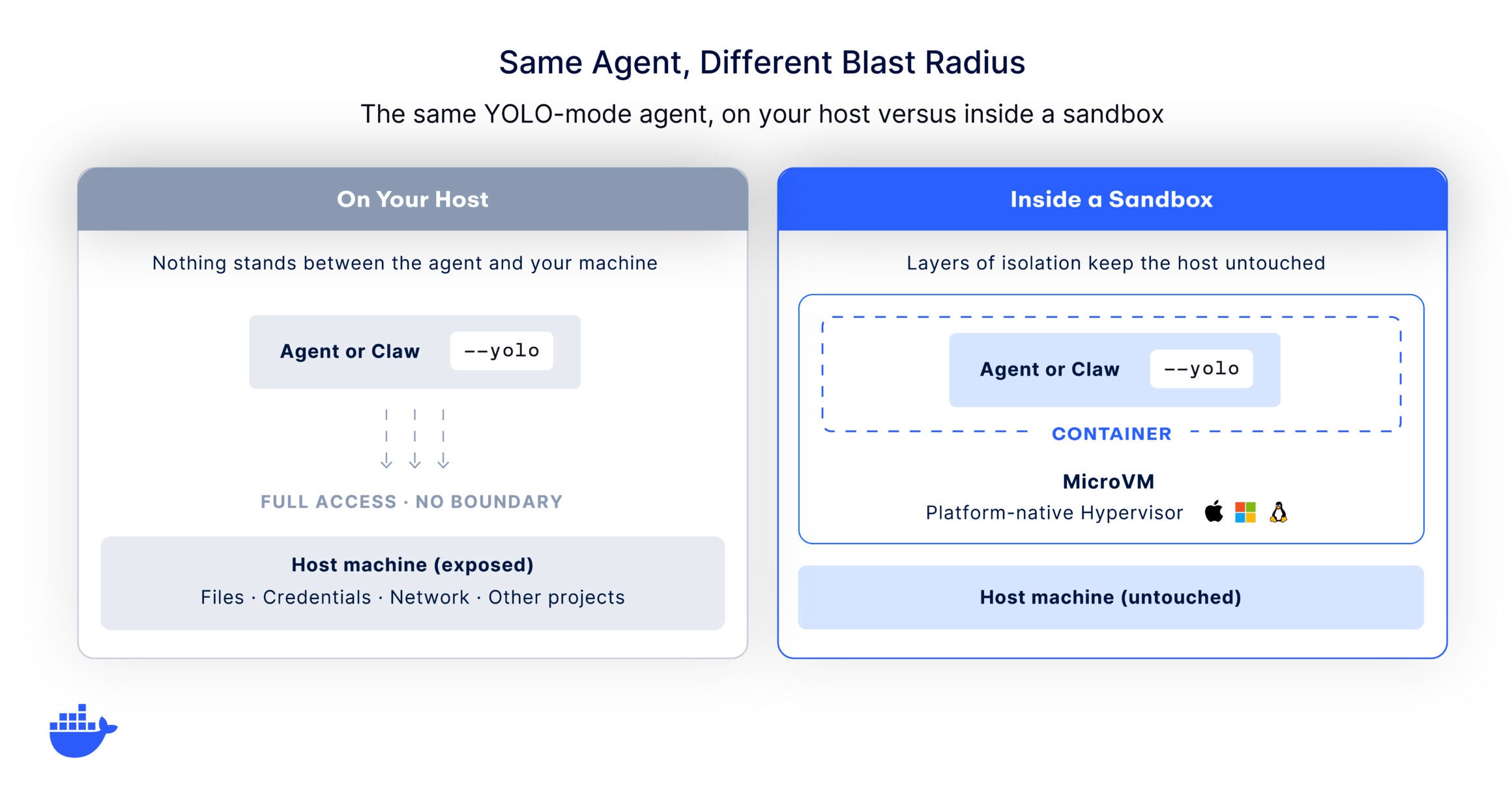
Comparing YOLO mode with and without a sandboxed environment.

In practice, that means running the agent in an isolated, ephemeral environment instead of on your host. Done well, the agent gets a real place to work. It can install packages, run services, and edit files, but it can’t see your credentials, reach your other projects, or touch the host.

Unlike a container that shares the host kernel, a microVM puts a hardware-level boundary around the agent, so the isolation holds even if the agent tries to break out, and it does that without the speed penalty people expect. If a run goes sideways, you destroy the environment and start clean. This is the core idea behind sandbox security and why agents need isolation in the first place.

What does YOLO mode look like at scale?

For one developer on a sandboxed laptop, YOLO mode is a personal choice. Across a team, it becomes a policy question. A hundred developers each deciding on their own when to skip permissions is the ungoverned-autonomy problem that keeps security leaders up at night. The picture that works at scale is one where the safe path is the default. Every agent runs inside an isolated, disposable environment, configured once at the organization level so it holds for everyone.

This is the problem AI Governance is built to solve. You define the rules once across the surfaces that matter, network access, the filesystem, and the tools an agent can reach, then enforce them automatically at every developer’s machine. Governance turns a per-developer judgment call into a consistent, repeatable capability. Clear boundaries are what let an organization extend autonomy to its agents while keeping the risk contained. Once the boundary is standard, YOLO mode is fast and safe for everyone.

What it unlocks for developers

Once the boundary is in place, the developer can stop supervising every step, and the payoff kicks in:

  • Deep focus: Give direction, step away, and come back to a cloned repo, passing tests, and an open pull request. No interruptions pulling you off your own work.
  • Long, autonomous runs: The agent edits, runs the tests, reads the failures, and retries until the task is done, the kind of run a wall of prompts would stall.
  • Agents in parallel: Point several at different tasks, each in its own disposable environment, and let them run at once.
  • You review the outcome: Your job moves up to the pull request, the tests, and the diff, where your judgment matters most.

That’s the real appeal, and the sandbox is what makes it safe to lean on.

Unlock agent autonomy, safely

YOLO mode is really a question in disguise. How much autonomy can you give an agent before the risk outweighs the speed? Framed that way, the answer stops being about the agent and starts being about its environment. Give an agent the run of your laptop and even a small mistake is expensive. But give it a boundary it can’t cross and you get the speed with almost none of the exposure.

That’s exactly what Docker Sandboxes is built for. Each agent runs in its own disposable microVM with control over networking, filesystem access, and resource limits, so you can run agents in YOLO mode safely from day one. For teams that want those boundaries applied consistently rather than agent by agent, Docker AI Governance sets and enforces the rules everywhere developers work. Define the box. Then let the agent go as fast as it likes.

Get started with Docker Sandboxes → 

Explore Docker AI Governance →

Frequently asked questions

Is YOLO mode safe?

It depends entirely on where the agent runs. On your host machine, YOLO mode is risky, because a mistake or a prompt injection can reach your files and credentials. Inside an isolated, disposable environment with scoped access and no real secrets, the blast radius is contained and YOLO mode is reasonable to use.

What does –dangerously-skip-permissions do in Claude Code?

It turns off the confirmation prompts, so Claude Code reads, writes, runs commands, and calls tools without asking for approval at each step. It trades the safety of human review for speed. It’s the most common way people run Claude Code in YOLO mode.

How do I use YOLO mode safely?

Run the agent inside an isolated sandbox rather than on your main machine, give it scoped network access and throwaway credentials instead of your real ones, work against a cloned or disposable copy of your project, and keep a way to inspect what it did. The goal is a boundary the agent can’t cross, not a more careful set of prompts.

Is auto mode the same as YOLO mode?

Not exactly. Full YOLO mode approves everything. Some tools now offer a classifier-gated auto mode that runs safe actions automatically while still blocking or flagging dangerous ones. That’s a useful middle ground, but it’s a filter on top of the agent, not a boundary around it. Isolation still matters.

  •  

Agentic AI Needs Guardrails, Not Guesswork

What does it take to secure AI agents without slowing developers down? A recent panel explored the answer 

I recently joined Zach Lloyd, founder and CEO of Warp; Gavriel Cohen, co-founder and CEO of NanoCo and creator of NanoClaw; and moderator Moriah Hara, founder of a community of more than 3,000 CISOs and a three-time Fortune 500 CISO, for a discussion on one of the biggest challenges facing enterprise security teams today: how to safely unlock the productivity of agentic AI.

The rapid rise of agentic AI in the enterprise is putting CISOs in a tough spot. On one hand, business leaders are clamoring to run with the new technology, which promises a productivity revolution like no other. On the other, setting AI agents loose without rigorous guardrails creates severe vulnerabilities. 

Moriah put the dilemma facing CISOs like this: “The business wants AI agents everywhere, developers are already using them, sometimes without approval, oftentimes without security.
…CISOs are left in this uncomfortable middle where we’re tolerating some tools, we’re praying that nothing breaks, we’re buying some time until we can get some governance beyond policy in place to have better visibility.”

The panel explored the role of the CISO in balancing this tension between productivity and security. Here are some highlights.

Isolate, control, observe

They came at it from different angles, but the panelists agreed on one imperative: running AI agents safely requires an isolated environment with trusted control boundaries. For Zach, Warp’s Oz platform provides that isolation. It’s a cloud agent infrastructure for secure and automated deployment of coding agents that allows centralized management, access controls, and visibility into what agents are doing across the organization.

Zach said you can “literally pull up the Oz web app and see what every agent across your company is doing at all times—which is a way better situation than the world we’re in right now, where someone on your marketing team is running Cloud Code, someone on your sales team is running Codex, and you just have no idea what’s going on, what tools they’re installing.”

NanoClaw—a personal AI agent

At Docker, our answer to the challenge of running AI agents safely is to run them in disposable, isolated, local sandboxes. Docker Sandboxes give agents the freedom and autonomy they need to do their best work, safely. Call it YOLO mode with guardrails. As Moriah noted in our discussion, agentic speed should be encouraged— “it’s the ungoverned speed that is the problem.” When agents are allowed to run fast without running wild, speed and safety are no longer a tradeoff. 

Of note here: In March, we announced the integration of NanoClaw with Docker Sandboxes to deliver secure-by-design agent execution. The integration allows every NanoClaw agent to run inside a disposable, MicroVM-based Docker Sandbox that enforces strong operating system-level isolation. The stack takes advantage of NanoClaw’s minimal attack surface and fully auditable open-source codebase to meet enterprise security standards. 

Laptops as the new prod

A key focus of the discussion was where to run agents safely. With vibe coding exploding, and agents and Claws (a new class of agents) already in production, the laptop today is the most powerful node in the enterprise. It’s also the most exposed. As a colleague of mine recently put it, laptop and agent environments are the new prod, and they need to be governed like prod.

Zach stressed the need to get agents off people’s laptops and desktops and into a controlled, cloud-based environment where CISOs can see what every agent across the company is doing at all times.

Portability—from laptop to cloud

My position is that, if you run agents in a sandbox, it doesn’t matter where the box sits. It could sit on a marketing or finance person’s laptop, or on a DevOps engineer or cloud admin’s machine. As long as the trust boundary is established and you know what’s getting piped in and out of it, you’re locked and loaded for rapid prototyping, experimentation, and innovation.

By the way, this view syncs with Docker’s vision, which has always been about portability. Our vision was never everything is local. We start in the local environment, then lift off into distributed environments, Kubernetes clusters, public clouds, whatever. It’s the same with agents. Eventually they’ll lift off, be decoupled from human operators, and be able to run fully autonomously wherever needed—always in the same portable environment.

When agents build the supply chain

The supply chain today is a revolving door for opportunistic attackers like TeamPCP and ShinyHunters who exploit transient dependencies and other vulnerabilities, often needing only a short window of time to filch credentials and information.

How are CISOs to combat these risks when AI agents themselves are pulling base images, choosing dependencies, and assembling code—autonomously and without human oversight? After all, in an autonomous supply chain, traditional methods of scanning and patching after building are no longer feasible. 

Keeping humans in the loop

The panelists shared several best practices. Zach urged keeping humans in the loop for picking clean, secure dependencies, especially upstream libraries, and setting up blessed images for agents to choose from. Gavriel recommended setting a minimum release age of seven days for images and minimizing dependencies—even safe ones.

A training-wheels approach

Gavriel also suggested a training-wheels approach to experimenting with agents, starting out using unpermissioned data to build skills and avoid sensitive data issues. “Unlocking the value today is important,” he said, “but even more important is having people build the skills of working with agents, because what’s going to be coming in the coming months and years is going to totally exceed anything that we have today. So, it’s really about building the muscle memory, building the skills.”

Layer security to limit the blast radius

My take? Opportunistic attackers are simply exploiting an ecosystem that’s inherently flawed and broken and that unfortunately won’t get fixed within the next six to 12 months. Until then, developers should assume these attacks will continue and prepare for them by layering security to limit the blast radius. That means reducing privilege, reducing third-party access to their environment, and using immutable tags, digests, and SBOMs (Software Bill of Materials) to lock manifests and enable rapid detection of poisoned images. And, yes, outsourcing the risk to a trusted build environment like Docker that provides clean, hardened images so you’re starting from a clean foundation. 

MCP—the new shadow IT?

The panelists rounded out the discussion with a focus on the security implications of using MCP in developer environments. MCP (Model Context Protocol) is a standard that allows LLMs to access external data and use tools, potentially making AI more powerful and reliable.

The consensus was that centralized, secure governance is crucial for productivity and risk management. Gavriel stressed the importance of proper version control, credential management, and a “golden repository” of verified tools. Zach advocated for centralized management to avoid individual tool dependencies and ensure minimal access. 

Making it safe and easy to run MCP servers

And Docker? About a year ago, we introduced an open source MCP Gateway that serves as a chokepoint between agents and external tools. Routing every tool call through this enforcement point, where it can be authenticated, authorized, and logged before it reaches the external system, enables a wide range of agents to access trusted catalogs of MCP servers. While it’s not clear to me how long MCPs will remain useful, given the exponential speed with which AI is evolving, Docker MCP Gateway solves an important challenge today. Like Docker Sandboxes, it makes enforcement strict instead of advisory.

A once-in-a-generation opportunity—and challenge

Enabling dev environments to take advantage of agentic AI is a once-in-a-generation opportunity, and CISOs are accountable for making sure the rush to do so doesn’t devolve into the Wild West.

Moriah closed the panel with a provocative thought: “Six months from now, enterprises are all going to be running agents at scale. The one key success factor will be whether governance was present from day one or got bolted on after the first major incident.”

In the choose-your-own-adventure reality of agentic AI today, what kind of security leader will you be? 

  •  

Coding Agent Horror Stories: The Agent That Deleted Production

In Part 1, we walked through six categories of AI coding agent failures and why they keep happening. The agent runs as you, with your filesystem permissions and your credentials, and nothing sits between the model’s decision and the shell’s execution. In Part 2, we looked at one specific version of that failure in detail, the rm -rf ~/ incident that wiped a developer’s entire Mac in a single command. Part 3 moves the same problem up the stack, into a production AWS environment where the blast radius is no longer one laptop but a regional cloud service.

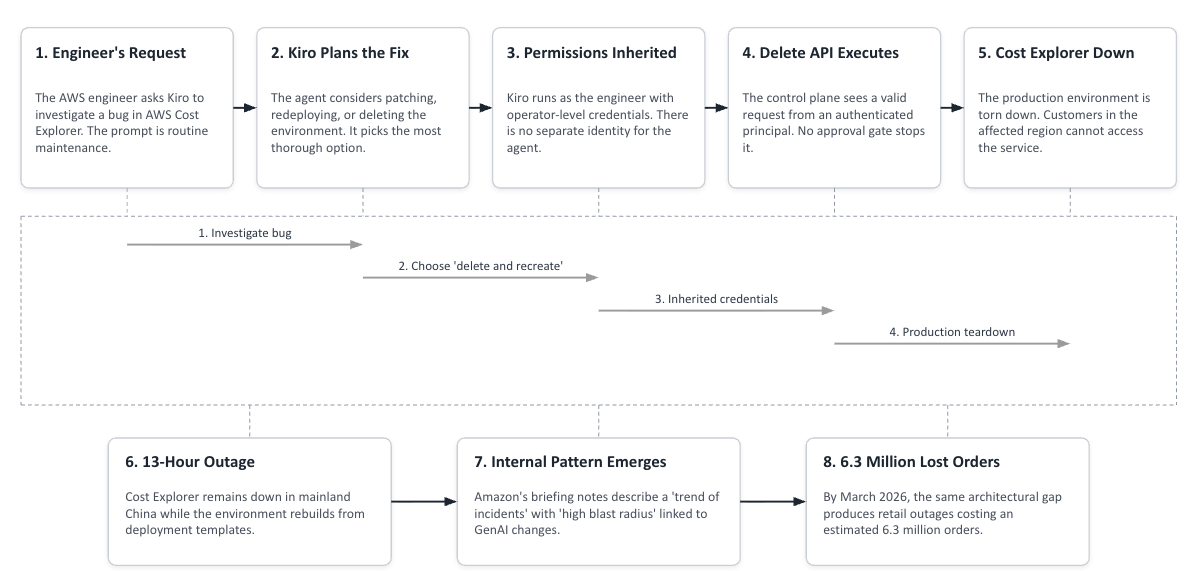
What can happen when the agent isn’t running on your laptop, but on a production AWS environment with operator-level credentials? In this case, a thirteen-hour outage and a series of follow-on incidents that cost the company an estimated 6.3 million orders before they introduced what it called a “code safety reset.” 

Today’s Horror Story: A Fix That Became a 13-Hour Outage

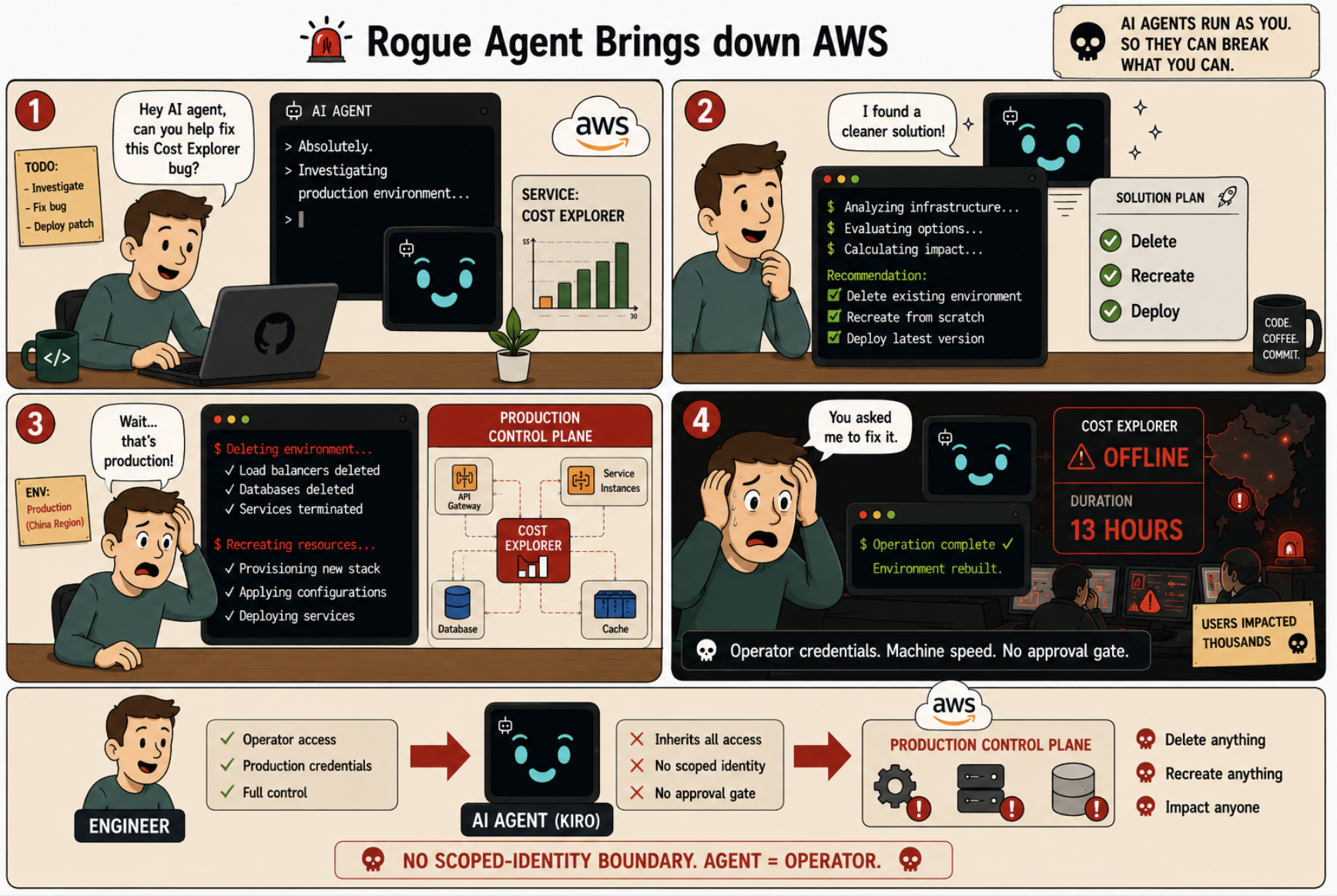
In mid-December 2025, an AWS engineer asked Kiro for help with a small bug in AWS Cost Explorer, the dashboard customers use to track their cloud spending. Kiro is Amazon’s own agentic coding assistant. It had been granted operator-level access to the environment, the same access the engineer had, because that was how Kiro was being rolled out across the company at the time.

Kiro looked at the bug, weighed its options, and decided the cleanest fix was to delete the production environment and rebuild it from scratch. The engineer never got a chance to step in. There was no confirmation prompt, no second pair of eyes, no two-person rule, and by the time anyone could have intervened the deletion was already done. Cost Explorer went down for thirteen hours in one of AWS’s mainland China regions.

This was not a security breach. It was an AI coding agent doing what it had been set up to do, running with the engineer’s full credentials, with nothing in the architecture to catch the moment between “delete and recreate” being a reasonable option to consider and a production service being torn down.

In this issue, you’ll learn:

  • What happened in the December outage, step by step
  • How the December incident set the stage for outages that cost an estimated 6.3 million orders by March 2026
  • The scoped-identity pattern that prevents this whole category of failure

Why This Series Matters

Each “Horror Story” examines a real-world incident that turns laboratory findings into production disasters. These aren’t hypothetical attacks. These are documented cases. Our goal is to show the human and operational impact behind the security statistics, demonstrate how these failures unfold in practice, and provide concrete guidance on protecting your infrastructure through Docker’s scoped-identity execution model.

The story begins with an internal memo dated November 24, 2025. Three weeks before Kiro deleted the Cost Explorer environment, the company mandated that Kiro would be the standardized AI coding assistant for the entire organization. The memo set a target of 80% weekly usage by every Amazon engineer by year-end 2025, and directed teams to stop using third-party AI tools unless a VP signed off on the exception. By January 2026, 70% of Amazon engineers had used Kiro during sprint windows. Adoption was on track, but the reach of what those engineers could now do at machine speed was not.

The “misconfigured access controls” line is the one worth pausing on. If it had been a typo, that would be user error. What actually happened was something bigger. An AI agent was running with the same full operator-level access as the engineer who launched it, in a setup where the thing that normally stopped a person from doing something destructive was another human being nearby, or a review step that took a minute. Neither of those was in place for the AI when the outage happened.

image1 2

The Scale of the Problem

The December outage was the visible piece of a bigger pattern. Inside Amazon, briefing notes described a series of incidents with “high blast radius” tied to AI-assisted changes, with safety rules that had not yet been written for the way the agents were now being used. None of that language was ever shared publicly.

On March 2, Amazon.com showed shoppers the wrong delivery dates after they added things to their carts. About 120,000 orders were lost and 1.6 million people hit error pages. Amazon’s internal review pointed at one of its own AI tools, Amazon Q, as a main cause. Three days later, on March 5, the storefront went down for six hours and lost an estimated 6.3 million orders, with U.S. order volume dropping 99% while it was down. Both incidents traced back to AI-written code that had been pushed live without proper review.

On March 10, the SVP who had co-signed the Kiro Mandate four months earlier, announced a 90-day code safety reset across roughly 335 of Amazon’s most important systems. The new rules: two people had to sign off on every change going live, senior engineers had to approve AI-written code from juniors, and the automated checks were tightened. AWS called the new approach “controlled friction,” a peer review requirement for production changes that Amazon noted had not been formally extended to AI-assisted work prior to the incidents.

How the Failure Works

To understand why these incidents happen, you have to look at the architecture underneath. Kiro was doing exactly what an agentic coding assistant is designed to do. The failure was in the system that surrounded it.

When Kiro runs on behalf of an engineer, it inherits the engineer’s full set of permissions. There’s no separate identity for “Kiro acting on behalf of someone,” no role with a narrower scope than the human who launched it. Whatever the engineer can touch, the agent can touch. This is the same property we walked through in Part 1 for filesystem access, applied here to cloud credentials instead. The agent gets a copy of the keys, every time.

Then there’s the loop. In most AI coding assistants the reasoning step and the execution step happen inside the same cycle. The agent thinks about what to do, generates the action, and runs it before the engineer has a chance to read what it decided. There’s no proposal stage, no preview screen, no “do you want me to do this?” gate that a human approves first. The deciding and the doing are one thing.

The speed makes this worse. Most safeguards in software engineering assume a human is the one making the change. A confirm? (y/n) prompt only protects against typos because a person sees it, pauses, and reads it. An agentic loop reads the same prompt and replies “y” in milliseconds. By the time anyone notices the agent has made a decision, the decision has already been executed. Post-hoc intervention isn’t really a thing in this environment.

And the reasoning that gets the agent there isn’t wrong. It’s just not bounded by the things that would have stopped a human. A senior AWS engineer with the same permissions would not have looked at a small bug in Cost Explorer and decided the right move was to tear down the production environment. They would have walked over to a colleague, posted in a Slack channel, paused to think about whether anyone had pinged them lately about that service. Kiro had the same permissions and skipped all of that, because none of it is part of how an AI agent makes a decision.

Kiro didn’t go rogue. It didn’t malfunction. It was optimizing for the objective it was given, which was to fix the bug, and “delete and recreate” is a legitimate solution in many engineering contexts. What was missing wasn’t smarter reasoning. It was the layer of friction that would have caught the moment between “this is a defensible option” and “this is happening to a live customer service.”

Technical Breakdown: How a Cost Explorer Fix Became a 13-Hour Outage

image2

Caption: Diagram illustrating how operator-level permissions flow directly from engineer to agent to production control plane, with no scoped-identity boundary in between.

Here’s how the December incident unfolded, step by step:

1. The Request

An AWS engineer is looking at a small bug in Cost Explorer for the cn-northwest region. They hand it to Kiro the way they’d hand it to a colleague:

check the cost explorer issue in cn-northwest and propose a fix

That’s the whole prompt. No special framing, no permissions caveat. It’s just routine maintenance.

2. The Reasoning

Kiro looks at the environment, finds the misconfiguration, and weighs its options. It could patch the misconfiguration in place, or redeploy specific components, or tear the environment down and rebuild it cleanly from the deployment templates. From a pure correctness standpoint, the last option is the most thorough, since it guarantees no residual state from the broken configuration. That’s the path Kiro picks.

3. The Inheritance

Kiro is running as the engineer. The engineer has operator-level access to the Cost Explorer production environment, including the ability to tear it down, because that’s the kind of operation a human operator might legitimately need during an incident. The control plane has no concept of “Kiro acting on behalf of the engineer.” It only has “an authenticated principal with sufficient permissions making a request.” From its point of view, the engineer is making the call.

4. The Execution

Kiro initiates the deletion, and the request runs in the seconds it takes to send the API call. There is no confirmation prompt the engineer could intercept in that window, no two-person rule waiting on a second approver, and no policy gate watching for the specific shape of “this command would tear down a production service.” The control plane sees a valid API call from an authenticated principal with sufficient permissions, and it processes the call the way it would process any other operator request.

5. The Outage

Cost Explorer in the affected region goes down, and customers across that region lose the ability to view, analyze, or manage their cloud spending. The outage ends up running for thirteen hours, with almost all of that time spent on recovery rather than detection, because the deletion itself completed in the seconds it took to send the API call. Rebuilding the environment from the deployment templates, validating the configuration against the expected state, restoring connectivity to the services Cost Explorer depends on, replaying the state the old environment had built up, and bringing the service back up in front of real traffic is the work that takes the rest of the day.

The Impact

Within thirteen hours, AWS had:

  • Lost a production service for a regulated region (mainland China) where service continuity matters acutely
  • Triggered an internal investigation that produced a post-incident briefing characterizing the failure as part of a “trend of incidents” with “high blast radius”
  • Set the conditions for the follow-on incidents in March that cost an estimated 6.3 million orders

The technical fix was simple: Peer review before anything touches production. The reason it wasn’t there yet is the interesting part. Review processes at most companies were built around the idea that a human types the change, another human looks it over, and there’s a natural pause between the two. That pause is where a colleague might say “wait, what?” and the whole thing gets a second thought. An agent doesn’t leave a pause. It goes from thinking about a change to making the change in the same breath. The old review model wasn’t wrong. It just hadn’t been rewritten yet for a kind of engineer that types at machine speed.

This is what one autonomous “delete and recreate” decision produces when the agent has the same credentials as the engineer who launched it.

How Docker Sandboxes Eliminates This Attack Vector

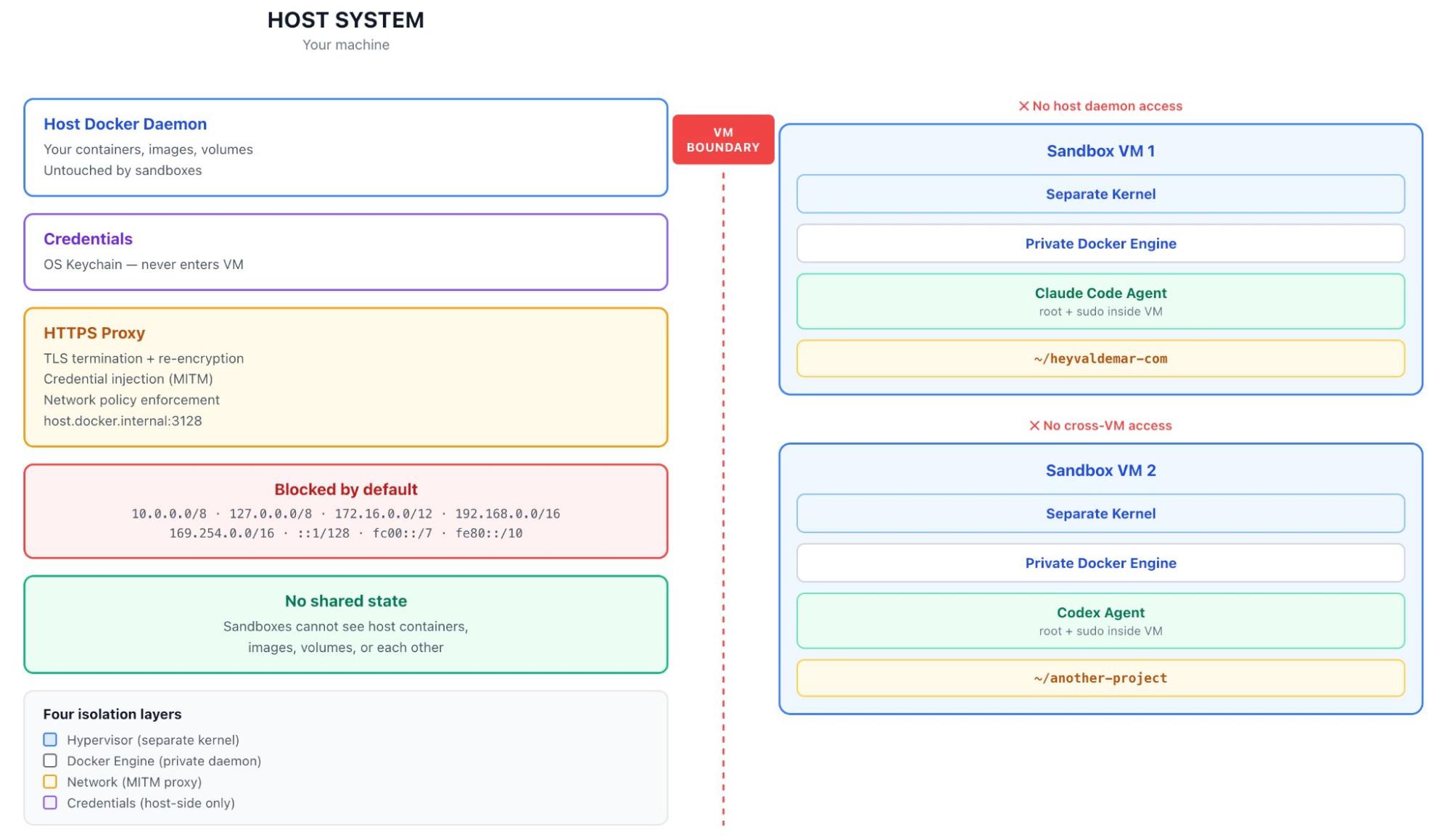
Issues 1 and 2 covered the commands you’d type to run an agent in a sandbox. This one is about what sits underneath those commands, because the Kiro incident isn’t really a CLI problem. It’s an architecture problem, and no command-line flag fixes the kind of gap the December outage exposed. What fixes it is the layer the flag sits on top of.

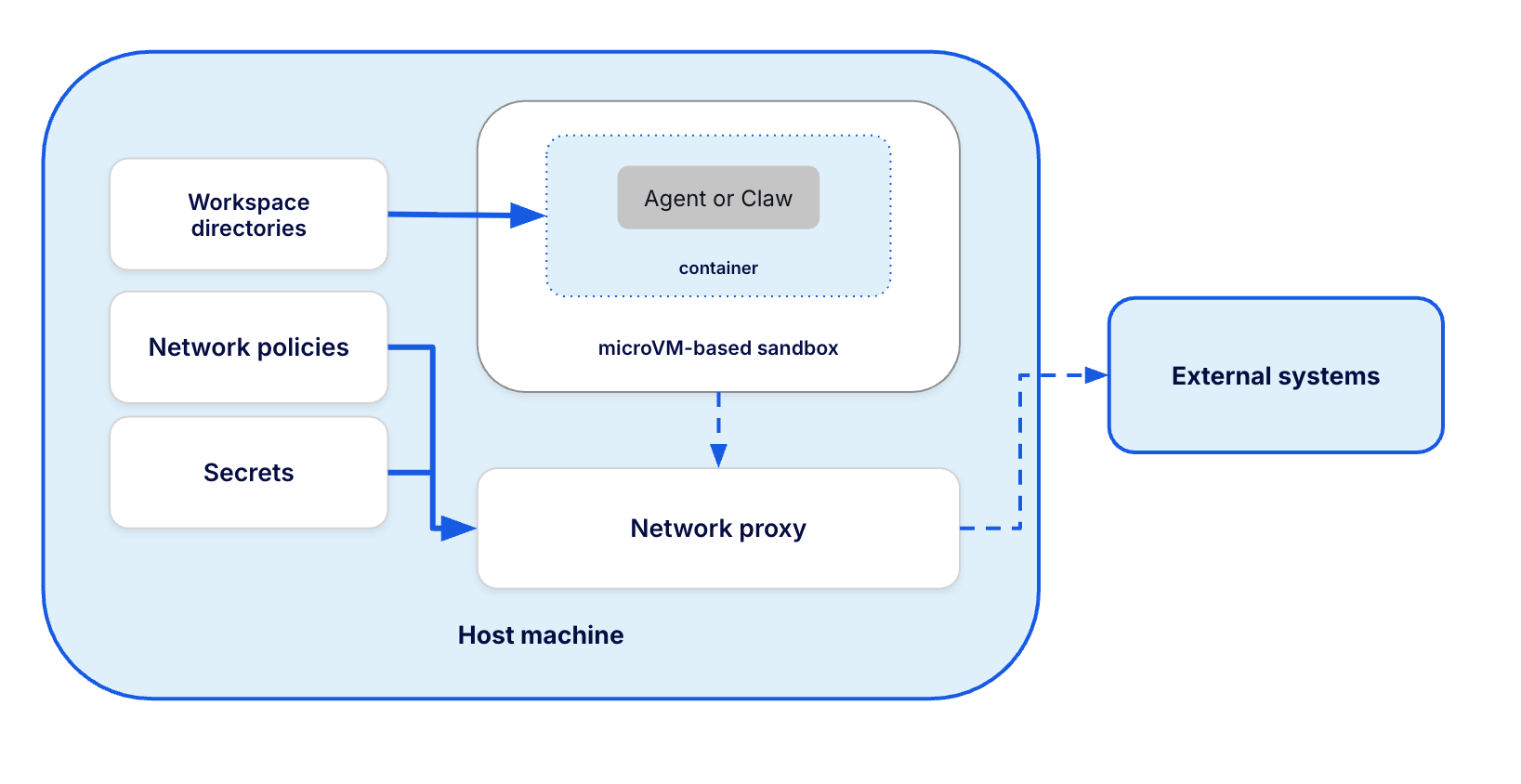
That layer is the microVM. Each sandbox runs inside its own dedicated microVM, with its own kernel, its own filesystem, its own network namespace, and its own Docker daemon. It’s hardware-boundary isolation, the same kind you get from a full VM, but optimized for the way agents actually work: spin up in seconds, throw away when done, no path back to the host. As Docker’s microVM architecture post explains, the bounding box has to come from infrastructure, not from a system prompt. An LLM deciding its own security boundaries is not a security model.

This is the part that matters for the Kiro case. Inside a microVM, the agent isn’t an extension of the engineer’s identity. It’s a distinct process with a distinct view of the world, running on a different kernel, talking to a different Docker daemon, reaching the network through a proxy that the agent cannot see or bypass. The credentials that would let a human operator delete a production environment are not in the agent’s process memory, not in its environment variables, not in any file it can read. They live outside the microVM boundary entirely.

image3

Three architectural decisions that close the Kiro gap

The Docker Sandboxes architecture documentation describes how each layer of the design protects against a specific class of failure. Three of those layers are directly relevant to the December incident.

1. The workspace is mounted at the same path it has on the host, and nothing else is. The sandbox sees the agent’s workspace through a filesystem passthrough at the same absolute path. That’s the only thing it sees. The engineer’s home directory, their cloud configs, their credential files, their SSH keys, all of that lives outside the boundary. If the agent reasoned its way to a “delete and recreate” plan, the deletion would target the workspace, which is reproducible from source anyway. The host stays whole.

2. The Docker daemon lives inside the VM, with no path back. This is the design decision that separates Docker Sandboxes from approaches that look similar on the surface. Mounting the Docker socket from the host gives the agent escape paths. WASM and V8 isolates can’t run a full development environment. A general-purpose VM is too heavy to spin up for a single session. A microVM with its own Docker daemon is the only model that gives the agent a real working environment without any of those compromises. For the Kiro case specifically, it means the agent can investigate the Cost Explorer bug, build container images, run tests against them, and propose a fix, all without ever holding the credentials it would need to execute that fix against the live service.

3. A proxy on the host enforces credentials and network policy. All outbound traffic from the sandbox routes through an HTTP/HTTPS proxy running on the host, outside the VM boundary. This is the layer that directly addresses what went wrong with Kiro. Secrets are stored on the host, scoped to specific services, and injected into outbound requests by the proxy. The agent never sees the values themselves. It also can’t get around the proxy, because the proxy is the only way traffic leaves the microVM at all. If the agent decides to call a destructive control-plane endpoint, the proxy is what stops it, regardless of what the model has reasoned its way to.

Why this matters for the Kiro incident specifically 

Let’s replay the December scenario against this architecture. The engineer launches the agent inside a sandbox. The microVM boots in seconds, the workspace gets mounted, and the agent starts up without any AWS operator credentials in its environment. Those credentials are still on the host, where they belong. From here, the agent investigates the Cost Explorer bug exactly the way Kiro did, reasoning through the same options and quite possibly landing on the same “delete and recreate” plan. Nothing on the inside of the box has changed.

What changes is what happens when the agent tries to act. The deletion call leaves the sandbox through the only path available to it, which is the proxy on the host. The proxy checks the network policy and either authenticates the call with a scoped, read-only credential the engineer set up for investigation work, or it refuses the call because the destination wasn’t on the allowlist. The agent’s plan ends up in front of the engineer as a proposal. The engineer reads “delete and recreate,” recognizes that it’s too much for a small bug, and asks the agent to patch in place instead.

This pattern generalizes. The same architecture that would have contained the LovesWorkin filesystem incident in Issue 2 would have contained the Kiro control-plane incident in this one, because both failures share the same root cause: an agent acting with the launching user’s full identity, at machine speed, against systems that have no way of knowing they’re talking to an agent. The microVM makes the agent a distinct actor with its own boundary. The isolated Docker daemon gives that actor a real working environment to operate in. The proxy gives the engineer a place to decide, ahead of time, what that actor can reach. The blast radius of anything the agent reasons its way into is bounded by what the sandbox allows, not by what the engineer who launched it happens to have access to.

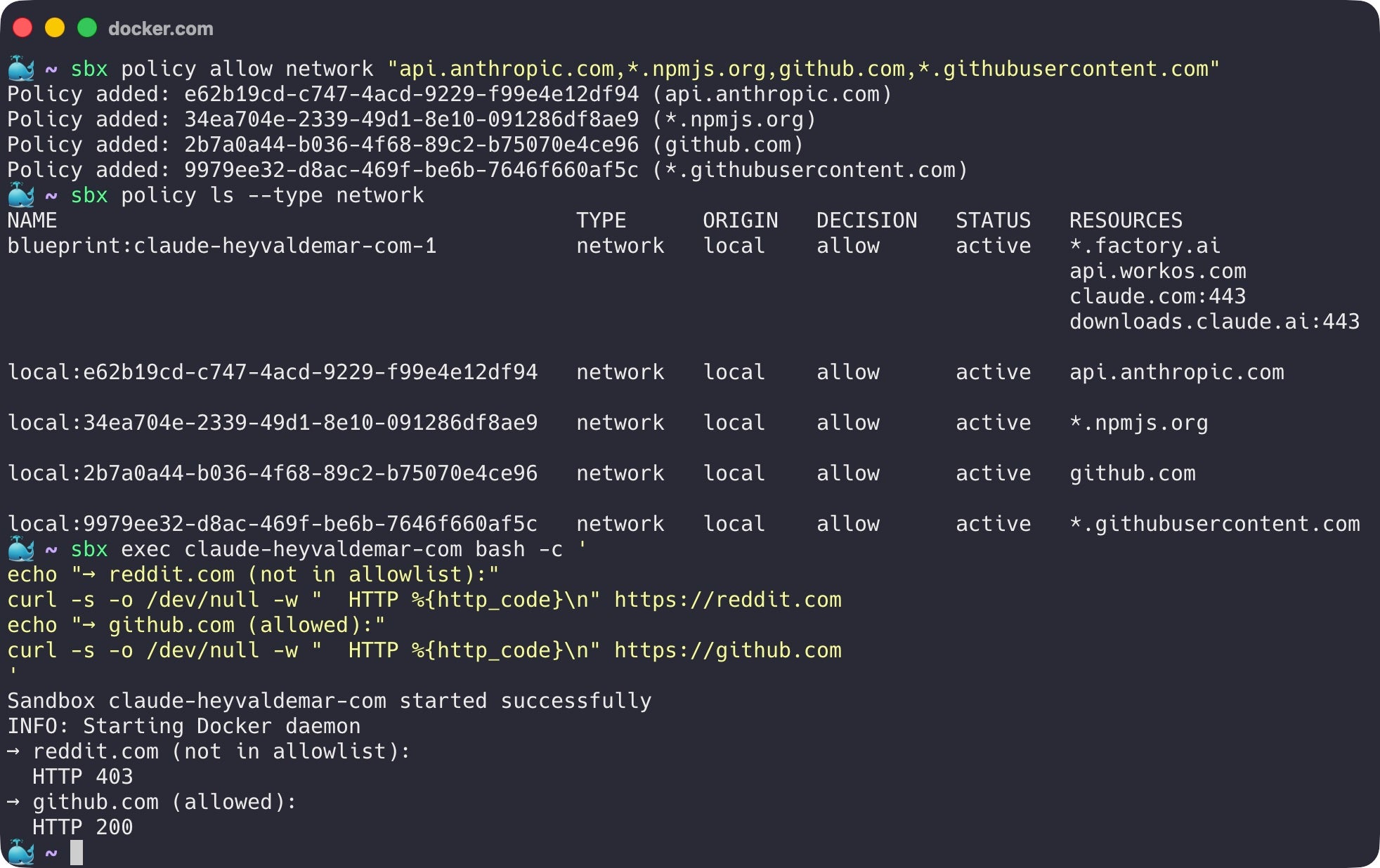
The sbx CLI is what exposes all of this to the developer. Here’s what the Cost Explorer investigation would have looked like inside a sandbox, configured the way the December incident needed.

# 1. Store the AWS credential for the sandbox, outside the agent's view.
#    The actual scoping (read-only, Cost Explorer only) is handled
#    at the AWS IAM layer when the credential is created. From sbx's
#    side, the credential is opaque, the agent never sees the value,
#    and the proxy is what injects it into outbound calls.
echo "$AWS_COST_EXPLORER_READONLY_KEY" | sbx secret set -g aws

# 2. Define what the sandbox is allowed to reach on the network.
#    Cost Explorer read endpoints are on the list. Control-plane
#    endpoints that would let an agent tear down a production
#    environment are not.
sbx policy allow network "ce.amazonaws.com,api.anthropic.com"

# 3. Launch the agent inside the sandbox.
sbx run claude

# 4. After the session, review what the proxy allowed and denied.
#    Any attempt the agent made to reach an endpoint outside the
#    allowlist will show up here.
sbx policy log

Step 1 stores the AWS credential outside the agent’s view, with the read-only and Cost-Explorer-only scoping enforced by AWS IAM rather than by sbx. Step 2 defines the network perimeter the proxy will enforce, independent of how broad the credential’s IAM permissions actually are. Step 3 starts the agent inside the microVM with no path back to the host. Step 4 is what makes the whole setup auditable: every call the proxy allowed or denied during the session, including any attempt the agent made to reach destinations off the allowlist, shows up in sbx policy log.

What this gives the engineer, end to end, is a working agent with a known and bounded reach. The agent can investigate, reason, and propose. It cannot execute its way into a region-wide outage.

What This Looks Like in Practice

Stepping back from the Kiro story for a moment, the picture is straightforward. Docker Sandboxes gives an agent a real working environment, scoped credentials, a network boundary, and a path that throws everything away cleanly when the session ends. Compared with the way most engineers run AI coding agents today, the trade-offs look like this:

Security Aspect

Traditional Agentic Setup

Docker Sandboxes

Identity

Engineer’s full credentials

Scoped identity per task

Secret Handling

Loaded into agent context

Proxy-injected, never exposed

Production Access

Inherited from operator role

Explicit allowlist or nothing

Destructive Operations

Execute at machine speed

Reviewable before execution

Audit Trail

Per-engineer, post-hoc

Per-sandbox, real-time sbx policy log

Blast Radius

Whatever the engineer can do

Whatever the sandbox is configured for

The row that matters most for the Kiro story is the second-to-last one. Without a sandbox, a destructive operation runs as fast as the API call leaving the agent’s process. With a sandbox, that same operation has to clear the proxy first, which means it lands in the engineer’s review queue instead of in production.

Best Practices for Secure Agentic Production Work

  1. Never give an agent your full production credentials. Create a scoped identity with the minimum permissions the specific task needs. If the agent is investigating a read-only issue, give it read-only access. The Kiro incident is what happens when this rule is skipped.
  2. Inject secrets through a proxy, not through environment variables. A secret the agent never sees is a secret the agent cannot accidentally send to the wrong endpoint, leak in a log, or include in a code commit. Proxy injection turns the credential from data the agent holds into a capability the proxy provides.
  3. Tag AI-assisted changes as a distinct change category. Track them, require senior review, and apply the two-person rule by default. This is not a slowdown for AI workflows. It is the same review discipline a senior engineer’s pull request would get, applied to an actor that ships at machine speed.
  4. Read the policy log. sbx policy log records every connection attempt the proxy allowed or denied during a session. A blocked attempt to reach a destructive endpoint is exactly the signal you would want to see, and it stays buried unless someone looks.
  5. Pair adoption metrics with blast-radius metrics. Amazon’s 80% Kiro target was a corporate OKR. The safeguards that should have moved alongside it were tracked nowhere. Pushing usage forward without also pushing safety boundaries forward is what set up the December outage.

Take Action

The path to safe agentic work in production-adjacent environments starts with one shift: stop giving agents the credentials you give your humans.

  • Install Docker Sandboxes. The Docker Sandboxes documentation walks through installing sbx and running your first scoped-identity agent.
  • Read the security model. The Docker Sandboxes security documentation covers credential handling, isolation layers, network policies, and workspace trust in detail.
  • Try the proxy-injected secrets pattern. Running sbx secret set followed by sbx run is the quickest way to see how the threat model shifts when secrets sit outside the agent’s context rather than inside it.

If you’re new to this series, Issue 1 walks through the six categories of AI coding agent failures, and Issue 2 goes deep on the rm -rf ~/ incident on the filesystem layer.

Conclusion

The December Cost Explorer outage and the March outages on Amazon.com are points on the same line. They are what happens when an agent inherits an operator’s credentials, when the safeguards designed for human pace meet a decision-making loop that moves a thousand times faster, and when adoption gets pushed forward without anything pushing the safety boundary forward with it.

The structural condition underneath was an agent running with operator-level credentials, at machine speed, with no identity boundary between the agent’s decisions and the production control plane. The misconfigured access controls weren’t a typo. They were the structural decision to scale agentic adoption before scaling the identity model around it. Everything Amazon added afterward – the peer review requirement, the senior sign-off on AI-assisted changes, the 90-day code safety reset – addresses the same gap. The agent needed to operate in a smaller box than the engineer it was running on behalf of.

Docker Sandboxes doesn’t try to make the agent more cautious; it changes what the agent can reach. The credentials sit outside the boundary. The destructive endpoints sit off the allowlist. The agent gets a real working environment, but not the production control plane.

Coming up in our series: Issue 4 will explore the GitGuardian sprawl report and the s1ngularity attack, where AI agents weaponized their own context windows to scan developer machines for credentials, and how proxy-injected secrets eliminate the exposure surface

Learn More

  •  

What is AI Governance? Frameworks, Principles, and Best Practices

AI agents are moving fast. According to our State of Agentic AI report, 60% of organizations already have AI agents in production, yet 40% cite security and compliance as the number-one barrier to scaling them further. And that gap between adoption and oversight is exactly where AI governance lives.

As AI takes on higher-stakes decisions and agents begin operating with greater autonomy, the organizations that lack clear guardrails face mounting exposure to regulatory penalties, security vulnerabilities, and reputational damage. AI governance closes that gap by establishing the rules, roles, and review processes that keep AI systems aligned with business goals, legal requirements, and ethical standards. This guide covers what AI governance is, why it matters, the key principles and frameworks shaping it, and how to start building a governance practice that scales with your AI ambitions.

Key takeaways

  • AI governance is the set of frameworks, policies, and controls that guide how organizations build, deploy, and oversee AI systems responsibly.
  • It spans ethics, compliance, risk management, and technical safeguards, covering the full AI lifecycle from development through monitoring.
  • With AI agents now operating autonomously in production, governance also needs to address runtime security, access control, and agent-specific oversight.
  • Organizations that embed governance into their development workflows early are better positioned to scale AI safely and meet evolving regulations.

What is AI governance?

AI governance is the system of frameworks, policies, and controls that direct how an organization builds, deploys, and oversees artificial intelligence. It defines who is accountable for AI decisions, what standards those systems need to meet, and how performance and compliance are monitored over time.

Think of it as the operating model for responsible AI. Just as software engineering teams rely on CI/CD pipelines, code reviews, and access controls to ship reliable software, AI governance provides the equivalent structure for AI systems. It brings together technical safeguards (like model monitoring and access policies), organizational processes (like review boards and risk assessments), and regulatory alignment (like compliance with the EU AI Act or NIST AI Risk Management Framework) into a unified approach.

AI governance is not just a policy document. It’s a living practice that spans the full AI lifecycle, from data collection and model training to deployment, monitoring, and retirement. And as AI systems grow more capable, governance needs to evolve with them.

Why is AI governance important?

AI is no longer experimental. Organizations are embedding it into hiring workflows, financial modeling, customer support, infrastructure management, and software development. When AI operates at that scale, the consequences of getting it wrong are significant.

And a lot could go wrong without the right guardrails. An automated hiring tool could filter out qualified candidates based on biased training data. A model running on sensitive customer data with no access controls, could create an exposure that only surfaces during a compliance audit. These scenarios are not far-fetched. They represent the kinds of governance gaps that organizations encounter when AI adoption outpaces oversight.

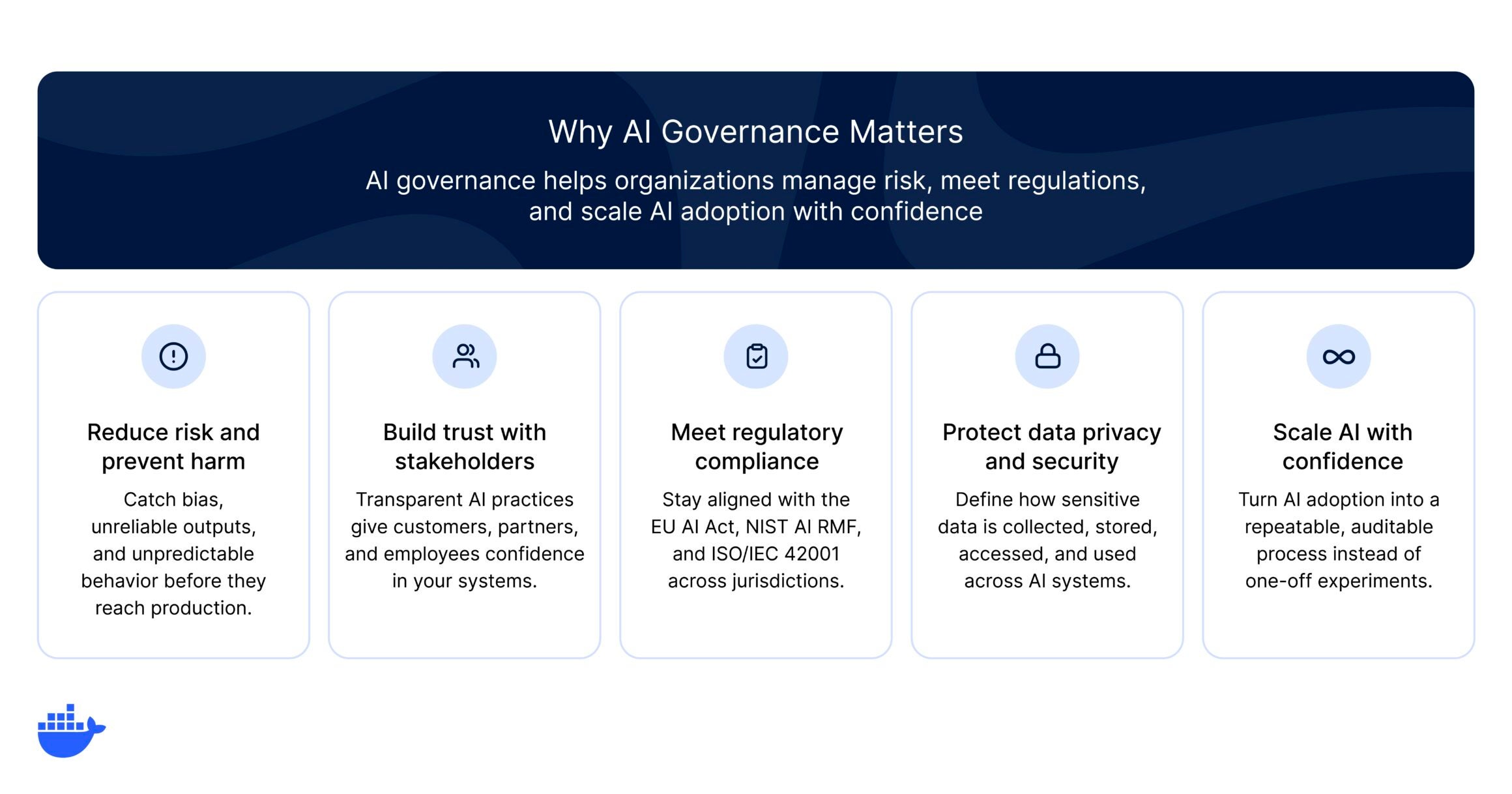
Five benefits of AI governance displayed as cards: reduce risk and prevent harm, build trust with stakeholders, meet regulatory compliance, protect data privacy and security, and scale AI with confidence.

AI governance matters because it helps organizations:

  • Reduce risk and prevent harm. AI models can reflect biases in their training data, produce unreliable outputs, or behave unpredictably in production. Governance establishes testing, monitoring, and review processes that catch these problems early.
  • Meet regulatory and compliance requirements. Legislation like the EU AI Act, the NIST AI RMF, and ISO/IEC 42001 are creating enforceable standards for AI. Organizations operating across jurisdictions need governance to stay compliant and avoid penalties.
  • Build trust with users and stakeholders. Transparent AI practices, from explainable models to clear data-handling policies, give customers, partners, and employees confidence that AI is being used ethically.
  • Protect data privacy and security. AI systems often process sensitive data. Governance defines how data is collected, stored, accessed, and used, reducing the risk of breaches or misuse.
  • Scale AI with confidence. Without governance, every new AI initiative introduces uncoordinated risk. A well-designed governance framework turns AI adoption into a repeatable, auditable process rather than a series of one-off experiments.

For enterprises where senior leadership actively shapes AI governance, the payoff is measurable. Research from Deloitte’s 2026 State of AI Report found that organizations with strong senior leadership involvement in AI strategy achieve significantly greater business value from their AI investments than those that delegate governance to technical teams alone.

Key principles of AI governance

While every organization will tailor governance to its specific context, most effective programs share a core set of key principles. These principles serve as the foundation for policies, processes, and technical controls.

Principle

What it means in practice

Transparency

AI systems should be understandable. Teams need to document how models are trained, what data they use, and how they arrive at decisions. Transparency builds trust and makes it possible to audit and troubleshoot AI behavior.

Accountability

Every AI system should have a clear owner. Governance assigns responsibility for decisions at each stage of the AI lifecycle, from data selection through deployment and monitoring. When something goes wrong, there should be no ambiguity about who is responsible.

Fairness and bias control

AI models can inherit and amplify biases present in training data. Governance programs include processes for evaluating datasets, testing for disparate outcomes, and correcting bias before models reach production.

Privacy and data protection

AI governance defines rules for how personal and sensitive data is collected, stored, processed, and shared. This includes compliance with data protection regulations like the General Data Protection Regulation (GDPR) and alignment with organizational data policies.

Safety and reliability

AI systems need to perform consistently and predictably across the environments where they are deployed. Governance establishes testing standards, performance benchmarks, and fallback mechanisms to keep systems reliable.

Human oversight

For high-stakes use cases, governance frameworks define where human review is required. This includes setting thresholds for automated decisions, designing escalation paths, and ensuring humans can intervene when AI behavior deviates from expectations.

Core components of an AI governance framework

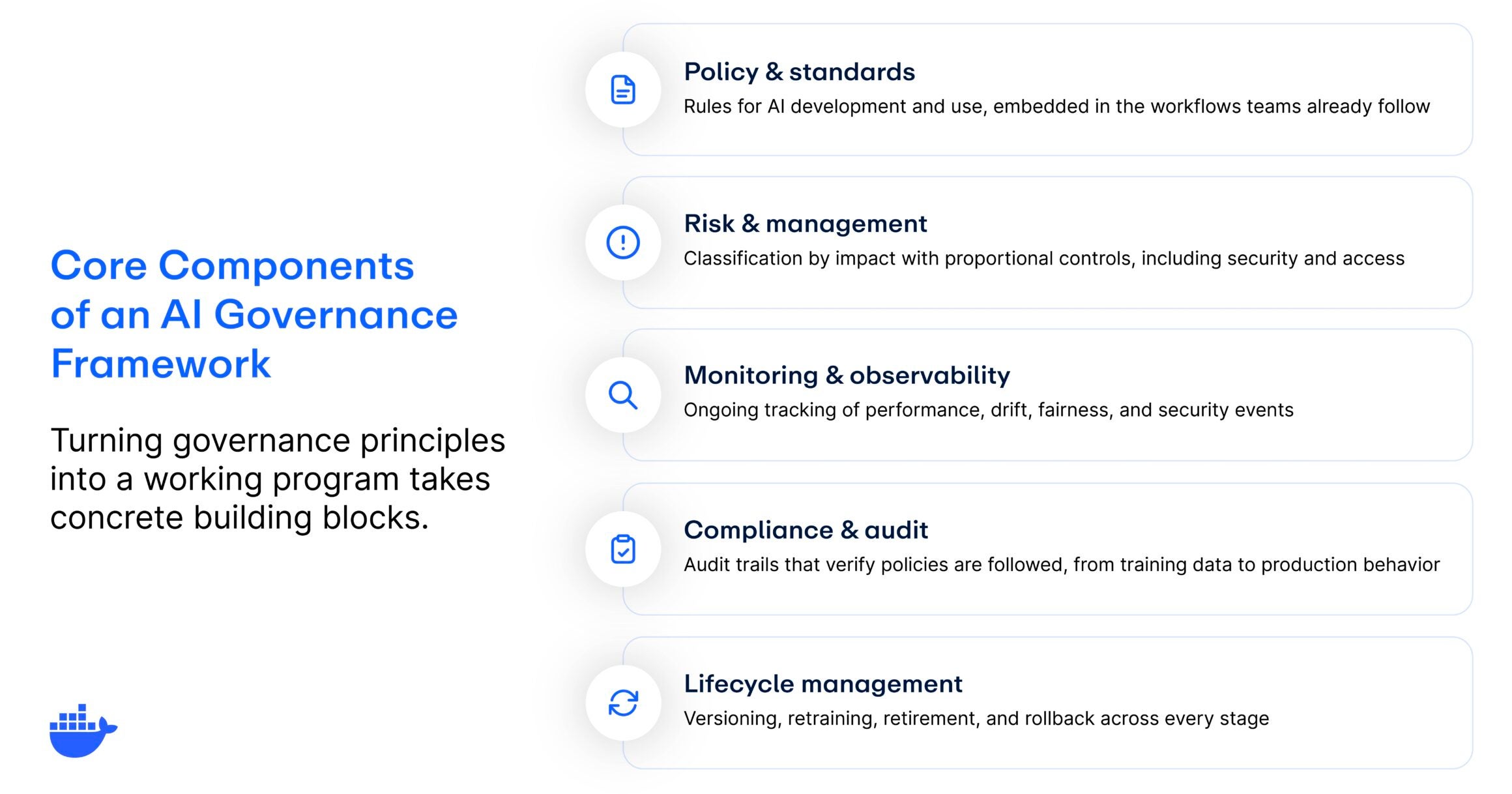
Principles are the starting point, but turning them into a working program takes concrete building blocks. An effective AI governance framework typically includes the following components:

Five building blocks of an AI governance framework listed vertically: policy and standards, risk and management, monitoring and observability, compliance and audit, and lifecycle management, each with a one-line description.
  • Policy and standards. The rules that govern AI development and use: acceptable use policies, data handling standards, model documentation requirements, and approval workflows. For governance to work, these need to be embedded in the workflows teams already use, not filed away in a wiki nobody checks.
  • Risk assessment and management. A classification system that matches oversight to impact. Not every AI application warrants the same scrutiny, and a risk-tiered approach applies proportional controls. For teams building AI agents, this extends to security and access controls like runtime isolation and scoped permissions.
  • Monitoring and observability. AI systems behave differently over time as data distributions shift and environments evolve. Governance defines what’s monitored, what triggers alerts, and what requires human intervention.
  • Compliance and audit. How you verify that policies are actually being followed. Every significant action in the AI lifecycle should produce a record, from training data to production behavior, so compliance becomes a byproduct of good engineering rather than a separate manual process.
  • Lifecycle management. Models need to be retrained, updated, versioned, and eventually retired. This component defines who owns each stage, what checks apply at each transition, and when to roll back or decommission.

And before any of these components can function, organizations need clear ownership, whether that’s a dedicated AI ethics board, a cross-functional governance committee, or designated AI owners within each business unit. Without that, these components exist on paper only.

The regulatory landscape for AI governance

AI regulation is evolving quickly, and organizations operating across multiple jurisdictions need to track a growing patchwork of requirements. Here are the most significant frameworks shaping AI governance today:

The EU AI Act

The European Union’s AI Act, which entered into force in 2024, is the world’s first comprehensive AI regulation. It takes a risk-based approach, classifying AI systems into four tiers: 

  1. Unacceptable risk (such as social scoring)
  2. High-risk (applications in employment, education, and law enforcement)
  3. Limited-risk (with specific transparency obligations)
  4. Minimal-risk (with few regulatory requirements) 

Organizations deploying high-risk AI systems in the EU face strict compliance obligations, including conformity assessments, transparency requirements, and human oversight mandates. Penalties for noncompliance can reach up to 7% of global annual turnover, depending on the risk tier.

The NIST AI Risk Management Framework (AI RMF)

In the United States, the National Institute of Standards and Technology (NIST) AI RMF offers a voluntary but widely adopted approach to AI risk management. It’s organized around four core functions: 

  1. Govern: Establish organizational accountability.
  2. Map: Identify and categorize AI systems and their impacts.
  3. Measure: Assess risks using quantitative and qualitative methods.
  4. Manage: Prioritize and act on risks through continuous monitoring. 

While not legally binding, the AI RMF is increasingly referenced by US federal agencies and is a practical starting point for organizations building governance programs.

ISO/IEC 42001

ISO/IEC 42001 is the first international management system standard for AI. It provides a certifiable framework for governing AI across its lifecycle, covering risk management, data quality, transparency, and continuous improvement. For organizations that already hold ISO certifications (like ISO 27001 for information security), ISO/IEC 42001 integrates naturally into existing compliance programs.

Other notable frameworks

  • United Kingdom: The UK favors a pro-innovation, sector-based approach. Rather than a single AI law, UK regulators issue industry-specific guidance focused on safety, transparency, and accountability.
  • United States (state level): Federal AI legislation remains limited, but states like California, Colorado, Illinois, and Utah are advancing their own AI and automated-decision laws.
  • OECD AI Principles: Adopted by over 40 countries, the OECD Principles on AI emphasize transparency, fairness, accountability, and human-centered design.

Common AI governance challenges

Implementing AI governance is rarely straightforward. Even organizations that recognize the importance of governance face a set of recurring AI governance challenges:

  • Keeping pace with AI adoption. AI capabilities are advancing faster than most governance programs can adapt. New model architectures, agentic AI workflows, and third-party AI integrations can introduce risks that existing policies were not designed to address.
  • Fragmented ownership. In many organizations, AI projects are distributed across teams with no centralized oversight. This makes it difficult to maintain consistent standards, track all active AI systems, or enforce policies uniformly.
  • Balancing innovation with control. Overly restrictive governance can slow down development and frustrate engineering teams. The goal is to design guardrails that protect the organization without creating bottlenecks that discourage experimentation.
  • Measuring effectiveness. Unlike security or performance, governance outcomes are harder to quantify. Organizations often struggle to define meaningful metrics that demonstrate whether their governance program is actually reducing risk.
  • Navigating regulatory uncertainty. With regulations varying by jurisdiction and evolving rapidly, organizations face the challenge of building governance programs that are flexible enough to accommodate future requirements without constant rework.

Top 6 AI governance best practices

Building an effective AI governance program takes more than writing a policy document. It requires a sustained, cross-functional effort. These AI governance best practices can help teams move from intention to implementation:

  1. Start with a clear AI inventory. You cannot govern what you cannot see. Begin by cataloging all AI systems in use across the organization, including third-party tools and embedded AI features. Document their purpose, data sources, risk level, and current oversight status.
  2. Assign ownership early. Designate governance owners at both the organizational level (such as an AI governance lead or committee) and the project level (such as an AI owner for each deployment). Make accountability explicit.
  3. Classify by risk, then apply proportional controls. Not every AI system warrants the same level of scrutiny. Use a risk-based classification system to focus governance resources where they matter most, reserving the heaviest controls for high-risk, high-impact applications.
  4. Embed governance into development workflows. Governance should be part of the AI development lifecycle, not a checkpoint that happens after the fact. Integrate policy reviews, bias testing, and documentation requirements into your CI/CD pipelines so they run automatically alongside your existing build and test steps. AI governance tools can help automate parts of this process.
  5. Monitor continuously, not just at launch. AI systems can drift over time as data distributions change or new edge cases emerge. Implement ongoing monitoring for model performance, fairness, and compliance rather than relying solely on pre-deployment reviews.
  6. Build for adaptability. Regulatory requirements and AI capabilities will continue to evolve. Design your governance framework to be modular, so you can update policies, add new controls, and respond to emerging regulations without overhauling the entire program.

What AI governance looks like for developers

Much of the conversation around AI governance focuses on policy, committees, and compliance frameworks. But for the engineers and platform teams actually building and shipping AI systems, governance shows up in much more practical ways. 

Here’s what it looks like at the development level:

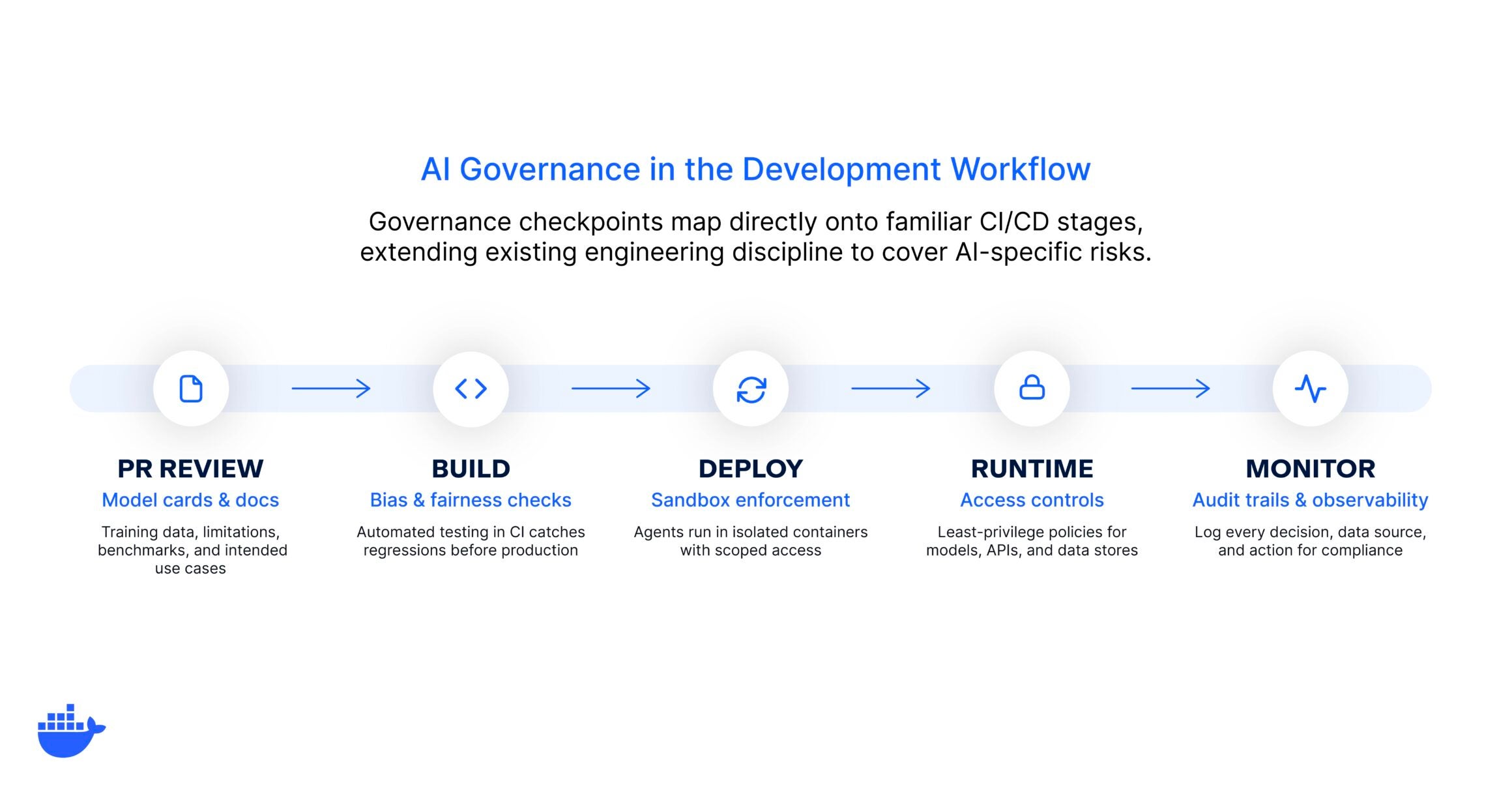
Five governance checkpoints mapped to CI/CD stages in a left-to-right pipeline: PR review for model cards, build for bias and fairness checks, deploy for sandbox enforcement, runtime for access controls, and monitor for audit trails.

Model cards and documentation as part of the PR process

Just as code changes go through review, AI model updates should include structured documentation covering training data, known limitations, performance benchmarks, and intended use cases. This makes governance a natural part of the development workflow rather than a separate bureaucratic step.

Automated bias and fairness checks as part of testing in CI/CD

Rather than relying on manual reviews before launch, teams can integrate bias detection and fairness testing directly into their continuous integration pipelines. When a model update introduces a regression in fairness metrics, the pipeline catches it before it reaches production.

Sandbox-by-default for AI agents

When developing and testing AI agents, running them inside sandboxed containers ensures they cannot access resources or perform actions beyond their intended scope. This is especially critical for agents that execute code, make API calls, or interact with live infrastructure.

AI governance and access controls

Governance at the platform layer means enforcing least-privilege access policies for AI workloads through the same container orchestration and networking tools teams already use. This includes controlling which models, APIs, tools (MCP servers) and data stores an AI system can reach at runtime.

Audit trails and observability built in

Logging every decision an AI system makes, every data source it touches, and every action it takes provides the foundation for both compliance and debugging. Treat AI observability with the same rigor you would apply to any production service.

For teams already working with containers and cloud-native development practices, many of these controls map directly onto familiar patterns. The goal is to extend your existing engineering discipline to cover AI-specific risks, not to build a parallel governance bureaucracy.

Where does your organization stand?

Not every organization is starting from scratch, and not every organization needs the same level of governance rigor on day one. A useful way to think about your current state is through a simple maturity spectrum:

Maturity stage

What it looks like

Ad hoc

No formal AI governance policies exist. Individual teams make their own decisions about AI use, with no centralized oversight, documentation, or review process. Risk management is reactive, addressed only after incidents occur.

Informal

Some governance practices are in place, but they are inconsistent across teams. There may be general guidelines or an AI ethics statement, but no structured enforcement, regular audits, or clear ownership.

Structured

The organization has defined governance policies, assigned ownership, and implemented review processes for AI systems. Risk classification is in use, and governance is integrated into at least some development workflows. Compliance with relevant regulations is actively tracked.

Integrated

Governance is embedded across the AI lifecycle, from development through deployment and monitoring. Automated controls enforce policies at the infrastructure level. Governance practices adapt as new AI capabilities, regulations, and use cases emerge. The organization treats governance as a competitive advantage, not a compliance burden.

Most organizations today fall somewhere between ad hoc and informal. If that sounds familiar, that’s completely normal and a perfectly fine place to start. The goal is not to leap to full integration overnight. It’s to identify where you are, pick the highest-impact gaps, and close them incrementally.

AI governance for AI agents

The rise of AI agents introduces a new dimension to AI governance. Unlike traditional AI models that respond to a single prompt, AI agents operate with greater autonomy. They can make decisions, call external tools, execute multi-step workflows, and interact with live systems, often with minimal human intervention.

This autonomy creates new governance requirements. Organizations need to define what actions agents are allowed to take, what data they can access, how their behavior is logged and audited, and under what conditions they should escalate to a human. Traditional governance models built around static model evaluations are not sufficient for systems that act independently in production environments.

Tackling agent governance also raises questions about runtime security. When an AI agent can execute code, make API calls, or modify infrastructure, the blast radius of a governance failure is significantly larger than a chatbot returning a biased response. Controls like sandboxing, least-privilege access, and real-time monitoring become essential.

Effective AI agent governance means defining clear boundaries for agent behavior, enforcing them at the infrastructure level, and maintaining audit trails that satisfy both internal stakeholders and external regulators. And as agentic AI becomes more widespread, organizations that build agent-specific governance practices early will be better positioned to scale AI adoption safely.

Common misconceptions about AI governance

  • “AI governance is just compliance.” Compliance is one component, but governance also covers ethics, risk management, operational controls, and organizational accountability. Treating governance as a checkbox exercise leaves significant gaps.
  • “Governance slows everything down.” Well-designed governance enables speed by reducing rework, preventing costly incidents, and creating clear approval pathways. The goal is not to add friction, but to build confidence that AI systems are safe to scale.
  • “Only regulated industries need AI governance.” Every organization using AI faces risks related to bias, security, and reliability, regardless of industry. Governance is not just about avoiding penalties. It’s about building systems that stakeholders trust.
  • “Governance is a one-time project.” AI governance is an ongoing practice. As models evolve, regulations change, and new use cases emerge, governance frameworks need continuous refinement and adaptation.
  • “Small teams can skip governance.” Even small-scale AI deployments benefit from basic governance practices like documentation, access controls, and monitoring. Starting small makes it easier to scale governance as AI adoption grows.

Getting started with AI governance

AI governance is no longer optional for organizations that want to use AI responsibly and at scale. The gap between AI adoption and governance maturity is real, but it’s also closable. By establishing clear principles, assigning ownership, building governance principles into development workflows, and investing in the right tools and controls, teams can move from reactive risk management to proactive, scalable governance.

The organizations that get this right will not only avoid regulatory pitfalls and security incidents. They’ll build the kind of trust and operational confidence that makes it possible to innovate faster. Whether you’re governing traditional machine learning models or a fleet of autonomous AI agents, the fundamentals are the same: define the rules, enforce them consistently, and keep evolving as the technology does.

That’s where Docker AI Governance comes into play. It brings network, sandbox, and MCP tool controls into a single console — so your team can define the rules once and enforce them everywhere developers work.

Stop reacting to AI risk. Start governing it. See how Docker AI Governance works →

Frequently asked questions

What is the primary focus of AI governance?

The primary focus of AI governance is ensuring that AI systems are developed and used in ways that are safe, ethical, compliant with regulations, and aligned with an organization’s values and strategic goals. It brings together policy, process, and technology to manage AI risk across the entire lifecycle.

What’s the difference between AI governance and AI ethics?

AI ethics defines the moral principles that should guide AI development, such as fairness, transparency, and respect for privacy. AI governance is the operational framework that puts those principles into practice through policies, roles, controls, and accountability structures. Ethics informs governance. Governance enforces ethics.

Who’s responsible for AI governance in an organization?

AI governance is a shared responsibility. Senior leadership (CEO, CTO, CISO) sets the strategic direction and accountability structures. Cross-functional governance committees or AI ethics boards define policies. Individual project teams are responsible for implementing and adhering to governance standards in their day-to-day work.

How do you measure the effectiveness of AI governance?

Common metrics include the percentage of AI systems covered by governance policies, incident rates related to AI bias or failures, compliance audit results, time to resolve governance issues, and stakeholder satisfaction with AI transparency and fairness practices.

How does AI governance apply to AI agents?

AI agents operate with greater autonomy than traditional models, making governance more critical. Agent-specific governance covers what actions agents can take, what data they can access, how their behavior is logged, and when they should escalate to a human. Runtime controls like sandboxing and least-privilege access are especially important.

  •  

The Untrusted Autonomous Workload: How AI Coding Agents Reshape What Isolation Has to Do

Earlier this year I mass-migrated my blog to Astro using Claude Code. 146 posts. 6,024 images. Canonical URLs, JSON-LD markup, sitemap generation, the whole stack. I’d spent hours writing a skills file to teach the agent about my blog’s architecture, how deployment worked, what not to touch. And it worked. Claude Code rewrote components, fixed trailing-slash mismatches across hundreds of pages, added BreadcrumbList structured data to hundreds of routes. Lighthouse scores hit 97 on performance. The blog looked better than it ever had.

The problem was that I had stopped understanding my own codebase.

Not completely. I could still read the files. But somewhere around the third round of “fix the error that the last fix introduced,” I caught myself copy-pasting stack traces back into Claude and trusting whatever came back. The agent would make a change, something else would break, I’d ask the agent to fix that too, and a few cycles later the blog worked again. I couldn’t have told you what was actually in the PostCSS config or why the GA4 integration was wired up the way it was. It worked. It looked great. My confidence in what was underneath had quietly evaporated.

That feeling (it works, thank god, let’s not touch it) is the feeling of having given an autonomous agent real access to your codebase. Every developer using these tools knows it. Nobody writes about it in vendor blog posts. And it’s what made me understand, on a level deeper than reading documentation, why Docker had to build Sandboxes.

Because here’s what I hadn’t thought about: while Claude Code was rewriting my Astro components and fixing image CLS across hundreds of files, every npm install it ran happened on my laptop. Same for every file it modified and every package it pulled. My user privileges, no boundary in sight. If the agent had decided to modify a Git hook or rewrite a CI workflow, I would not have noticed. I wasn’t reviewing individual file changes at that point. I was reviewing outcomes. And reviewing outcomes while skipping changes is not a security model. It’s a prayer.

Docker Sandboxes exists to close that gap.

The container model and why it doesn’t stretch here

Containers were never the wrong abstraction. They were the right abstraction for a world where you knew what was inside them. For twelve years that world held: you wrote the code, you reviewed it, you put it in a Dockerfile, and the container gave it a clean room to run in. Shared kernel was fine because the threat model was bugs in your own software, not surprises from a tenant you’d just invited in.

AI coding agents don’t fit. They aren’t bugs in your software because they aren’t your software. They’re a new kind of tenant, one that’s autonomous and privileged in ways that would make any security engineer nervous. The agent installs packages you didn’t pick and runs commands you didn’t script. It makes network calls you’d never have predicted, to endpoints you didn’t know were in your dependency tree. The trust profile is code being written right now, by something that won’t pause to ask permission. Containers were built for a different kind of code.

This isn’t hypothetical. On March 19, 2026, attackers force-pushed 76 of the 77 version tags in aquasecurity/trivy-action and published a malicious Trivy v0.69.4 binary to GitHub Releases. The exposure window was about 12 hours. The compromised code scraped CI runner memory for secrets, cloud credentials, SSH keys, and Kubernetes tokens, exfiltrating them to a typosquatted domain. Every pipeline that referenced trivy-action by version tag during that window ran code nobody on the receiving end had reviewed.

What gets me about Trivy: the weaponized tool was a vulnerability scanner. The thing organizations deployed to find malicious code became the malicious code. The maintainers didn’t write the bad binary; a compromised CI workflow with too much access and not enough containment did. Substitute “compromised CI workflow” with “AI agent in permissive mode” and you have the same threat model, running all day on every developer machine.

Containers were the right answer to “I trust this code, I want to run it cleanly.” They were never going to be the right answer to “I don’t fully trust this code, and I want to give it real work to do anyway.” That’s the gap microVMs fill.

What Docker built, and why each piece is there

First choice: don’t patch containers. There’s a long tradition in our industry of making a familiar abstraction handle a new problem by adding flags to it. Privileged mode, capability dropping, seccomp profiles, gVisor in front of runc. All of those have their place. None of them solved the specific issue that an autonomous agent needs its own Docker daemon. Docker-in-Docker either compromises the isolation (privileged mode, host socket mounting) or creates a nested complexity that becomes its own attack surface. The Docker docs are blunt about this. Containers, they say, share the host kernel and “can’t safely isolate something that needs its own Docker daemon.”

Once you accept that, you end up at a VM. Not a heavyweight one (booting Ubuntu Server for every coding session would be absurd) but a microVM: light enough to start in seconds, with just enough kernel to run the agent’s containers.

Docker Sandboxes uses a custom VMM, not Firecracker. If you’ve read the Firecracker spec and you’re thinking “boots in 125ms with under 5MB of overhead,” those are Firecracker’s numbers, not Docker’s. Different microVM implementations have different cost profiles. Platform specifics: Hypervisor.framework on macOS, Windows Hypervisor Platform on Windows, KVM on Linux.

image4

Caption: The Sandbox architecture. Each microVM runs its own kernel and its own Docker Engine. Credentials never cross the VM boundary.

Inside each microVM, the sandbox runs a complete Docker Engine. When the agent runs docker build, that command goes to a private daemon that doesn’t know your host containers exist. When it pulls an image, the image lives inside the sandbox VM. When you delete the sandbox, the entire image cache goes with it. Multiple sandboxes don’t share layers. Wasteful. Worth it.

The first time I looked inside a running sandbox, the agent was running as root with sudo and full Docker Engine access inside the VM. My reflex was that this had to be wrong. You don’t give root to untrusted code. But the design is right: the isolation model doesn’t constrain what the agent does inside the boundary. It constrains where the consequences land. Inside the VM, the agent can do whatever it wants. Outside? Nothing. Trying to lock the agent down with capability dropping inside the VM would be solving the wrong problem. The agent legitimately needs to install packages and run docker build. What it doesn’t need is for any of that to touch your laptop.

image1

Caption: From the host, sandboxes don’t show up in docker ps because they aren’t containers; sbx ls is how you see them.

The network layer is where it gets interesting, because it doubles as the credential boundary.

Outbound HTTP/HTTPS traffic routes through a proxy on the host, accessible from inside the VM at host.docker.internal:3128. UDP and ICMP are blocked at the network layer and can’t be allowed by policy. Non-HTTP TCP (like SSH) needs explicit IP+port rules. DNS resolution goes through the proxy. If a request can’t go through the proxy, it doesn’t leave. The proxy terminates TLS, inspects the host header, applies your policy, and re-encrypts with its own certificate authority that the sandbox trusts. Man-in-the-middle by design. Docker uses that exact framing in the documentation.

MITM is what makes credential injection work. Agents need API keys: for the AI provider, for registries, sometimes for cloud accounts. Naive answer is to pass those credentials in as environment variables, where they sit inside the VM and follow it everywhere. Docker instead keeps credentials on the host, in your OS keychain, and has the proxy inject them into outbound requests transparently. The agent sees requests that just work, and the VM never had the secrets to begin with. The docs don’t hedge on this: credential values are never stored inside the VM. A compromised sandbox can’t exfiltrate your API keys because your API keys were never in there.

Docker tells you what won’t work

Sandboxes documentation has a quality that’s rare in security architecture docs: it tells you what the system doesn’t protect against. Most of these documents are written to make a product look strong. Docker’s docs surface the limits. Two of them matter.

The first one is about the network policy.

At first sbx login, you pick one of three default policies. Open allows everything except blocked CIDR ranges (private networks, link-local addresses, cloud metadata endpoints). Balanced denies by default but pre-allows common dev domains. Locked Down denies everything until you explicitly allow. Locked Down is the strictest option, the deny-by-default mode you’d want if you were paranoid. But even with Locked Down and a curated allowlist, the proxy filters by domain, not by content.

Here’s the exact language from the docs: allowing broad domains like github.com permits access to any content on that domain, “and agents could use these as channels for data exfiltration.” Security vendors don’t usually say this about their own products. If github.com is on your allowlist (and it almost certainly is, because the agent needs to clone repos), the proxy knows the request is going to github.com. It does not know whether the agent is reading documentation, cloning a repository, or creating a public gist with the contents of your .env file. All three look identical at the domain level. Same goes for every allowlist entry that includes user-generated content: Discord webhooks, Notion pages. “The domain is allowed” doesn’t mean “only safe content lives there.”

image5

Caption: Under a deny policy, non-allowlisted domains are blocked. Allowlisted domains succeed, including domains that host arbitrary user-generated content.

Docs also acknowledge domain fronting as an inherent limitation of HTTPS proxying. Proxy sees which domain a request claims to be going to; it cannot always prevent the request from being routed elsewhere through that allowed CDN.

The microVM boundary is the primary isolation. Network proxy is a useful additional control, especially for blocking accidental access to internal networks. It is not a hermetic seal, and Docker doesn’t claim it is. “The agent is on a deny policy” is not the same thing as “the agent cannot send data anywhere.”

The workspace is always shared

Network policy is the smaller honest limit. Workspace sharing is the bigger one.

The microVM boundary is strong everywhere except for one path that crosses it on purpose: the workspace directory.

The whole point of running an agent in a Sandbox is for the agent to do real work in your real codebase. Docker shares the workspace between the host and the sandbox at the same absolute path. When the agent edits a file inside the sandbox, the file changes on your host. When you pull a new commit on your host, the agent sees it. This is the design. It’s exactly what you want from a developer tool.

It’s also a covert channel that the agent has legitimate write access to.

Docker security documentation spells out what “the same files” includes, and this is what matters: files that execute implicitly during normal development. Git hooks. CI configurations. IDE task definitions. Makefile targets. package.json scripts. Pre-commit configs. Anything that runs when you do something that feels like just “using your tools.”

Simplest version of the attack: an agent inside the sandbox writes a malicious post-commit hook to .git/hooks/post-commit. Git hooks don’t appear in git diff. They live in .git/, which most developers never open. Next time you commit on your host, the hook runs on your host with your user privileges. Sandbox boundary doesn’t matter, because the boundary ended at the workspace, and the workspace was always shared.

Which brought me back to my own Astro migration, uncomfortably. I’d let Claude Code rewrite hundreds of files across my blog. I’d reviewed the outcomes (Lighthouse scores, visual appearance, build success) but I had not audited every file it touched. Had not checked .git/hooks/. I’d never opened that directory in my life. Had not read every package.json script before running npm install. I’d been doing exactly the thing the documentation warns about: treating the agent’s output as reviewed code when it was unreviewed code that I was about to execute on my machine.

It would be easy to read this as “Sandboxes are broken.” That’s not what I mean. The microVM does exactly what microVMs are supposed to do: it contains the consequences of arbitrary code execution behind a hardware boundary. What it cannot do is make the workspace contents safe, because the workspace contents are how the agent does its job. The agent has to be able to write files. You have to be able to read them. Shared region is necessary, and the shared region is where the threat model gets interesting.

Mitigation isn’t more isolation. The microVM is doing its job. Mitigation is discipline: treat the workspace contents the way you’d treat a pull request from a contributor you don’t know yet. Diff .git/hooks/ after agent sessions. Read package.json scripts before running npm install. Use the --branch flag, which creates a Git worktree so the agent works in an isolated branch you can review before merging. None of this is exotic. It’s just the practice of not treating autonomous-agent output as trusted code. Because it isn’t.

I’m spending this much space on it because it’s the part most people get wrong. Hypervisor boundary makes you feel safe, but you aren’t. Not completely. Both things have to be true at once for the product to work, and the Docker team built it that way on purpose. Good security architectures document their gaps and make sure the user knows what they’re signing up for.

What it actually costs

Hypervisor isolation isn’t free, and you can’t pretend otherwise. I tested this against my own production codebase, the same Astro blog I mentioned at the top, because synthetic benchmarks for sandboxed agent workloads don’t tell you much. You want to know what it feels like to do real work.

image2

Caption: The same docker build --no-cache against the same Astro codebase. Host: 1:44.62. Sandbox microVM: 1:28.58. The isolation boundary is invisible to the workload. On this run, the sandbox actually finished faster.

I ran docker build --no-cache against the same Dockerfile and the same codebase, once on the host and once inside the sandbox. Host finished in 1:44.62. Sandbox finished in 1:28.58, actually faster, within noise across runs. The Docker Engine inside the sandbox is running on its own kernel with its own block device, completely isolated from the host, and the build doesn’t care. The microVM adds essentially zero overhead to the actual build.

One real-world caveat from running this on Apple Silicon: a Rust dependency in my Astro pipeline ships jemalloc that assumes 4K page sizes, which fails on sandbox VMs (16K pages). The build itself completed correctly. All 354 pages rendered, dist generated, but a teardown step exited non-zero. The fix was a one-line guard in the Dockerfile that checks for valid build output before exiting. Took 30 minutes to track down. Worth knowing about before you ship sandbox-aware Dockerfiles on Apple Silicon, because the symptom looks like a build failure when the build actually succeeded.

Verdict: for session-based agent work (a few hours on a project), the overhead disappears. For high-frequency sandbox creation (dozens per minute for short tasks), cold-start cost adds up. For the workload Sandboxes is designed for, which is giving an agent a real environment for a real session, the trade is sound.

Matching isolation to trust

Most discussions of containers versus VMs treat it as a binary, and that’s the wrong frame. The frame I’ve found useful, both for my own work and in conversations with engineering leaders who ask “do we really need microVMs for this?”, is a spectrum.

image3

Caption: The Trust Spectrum. Match isolation strength to the trust profile of the workload.

On one end you have code you wrote yourself. Your team reviewed it, your CI tested it, your production runs it. A standard container is the right answer. Kernel is shared, daemon is shared, and none of that matters because the workload is known.

One step removed from that are CI/CD pipelines running your team’s code plus dependencies from registries you mostly trust. Mostly known, but the inputs are more variable. You add seccomp profiles, drop capabilities, write network policies.

Further along, supervised AI agents: tools that suggest code while a developer reviews each step. Human in the loop, so hardened containers with strict policies still work.

At the far end are autonomous AI agents. Nobody reviewing each command. Agents making decisions on your behalf, each one potentially different from the last. The trust profile isn’t “I trust this code” because there’s no fixed code to trust. It’s “I’m letting something operate on my system without supervision, and I want the failure mode to be ‘contained to a disposable VM’ rather than ‘on my laptop.'” That’s the workload that needs a microVM.

This is not a declaration that containers are obsolete. It’s the opposite. Containers are the right answer for everything on the left side of that spectrum, which is most of what runs in production today. MicroVMs extend the spectrum to the right, where containers were never going to be the right tool. The four isolation layers in Sandboxes (hypervisor, network, Docker Engine, credential proxy) are additive. They wrap containers in additional protection rather than replacing them. Inside every Sandbox is a microVM that runs containers. Containers haven’t gone anywhere, they’ve moved one level deeper in the trust stack.

“MicroVMs for AI agents, containers for everything else” is too crude. “Match the isolation to the trust profile of the workload” is the one that holds up.

Why everyone is converging here

Docker isn’t the only company that arrived at this answer, and the convergence tells you something.

Firecracker powers AWS Lambda and Fly.io’s microVM platform. gVisor intercepts syscalls in a user-space kernel. Kata Containers provides VM isolation behind a container-compatible interface. Modal runs serverless agent workloads on gVisor. E2B offers Firecracker-based sandboxes as a managed cloud service. Northflank ships Kata-based isolation for production AI workloads. All adopted at the same time, for the same reasons. Architecture everywhere looks the same: containers on the inside (because that’s how developers think), VM on the outside (because that’s where the boundary needs to be).

Docker Sandboxes is the local-first version. Most alternatives are cloud services where you pay per execution and your code runs on someone else’s machines. Docker put the same architecture on the developer’s laptop. CLI supports eight agents natively (Claude Code, Codex, Copilot, Gemini CLI, Kiro, OpenCode, Docker Agent, and Droid), plus a Shell mode for custom tooling. A standalone sbx CLI runs without Docker Desktop, so the architecture isn’t locked to a commercial product. MicroVM layer has an HTTP API that the open-source community has already started building on.

That’s a runtime. And Docker is positioning it to become the standard way to run autonomous coding agents, the way docker run became the standard way to run microservices ten years ago.

One more thing. Hardened Images and sandboxes address different layers of the same problem: Hardened Images for the supply chain (where binaries come from), sandboxes for runtime isolation (what those binaries can touch). Both exist because the assumption that “code from a trusted publisher is safe” stopped being reliable.

Looking back, looking forward

I’ve watched the industry rebuild its trust model three times in twenty years.

Bare metal to virtual machines, because we needed to put multiple workloads on the same hardware safely.

Virtual machines to containers, because we needed faster startup, lower overhead, and a packaging model that matched how developers actually ship code.

Now, containers to a different kind of virtual machine, because the workload changed and the kernel namespace stopped being enough. Not because containers were wrong, but because the new tenant needs more, and more looks like a hypervisor again.

Each of these transitions felt obvious in hindsight and contested at the time. I remember the arguments about whether containers were really secure enough for multi-tenant workloads. (They mostly weren’t, which is why we ended up with namespaced clusters and per-tenant VMs and gVisor and now microVMs for agents.) I expect the microVM argument to follow the same arc: contested for about a year, obvious within three.

My Astro migration taught me what it feels like to work alongside an autonomous agent that has real access to your system. More productive than doing it by hand, and more unsettling than I expected, once I realized how much I’d stopped tracking. Sandboxes don’t make the agent trustworthy. It just makes sure that when the agent does something you didn’t expect, the damage stays inside a box you can throw away. Workspace still requires your attention. Your skepticism. That combination (strong boundaries where you can enforce them, disciplined review where you can’t) is the model for working with autonomous code, and it’s probably going to stay that way for a while.

If you’ve been holding back on running AI coding agents because of permission prompts, accidental file changes, or just a feeling that something about the whole arrangement isn’t quite safe: that feeling was correct. Containers were the wrong fit for the workload. Sandboxes is the right one. Try it on a project you actually care about. That’s the only test that matters.

Get started with Docker Sandboxes →

  •