❌

Vue lecture

Introducing Amazon Bedrock Managed Knowledge Base for faster, more accurate enterprise AI applications

Today, we’re announcing Amazon Bedrock Managed Knowledge Base, a new set of capabilities that enables developers to build enterprise-grade generative AI applications with their proprietary data in minutes. Organizations building agentic AI applications need secure, reliable, and up-to-date access to enterprise-wide data to deliver accurate, fast, and trusted outcomes. Managed Knowledge Base abstracts away the complexity of building and managing retrieval-augmented generation (RAG) pipelines, allowing developers to focus on business outcomes rather than infrastructure management.

Developers building knowledge bases for their agents face three key challenges today:

  • Connecting to enterprise data: Enterprise knowledge lives across disparate systems with different content types, access control lists, and document formats. Building and maintaining custom connectors for each source adds complexity that slows down development.
  • Optimizing RAG accuracy: Best practices for retrieval-augmented generation keep evolving. Developers need to experiment with different parsing strategies, chunking approaches, embedding models, and agentic retrieval behaviors to get accurate answers from their data.
  • Managing infrastructure at scale: Organizations need to serve large knowledge bases with millions of documents, or manage thousands of smaller knowledge bases across teams. Both patterns require reliable infrastructure, security enforcement, and cost control.

These challenges require developers to repeatedly perform undifferentiated work instead of focusing on their applications.

Amazon Bedrock Managed Knowledge Base addresses these challenges by abstracting away the multiple infrastructure components developers traditionally have to assemble and maintain themselves (storage, retrieval, embeddings, re-ranking, and foundation model selection) into a single managed primitive. By default, the service automatically selects and manages a default embeddings model, re-ranker model, and foundational model on your behalf, so you can get up to speed quickly without needing to pick or maintain one yourself. On top of this managed foundation, three core innovations further improve ease of use and accuracy:

  • Native data connectors: Six pre-built ingestion connectors that natively pull enterprise data and permissions from SaaS applications, eliminating the overhead developers face in managing application-specific requirements. At launch, we support Amazon S3, SharePoint, Confluence, Web Crawler, Google Drive, and OneDrive.
  • Smart Parsing: Different content types and sources require different approaches to achieve accurate retrieval. Smart Parsing handles this complexity automatically, selecting the right parsing strategy for each data type and connector to provide the highest accuracy for your agents.
  • Agentic Retriever: Optimized for complex queries that require multiturn, multihop retrieval within a single knowledge base or across multiple knowledge bases. Agentic Retriever automatically infers end-user intent and draws relevant context from institutional knowledge spread across data sources and modalities.

With just a few lines of code, Amazon Bedrock Managed Knowledge Base automatically manages and scales the end-to-end RAG pipeline that powers your enterprise knowledge agents. For agent builders, it’s available as a pre-built target type in Amazon Bedrock AgentCore Gateway, reducing integration to a few lines of code, auto-generating role-based permissions, and providing observability and evaluation metrics in the AgentCore Observability dashboard.

Getting started with Amazon Bedrock Managed Knowledge Base
Creating a Managed Knowledge Base is straightforward. Navigate to the Amazon Bedrock AgentCore console or the Amazon Bedrock console, open the Knowledge Bases page, and choose Create Managed KB. The experience is the same in both consoles.
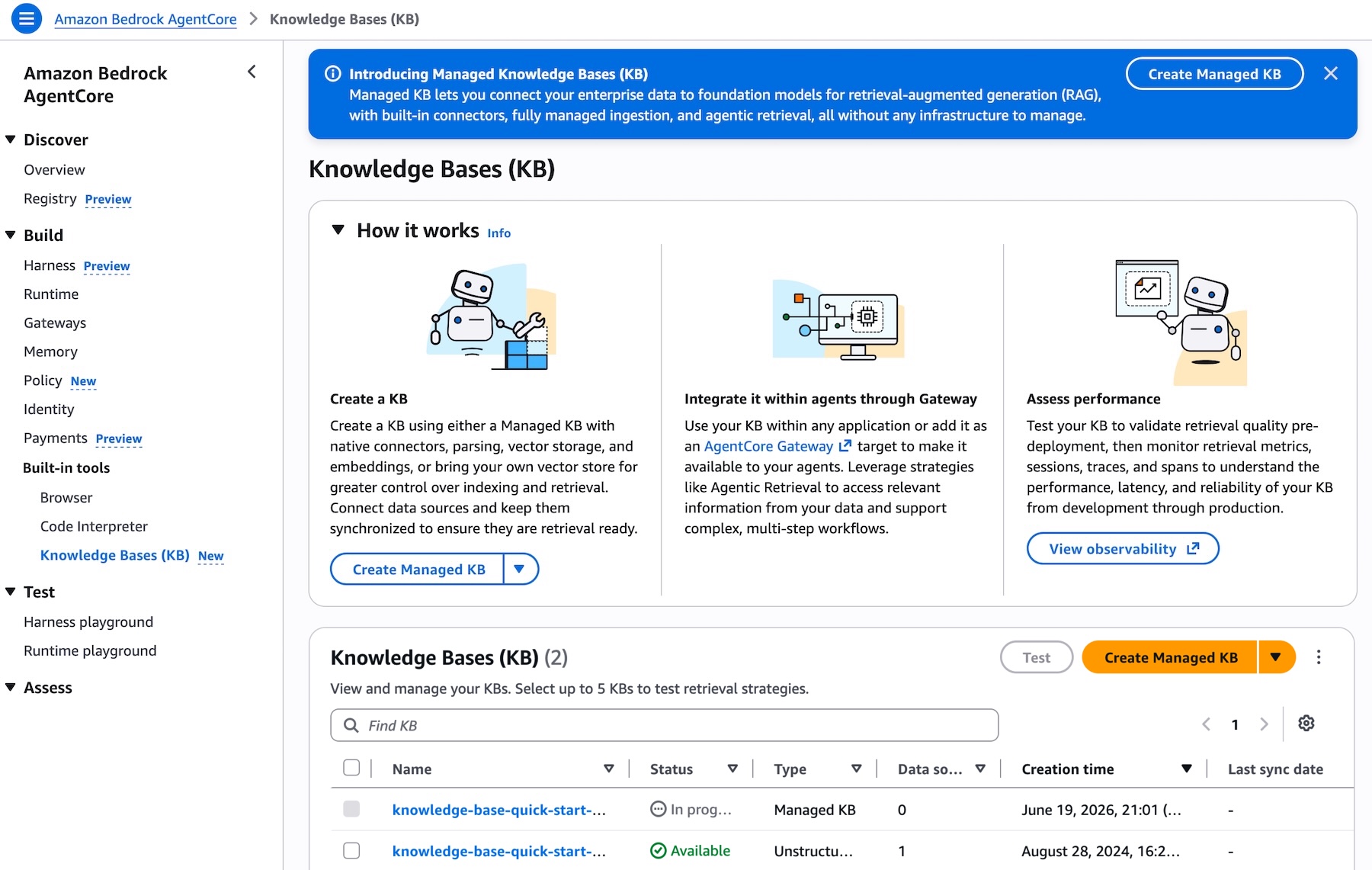
Picture 1 – Knowledge Bases list page in the Amazon Bedrock AgentCore console showing the Type column with different KB types and the Create Managed KB button

When creating a new Knowledge Bases, you can connect to your enterprise data sources by choosing from the list of supported connectors directly from a dropdown. AWS Identity and Access Management (IAM) roles are automatically created, and you can choose to edit these permissions if needed:
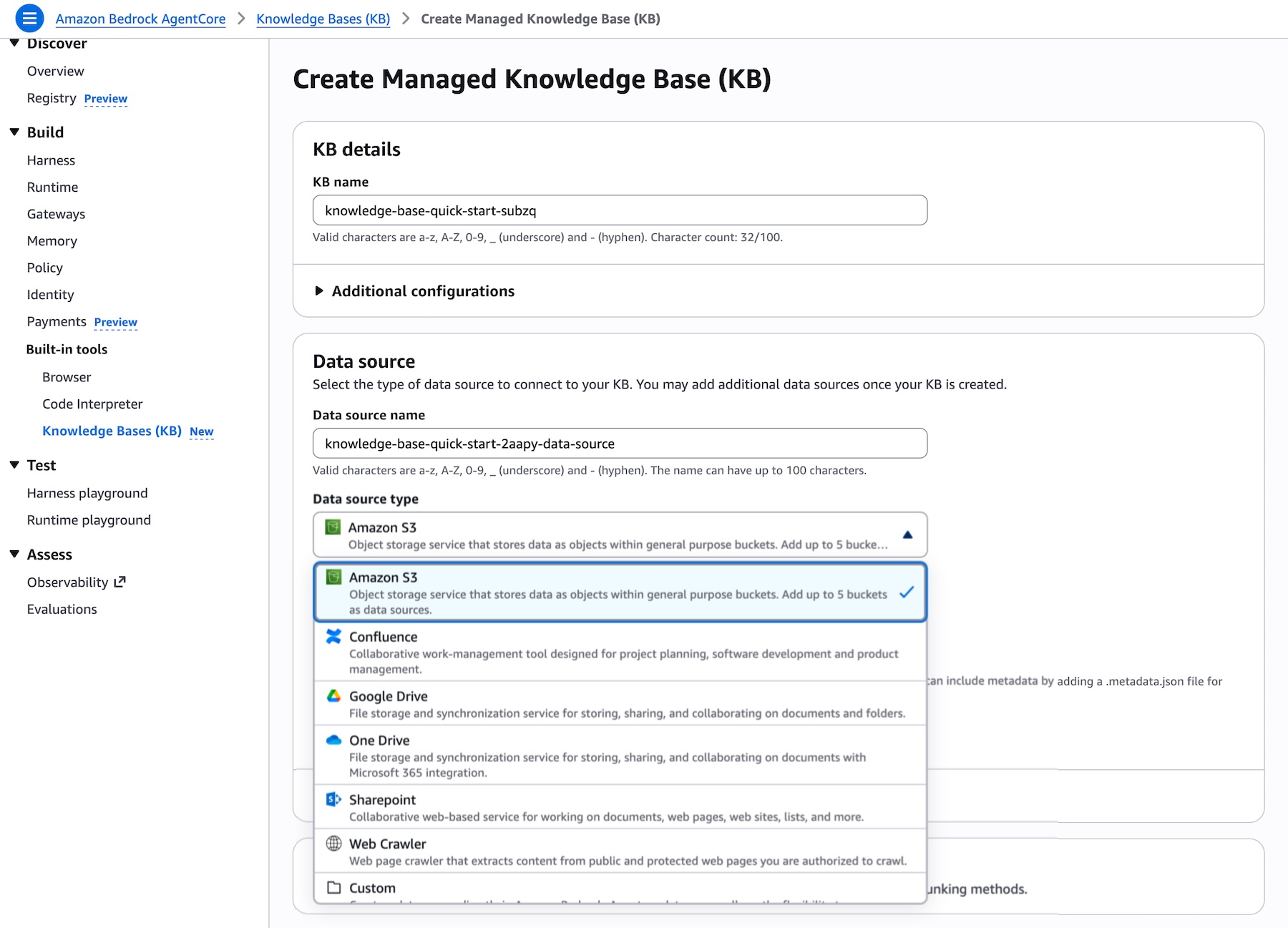
Picture 2 – Create Knowledge Base page showing the Data source dropdown expanded with all supported connectors: Amazon S3, Confluence, Custom, Google Drive, One Drive, SharePoint, and Web Crawler

An optimized set of defaults will be presented, allowing you to create your knowledge base in just a few clicks. Once the data is synced, you can integrate the knowledge base with your agent or provide it as a tool for your foundation model and start querying.

Smart Parsing for accurate data ingestion
One of the key challenges in building knowledge bases is preparing diverse data types for accurate retrieval. Once you point Managed Knowledge Base at your data sources, Smart Parsing automatically determines the optimal parsing strategy for each data type and connector, no extra configuration is required.

Smart Parsing combines multiple techniques:

  • Connector-specific data models: Optimized handling for each data source. For example, the Web Crawler connector preserves HTML structure including embedded images and tables, ensuring rich content is not dropped during ingestion. SharePoint connectors maintain document hierarchy and relationships between files.
  • Multimodal processing: Automatic detection and processing of different content types within documents. The system identifies bounding boxes in documents, then sends them to foundation models for data extraction, captioning, and scene description in video files.
  • Optimized chunking: Smart Parsing leverages foundation models to understand document structure and extract meaningful content, ensuring that complex documents with mixed formats are properly indexed. Intelligent defaults balance retrieval accuracy with performance based on document type and content structure, while advanced users can customize chunking strategies when needed.

This automated approach eliminates weeks of experimentation typically required to achieve production-quality retrieval accuracy, while still preserving the flexibility to customize when needed.

Using Agentic Retriever for complex queries
After your data is ingested, you can start querying your knowledge base. Generative AI applications often struggle with complex user queries that require reasoning, recursive multi-step retrieval, and intermediate evaluations of results. Consider a user asking two related questions: “What is the cloud infrastructure budget for the ML platform team?” and “Does our expense policy allow prepaying annual commitments?” A single retrieval step might surface documents about the ML platform team but fail to connect the budget information with the expense policy needed to fully answer the question.
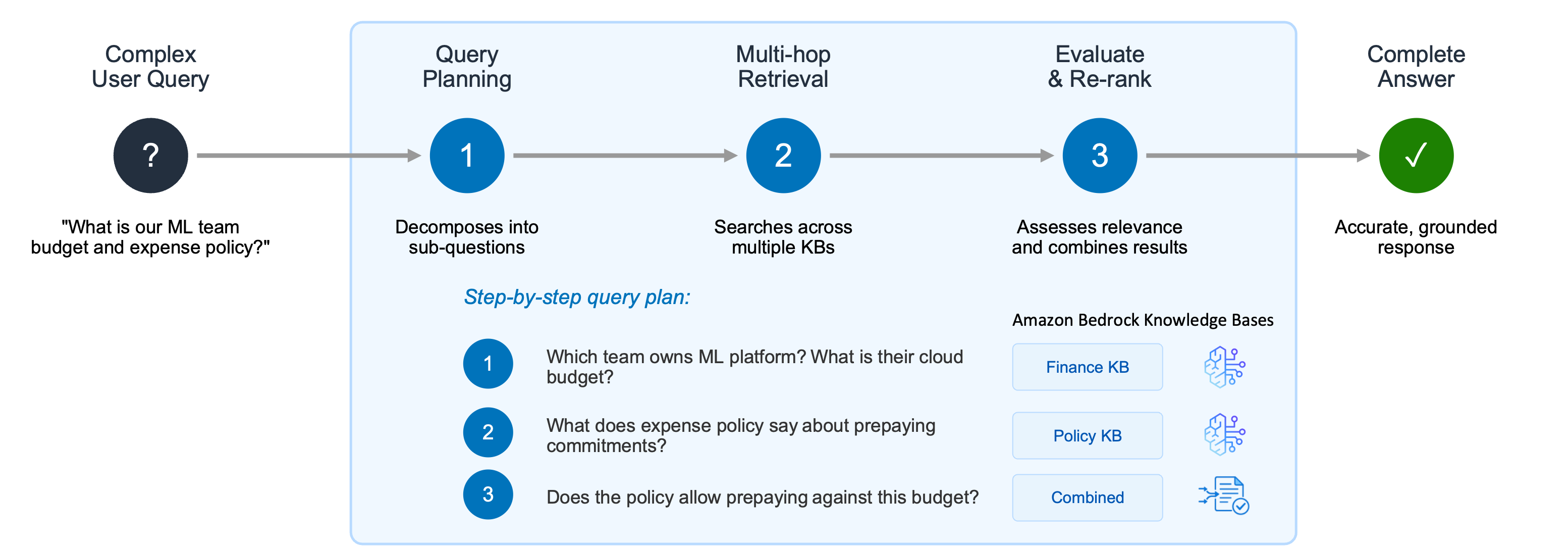
Picture 3 – Agentic Retriever decomposes complex user queries into a step-by-step plan, performing multi-hop retrieval across multiple knowledge bases and combining results to deliver accurate, grounded responses

Agentic Retriever solves this by creating a step-by-step query plan: 1. Which team owns the ML platform, and what is their cloud infrastructure budget? 2. What does the expense policy say about prepaying annual commitments? 3. Does the policy allow the ML platform team to prepay against this budget?

The system performs multi-hop retrieval and reasoning at each step, and once it has gathered sufficient relevant passages, it stops the search process and returns the top results. By abstracting away the complexity of building a separate multi-hop reasoning pipeline, this approach dramatically improves accuracy for complex queries while letting developers focus on their agentic search applications instead of orchestration logic.

You can try Agentic Retriever directly from the test panel of your knowledge base in the Amazon Bedrock AgentCore console. Select Agentic retrieval only as the retrieval type to let the system automatically plan and execute multi-step queries across your knowledge bases:
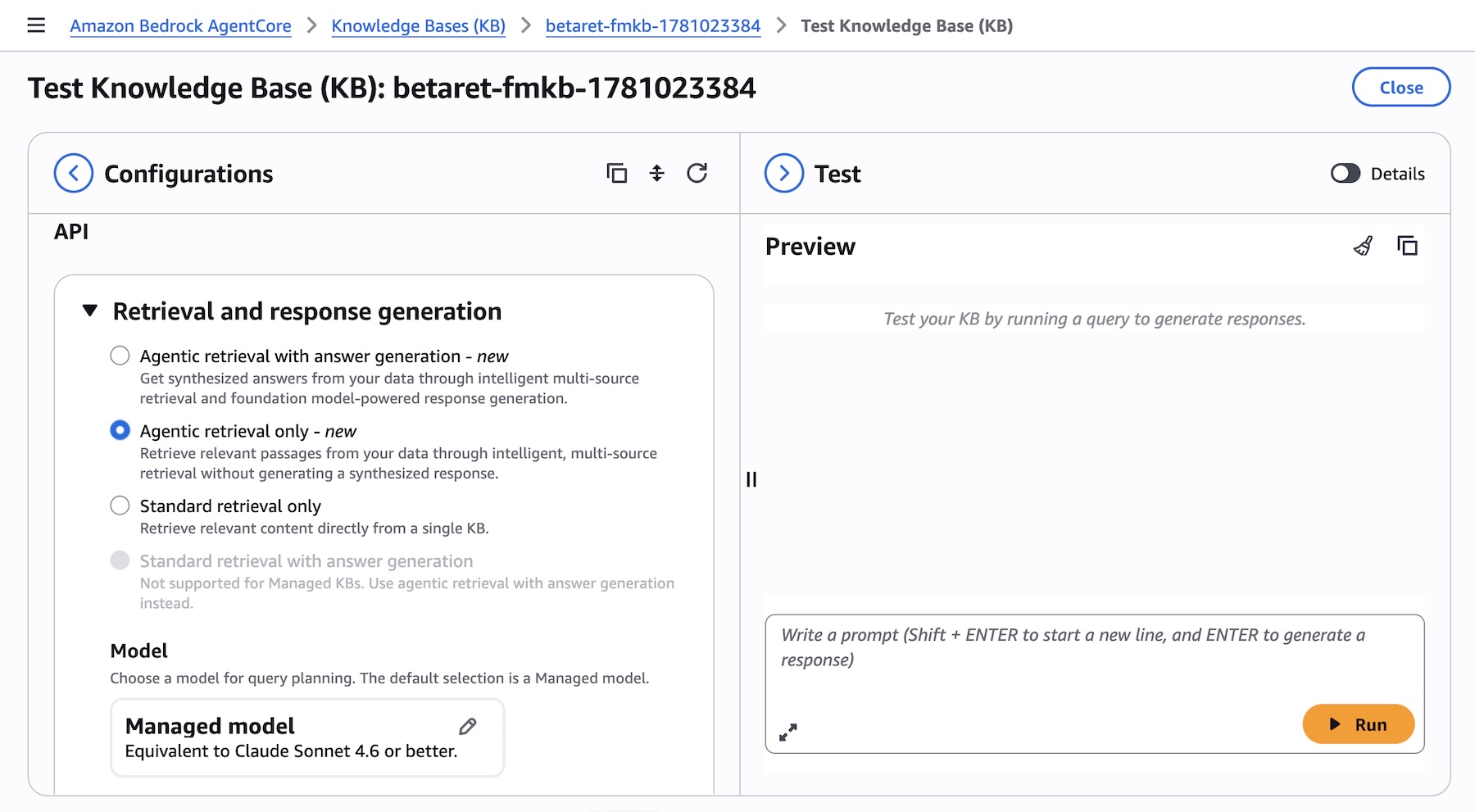
Picture 4 – Test Knowledge Base panel showing Agentic retrieval with answer generation selected as the retrieval type, with model selection and maximum agentic iterations options

Enabling MCP with Bedrock AgentCore
Amazon Bedrock Managed Knowledge Base seamlessly integrates with AgentCore Gateway as a native target type. This integration eliminates the need for manual integration and provides built-in observability, policy enforcement, and automatic permission management.

You can navigate to the Amazon Bedrock AgentCore console or SDK and create an AgentCore Gateway or select an existing one. When adding targets to your gateway, you will find Knowledge Base as a new pre-built target type alongside other options such as MCP server, Lambda ARN, REST API, and other integrations. Simply select your knowledge base ID to expose it through the gateway:
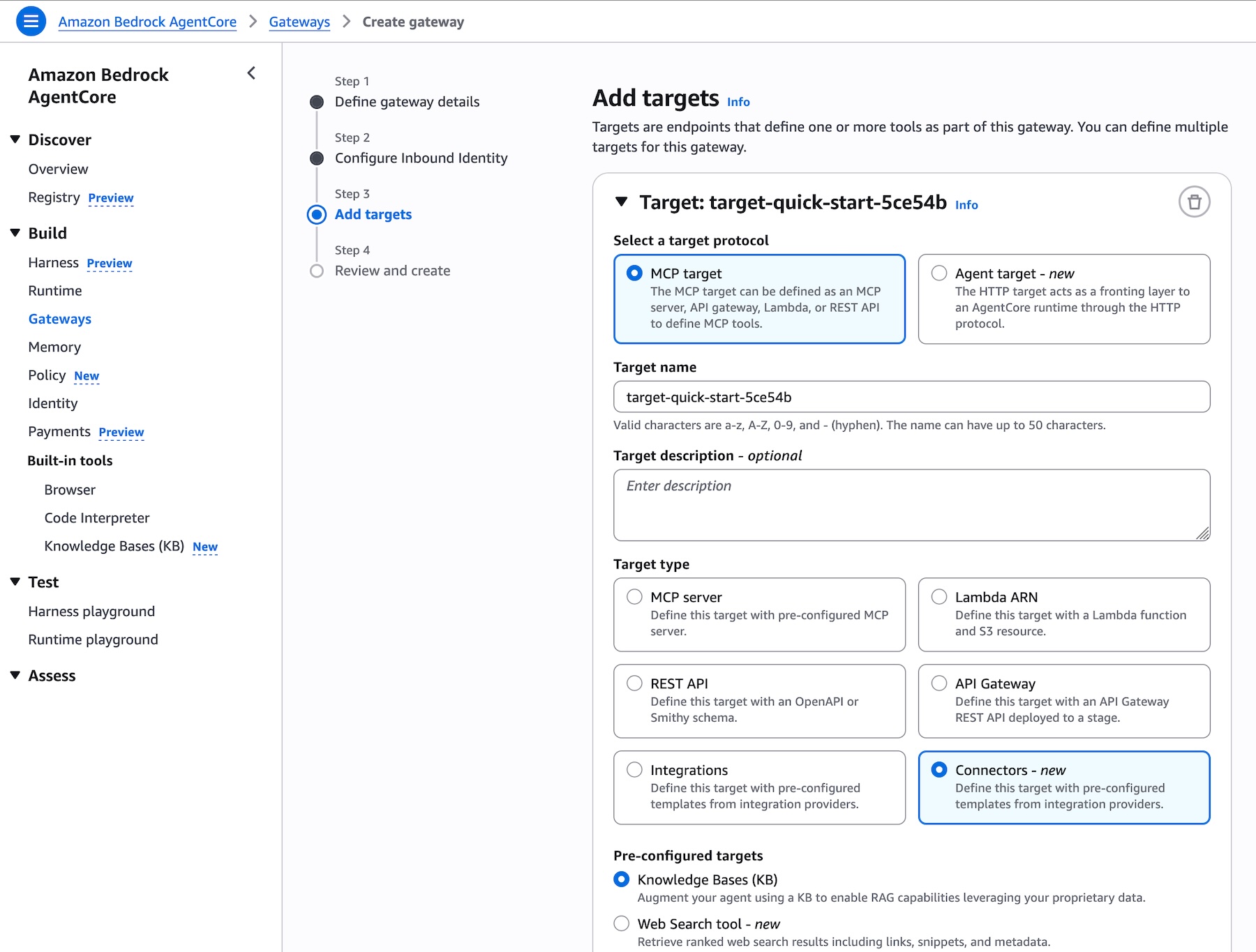
Picture 5 – Add targets page in AgentCore Gateway showing Knowledge Base as a new pre-built target type, with the knowledge base ID selector and runtime retrieval mode options

Add targets page in AgentCore Gateway showing Knowledge Base as a new pre-built target type, with the knowledge base ID selector and runtime retrieval mode options

Gateway exposes the standard Model Context Protocol (MCP), so the knowledge base tools are automatically discovered by clients from any MCP-compatible framework, including Strands Agents, LangChain, CrewAI, LlamaIndex, and LangGraph. No custom integration code is required.

Model choice and flexibility
Amazon Bedrock Managed Knowledge Base preserves the flexibility developers expect from Amazon Bedrock. Every foundation model available on Bedrock can power the generation step, and developers can select from different embedding and re-ranking models to optimize retrieval for their specific use case, enabling teams to fine-tune accuracy and cost-performance without changing infrastructure.

Unlike managed solutions that lock you into specific model providers, Amazon Bedrock Managed Knowledge Base separates the infrastructure management (connectors, parsing, storage, retrieval orchestration) from model selection. This means you can:

  • Take advantage of the latest models: Adopt the latest embedding, re-ranking, and foundation models as they become available to improve accuracy, latency, and cost for your application without rebuilding your RAG pipeline.
  • Optimize for price-performance: Choose smaller, faster models for simple queries and more capable models for complex reasoning tasks, all using the same knowledge base infrastructure.
  • Use Bedrock embedding models: While Smart Parsing provides optimized defaults, you can configure Bedrock embedding models when your domain requires specialized semantic understanding.
  • Maintain consistency with existing applications: If you’re already using Bedrock Knowledge Bases APIs (Retrieve, StartIngest, StopIngest, IngestKnowledgeBaseDocuments), Managed Knowledge Base uses the same APIs, so migration requires no code changes, just point to the new knowledge base ID.

This approach ensures you can spend time on your generative AI application without losing the ability to change models based on evolving requirements or new model capabilities.

Get started today
Amazon Bedrock Managed Knowledge Base is available today in the US East (N. Virginia), US West (Oregon), Asia Pacific (Sydney, Tokyo), Europe (Dublin, Frankfurt, London), and AWS GovCloud (US-West) Regions. For Regional availability and future roadmap, visit AWS Capabilities by Region.

With Bedrock Managed Knowledge Base, you pay for what you use with no upfront commitments. Pricing is based on two dimensions: the size of indexed data stored and the number of retrievals performed (on-demand). For detailed pricing information, visit the Amazon Bedrock pricing page. Bedrock is also a part of the AWS Free Tier that new AWS customers can use to get started at no cost and explore key AWS services.

These capabilities work with any open source framework such as CrewAI, LangGraph, LlamaIndex, and Strands Agents, and with any foundation model. Bedrock services can be used together or independently, and you can get started using your favorite AI-assisted development environment with the AgentCore open source MCP server.

To learn more and get started quickly, visit the Bedrock Knowledge Bases Developer Guide.

Daniel Abib

 Updated on June 19, 2026 — Fixed correct screenshots to create a new Managed KB.
  •  

Announcing Web Search on Amazon Bedrock AgentCore: Ground your AI agents in current, accurate web knowledge

Today, we’re announcing the general availability of Web Search on Amazon Bedrock AgentCore, a fully managed tool that enables agents to ground responses in current, cited web knowledge with zero data egress from customer’s secured AWS environment.

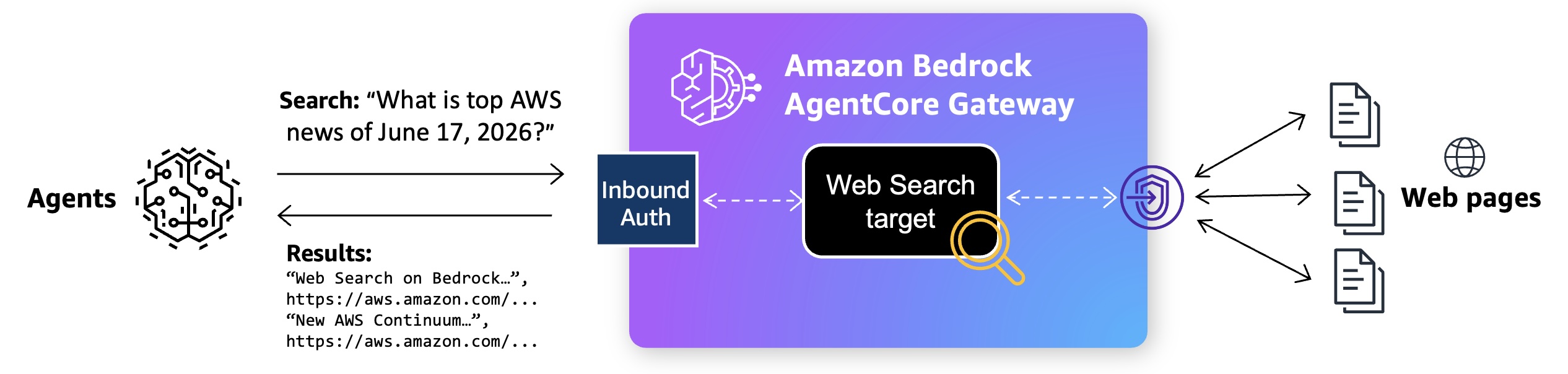
Web Search uses a built-in connector target on Bedrock AgentCore Gateway using the Model Context Protocol (MCP). Your agent sends a natural-language query, and Web Search returns most relevant snippets, source URLs, titles, and publication dates that the model can reason over to produce a grounded response.

It is built on Amazon’s search infrastructure, informed by years of experience powering agentic search experiences across Alexa+, Amazon Quick, and Kiro. It uses a multi-source grounding approach that combines Amazon’s web index with structured knowledge graph data. Beyond standard web results, this gives agents access to Amazon Knowledge Graph with verified facts, helping them retrieve more relevant and accurate responses than traditional web search alone.

With this launch, you can focus on building agents instead of manually adding web search to agents on Bedrock AgentCore and managing its infrastructure. Your AI agent looks at user question, retrieves the latest facts, and then takes any necessary action grounded in current developments beyond a model’s training data. You can also meet enterprise governance policies without sending user prompts and retrieval queries to external search API providers outside of AWS.

Web Search on Bedrock AgentCore in action
To get started, create the Bedrock AgentCore Gateway with Web Search tool target in the Bedrock AgentCore console. When the Gateway URL is created, you can interact with API call, Command Line Interface (CLI), or MCP Inspector.

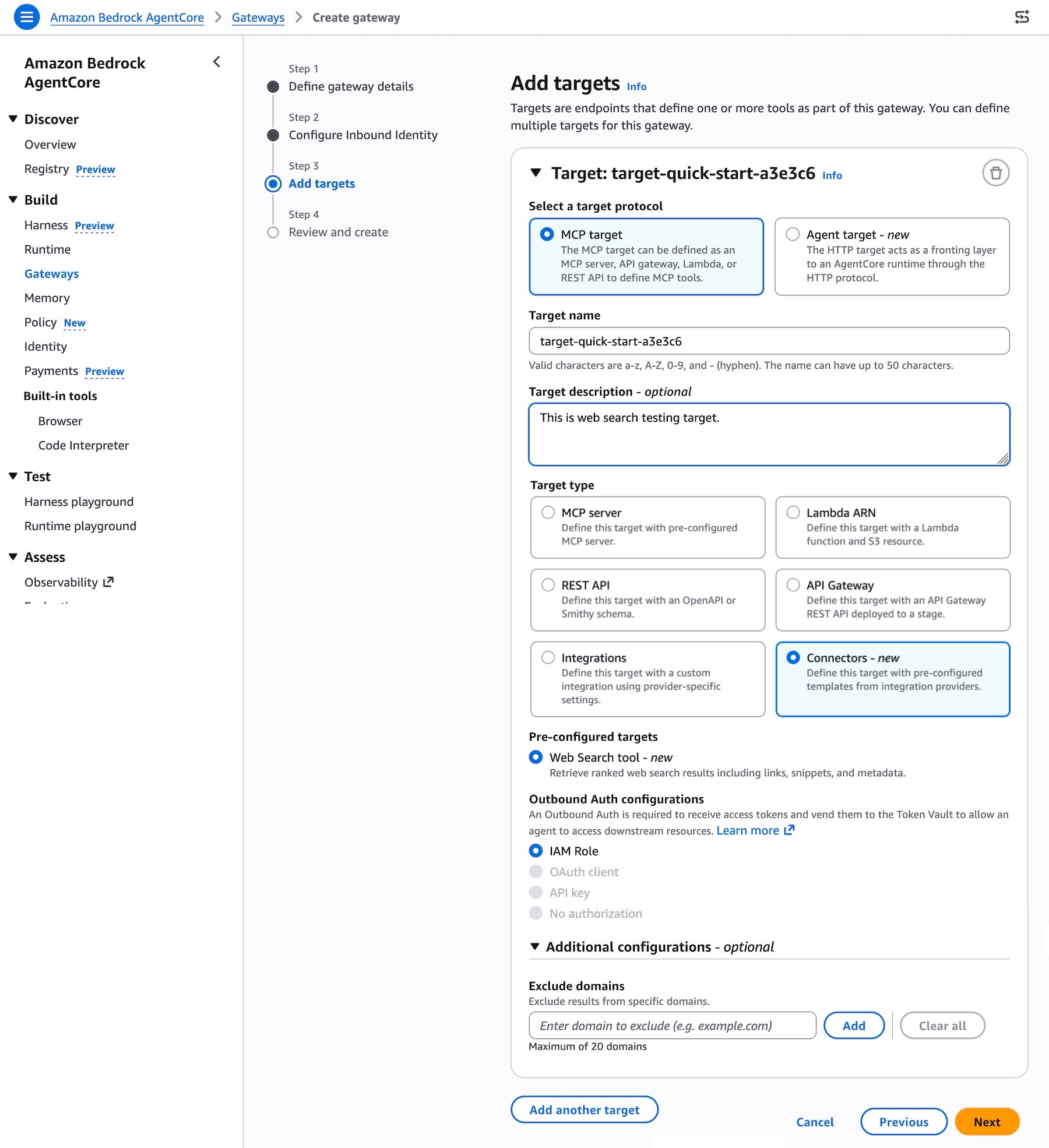
To add Web Search tool target when creating the Gateway, choose MCP target as a target protocol and Connectors as a target type. You can select the Web Search tool as a preconfigured target to retrieve most relevant web search results including links, snippets, and metadata.

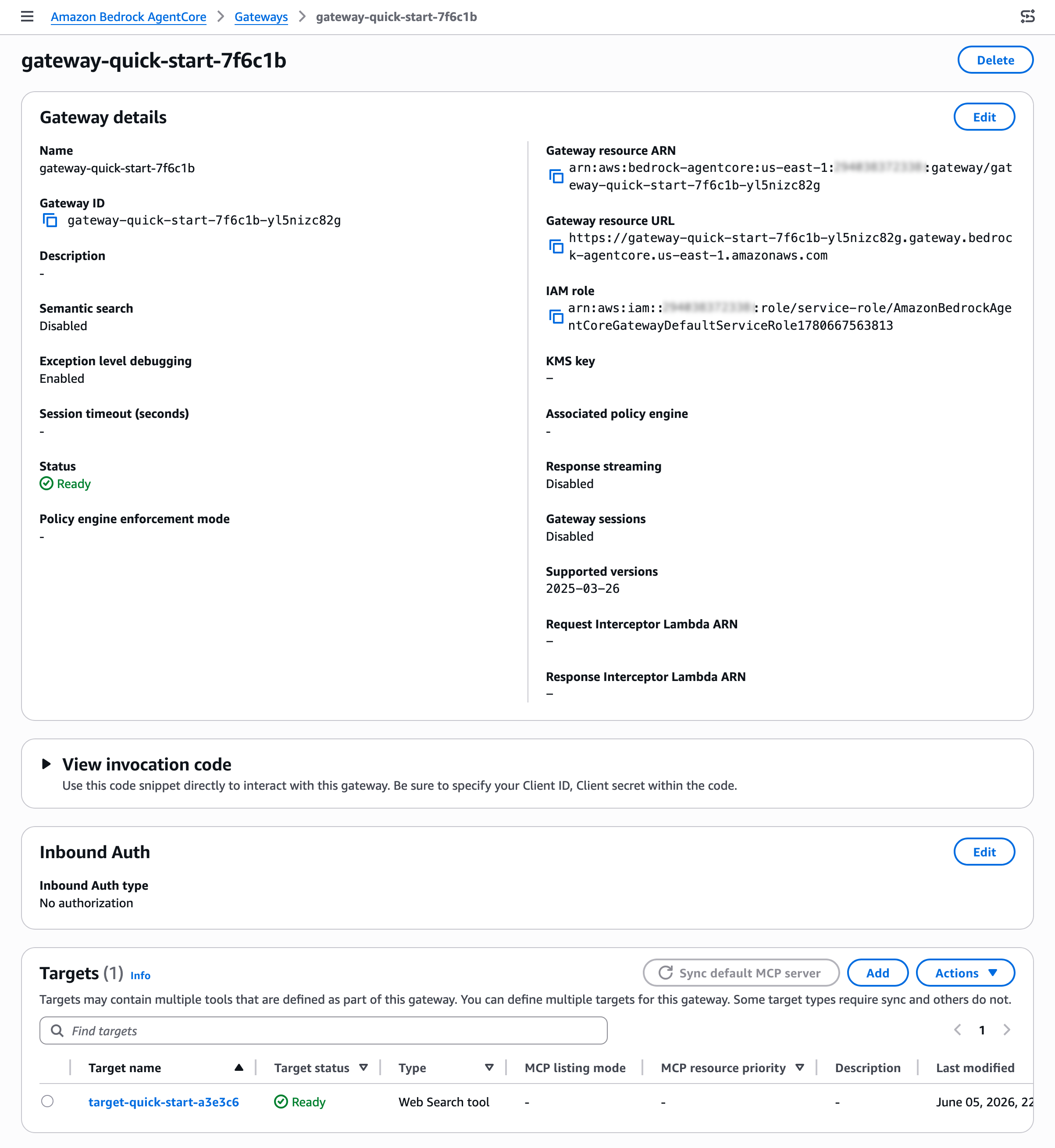
After creating your gateway, you can find the Web Search tool target on the detail page of your gateway. You can also add a new Web Search tool target to an existing gateway.

To interact with Web Search tool, use the sample invocation code in the View invocation code section. You can use code snippets through Python codes with API requests, MCP Python SDK, Strands MCP Client, and MCP Inspector.

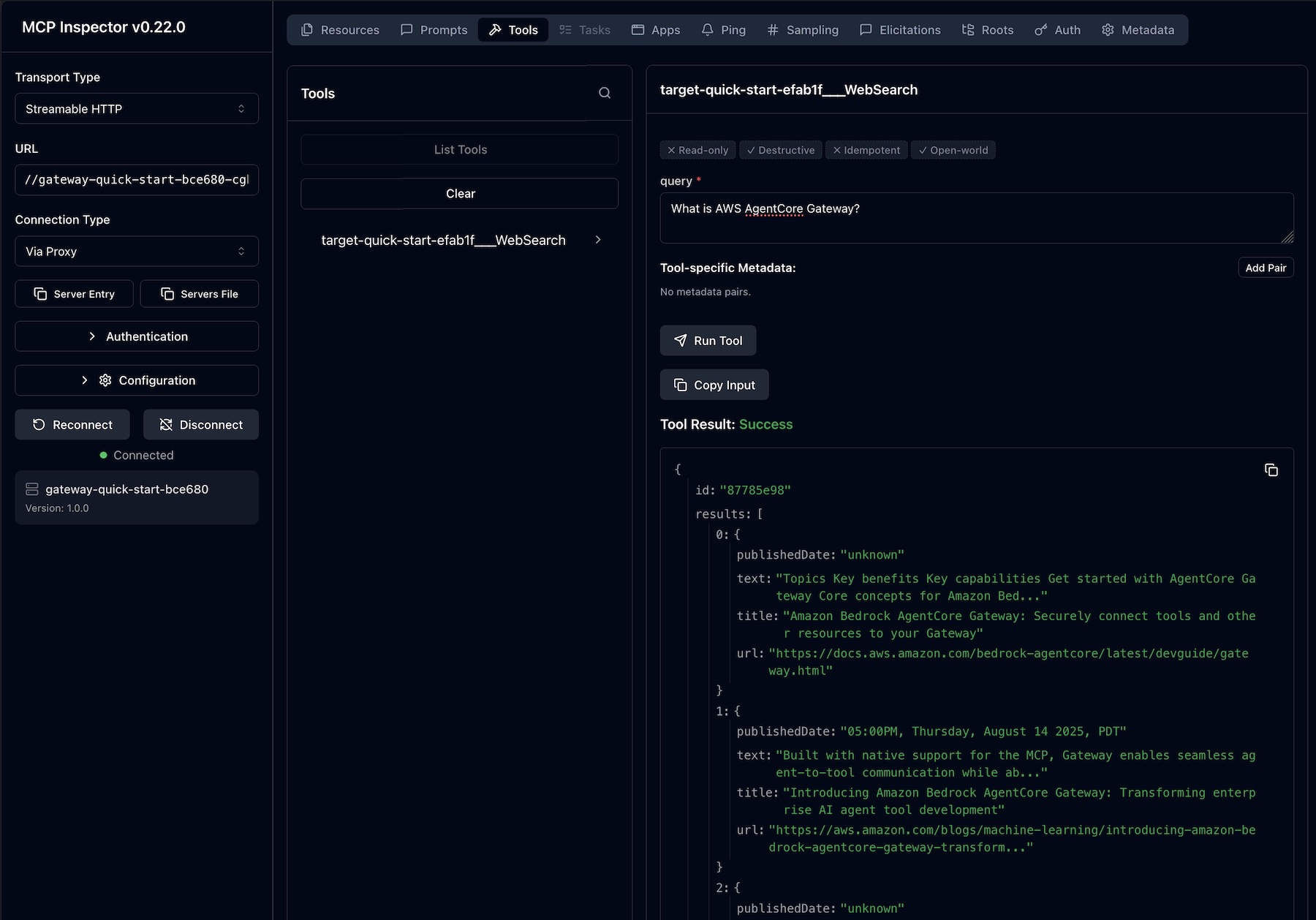
For example, you can interact with the MCP Inspector, an interactive developer tool for testing and debugging MCP servers. When you connect to the MCP server through the Gateway resource URL, you will find a Web Search tool for each connector target on the Gateway. Enter input the web search query and choose Run Tool to get the results.

To learn more about how to use Web Search on Bedrock AgentCore, visit the Bedrock AgentCore Gateway documentation.

Customer voices
Some of our customers had early access to this new feature. This is what they shared with us:

Benchling helps scientists accelerate R&D, making it easy to centralize scientific data, collaborate across teams, and access insights. Nicholas Larus-Stone, Head of AI Agents at Benchling shared “Scientists using Benchling AI can now ask about a target they’re actively working on and get answers grounded in both their institutional data in Benchling and published literature. The result is more complete science, and hypothesis generation done right. Because we’re using the Web Search tool on Amazon Bedrock AgentCore, customers have a secure, governed environment to bring that high quality published data into their workflows without compromising how they manage their data.”

Gen Digital leads consumer and small business cyber safety, offering antivirus, antimalware, identity and privacy protection, virtual private networks, and cloud backup. Iskander Sanchez-Rola, Senior Director of AI & Innovation, Gen Digital shared “With the Web Search tool on Amazon Bedrock AgentCore, Norton Revamp helps professionals build their online reputation with current, grounded content ideas shaped by what’s actually happening in the world today. What we value most is that AWS uses its own search index and keep queries within our trusted AWS environment.”

To read more customer stories, visit the Amazon Bedrock Customers.

Now available
Web Search on Amazon Bedrock AgentCore is generally available today in the US East (N. Virginia) Region. For Regional availability and a future roadmap, visit the AWS Capabilities by Region.

You can get started with Web Search on Bedrock AgentCore with no upfront commitments. Pricing is simple and usage-based. You are charged based on the number of search queries your agents submit to the web search. Web Search is priced at $7 per 1,000 queries. New AWS customers also receive up to $200 in Free Tier credits. To learn more, visit the Amazon Bedrock AgentCore pricing page.

Try it in the Amazon Bedrock AgentCore console and send feedback to AWS re:Post for Amazon Bedrock AgentCore or through your usual AWS Support contacts.

— Channy

Updated on June 18, 2026 — Added a clear pricing statement for Web Search in Bedrock AgentCore.

  •  

Anthropic Claude Fable 5 on AWS: Mythos-class capabilities with built-in safeguards now available

Updated on July 1, 2026– Access to Claude Fable 5 and Claude Mythos 5 on AWS has been restored


Today, we’re announcing the availability of Claude Fable 5 on Amazon Bedrock and Claude Platform on AWS. Claude Fable 5 makes Mythos-level capabilities available to customers, with strong safeguards designed to make it safe for broader use. Fable 5 is state-of-the-art on nearly all tested benchmarks and delivers exceptional performance in software engineering, knowledge work tasks, and vision – built for ambitious, long running work.

With Claude Fable 5 on Bedrock, you can build within your existing AWS environment and scale inference workloads. You can also use Claude Fable 5 through the Claude Platform on AWS, giving you Anthropic’s native platform experience.

According to Anthropic, Claude Fable 5 represents a step-change in what you can accomplish with AI models. Here is what makes this model different:

  • Long-running, asynchronous execution: Claude Fable 5 handles complex tasks that previous models could not sustain, executing coding and knowledge work tasks for extended periods without intervention.
  • Advanced vision capabilities: Claude Fable 5 understands diagrams, charts, and tables nested in files and PDFs. This opens up research and document-heavy work in finance, legal, analytics, architecture, and gaming. In coding, the model implements designs with high fidelity and uses vision to critique its output against goals.
  • Proactive self-verification: The model updates its own skills based on learnings and develops its own harnesses and evaluations.

Claude Fable 5 includes safeguards that limit its performance in specific areas where misuse risk is elevated. Harmful prompts related to cybersecurity, biology, chemistry, and health fall back to receive a response from Opus 4.8 instead. Anthropic is able to expand access to nearly all of Claude Fable 5’s state-of-the-art capabilities by developing more powerful safeguards. The same model without these limits is Claude Mythos 5 and it will only be available to a small group of vetted customers.

Claude Fable 5 model in action
You can use Claude Fable 5 in both Amazon Bedrock and Claude Platform on AWS. This post covers guidance on how to access and use on Amazon Bedrock. For guidance on the Claude Platform on AWS, visit the documentation to learn more.

To get started with Amazon Bedrock, you can access the model programmatically now using the Anthropic Messages API to call the bedrock-runtime or bedrock-mantle endpoints through Anthropic SDK. You can also keep using the Invoke and Converse API on bedrock-runtime through the AWS Command Line Interface (AWS CLI) and AWS SDK.

Configure data retention setting
In order to access Claude Fable 5 model, you must opt into data sharing by using the Data Retention API and setting provider_data_share before you can invoke the models. There is no console user interface for this setting at launch.

This mode allows Amazon Bedrock to retain and share your inference data with model providers per their requirements. Anthropic requires 30-day inputs and outputs retention, as well as human review. To learn more, visit the Amazon Bedrock abuse detection.

Here is a sample script to set data retention for the bedrock-mantle engine.

curl -X PUT https://bedrock-mantle.us-east-1.api.aws/v1/data_retention \
  -H "x-api-key: <your-bedrock-api-key>" \ 
  -H "Content-Type: application/json" \
  -d '{ "mode": "provider_data_share" }'

If you want to use the bedrock-runtime engine, run this sample script.

curl -X PUT https://bedrock.us-east-1.amazonaws.com/data-retention \
  -H "Authorization: Bearer <your_bearer_token>" \
  -H "Content-Type: application/json" \
  -d '{ "mode": "provider_data_share" }'

Updated on Jun 10, 2026 — You can also use AWS SigV4 (Signature Version 4) to call the data retention API. Configure your AWS CLI or AWS SDK using environment variables.

export AWS_ACCESS_KEY_ID=your_access_key_id
export AWS_SECRET_ACCESS_KEY=your_secret_access_key
export AWS_SESSION_TOKEN=your_session_token

First, retrieve your current Bedrock data retention settings.

curl -s https://bedrock.us-east-1.amazonaws.com/data-retention \
  --aws-sigv4 "aws:amz:us-east-1:bedrock" \
  --user "$AWS_ACCESS_KEY_ID:$AWS_SECRET_ACCESS_KEY" \
  -H "x-amz-security-token: $AWS_SESSION_TOKEN"

This should return something like this: {"mode":"inherit","updatedAt":null} and update the data retention settings.

curl -s -X PUT https://bedrock.us-east-1.amazonaws.com/data-retention \
  --aws-sigv4 "aws:amz:us-east-1:bedrock" \
  --user "$AWS_ACCESS_KEY_ID:$AWS_SECRET_ACCESS_KEY" \
  -H "x-amz-security-token: $AWS_SESSION_TOKEN" \
  -H "Content-Type: application/json" \
  -d '{"mode":"provider_data_share"}'

If everything worked as expected, you should receive a response like: {"mode":"provider_data_share","updatedAt":"2026-06-10T16:51:39.331Z"}.

The latest AWS CLI supports configuring the data retention setting. Set your bearer API key as an environment variable after you generate a API key in the Bedrock console.

export AWS_BEARER_TOKEN_BEDROCK=bedrock-api-key-XXXXXXXXXX

Run the following CLI command to use the Claude Fable 5 model.

aws bedrock put-account-data-retention \ 
  --mode provider_data_share

To learn more, visit the Data Retention API on the Amazon Bedrock User Guide.

How to use the Claude Fable 5 model
Let’s start with Anthropic SDK for Python using the Messages API on bedrock-mantle endpoint. Install Anthropic SDK.

pip install anthropic

Here is a sample Python code to call Claude Fable 5 model:

import anthropic

client = anthropic.Anthropic(
    base_url="https://bedrock-mantle.us-east-1.api.aws/anthropic",
    api_key= <your-bedrock-api-key>
)

message = client.messages.create( 
     model="anthropic.claude-fable-5", 
	 max_tokens=4096, 
	 messages=[ 
	     { "role": "user", 
		   "content": "Design a distributed architecture on AWS in Python that should support 100k requests per second across multiple geographic regions", 
		 }, 
	 ], 
)

print(message.content[0].text)

To learn more, check out Anthropic Messages API code examples and notebook examples for multiple use cases and a variety of programming languages.

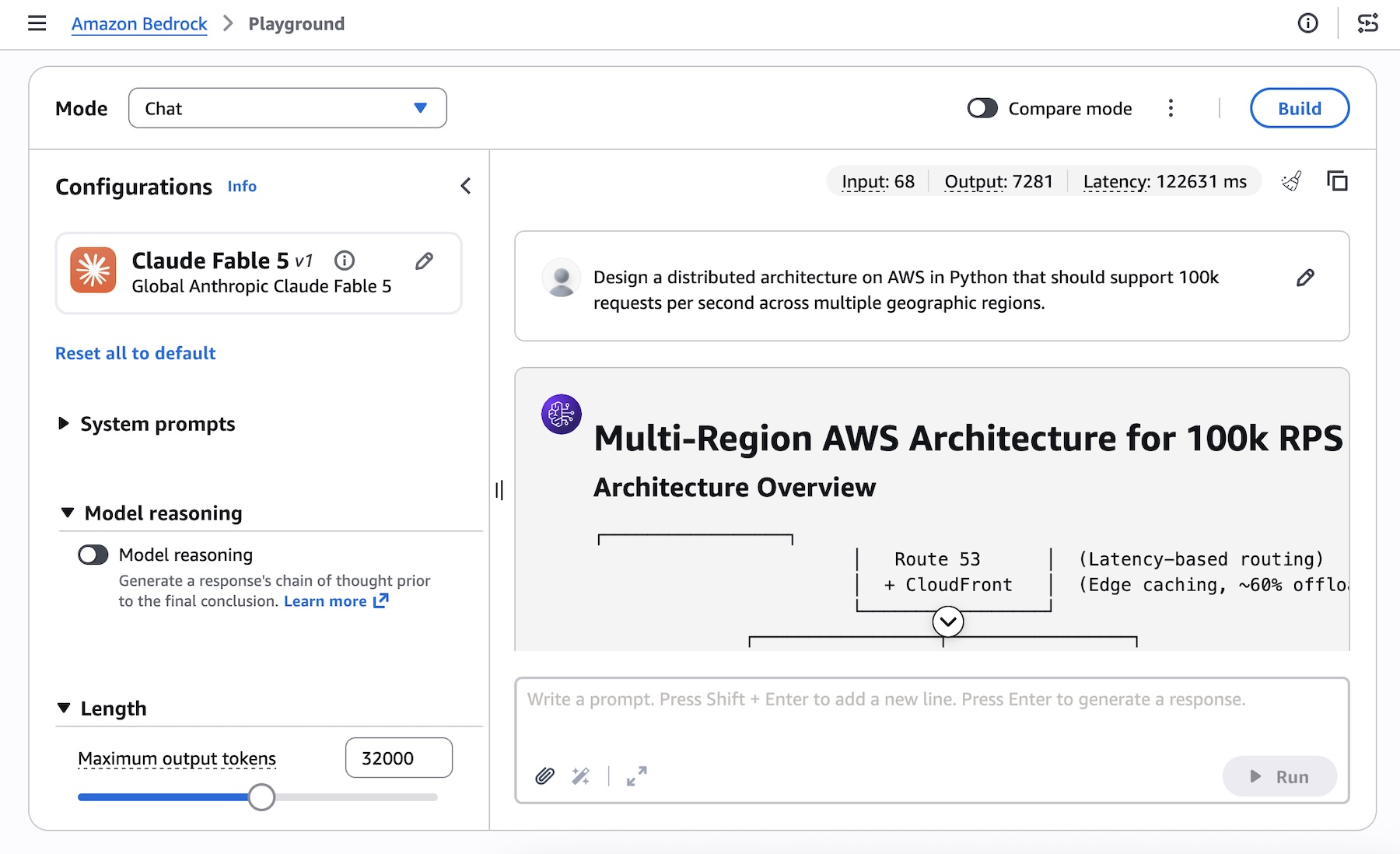
You can use Claude Fable 5 in the Bedrock console. Choose Claude Fable 5 in the Playground and test it.

You can also use Claude Fable 5 with the Invoke API and Converse API on bedrock-runtime endpoint. Here’s an example to call Converse API for a unified multi-model experience using the AWS SDK for Python (Boto3):

import boto3 
bedrock_runtime = boto3.client("bedrock-runtime", region_name="us-east-1") 
response = bedrock_runtime.converse( 
    modelId="global.anthropic.claude-fable-5", 
    messages=[ 
        { 
            "role": "user", 
            "content": [ 
                { 
                    "text": "Design a distributed architecture on AWS in Python that should support 100k requests per second across multiple geographic regions." 
                } 
            ] 
        } 
    ], 
    inferenceConfig={ 
        "maxTokens": 4096 
    } 
) 
print(response["output"]["message"]["content"][0]["text"]) 

To learn more, visit code examples that show how to use Amazon Bedrock Runtime with AWS SDKs.

Things to know
Let me share some important technical details that I think you’ll find useful.

  • Model access: Claude Fable 5 access is gradually expanding for all AWS accounts. If your account doesn’t have access yet, it will be enabled soon depending on your Bedrock usage. If you want to get access to this model quickly, contact your usual AWS Support.
  • Pricing: When a harmful prompt is routed to Opus 4.8 instead of Fable 5, you pay only Opus prices. If a request is blocked mid-conversation, initial tokens are charged at Fable rates and subsequent tokens at Opus rates. To learn more, visit the Amazon Bedrock pricing page.
  • Data retention: For Fable 5, Mythos 5, and future models on Bedrock with similar or higher capability levels, Anthropic will require 30-day retention for all traffic on Mythos-class models. Retaining data for a limited period allows Anthropic to detect patterns of misuse that are not visible from a single exchange. Once you opt into data retention, your data will leave AWS’s data and security boundary.
  • Claude Mythos 5 on Bedrock (Limited Preview): You can also use Anthropic’s most capable model for cybersecurity and life sciences, including vulnerability discovery, drug design, and biodefense screening. Access is currently limited due to the dual-use nature of these domains. To learn more, visit the model card documentation.

Now available
Anthropic’s Claude Fable 5 model is available today on Amazon Bedrock in the US East (N. Virginia) and Europe (Stockholm) Regions; check the full list of Regions for future updates. Claude Fable 5 is also available on the Claude Platform on AWS in North America, South America, Europe, and Asia Pacific.

Give Claude Fable 5 a try with the Amazon Bedrock APIs, in the Claude Platform on AWS, and send feedback to AWS re:Post for Amazon Bedrock or through your usual AWS Support contacts.

— Channy

Editors Note: Updated on June, 12, 2026 – Claude Fable 5 and Claude Mythos 5 on Amazon Bedrock access unavailable. To support compliance with the US Government export control directive, Anthropic has asked AWS to revoke access to Claude Fable 5 and Claude Mythos 5 for all users. All other models, including Opus4.8, are not affected and you can continue using them in full confidence. Please view the Anthropic statement for further details.

Editors Note: Updated on June 10, 2026 – Added how to configure data retention setting through AWS SigV4 and AWS CLI.

Editors Note: Updated on June 9, 2026 – 1) Updated the console screenshot. You can use the console on bedrock-runtime engine. The console support on bedrock-mantle is coming soon. 2) Fixed the right model id in the sample code, 3) Fixed correct provider_data_share parameter, 4) Add a data retention setting script for bedrock-runtime engine.

  •  

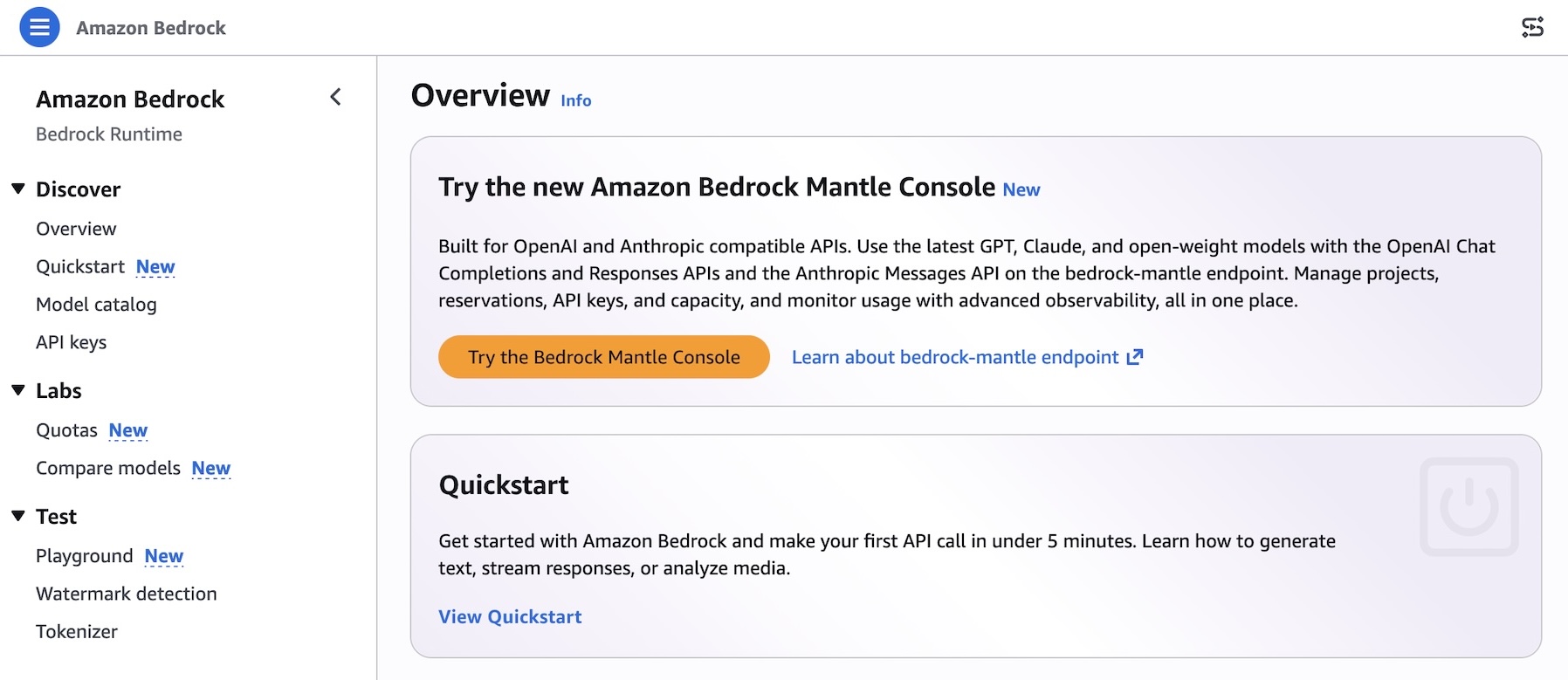
Try the new console experience in Amazon Bedrock, optimized for Anthropic- and OpenAI-compatible APIs

Today, we’re announcing a new console experience in Amazon Bedrock for you to experiment, iterate, and scale with the latest AI models on Amazon Bedrock’s next-generation inference engine built for high performance, reliability, and security. This console has a refreshed workflow optimized for bedrock-mantle endpoint, which supports the latest GPT, Claude, and open-weight models with the OpenAI Responses API, OpenAI Chat Completions API, and the Anthropic Messages API.

The new console experience makes it simple to find the right model and move quickly from evaluation to production.

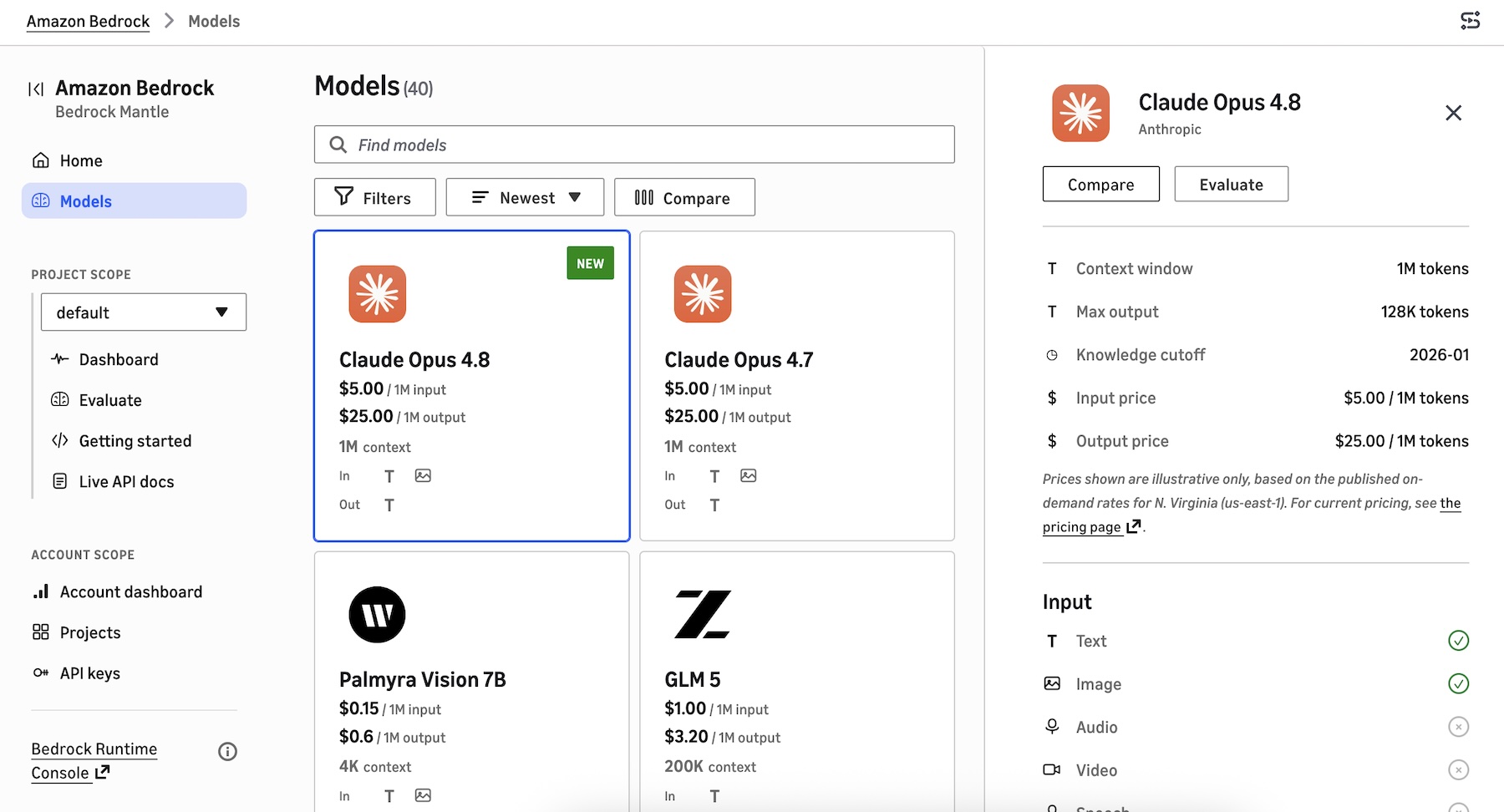
  • New model card: You can browse the full model catalog, compare them side by side on capabilities, modality support, context window, and applicable service quotas in a single view, removing the need to stitch together documentation, and limit calculators.
  • Project-based work: You can make a project to run evaluations and review usage insights in one streamlined workflow that mirrors the lifecycle of building a generative AI application.
  • Live documentation: You can use project-aware live documentation: code samples, SDK snippets, and API references are automatically prefilled with your project variables. You can copy a snippet straight from the console into your application and run it without modification.

How to get started
You can try a new experience by choosing Try the Bedrock Mantle Console from within the Amazon Bedrock console, or by using the new console link directly.

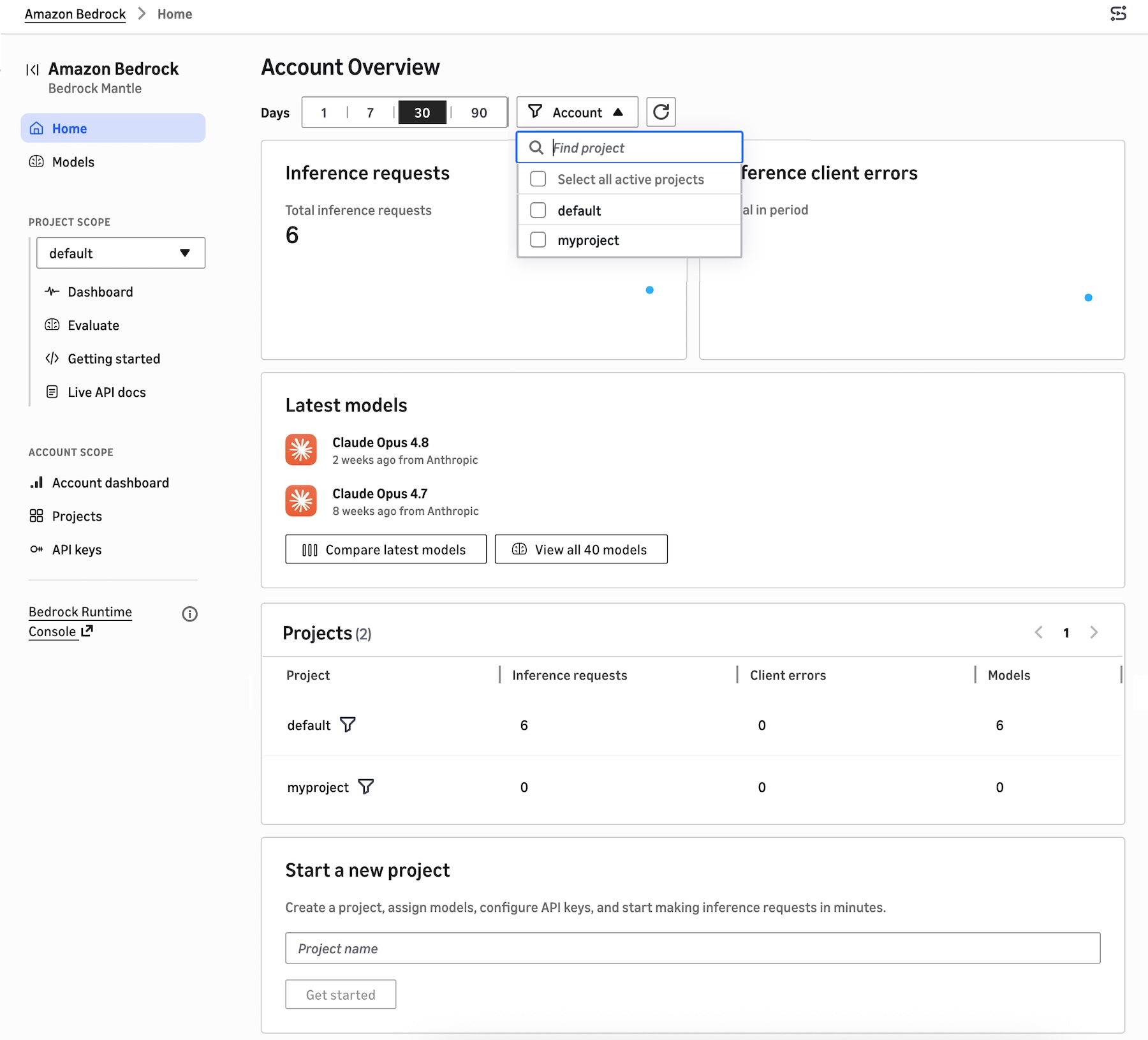
You can find a project-based dashboard to show inference requests and error by range of recent dates, recently used models, and the project list. You can create a project, assign models, configure API keys, and start making inference requests in minutes.

A new model catalog shows the latest GPT, Claude, and open-weight models that are supported on the bedrock-mantle engine. You can see the details of features, tokens, pricing, input/output, pricing information, and Regional availability. You can also compare up to 3 models in a single view.

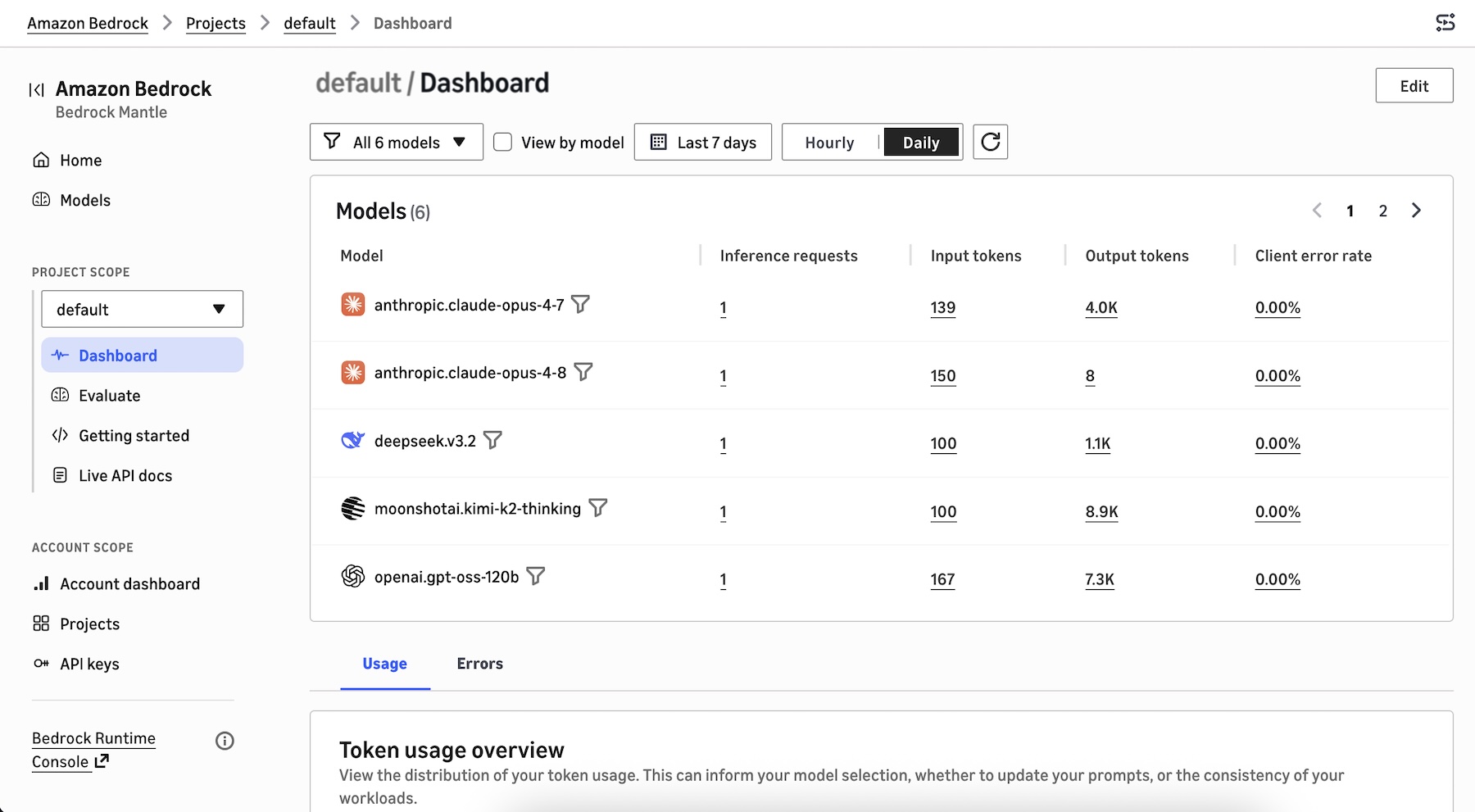
When you choose the project dashboard, you can see the models used in the project, the distribution of your token usage such as total token usage, token usage per minute, inference requests per minute, and tokens per inference request. This can inform your model selection, prompt optimization, and workload consistency decisions.

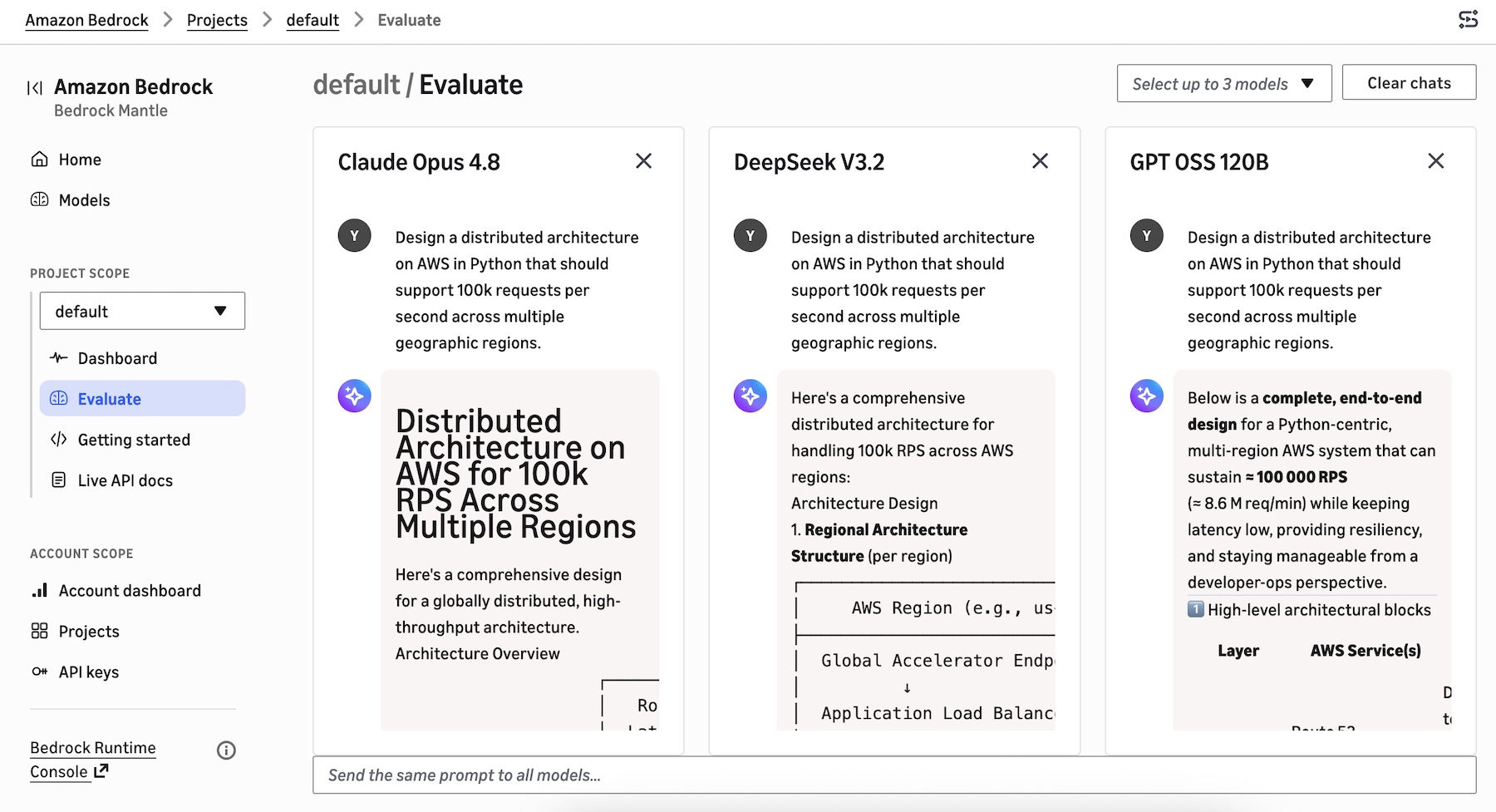
You can select up to 3 models to start evaluating to compare responses side by side with the same prompt.

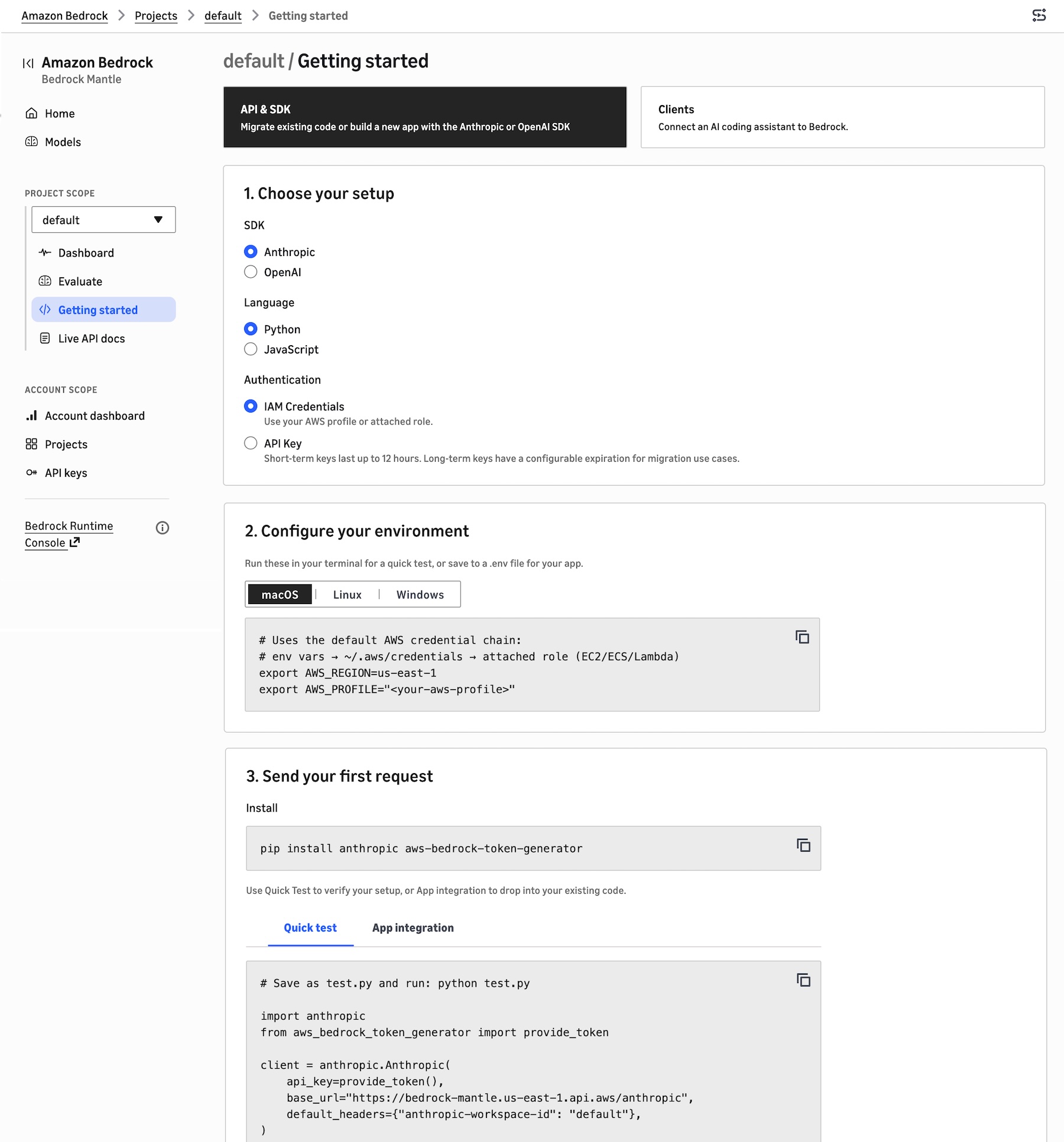
To build your application in the project, choose Getting started. You can migrate existing code, build a new app with the Anthropic or OpenAI SDK, or connect an AI coding assistant to Bedrock.

Choose the API & SDK, your SDK (either Anthropic or OpenAI), your preferred programming language, and your authentication method. It shows your environment code to run these in your terminal for a quick test, or save to a .env file for your application. You can also send your first request with sample code snippets to verify your setup.

When you choose Clients, you can select the AI coding agent source such as Claude Code, Cline, Codex, Cursor, or OpenCode that you want to connect to the bedrock-mantle engine. It provides instructions on how to install the AI agent, use your AWS IAM credentials or use a Bedrock API key, set environment variables, and route requests from each AI agent through Bedrock.

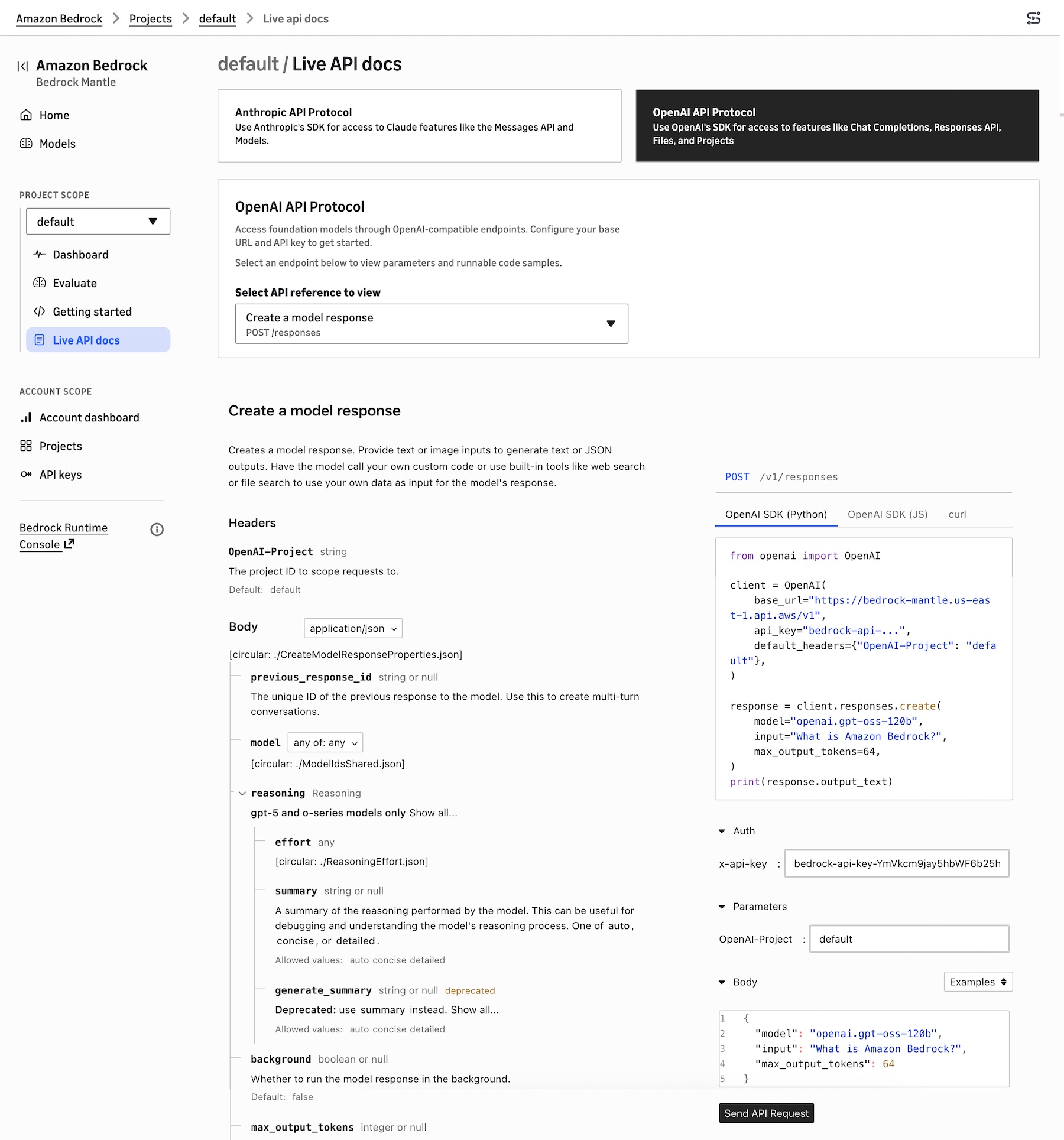
To learn about Anthropic- and OpenAI-compatible APIs, choose Live API docs. You can choose Anthropic API Protocol for access to Claude model features like the Messages API or OpenAI API Protocol for access to features like Responses API.

For example, when you choose OpenAI Response API, it retrieves a model response with the given model ID. These API references are automatically prefilled with the project’s selected model ID, Region, bedrock-mantle endpoint URL, and API key reference, and they update in place as you change models or settings.

You can also choose the existing Bedrock console to manage fully-managed features such as Agents, Knowledge Bases, Guardrails, fine-tuning, or the InvokeModel and Converse APIs to run on the bedrock-runtime endpoint.

Now available
The new console experience is available in all AWS Regions where the bedrock-mantle endpoint is offered: US East (N. Virginia, Ohio), US West (Oregon), Asia Pacific (Jakarta, Mumbai, Sydney, Tokyo), Europe (Frankfurt, Ireland, London, Milan, Stockholm), and South America (São Paulo). Check the full list of Regions for future updates.

Give the new console experience a try in the new Amazon Bedrock console and send feedback to AWS re:Post for Amazon Bedrock or through your usual AWS Support contacts.

— Channy

  •  

Get started with OpenAI GPT-5.5, GPT-5.4 models, and Codex on Amazon Bedrock

As we previewed in What’s Next with AWS 2026, we’re announcing the availability of OpenAI GPT-5.5, GPT-5.4 models, and Codex on Amazon Bedrock, giving you access to frontier models and a coding agent for software development.

According to OpenAI, GPT-5.5 and GPT-5.4 models are excellent for coding, reasoning, agentic workflows, and complex professional work. You can use GPT-5.5 for the hardest customer workloads and GPT-5.4 for the best price-performance. You can call them through Responses API on Amazon Bedrock’s next-generation inference engine built for high performance, reliability, and security.

Codex is the OpenAI coding agent for AI-powered software development. According to OpenAI, more than 4 million developers use Codex every week to write, refactor, debug, test, and validate code across large codebases. With GPT-5.5 powering inference, Codex introduces a new class of intelligence optimized for complex, long-horizon developer workflows. You can use the Codex App, the Codex CLI, and IDE integrations with Visual Studio Code, JetBrains, and Xcode, with all model inference routed through the Responses API on Amazon Bedrock.

For customers with data residency requirements, all processing stays within the Bedrock Region you select. You pay per token with no seat licenses and no per-developer commitments.

GPT-5.5 and GPT-5.4 models on Bedrock in action
You can access the model programmatically using the OpenAI Responses API to call the bedrock-mantle endpoints through the OpenAI SDK, command-line tools such as curl.

Let’s start with OpenAI SDK for Python. Install OpenAI SDK.

pip install -U openai

Set the environment variables for authentication.

export OPENAI_BASE_URL="https://bedrock-mantle.us-east-2.api.aws/openai/v1"
export OPENAI_API_KEY="<BEDROCK_API_KEY>"
export BEDROCK_OPENAI_MODEL_ID="openai.gpt-5.5"

Here is a sample Python code to call GPT-5.5 model on Bedrock:

import os
from openai import OpenAI
 
client = OpenAI(
    base_url=os.environ["OPENAI_BASE_URL"],
    api_key=os.environ["OPENAI_API_KEY"],
)
 
response = client.responses.create(
    model=os.environ["BEDROCK_OPENAI_MODEL_ID"],
    input=[
        {
            "role": "developer",
            "content": "You are a software engineer with excellent AWS cloud knowledge. Be concise and practical.",
        },
        {
            "role": "user",
            "content": "Design a distributed architecture on AWS in Python that should support 100k requests per second across multiple geographic regions.",
        },
    ],
    reasoning={"effort": "medium"},
    text={"verbosity": "low"},
)
 
print(response.output_text)

You can call directly the model endpoint using curl.

curl "$OPENAI_BASE_URL/responses" \
  -H "Content-Type: application/json" \
  -H "Authorization: Bearer $OPENAI_API_KEY" \
  -d '{
    "model": "openai.gpt-5.5",
    "input": [
      {
        "role": "developer",
        "content": "You are a software engineer with excellent AWS cloud knowledge."
      },
      {
        "role": "user",
        "content": "Design a distributed architecture on AWS in Python that should support 100k requests per second across multiple geographic regions."
      }
    ],
    "reasoning": {"effort": "medium"},
    "text": {"verbosity": "low"}
  }'

You can use the Responses API when you want to use model-managed multi-turn state, need hosted tools, function tools, or richer tool orchestration, and run background or long-running work. To learn more, visit the OpenAI Cookbook Responses examples and getting started guide.

Using OpenAI Codex with GPT-5.5 on Amazon Bedrock
You can download Codex CLI, Codex App or Codex VS Code extension and get started with the Bedrock for model inference. Codex supports two Bedrock authentication pathways: Amazon Bedrock API key or AWS SDK credential chain. If you set AWS_BEARER_TOKEN_BEDROCK, Codex uses it first; otherwise Codex falls back to AWS SDK credential chain.

Set AWS_BEARER_TOKEN_BEDROCK in the environment that Codex will read:

export AWS_BEARER_TOKEN_BEDROCK=<your-bedrock-api-key>

Then, configure your preferred Region and set the model ID to openai.gpt-5.5 in ~/.codex/config.toml, which is required for Bedrock API-key authentication. You can also choose openai.gpt-5.4, openai.gpt-oss-120b, or openai.gpt-oss-20b. For the desktop app or VS Code extension, put any environment variables the app needs in ~/.codex/.env.

model = "openai.gpt-5.5"
model_provider = "amazon-bedrock"
[model_providers.amazon-bedrock.aws]
region = "us-east-2"

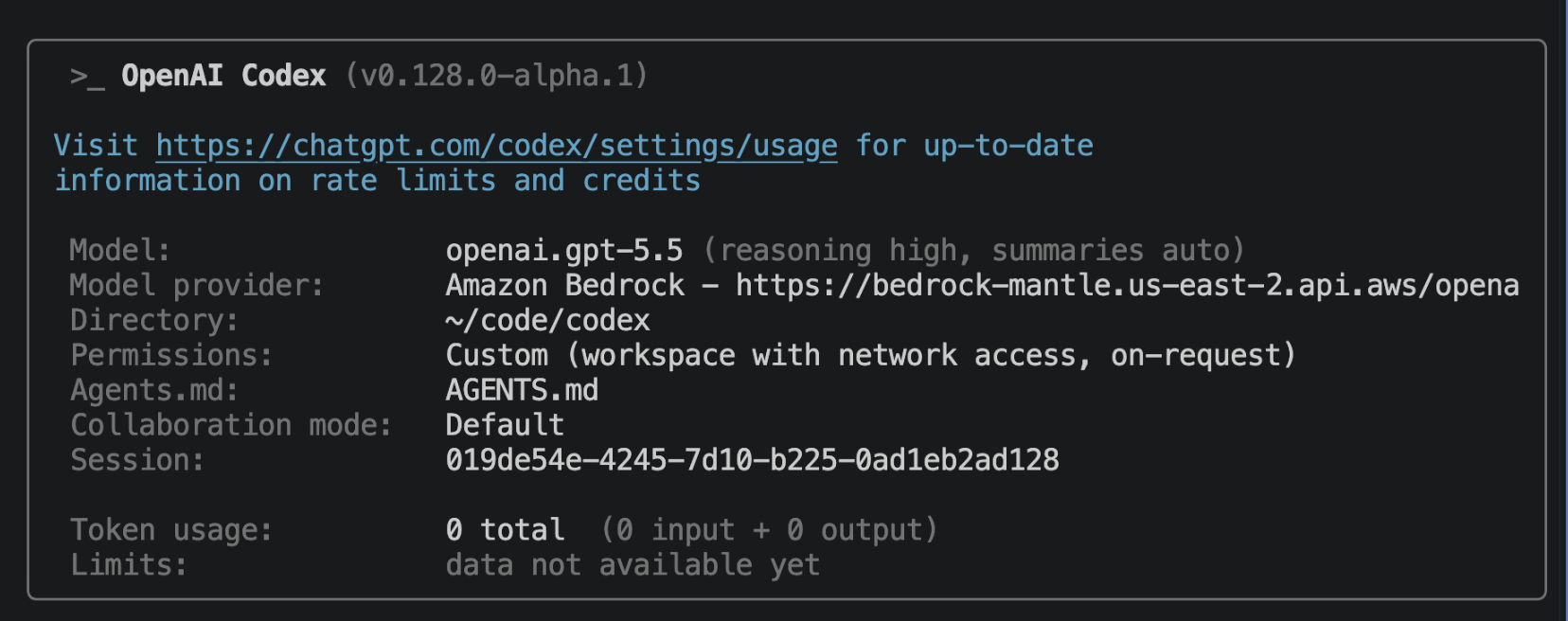
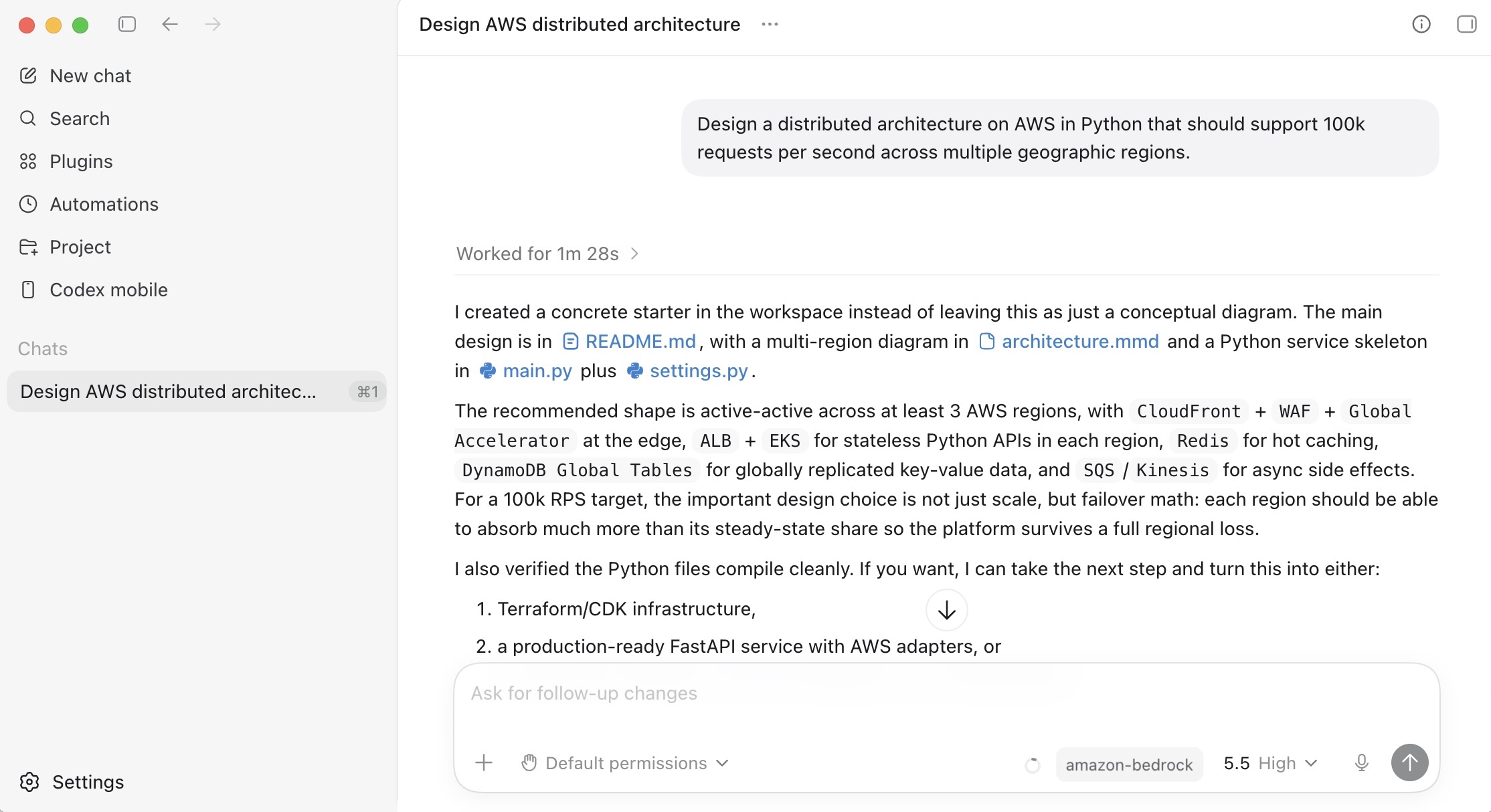
Restart the desktop app or VS Code extension after changing ~/.codex/config.toml or ~/.codex/.env. In Codex CLI, you should see a /status tab that looks like this:

In Codex App, you can use GPT-5.5 model through Amazon Bedrock inference.

To learn more about how to configure Codex to use OpenAI models on Amazon Bedrock, visit Use Codex with Amazon Bedrock.

Things to know
Let me share some important technical details that I think you’ll find useful.

  • Model latency: OpenAI model information positions GPT-5.5 as fast and GPT-5.4 as medium speed, but customer-perceived latency depends on reasoning effort, output length, tool calls, background mode, Region, quotas, throttling, prompt size, and cache hits. Start GPT-5.5 at medium effort. Start GPT-5.4 with effort set explicitly rather than relying on its none default.
  • Scaling and capacity: Bedrock’s new inference engine is designed to rapidly provision and serve capacity across many different models. When accepting requests, we prioritize keeping steady state workloads running, and ramp usage and capacity rapidly in response to changes in demand. During periods of high demand, requests are queued, rather than rejected.

Now available
OpenAI GPT models and Codex on Amazon Bedrock are available today: GPT-5.5 model in the US East (Ohio) Region, GPT-5.4 model in the US East (Ohio) and US West (Oregon) Regions. Check the full list of Regions for future updates. To learn more, visit the OpenAI on Amazon Bedrock page and the Amazon Bedrock pricing page.

Give GPT-5.5, GPT-5.4 models, and Codex on Amazon Bedrock a try today and send feedback to AWS re:Post for Amazon Bedrock or through your usual AWS Support contacts.

— Channy

Updated on June, 1, 2026 – The GPT 5.5 and 5.4 models now support the Responses API only on Amazon Bedrock, and console support is coming soon.

Updated on June, 3, 2026 – Amazon Bedrock now supports GPT‑5.4 from OpenAI in AWS GovCloud (US-West) Region.

Updated on June, 7, 2026 – You can use the GPT 5.5 and 5.4 models in the new Amazon Bedrock console.

  •