❌

Vue lecture

What’s new with Google Data Cloud

September 7 - September 10

  • Pub/Sub SMTs can now AI Inference your Gemini Enterprise Agent Platform models!
    Pub/Sub AI Inference SMTs allow you to apply inference on an incoming stream of events using models hosted in Gemini Enterprise Agent Platform. The model’s prediction is appended to your event, making it available for downstream processing in your data warehouse (like BigQuery) or operational database (like BigTable). This feature, now generally available, can dramatically simplify or enhance anomaly detection systems you are operating. 

  • PostgreSQL Source Connector is now generally available in Managed Service for Apache Kafka!
    Managed Service for Apache Kafka’s PostgreSQL connector allows customers to capture changes from their PostgreSQL database and ingest them into their Kafka infrastructure with low latency. This source connector is compatible with Cloud SQL for Postgres, AlloyDB, and self-managed PostgreSQL databases. Try this along with our entire portfolio of managed connectors, including MirrorMaker 2.0, BigQuery, Cloud Storage, and Pub/Sub! E-mail kafka-hotline@google.com if you have questions or feedback!
  • Pause-on-failure for Dataflow batch jobs is GA
    Dataflow pause-on-failure enables you to preserve the state of a batch Dataflow job before it fails. By pausing your Dataflow job, you can address issues that are external to the pipeline and resume processing without losing completed work. This helps you better manage resource costs and improve job reliability when you face temporary outages or capacity constraints.

  • The insertAll API is now the BigQuery Storage Write API (REST)
    The legacy insertAll streaming API is now rebranded as the BigQuery Storage Write API (REST). By dropping the "legacy" label, developers can confidently build long-term HTTP-based streaming workflows. This stateless JSON-over-HTTPS endpoint offers a lightweight alternative to heavy gRPC libraries—ideal for serverless web apps, IoT telemetry, and AI logging. The transition is seamless for existing users, requiring zero code changes and offering 100% backward compatibility. However, the Storage Write API (gRPC) version remains the recommended standard for high-throughput, continuous pipelines.

August 31 - September 4

  • Stateful processing is available in BigQuery continuous queries in Preview
    Stateful operations significantly expand what’s possible with BigQuery continuous queries. This feature allows users to leverage functions like JOINs, aggregations, and windowing functions directly in their streaming queries. Now you can calculate metrics over time (for example, a 30-minute average) to power your downstream applications and AI agents with much richer, real-time signals.

    Try out our feature here and share your feedback with bq-continuous-queries-feedback@google.com!
  • Synthetic data generator tool is available for Managed Service for Kafka
    You’ve launched your first Kafka cluster. Now what? The next thing to do is to produce some data to the cluster, but that involves modifying a client application somewhere or spinning up a virtual machine. The synthetic data generator tool, now generally available, can start sending mock data to your cluster in 3 clicks, and will get data streaming into your cluster in less than two minutes. The perfect utility for those moments you just want to test your cluster and new features. Try our quickstart today!

  • Dataflow pipeline updates are faster & more flexible
    Dataflow pipeline updates can now stop-and-replace pipelines, a major addition to the existing in-place-update feature. The new parallel pipeline option accelerates the migration between the old & new pipeline, resulting in reduced disruption to your business. You can also set a timeout on drains that prevents runaway costs for your pipeliness in the event of stuck processing. This feature is generally available. Try it here!

July 6 - July 10

  • New Lakehouse managed tables now in preview
    Lakehouse tables for Apache Iceberg are now in preview and available in the console. By using Google-managed Apache Iceberg tables in Lakehouse, you can eliminate the overhead of maintaining duplicate data pipelines and complex synchronization logic between BigQuery and open-source engines. This unified table format delivers native, multi-engine read and write interoperability, allowing you to run concurrent DML/DDL operations across diverse analytics tools on a single, shared storage layer.  Built-in automated table management handles painful background optimization tasks like compaction and partition tuning, freeing up your team to focus on building rather than managing storage maintenance.

June 1 - June 5

  • Beyond the Query: Powering AI Agents with Bigtable, Firestore & Memorystore
    Discover the latest advancements in Google Cloud's NoSQL Database portfolio, including Bigtable, Firestore, and Memorystore. This series is designed for a broad audience: whether you are exploring these databases for the first time or are an existing user looking to leverage the new capabilities announced at Next '26.

    Register here to secure your spot!

  • Cloud Engineer's AI Toolkit Workshops: Solve data-driven challenges with BigQuery, AlloyDB, Gemini and more. Hosted by Google Cloud Labs, this highly technical event is built specifically for Platform Engineers, SREs, and cloud infrastructure teams ready to bridge the gap between AI prototypes and production-grade deployments. Look out for more locations coming soon

    Toronto - June 25 (Data Cloud) | RSVP Here
    Chicago - June 30 (Data Cloud) | RSVP Here

  • Start a 10-day Bigtable free trial with a 1 node SSD cluster and up to 500GB of storage capacity. With no credit card required to start, you can easily ingest workloads and manage workloads that require low-latency, high-throughput, and predictable access. Plus, new Google Cloud customers get $300 in free credits on signup.

May 11 - May 15

  • Managed Service for Apache Airflow has launched a wave of new features, including the general availability of Airflow 3.1, AI-powered agentic troubleshooting, a new managed Airflow MCP Server for custom agent integration, and declarative YAML-based orchestration pipelines—discover all the details in the full blog post.

April 20 - April 24

  • Google-built ODBC Driver for BigQuery is now available in Preview
    We are excited to announce the launch of the new, Google-built ODBC driver for BigQuery. This new open-source driver provides a direct, high-performance connection for applications to BigQuery and is developed entirely in-house by Google. Download a new driver and connect your application to BigQuery.

April 13 - April 17

  • We announced we are reintroducing Data Studio to play a significant role in the AI era, expanding from data visualizations and reports to host BigQuery conversational agents and data apps built in Colab notebooks.
  • We announced BigQuery Graph is now available in preview, offering an easy-to-use, highly scalable graph analytics solution, empowering data professionals to model, analyze and visualize massive-scale relationships in an entirely new way.

April 6 - April 10

March 23 - March 27

  • We showed you how you can scale your reads with Cloud SQL autoscaling read pools. This feature allows you to provision multiple read replicas that are accessible via a single read endpoint and to dynamically adjust your read capability based on real-time application needs. 
  • Our customers are leveraging the full power of Conversational Analytics and Looker to drive major business and technical breakthroughs in the AI era. Companies like Telenor, Pet Circle, Fluent Commerce, Lighthouse Intelligence, Wego, and ROLLER are turning data into insights and actions, grounded by Looker’s semantic layer.

March 16 - March 20

February 23 - February 27

February 16 - February 20

  • Our customers are leveraging the full power of Looker to drive major business and technical breakthroughs. Companies like Arrive, Audika, Carousell, Framebridge, GumGum, Intel, Overdose Digital, Ocean Network Express, Subskribe and Promevo are leveraging Looker’s newest AI-driven capabilities, including Conversational Analytics, to transform data to insights and actions, and empower their entire organization with a single source of truth, powered by Looker’s semantic layer.

February 2 - February 6

  • Join us on March 4 for our webinar, Win Your AI Strategy with Cloud SQL Enterprise Plus, to learn how to power your generative AI workloads with 3x higher performance and 99.99% availability. Register today to discover how to build a scalable, enterprise-grade foundation for your most demanding AI applications.

January 26 - January 30

January 19 - January 23

  • We have fundamentally reimagined Firestore with pipeline operations for Enterprise edition. Experience a powerful new engine featuring over a hundred new query features, index-less queries, new index types, and observability tooling to improve query performance. Seamlessly migrate using built-in tools and leverage Firestore’s existing differentiated serverless foundation, virtually unlimited scale, and industry-leading SLA. Join a community of 600K developers to craft expressive applications that maximize the benefits of rich queryability, real-time listen queries, robust offline caching, and cutting-edge AI-assistive coding integrations.

  • Introducing Google Cloud SQL on MSSQLTips: We are highlighting a new technical guide published on MSSQLTips titled "Introducing Google Cloud SQL." This article serves as an essential resource for SQL Server administrators and developers exploring Google Cloud's fully managed database service. It provides a detailed overview of Cloud SQL capabilities, including high availability, security integration, and the seamless transition of on-premises SQL Server workloads to the cloud, making it an ideal resource for those planning their migration strategy.

  • We are excited to announce the Public Preview of Microsoft Entra ID (formerly Azure Active Directory) integration with Cloud SQL for SQL Server. Designed to tackle the challenge of identity sprawl in multi-cloud environments, this integration allows organizations to govern database access using their existing Microsoft identity infrastructure. Key benefits include centralized identity management, enhanced security features like Multi-Factor Authentication (MFA), and simplified user administration through direct group mapping. This feature is available for SQL Server 2022 and supports both public and private IP configurations.

January 12 - January 16

  • Google-built JDBC Driver for BigQuery is now available in Preview
    We are excited to announce the launch of the new, Google-built JDBC driver for BigQuery. This new open-source driver provides a direct, high-performance connection for Java applications to BigQuery and is developed entirely in-house by Google. Download a new driver and connect your Java application to BigQuery.
  • Troubleshoot Airflow tasks instantly with Gemini Cloud Assist investigations: Cloud Composer just got smarter. We are excited to announce that Gemini Cloud Assist investigations are now available directly within Cloud Composer 3. Instead of manually sifting through raw logs, you can now simply click "Investigate" on a failed Airflow task. Gemini analyzes logs and task metadata to identify failure patterns—such as resource exhaustion or timeouts—and provides actionable recommendations driven by Gemini Cloud Assist to resolve the issue. This integration shifts the debugging experience from manual toil to automated root cause analysis, significantly reducing the time required to restore your pipelines. Learn more about AI-assisted troubleshooting.
  •  

Looker’s semantic layer governs Gemini Enterprise data for user trust

For organizations deploying AI agents at scale, there’s often a critical divide between structured and unstructured data. While large language models (LLMs) excel at parsing text documents, emails, and PDFs, they can struggle when presented with raw enterprise databases. Meanwhile, standard natural-language-to-SQL (NL2SQL) models often guess how database schemas fit together, which can lead to unpredictable queries, inconsistent metrics, and AI hallucinations that erode user trust. 

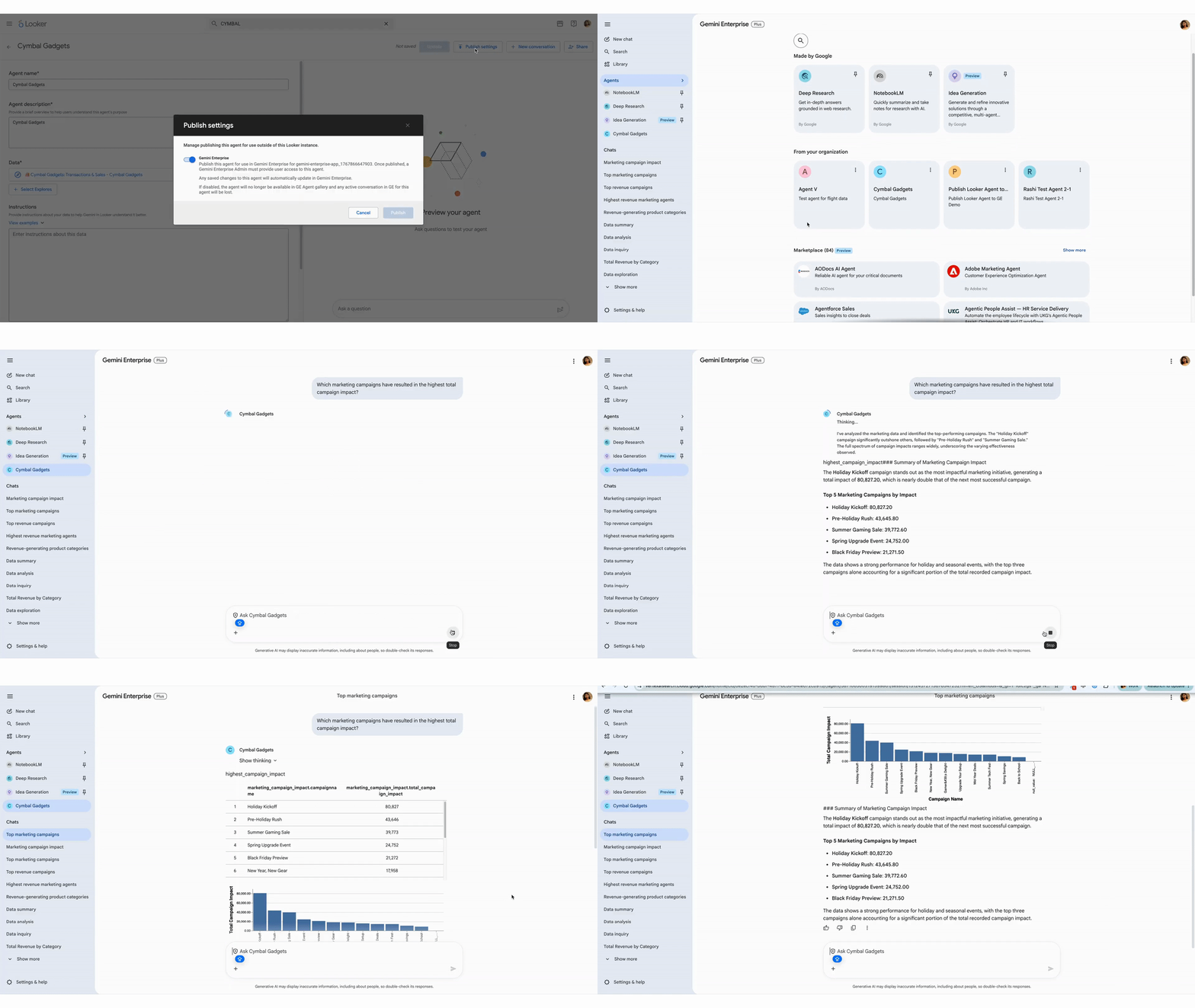
Gemini Enterprise brings the best of Google AI to every employee through an intuitive chat interface that acts as a single front door for AI in the workplace. And now, Looker’s governed semantic layer serves as the trusted foundation for structured data within Gemini Enterprise, enabling trusted self-service business intelligence for all Gemini Enterprise users. With this integration, Looker analysts and admins can publish conversational agents natively into their Gemini Enterprise environments via the Agent-to-Agent (A2A) protocol. Now, organizations can provide their AI-accelerated taskforce with robust and trusted tools, powered by real-time analytics, that they can explore in natural language in addition to their daily workspace workflows. Making it easy to offer conversational agents in Gemini Enterprise expands discoverability and promotes a data-driven culture, while reducing friction to adoption.

Bringing a semantic foundation to structured and unstructured data

By combining Looker’s semantic layer with Gemini Enterprise, you can query both structured databases and unstructured documents in plain English, all in one place. Instead of jumping between dashboards and other tools to understand your numbers, teams can instantly connect hard metrics with real-world context to solve problems and make decisions faster.

1

Publishing Looker agents for consumption in Gemini Enterprise

Minimize AI hallucinations

If you ask the typical AI chatbot to calculate "revenue" or "churn rate" against an unstructured cloud database, it has to guess which tables to join, which filters to apply, and which timestamps to trust. This can result in different people asking the same question, only to get completely different answers.

Looker’s semantic layer eliminates this guesswork, serving critical context to Gemini Enterprise in the form of codified data, allowing the agent to give deterministic, predictable responses.

code_block
<ListValue: [StructValue([('code', '[ Gemini Enterprise Chat UI ] \r\n │\r\n (A2A Protocol / NLP)\r\n ▼\r\n [ Looker Governed Agent ] ──► Generates Deterministic SQL\r\n │\r\n [ Looker Semantic Layer ] ──► Business-Approved Definitions & Logic\r\n │\r\n ▼\r\n [ Enterprise Data Cloud ] ──► (BigQuery, AlloyDB, Spanner, etc.)'), ('language', ''), ('caption', <wagtail.rich_text.RichText object at 0x7ff259095010>)])]>

When a Gemini Enterprise user requests a business KPI in Gemini Enterprise, the request is routed directly to a Looker agent. The semantic layer generates deterministic, precise SQL based on version-controlled business logic. This helps ensure when an executive asks for "Revenue," they get the exact, governed enterprise metric — not a guess.

Robust governance and secure access management

Data governance and security are critical when introducing AI to enterprise data warehouses. Organizations can’t risk corporate information being loosely ingested, indexed, or exposed outside of strict permissions.

Looker’s integration with Gemini Enterprise is built on a zero-risk pass-through architecture, processing the data, but not writing to persistent storage. Gemini Enterprise does not ingest, replicate, or store your underlying database records. Instead, the integration operates safely and securely over the A2A protocol, following these core tenets:

  • OAuth authorization: In order to interact with a Looker agent within Gemini Enterprise, end users provide a secure, one-time OAuth consent. This binds their Gemini session to their specific Looker credentials.

  • Strong governance enforcement: Because the architecture relies on live pass-through queries, Looker’s existing row-level and column-level access controls are maintained.

  • Strict security isolation: If a user does not have permission to view, say, sensitive regional payroll or financial rows within the Looker platform, the Looker agent actively restricts that data in the Gemini environment. Should an agent be published to the Agent Gallery to simplify discovery, it still does not bypass the security controls that you established.

Technical capabilities and enterprise readiness

Deploying Looker agents natively into Gemini Enterprise via the A2A protocol doesn't just make it smarter — it makes it more interactive and interoperable, without sacrificing security. Here are some of the features you’ll find in this release.

Rich visual interactivity: support for charts

They say a picture is worth a thousand words. When users interact with Looker agents inside Gemini Enterprise, the platform goes beyond textual explanations and provides native, interactive data charts. If a user asks for a visual trend—such as monthly sales performance or regional distribution—the Looker agent maps the database response with rich, presentation-ready visualizations directly inside the universal chat box.

Note: If you published Looker agents in Gemini Enterprise prior to Looker release 26.12, we recommend updating or refreshing them to take advantage of these enhanced visualization capabilities.

Interoperability with first- and third-party agents

Looker agents published to Gemini Enterprise can understand context across different agents and data sources. Leveraging standard communication frameworks, these agents can securely share structured, governed insights with other first-party Google Cloud agents like the Deep Research Agent or external third-party agents to create structured workflows. This enables complex multi-agent orchestration, where an enterprise operational agent can pull data from a Looker agent to feed into a separate productivity or supply-chain workflow.

Looker-based user authentication

To preserve enterprise governance, this integration implements a robust, identity-centric authentication model. Users are required to provide a one-time OAuth consent, binding their active Gemini Enterprise session securely to their underlying Looker credentials. This helps ensure that every conversational query hitting your databases is authenticated at the user level, enforcing pre-existing Looker permission structures, row-level data access filters, and column-level masking rules — no exceptions.

Trusted data in Gemini Enterprise

The future of work is agentic. Gemini Enterprise provides a single, secure architecture to deploy a global digital task force,empowering your business with the best of Google AI for developers, employees, and customers.

The integration of Looker with Gemini Enterprise not only brings trusted data analytics to business users but also adds rich interactivity, visual charts, and data storytelling directly into their everyday workspace. As business users embrace this agentic new way of working, they aren't just getting text answers; they are getting presentation-ready visualizations that bring operational metrics to life and deliver complex insights. 

To get started, learn how to publish your data agents in Gemini Enterprise to make your agent’s predefined context and analytics available to your entire organization.

  •  

Automate data monitoring and root-cause analysis with Looker Agentic Workflows

Traditional business intelligence alerts can only tell you that a metric changed, leaving data analysts to manually hunt through dashboards to figure out why. Today, we are introducing Looker Agentic Workflows in preview, a new capability in Looker that automates both metric monitoring and root-cause analysis, using intelligent background agents.

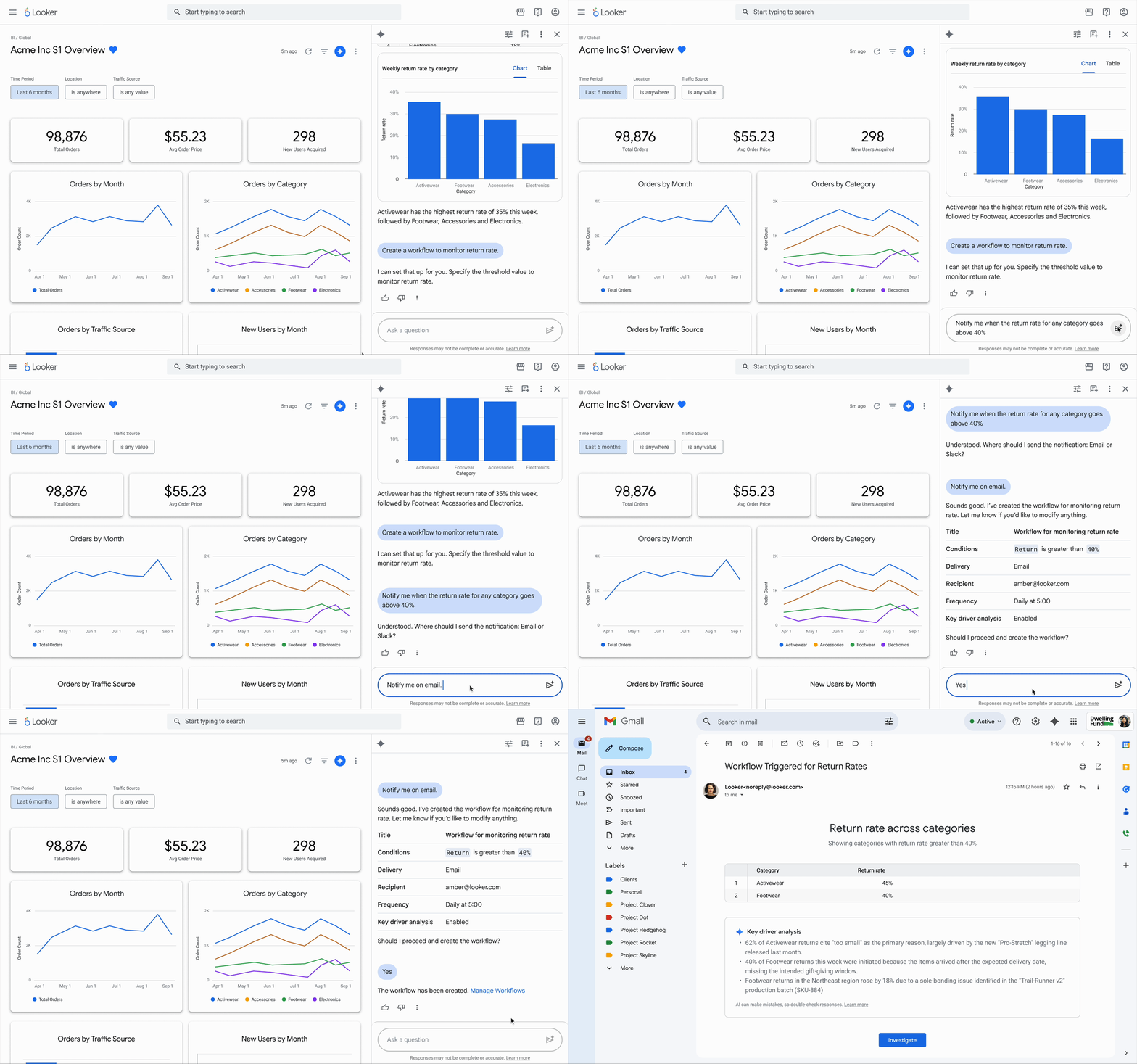
With Conversational Analytics in Looker, teams can already query business data using natural language. Looker Agentic Workflows turns those ad-hoc questions into continuous, automated monitoring routines directly from the chat interface. You can set up an automation simply by prompting the agent, such as asking to "Monitor return rates weekly" or "Notify me if average order value exceeds $1,000." The agent interprets your intent, confirms specific threshold conditions, and generates a workflow configuration plan for you to review before launching the monitor.

image1

Review the workflow plan generated inside the conversational analytics pane

Deliver root-cause analysis in Slack and email

When a metric crosses your defined threshold, the background agent does more than send a basic notification. It can automatically run a Key Driver Analysis (KDA) across the underlying data model to isolate specific factors driving the change, such as product categories or customer cohorts. The complete diagnostic summary is delivered directly into your team's workspace via Slack or email, eliminating the need for manual data hunting or analyst support tickets.

image2

Automated root-cause analysis delivered with the metric change notification.

Investigate deeper with central oversight

Every notification includes a direct link back into Conversational Analytics in Looker. Clicking the link opens an interactive session pre-loaded with the agent's diagnostic findings, allowing you to ask follow-up questions and test hypotheses immediately. Balancing user flexibility with enterprise governance, Looker provides a centralized workflow management interface. Business users can view and edit their own active monitors, while Looker administrators retain full oversight to review, adjust, or disable workflows across the entire instance.

image3

Central pane to review, edit, and manage workflows

Get started with Looker Agentic Workflows

Looker Agentic Workflows is available in preview for Looker version 26.08 and later. Administrators can activate the feature by opening the Gemini in Looker settings page and enabling the Agentic Workflows preview toggle. Once enabled, users with chat_with_agent and create_alerts permissions can build workflows immediately. Review the Looker documentation to configure your first workflow.

  •  

Bringing Conversational Analytics to your entire data ecosystem

Increasing the adoption of generative AI across the enterprise requires you to do more than deploy a generic chatbot with a custom wrapper. Interacting with business-critical databases demands absolute trust, strict governance, and deep grounding in enterprise semantics.

Over the last year, Conversational Analytics (CA) in Google Cloud has moved from isolated experiments to scaled, enterprise-wide deployments. BigQuery Conversational Analytics and the Conversational Analytics API are now generally available, adding to the general availability of Conversational Analytics in Looker last year. Building on this momentum, Conversational Analytics in Databases are also available in Preview. And so much more has happened — Google Cloud Conversational Analytics is available for more data, across more surfaces, with more enterprise controls, and greater capability than ever before.

Let’s take a deeper look at the state of Conversational Analytics in the Google Data Cloud — what you can do with it, the benefits that it brings, and how to get started with it today. 

Query across multi-cloud and database workloads

Conversational Analytics is now generally available for BigQuery and Looker, and in preview for AlloyDB, Cloud SQL, and Spanner. You can also analyze data stored in Lakehouse Managed Service tables, Apache Iceberg REST catalogs, and federated AWS S3 Unity Catalogs. Whether your data resides exclusively in Google Cloud or across multiple cloud providers, your agents can query it natively.

For data practitioners, Conversational Analytics is integrated directly into BigQuery Studio, BigQuery Data Canvas, Database Studio and Data Agent Kit. For business teams, these conversational capabilities extend directly into Looker, Data Studio, and Gemini Enterprise. Data teams can publish Conversational Analytics agents created in BigQuery, Looker, AlloyDB, Spanner, and Cloud SQL directly into Gemini Enterprise, giving business leaders a centralized interface to query complex data safely.

Our APIs and MCP tools let you embed Conversational Analytics wherever your business users work, like custom applications and multi-agent systems, or as slack chatbot that can answer questions across data sources, as we showed at Google Cloud Next.

Enterprise security and governance controlsScaling generative AI to tens of thousands of users requires ironclad governance and transparent cost controls. Conversational Analytics includes Customer Managed Encryption Keys (CMEK), Private IP, and Virtual Private Cloud (VPC) controls.

We guarantee Data Residency (DRZ) at rest and machine learning processing inside multi-region endpoints within the European Union and the United States, along with HIPAA compliance. For data access, role-based controls, including parameterized secure views in AlloyDB for PostgreSQL, help ensure users chatting with an agent only see data they are authorized to view, enforced down to row- and column-level permissions.

1

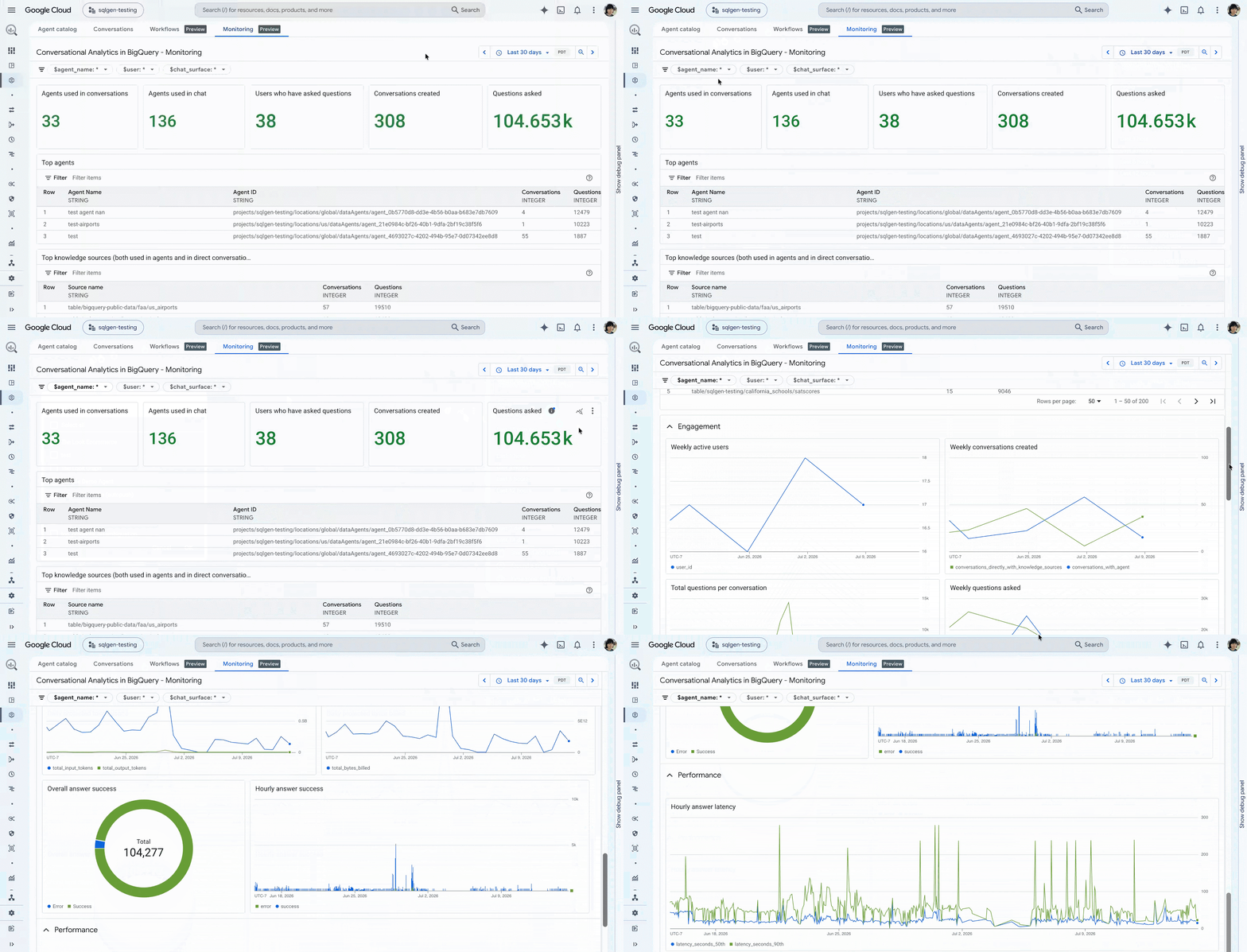
Monitoring Conversational Analytics in BigQuery to track agent fleet health, active users, query volumes, and top knowledge sources.

As usage grows, administrators need tools to manage costs, observe system health, and improve accuracy. You can configure native cost controls to define limits on maximum query sizes in bytes, and track usage through BigQuery query labels and Looker system activity logs.

To maintain fleet visibility, agents can also export health, tool usage, latency, and token consumption metrics via OpenTelemetry (OTEL) standards. Integrated feedback loops allow administrators to review agent traces and user feedback, establishing a foundation for continuous evaluation and accuracy improvements over time.

Grounded context through agent and data co-designWrapping a generic LLM around an enterprise database can sometimes lead to hallucinated logic. To minimize this, we co-designed Conversational Analytics agents alongside the data platforms they query.

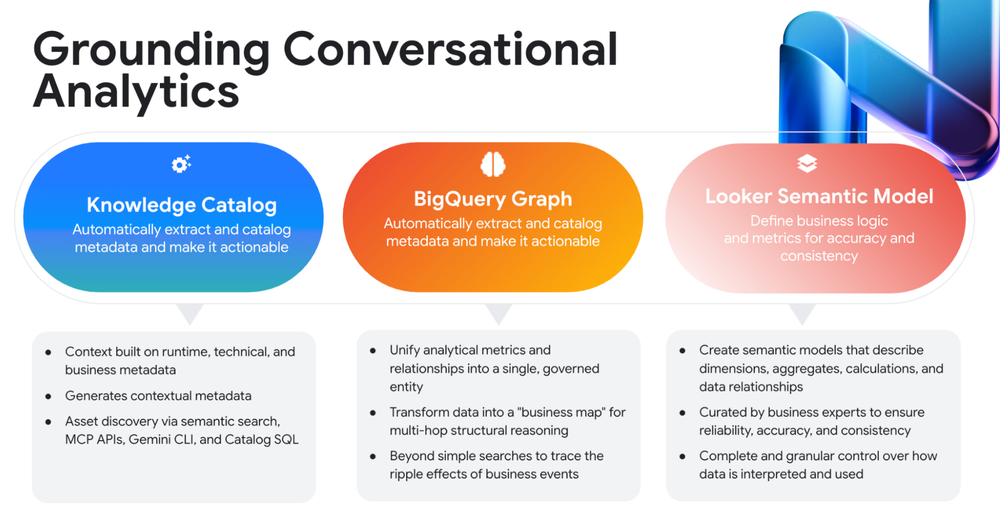
For instance, agents leverage Knowledge Catalog for data discovery, glossaries, and automated context enrichment like table joins and descriptions. BigQuery Graphs and Spanner Graphs allow agents to query structured and unstructured data across multi-hop relationships. Additionally, Looker’s semantic layer (LookML) grounds agent responses in centrally governed metric definitions, helping ensure answers remain deterministic rather than relying on guessed SQL joins.

2

Grounding Conversational Analytics across Knowledge Catalog, BigQuery Graph, and Looker’s semantic model helps ensure deterministic, enterprise-governed responses.

Conversational Analytics agents are also co-designed with the data they query. This means their tools are context-aware, to have the best understanding of the metadata. They also benefit from built-in capabilities like multimodal data querying using BigQuery object tables, operating over multimodal data with ai.search, ai.generate_embedding, ai.classify, ai.score and using ai.forecast and ai.detect_anomalies to use the TimesFM foundation for forecasting and anomaly detection.Additionally, ai.key_drivers performs automated contribution analysis to pinpoint exactly what is driving unexpected changes in your data. When integrated with Looker, these agents leverage the semantic layer to ground their responses in centrally governed, deterministic metrics. To avoid AI hallucinations, this API-first approach (using 'Golden Queries') ensures agents retrieve verified business logic rather than guessing at SQL joins. Looker additionally equips the agents to seamlessly navigate high-cardinality datasets with dynamic filtering, automatically enforce row-level security during the chat experience, and surface context-aware suggested questions.

Proactive insights with Agentic Workflows

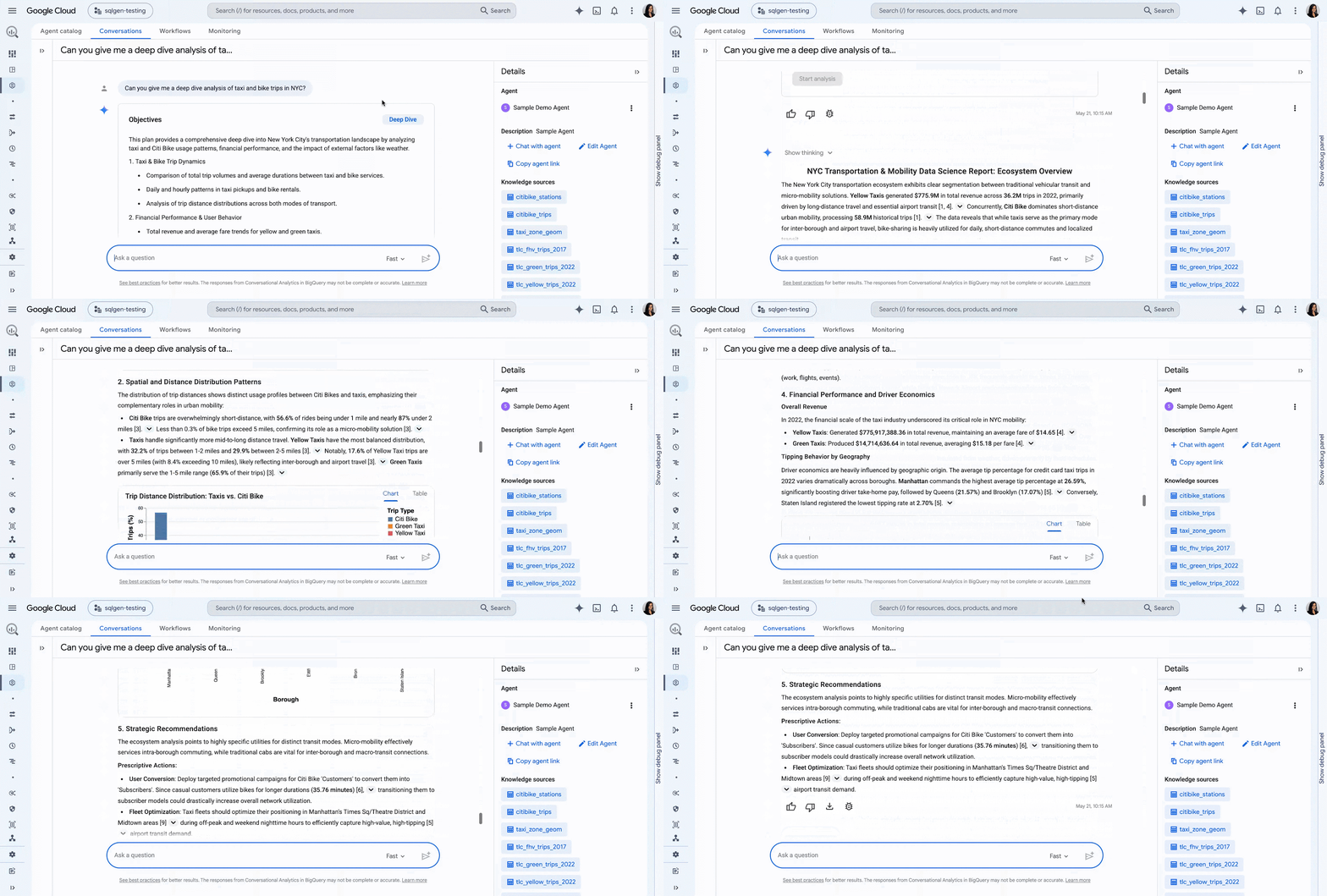
Analytics is moving beyond reactive question-answering toward proactive intelligence. That is, instead of requiring users to ask the right question at the right time, Conversational Analytics agents can run multidimensional deep dives to analyze 10 to 20 contributing factors behind a change in a metric.

With Agentic Workflows, now in preview, you can schedule automated reporting routines delivered directly into your chat workflow. Agents continuously run anomaly detection across key metrics, sending daily or weekly summaries straight to your team. Streaming anomaly detection can also launch an agent automatically the moment a key metric deviates from baseline thresholds.

3

Running a multi-step deep dive in Conversational Analytics to automatically investigate complex data relationships across enterprise datasets.

Flexible integration with APIs, SDKs, and MCP

Conversational Analytics is available to developers and business users in their existing environments. The Conversational Analytics API includes native SDKs for Node.js, Java, Go, Python, PHP, Ruby, and .NET and keeps insights where the work happens. We are expanding how and where people use Conversational Analytics, starting with Looker Dashboards and Data Studio, as well as supporting publishing agents to Gemini Enterprise.

You can also add Conversational Analytics to other multi-agent systems. Using the Agent Development Kit (ADK) and Model Context Protocol (MCP), you can integrate Conversational Analytics into custom applications, Slack bots, or multi-agent orchestrators. For example, a supply chain orchestrator agent can query a financial data agent to calculate the margin impact of a shipping delay in real time.

Get started with Conversational Analytics

Google Cloud Conversational Analytics unifies your data estate, security control plane, and developer APIs to deliver proactive data insights wherever your team works. Explore our Conversational Analytics documentation, review our quickstart repositories, and sign up to try our new previews today.

  •