❌

Vue lecture

Introducing enhanced custom event buses in Amazon EventBridge for enterprise-scale event-driven applications

Organizations building event-driven applications on Amazon EventBridge typically start with a single custom event bus in one account. This works well when a single team owns the architecture. As adoption grows across the organization, though, things get complicated. AWS best practices recommend a multi-account structure, which means each team runs in its own account. To route events between them, teams create multiple event buses connected through cross-account rules or bus-to-bus configurations. This workaround reintroduces the operational complexity that serverless architectures are meant to eliminate. Platform teams lose visibility into who is subscribing to which events, cross-account and bus-to-bus routing charges compound quickly, and teams that need capabilities like event ordering are forced to build complex workarounds or adopt entirely different technologies.

Today, we are announcing an enhanced custom event bus in Amazon EventBridge, purpose-built for organizations scaling event-driven applications across teams and accounts. With the new enhanced custom event bus, you can deploy a single, centralized event bus shared across all AWS accounts in your organization, with ordering guarantees, a simplified Subscriber resource, and a new pricing model that delivers improved economics at scale and cost allocation for publishers and subscribers.

Let’s try it out
To get started with an enhanced custom event bus, I navigated to the EventBridge console in the AWS Management Console and opened the Create custom event bus page. I selected Custom event bus, the recommended option labeled New. The page also offered Custom event bus – classic, which continues to receive events and route them with rules and targets. Below the selection, EventBridge showed how the new bus works. One shared bus serves every team in the organization. Publishers send events, subscribers consume only what they need, and EventBridge handles ordering, retention, routing, and delivery.
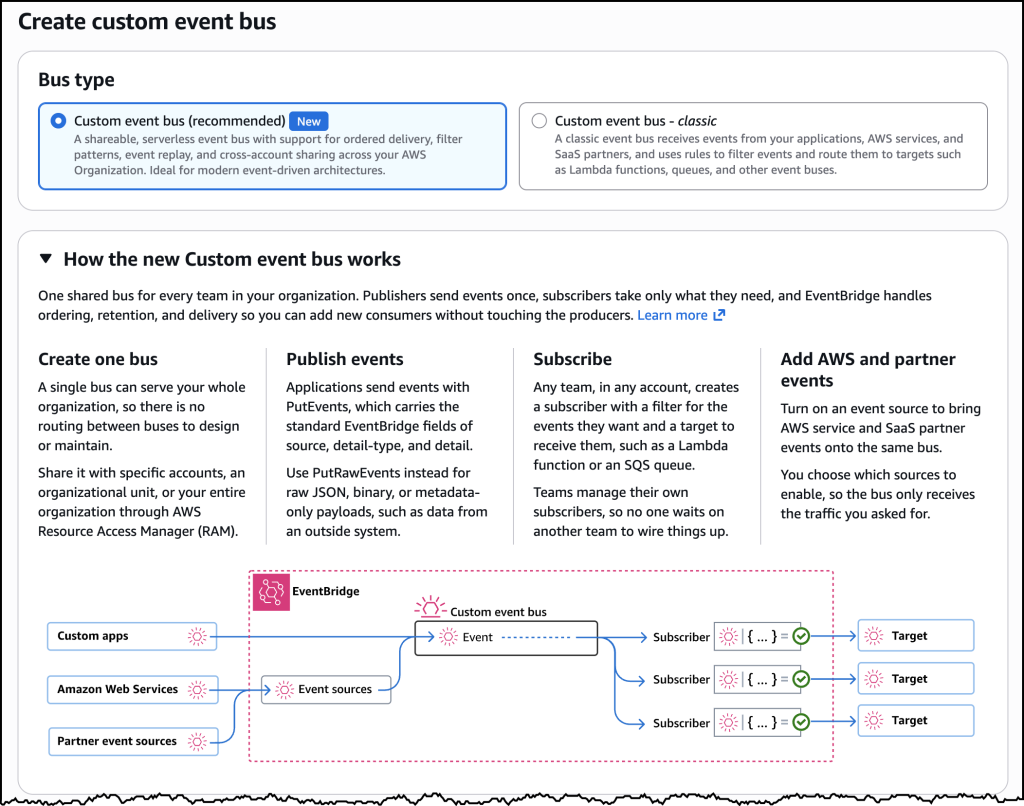
The Create custom event bus page. Custom event bus is the recommended new option, with ordered delivery, filter patterns, event replay, and sharing across your AWS organization. Custom event bus – classic remains available for existing workloads.

Next, I configured resource sharing. I turned on Enable event bus sharing and selected Allow sharing only within your organization. I chose AWS account ID as the principal type. I could also share with an organization, an organizational unit, or an AWS Identity and Access Management (IAM) role or user. Sharing uses AWS Resource Access Manager (AWS RAM), so I did not have to set up cross-account permissions or bus-to-bus routing myself.
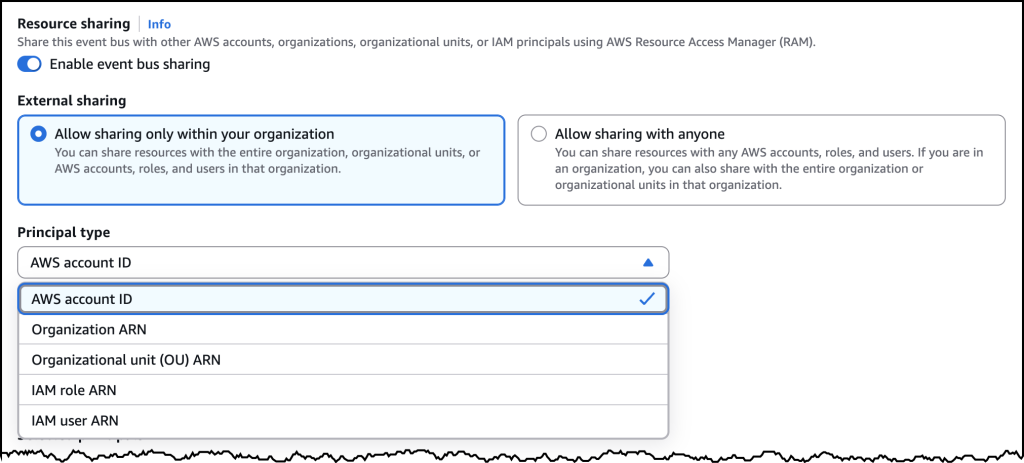
Resource sharing on the new custom event bus. I enabled sharing within my organization through AWS RAM and selected an AWS account as the principal, which is how teams publish and subscribe on the same bus without extra routing.

Organization-wide sharing
With the new enhanced custom event bus, you can create a single event bus and share it across all AWS accounts in your organization. Platform teams deploy one bus and establish it as the central event backbone, eliminating the need to configure cross-account permissions or bus-to-bus routing. Application teams across your organization can publish and subscribe to events on the same bus without waiting for infrastructure provisioning.

Publishers send events without needing to know which teams consume them, and subscribers create their own Subscriptions independently. Platform teams maintain visibility into all event flows and fine-grained control over who can publish and consume events. The new enhanced custom event bus has a default quota of 10,000 Subscribers per bus, and you can request a higher quota. That reduces the fragmentation that occurs when subscriber limits force you to split across multiple buses.

Event ordering
Event-driven architectures work best when consumers are designed around asynchronous patterns, where the order of events does not matter. There are a few cases where order does matter. In a logistics application, driver location updates must arrive in sequence. Out-of-sequence events cause routing algorithms to make decisions based on stale data.

The enhanced custom event bus supports both patterns on the same bus. Publishers can include an EventGroupId when sending events. EventBridge delivers events that share the same EventGroupId in sequence to Subscribers that chose ordered delivery. Other subscribers on that bus can receive the same events without ordering. You can keep events for each driver in the correct order without building complex workarounds, while the rest of your consumers stay fully asynchronous.

To support ordered processing, the enhanced custom event bus includes synchronous invocation for targets like AWS Lambda. Synchronous mode confirms successful processing before acknowledging the event, eliminating the common pattern of placing Amazon Simple Queue Service (Amazon SQS) between an event bus and Lambda to ensure reliability.

Subscriptions
The enhanced custom event bus introduces the Subscriber resource, which combines event filtering, target configuration, retry policies, and dead-letter destinations into a single, manageable unit. Today, achieving the same outcome with EventBridge requires configuring separate rules, targets, and retry settings across multiple resources. Subscribers simplify this by giving each consumer one resource that defines what events they want, where to deliver them, and how to handle failures.

Subscribers also include variable start time options, making it easier for teams to onboard new consumers or replay events to recover from application errors or hydrate new applications.

Event evaluation
Publishers can turn on content-based deduplication so EventBridge detects and drops retries of the same event from the payload itself. You do not have to generate and track a deduplication ID when a timeout or a partial failure sends the same event twice. EventBridge hashes the meaningful parts of the event and collapses matches that arrive within five minutes, which gives those retries exactly-once delivery semantics instead of EventBridge’s usual at-least-once model. If you already stamp your own idempotency token, keep using it. Content-based deduplication is for sources that cannot reliably identify the same event on a retry.

Subscribers can use JSONata expressions to reshape an event before it reaches a target, extracting fields, renaming them, or computing new values when a downstream API expects a different shape. If you already produce Apache Avro or Protocol Buffers events, EventBridge can deserialize those payloads to JSON, allowing subscribers fine grained filtering and routing on the full event payload without having to consume, deserialize, and match or discard on their own.

New pricing model
The enhanced custom event bus uses a new ingress and egress throughput pricing model. Publishers pay for events ingested, and subscribers pay for events delivered. This replaces the per-event model where cross-account and bus-to-bus routing charges compound in multi-bus architectures. For pricing details, visit the EventBridge pricing page.

Existing EventBridge custom event buses continue to work as they do today with no changes required. They now appear as Custom event bus – classic. The enhanced custom event bus is a new resource that you adopt at your own pace. In the console, it appears as Custom event bus.

Now available
The enhanced custom event bus is available today in the US East (N. Virginia, Ohio), US West (Oregon), Europe (Ireland, Frankfurt, Stockholm, Spain), and Asia Pacific (Hong Kong, Malaysia, Mumbai, Singapore, Sydney, Thailand, Tokyo) Regions. You can create your first enhanced custom event bus through the AWS Management Console, AWS Command Line Interface (AWS CLI), or EventBridge APIs. To get started, visit the EventBridge documentation or try it out directly in the EventBridge console.
  •  

AWS reimagines the getting started experience

Amazon Web Services (AWS) started with a handful of foundational infrastructure services such as Amazon Simple Storage Service (Amazon S3), Amazon Elastic Compute Cloud (Amazon EC2), and Amazon Simple Queue Service (Amazon SQS), so that anyone with an idea could start building. As the world’s largest companies and governments adopted AWS, they asked for features to optimize their configuration for a range of global business contexts, security requirements, and operational needs. To meet these needs, AWS expanded globally through new Regions and added breadth and depth of services in security, networking, governance, and cost controls, so those customers could operate wherever they needed and at the scale they require. That combination of global reach, breadth, and depth remains essential for those customers, but if you are at the start of a new idea, every configuration option is effort standing in the way of shipping your dream product fast.

Today, we’re announcing a new simplified experience on AWS for builders who are working at the pace of AI. Instead of having to complete configuration tasks before you can work on your project, you start with sensible defaults and simple administration. You sign up using an existing identity from providers including Google, GitHub, and Apple. For most new customers, no credit card is required to start and you receive $100 in free credits as part of the AWS Free Tier. You can build immediately in your first project. As you continue to work, you can invite collaborators with just an email address, without learning about AWS Identity and Access Management (IAM) or AWS IAM Identity Center. When your project grows beyond the free credits, you can set a spend limit so you stay within your budget on the paid plan. If you grow to need additional customization, you can activate advanced AWS features to access the full breadth and depth of AWS without migrating.

How it works
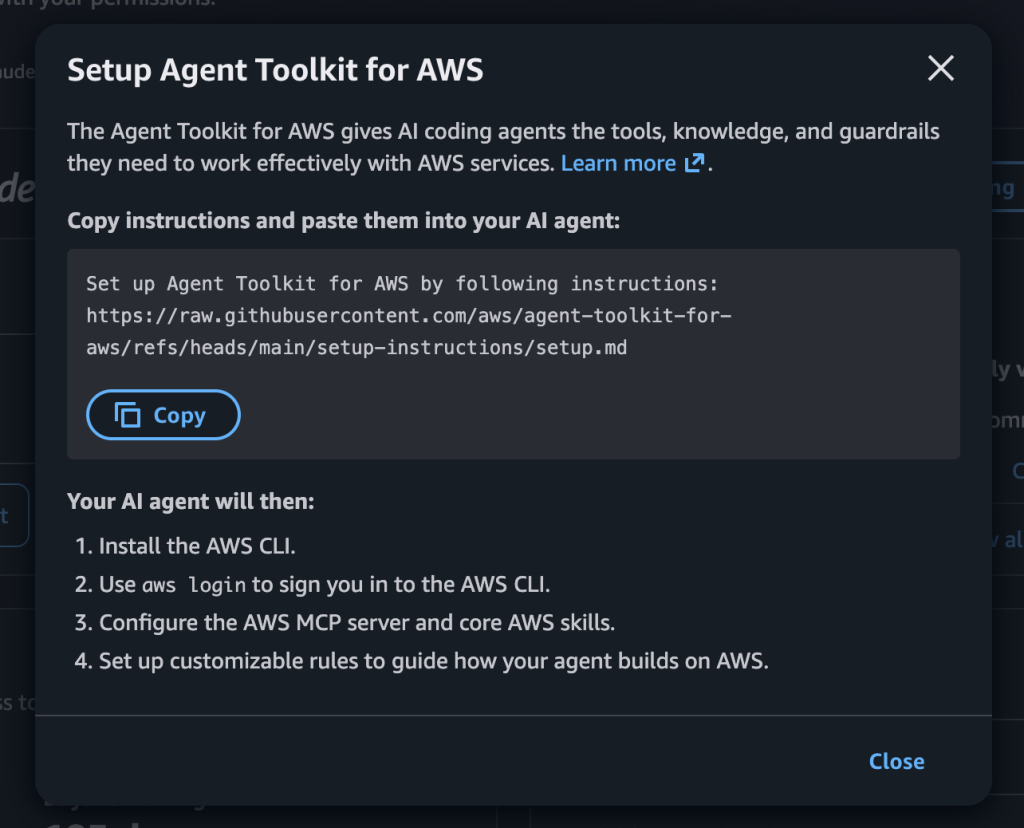
When you sign up, AWS organizes your work in a project. A project contains an AWS account, where you create resources, and settings for sharing with team members. AWS creates that structure for you and applies additional security controls so you can start building your idea. After signing in, you get a prompt to paste into your coding agent that configures it to work with your new AWS environment. From there, your agent can deploy resources, run workloads, and iterate on your application following best practices for working with AWS.

You can create another project with a click. When you want to work with an additional team member, you send an invitation to their email address. Identity permissions are handled for you, so there are no IAM users to create; each person you invite only gets access to the projects you specify. Console workflows and coding agents also configure permissions between supported services and resources automatically, so you do not have to set up or troubleshoot resource permissions by hand.

When you’re ready to move beyond free credits, you can upgrade to a paid plan by entering your payment method. You can set a monthly spend limit on a project based on your usage trends, starting at $20 per month. The spend limit is the ceiling for that project’s costs, and you pay for what you actually use up to that amount. For example, if you set a $50 spend limit and your project incurs $32 in charges that month, you pay $32 (plus taxes). AWS will suggest a spend limit based on your usage, and you can accept that recommendation or set a custom amount if you are planning to further scale your usage. If your project approaches the limit, you first receive notifications. If spend reaches the limit, AWS pauses your project rather than accumulating charges, and you can resume working on it when you raise the limit. Each project has its own spend limit so you can give a larger budget to a workload that is gaining traction while keeping a smaller budget on an experimental idea.

Let’s try it out
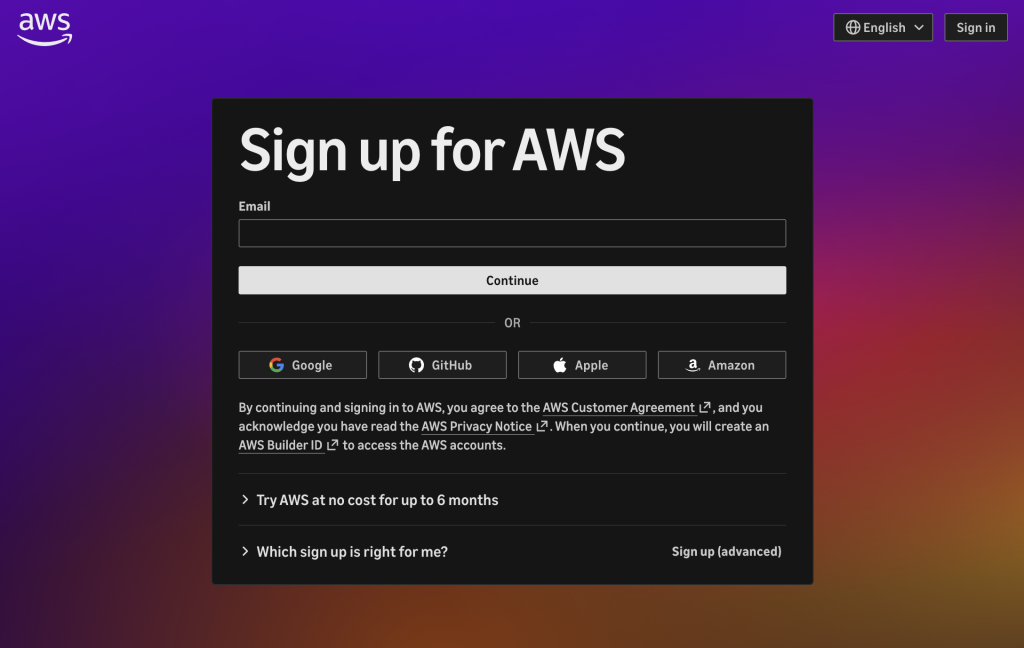
To get started, I went to aws.amazon.com and chose Create account. I signed in with my Google account and within seconds had a new project ready to go, as shown in the following screenshot.

The Sign up for AWS page, with options to continue with email or sign in using Google, GitHub, Apple, or Amazon.

The first thing I saw was a prompt to configure my coding agent. I copied the prompt and pasted it into my agent. The agent set up the AWS Command Line Interface (AWS CLI) and the Agent Toolkit for AWS, logged me into AWS, and created a CLAUDE.md file in my project with guidance for the new experience.

The Setup Agent Toolkit for AWS dialog, with a prompt to copy and paste into your coding agent.

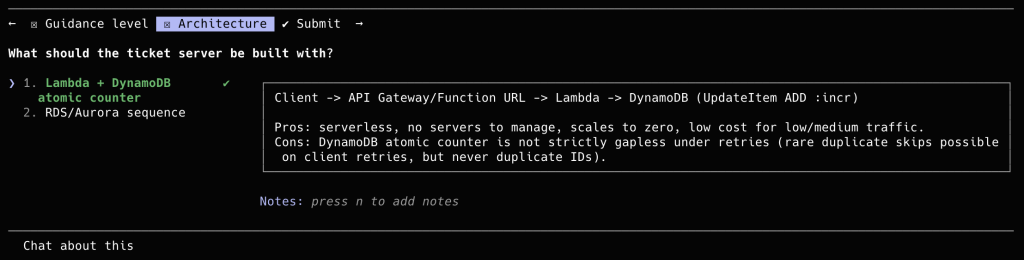
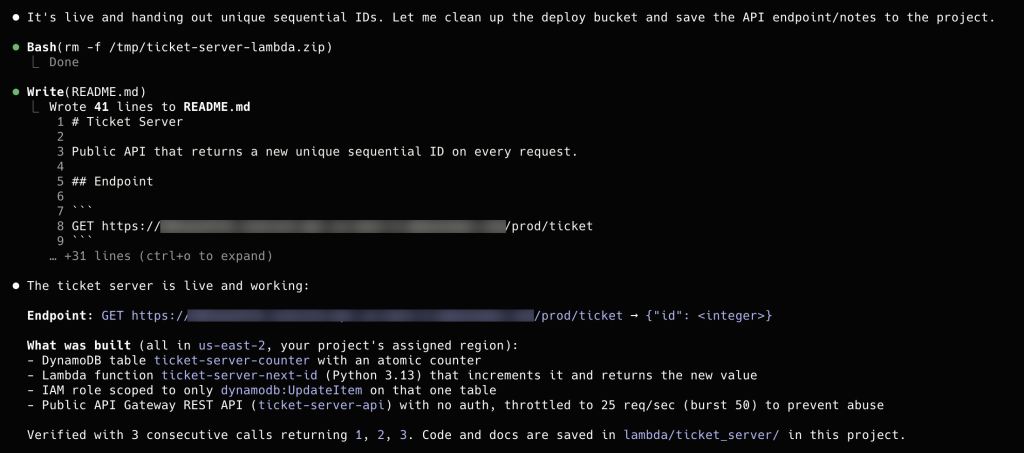
With the agent connected, I gave it a short prompt: build an API that returns a new unique sequential ID on every request. The agent created an AWS Lambda function, an Amazon DynamoDB table, and an Amazon API Gateway API, then deployed them for me. I did not have to configure resource permissions by hand. Within a few minutes I had a public endpoint that returned a newly minted ID on each request. My project started with $100 in free credits, and I received an additional $20 when the Lambda function was deployed.

A coding agent prompt to build an API that returns a unique sequential ID on every request.

The coding agent presents architecture options for the sequential ID API, with AWS Lambda and Amazon DynamoDB selected.

The coding agent confirms the API is live and lists the Amazon DynamoDB table, AWS Lambda function, and Amazon API Gateway API it deployed.

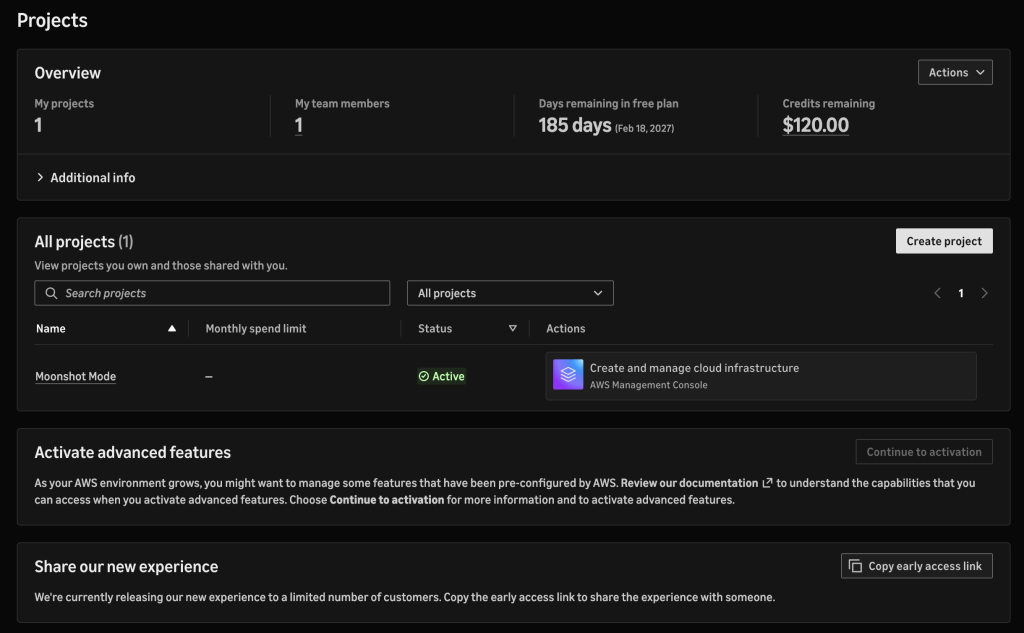
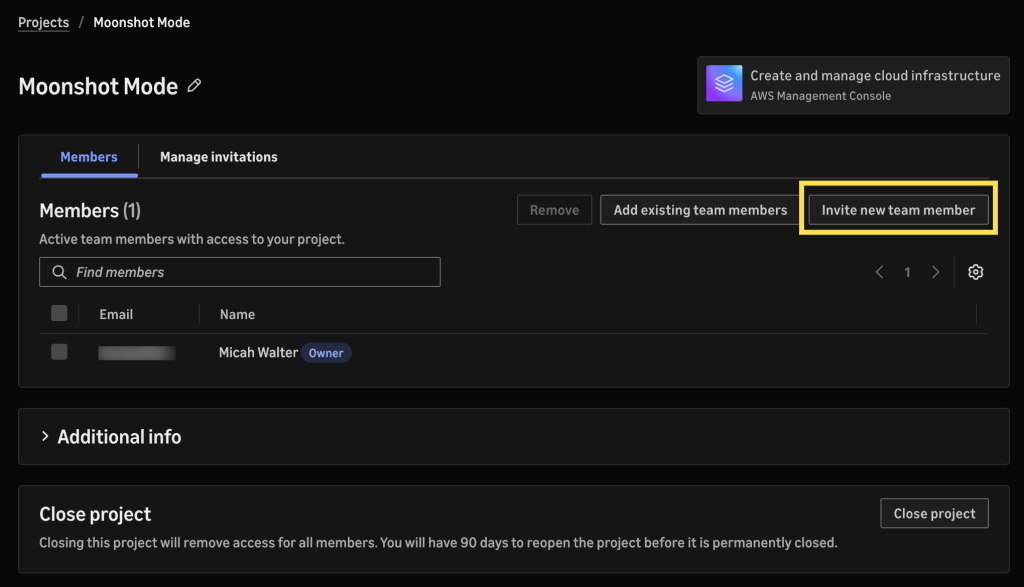
From the project, I could manage settings, invite team members by email, and monitor billing, as shown in the following screenshots.

The Projects page, showing remaining free-plan days, credits, and a project.

The project Members page, with the option to invite a new team member by email.

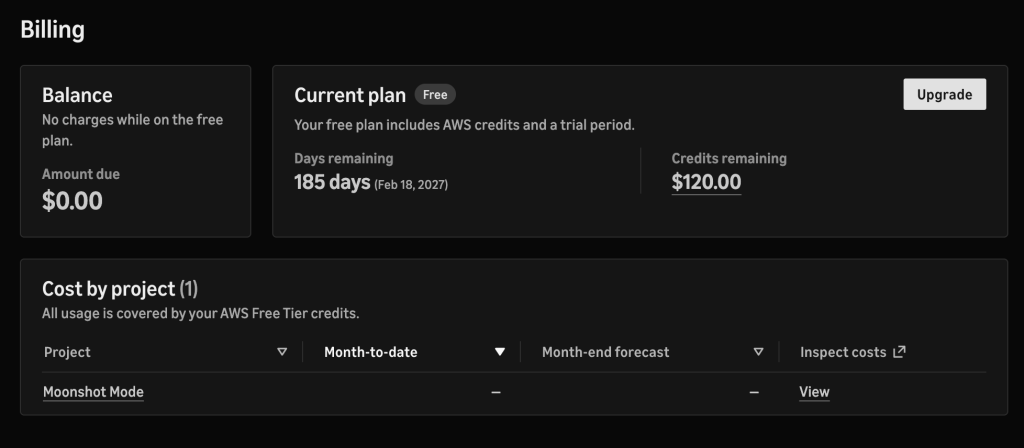
The Billing page, showing a $0.00 balance on the free plan, remaining credits, and cost by project.

Activating advanced features
If you reach the point where you need multiple Regions, or governance features like custom policies in AWS Organizations, you can activate advanced features at no additional cost. You’ll find yourself in a fully configured AWS Organization built according to best practices, with no migration and no downtime. Everything you configured previously is preserved and reflected in the underlying AWS services.

Now rolling out
We’ve heard from builders that they do not want to spend their first hours configuring an AWS environment. They want to build what they came to build, and we listened. AWS began as a place where anyone with an idea could start building, and this new simplified experience brings that starting point back, with sensible defaults so you can begin immediately, and with the global reach, breadth, and depth of AWS still there when your idea needs it. We are gradually rolling this experience out to new customers. We cannot wait to see what you build, and we want your feedback on the experience.

To try the new experience, create a new AWS account. To learn more, see the AWS Sign up user documentation.

  •  

AWS Weekly Roundup: OpenAI GPT-6 Astra on Amazon Bedrock, Amazon Quick desktop GA, Kiro for students, and more (September 14, 2026)

There’s a particular energy to mid-September in New York. Pumpkin spice lattes are flowing, temperatures are dropping, and it’s nearly sweater weather. The city is back at full speed, and so is the AWS launch calendar. This week that energy showed up in a new frontier model on Amazon Bedrock, a desktop app for Amazon Quick, and a reminder that the developers seeing the biggest gains from AI agents aren’t just using better tools — they’re working differently.

Let’s dive in.

Headlines
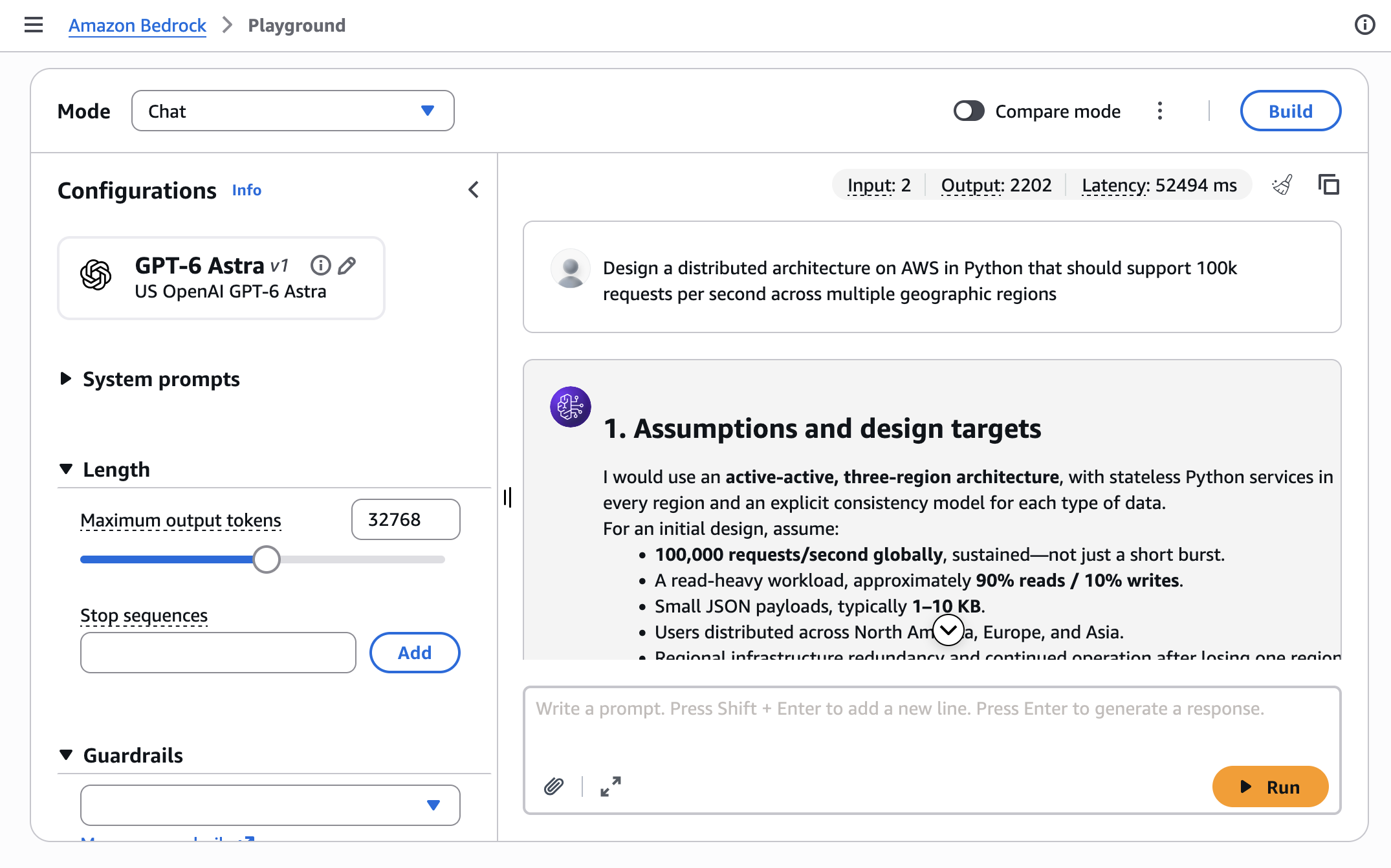
OpenAI GPT-6 Astra is now generally available on Amazon Bedrock – GPT-6 Astra is OpenAI’s latest and most capable model to date, and you can now run it on Amazon Bedrock. It brings deeper reasoning and judgment, professional-quality writing and design, and advanced computer and browser use to demanding business workflows. The model supports a context window of up to 1 million input tokens, so you can send it large codebases, long contracts, or extensive document collections and ask it to reconcile competing inputs.

You can call GPT-6 Astra through supported Amazon Bedrock APIs, or configure ChatGPT Work and Codex to use the model on Amazon Bedrock. Alongside the launch, OpenAI is introducing new enterprise plugins for ChatGPT Work that extend Astra’s browser-use capabilities across common business applications. Established AWS controls help you secure workloads, govern access, and audit model invocation activity, and your inference data isn’t used for model training. Read more

Last week’s launches
Here are some launches and updates from this past week that caught my attention:

  • Amazon Quick desktop app is now generally available on macOS and Windows – The Amazon Quick desktop app brings Amazon Quick to your computer, where it can work with local files and stay connected to your calendar, email, and business apps in the background. Conversations, context, and agents stay synchronized across desktop and mobile, so work you start on one surface carries over to the other. With this release, Quick agents also keep running after you close your computer, which means you can start a long-running task before you leave the office, add input from the mobile app on the way home, and review the result when you get there. Existing Quick users can download the desktop app, and the mobile app is available from the Apple App Store and Google Play. Read more
  • AWS Lambda now supports a 90-minute function timeout on Lambda Managed Instances – You can now configure a function timeout of up to 90 minutes for asynchronous and event source mapping (ESM) invocations on Lambda Managed Instances, a 6x increase from the previous 15-minute limit. That opens the door to data processing, media transcoding, financial calculations, AI inference, and batch jobs that need longer continuous execution, without splitting the work across multiple functions. Synchronous invocations keep the existing 15-minute maximum. The longer timeout also applies to steps inside Lambda durable functions, which can still run for up to a year when invoked asynchronously. Read more
  • Amazon EBS Volume Clones now copies volumes across accounts – Amazon Elastic Block Store (Amazon EBS) Volume Clones can now copy a volume into another AWS account and re-encrypt it with an AWS Key Management Service (AWS KMS) key in the target account. If you keep production and development in separate accounts, you can share a volume with AWS Resource Access Manager (AWS RAM) and let the target account create a fresh copy in the same Availability Zone, for example, cloning a production database volume into an isolated development account. Cross-account copy works for all volume types, including unencrypted volumes and volumes encrypted with customer managed keys. Read more
  • Second-generation single-rack AWS Outposts is now generally available – The new single-rack AWS Outposts is a self-contained 42U rack that puts compute, storage, and networking into one compact unit for locations that need low latency, local data processing, or data residency, and don’t have room for a larger footprint. A single rack delivers up to 2,688 vCPU and 100 TB of Amazon EBS storage, and supports the latest x86-powered Amazon EC2 instances, including general purpose (M7i, M8i), compute-optimized (C7i, C8i), memory-optimized (R7i, R8i), and Outposts accelerated networking instances. You get the same APIs, console, automation, governance, and security controls as multi-rack Outposts and AWS Regions. Read more
  • Amazon OpenSearch Serverless is now available on v0 by Vercel – You can now describe a search or AI application in natural language inside v0 by Vercel and get a full-stack app backed by Amazon OpenSearch Serverless. v0 provisions a collection, indexes your data, and uses the OpenSearch Serverless endpoint for full-text search and vector search for retrieval-augmented generation (RAG) workloads, without leaving the v0 interface. OpenSearch Serverless scales capacity up and down for you, so you can focus on the application instead of cluster management. You can provision under a new AWS account or link an existing one. Read more
  • AWS Transform for .NET modernization is now generally available via CLI – You can trigger an AWS-managed .NET modernization in AWS Transform custom with a single CLI command, then run it interactively or script it into an existing pipeline. The CLI sits alongside the existing AWS Transform for .NET experiences in the web application, Visual Studio IDE, Kiro Power, and MCP agents. Use it to upgrade language versions, migrate frameworks, optimize performance, and analyze codebases with transformations you can run as-is or customize. The .NET modernization transformation includes 50,000 free agent minutes per month. Read more

For a full list of AWS announcements, be sure to keep an eye on the What’s New with AWS page.

Other AWS news
Here are some additional posts and resources that you might find interesting:

  • Clare Liguori on frontier engineering – If you already use an AI coding assistant but don’t feel like you’re shipping much faster, start here. Clare Liguori, Senior Principal Engineer at AWS, published a practitioner’s manifesto on frontier engineering: ten principles, drawn from teams across Amazon, for changing how you build software with AI agents. The argument is direct. Software development has split in two, people who changed how they work with agents, and people who only changed their coding tools. Frontier engineering is not vibe coding. You spend the first weeks writing steering files, refactoring the codebase, and learning to decompose work for agents. Those weeks feel slower. The weeks after feel dramatically faster, because you’re no longer building the software directly — you’re building the agent setup that builds the software.
  • A free year of Kiro for students around the world – The Kiro Students program is expanding from 11 universities to 121 new schools across 16 countries. Eligible students get one year of Kiro with 1,000 credits per month and full access to paid features such as premium models and Kiro Web, no credit card and no trial timer. You can work in the IDE, the CLI, Kiro Web in a browser, or Kiro Crew. If you’re a student, sign up with your university email.
  • The state of AI for security: measuring what matters for trust – Security teams are using AI for triage, threat modeling, incident response, and code review, but a tool that flags everything doesn’t save time. In The state of AI for security, Anshumali Shrivastava and Neha Rungta introduce Deception Benchmark, a new evaluation that tests whether a model can tell a real vulnerability from code that looks risky but is actually safe. The benchmark includes 14,822 samples across 16 languages and more than 70 Common Weakness Enumeration (CWE) categories. Under standard prompting, precision landed in the mid-50s, about as likely to be inaccurate as accurate, and none of the 12 models tested kept both false positives and false negatives below 10 percent. The post links to the dataset, whitepaper, and submission workflow for verified scoring.
  • Build full-stack AWS applications in minutes with AI-powered scaffolding – Version 1.0 of the Nx Plugin for AWS is an open source toolkit of deterministic generators for APIs, websites, databases, and AI agents, plus the AWS infrastructure to run them. Each generator writes working, deployable code with security, observability, and type-safety already in place, so an AI assistant can assemble the foundation and spend its effort on your application logic. Bingo Industries used it to take a multi-agent operations chatbot from idea to production in less than 3 weeks. The plugin is open source on GitHub. Create a workspace with pnpm create @aws/nx-workspace and point your coding agent at the included MCP server.
  • The oldest architecture in computing – On All Things Distributed, Werner Vogels starts from a question customers always ask “Will AI take my job?”, and lands on memory. After spending time with Kiro Crew, he traces a line from Jeff Hawkins’ A Thousand Brains to how Crew stores, consolidates, and forgets across markdown files, a vector database, and a key-value index. His conclusion: the brain is the oldest architecture in computing, and the people who think hardest about how it works will build the next tools. Now, go build.

For a full list of AWS blog posts, be sure to keep an eye on the AWS Blogs page.

Upcoming AWS events
Check your calendar and sign up for upcoming AWS events:

Join the AWS Builder Center to connect with builders, share solutions, and access content that supports your development. Browse here for upcoming AWS-led in-person and virtual events and developer-focused events.

That’s all for this week. Check back next Monday for another Weekly Roundup!

— Micah

This post is part of our Weekly Roundup series. Check back each week for a quick roundup of interesting news and announcements from AWS!

  •  

AWS Weekly Roundup: Price reduction of GPT models in Bedrock, CloudWatch managed collectors for Prometheus metrics, and more (August 3, 2026)

Last week I had the joy of participating in Amazon’s “Bring Your Kids to Work Day” with my 7 year old son. We commuted together into the New York City office, his first real rush hour train ride, and spent the day exploring how Amazon uses AI, machine learning, and robotics to deliver packages to customers all over the world. Watching his eyes light up as he saw robots navigating a fulfillment center reminded me why so many of us got into technology in the first place. There’s nothing quite like seeing that sense of wonder when something complex clicks.
That same energy carried into the week’s launches. We’ve got updates across AI pricing, observability, multicloud networking, and data management. Let’s dive in.

Headlines
Amazon Bedrock announces up to 80% lower prices for OpenAI GPT‑5.6 models – If you’re using OpenAI’s GPT‑5.6 family through Amazon Bedrock, your costs just dropped significantly. Effective July 30, on-demand inference prices for GPT‑5.6 Luna are reduced by 80%, while GPT‑5.6 Terra prices are reduced by 20%. Luna now costs $0.20 per million input tokens and $1.20 per million output tokens, making it one of the most affordable frontier-class models available. These price reductions apply automatically — no action required on your part. Read more

Last week’s launches
Here are some launches and updates from this past week that caught my attention:

  • Amazon CloudWatch announces managed Prometheus collectors – Amazon CloudWatch now supports collecting Prometheus metrics from your AWS infrastructure using fully managed collectors, enabling you to monitor Amazon EKS, Amazon EC2, Amazon ECS, Amazon MSK, and Amazon OpenSearch Service workloads without deploying or managing any agents. If you’ve been maintaining your own Prometheus scraping infrastructure, this removes a significant operational burden. Read more
  • AWS Interconnect — multicloud connectivity with Oracle Cloud Infrastructure is now generally available – AWS Interconnect is the first purpose-built multicloud connectivity product of its kind, allowing you to quickly provision resilient, scalable private connections between AWS and other cloud providers. With this GA launch for Oracle Cloud Infrastructure (OCI), you can establish private cross-cloud networking without traversing the public internet, making it easier to run multicloud architectures with the security and performance your workloads demand. Read more
  • AWS IAM Identity Center extends multi-Region support to Identity Center directory – You can now replicate IAM Identity Center from your primary AWS Region to additional Regions when using the Identity Center directory as your identity source. If IAM Identity Center is affected by a disruption in the primary Region, your users continue to have access to their AWS accounts using provisioned entitlements in additional Regions. This feature was previously available only for instances connected to external identity providers. Read more
  • Amazon S3 Tables now supports the Variant data type for Apache Iceberg V3 – Amazon S3 Tables adds support for the Variant data type, introduced in the Apache Iceberg V3 table format specification. Variant provides a high-performance, native solution for managing semi-structured data within your data lake — think IoT sensor data, application logs, and other schema-flexible payloads — without resorting to JSON blobs. Read more

Other AWS news
Here are some additional posts and resources that you might find interesting:

Upcoming AWS events
Check your calendar and sign up for upcoming AWS events:

  • AWS Summits – AWS Summits are free events that bring the cloud and AI community together to connect, learn, and explore the latest technologies. Browse the full calendar to find a Summit near you in the second half of 2026.
  • AWS Community Days – Community-led conferences where content is planned, sourced, and delivered by community leaders.

Join the AWS Builder Center to connect with builders, share solutions, and access content that supports your development. Browse here for upcoming AWS-led in-person and virtual events and developer-focused events.


That’s all for this week. Check back next Monday for another Weekly Roundup!

  •  

Upgrade Amazon EKS clusters with confidence using Kubernetes version rollbacks

Upgrading a Kubernetes control plane has long been a one way door. Open source Kubernetes doesn’t support control plane rollback, so once you upgrade, there’s no going back. The community is making real progress here, and KEP-4330 introduces emulated versions to ease rollback. But in practice this constraint has pushed organizations to build elaborate compensating mechanisms like bake periods, stagger groups, automated sign offs, and months long upgrade cycles. With Kubernetes releasing three minor versions per year, teams managing hundreds of clusters, especially in regulated environments, often delay upgrades entirely because they aren’t confident they can recover if something goes wrong. The result is clusters stuck on older versions, missing security patches, and eventually running up against extended support timelines.

Today, we’re announcing Kubernetes version rollbacks for Amazon Elastic Kubernetes Service (Amazon EKS), a new feature that gives cluster administrators a safety net when performing cluster upgrades. With version rollbacks, you can reverse a Kubernetes version upgrade within seven days if you encounter issues after upgrading, returning your cluster to its previous working state.

Where approaches like emulated versions keep a cluster in a transitional holding state, EKS version rollback returns your cluster to a fully validated previous version that ran in production, not an emulation of it. Now, if you upgrade a cluster from, say, Kubernetes 1.34 to 1.35 and discover a compatibility issue, you can roll back to 1.34 within seven days. There’s no need to rebuild your cluster or scramble to troubleshoot under pressure. Think of it as an undo button for Kubernetes version upgrades.

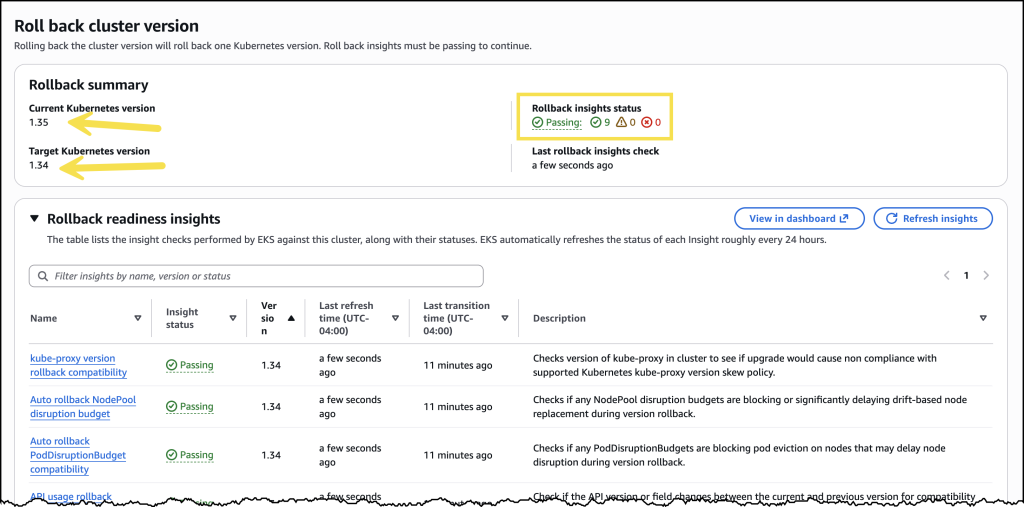
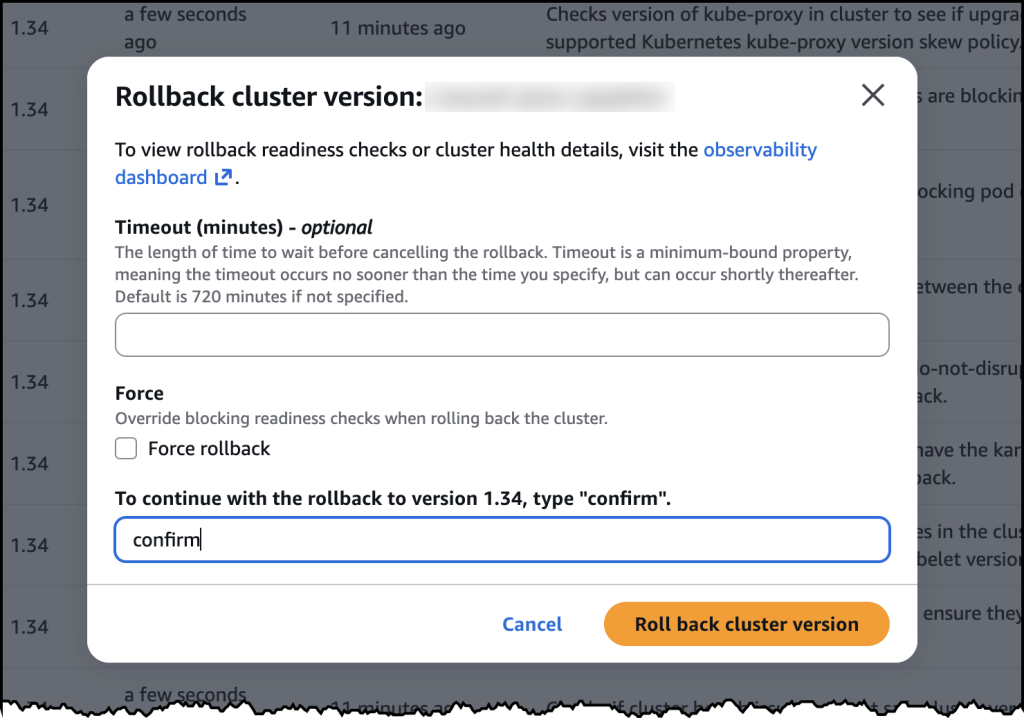
The feature supports rolling back one minor version at a time, matching the same incremental approach EKS uses for upgrades. And to help you roll back safely, EKS automatically evaluates your cluster’s rollback readiness through cluster insights, flagging items like node version compatibility or add-on dependencies before you proceed. If you’ve already assessed the situation and want to move quickly, you can use the --force flag to bypass those checks. The above applies to all EKS clusters, whether you manage your own nodes or let AWS handle them. But for customers who have embraced fully managed infrastructure, rollback goes a step further.

Rollback for EKS Auto Mode
EKS Auto Mode gives you one click deployment of production ready Kubernetes clusters, automating compute, networking, and storage management so you can focus on your applications rather than infrastructure. EKS Auto Mode introduces additional considerations for version rollbacks because both the control plane and managed nodes need to be rolled back together. Since node rollbacks respect your pod disruption budgets, the process can take time depending on your configuration.

To give you control over this process, we’ve introduced a cancel API that lets you stop a node rollback at any point. If you decide the rollback is taking too long or you want to change your approach, you can cancel and adjust your disruption budgets to accelerate things, or choose a different path forward.

By default, EKS never bypasses your disruption budgets during a rollback because we prioritize workload stability. You can always choose to modify or remove disruption budgets yourself to speed up the process if needed.

Let’s try it out
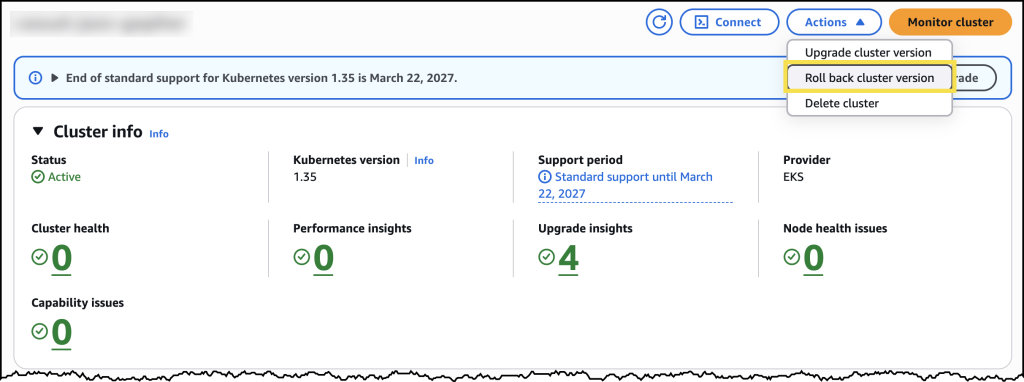
To try version rollbacks, I navigated to the Amazon EKS console and selected one of my clusters that I had recently upgraded.

From the cluster’s configuration page, I can see the option to initiate a version rollback, along with information about my current rollback window.

Before initiating the rollback, I reviewed the rollback insights to check for any potential issues. The insights showed me the status of my nodes and flagged anything I should address before proceeding.

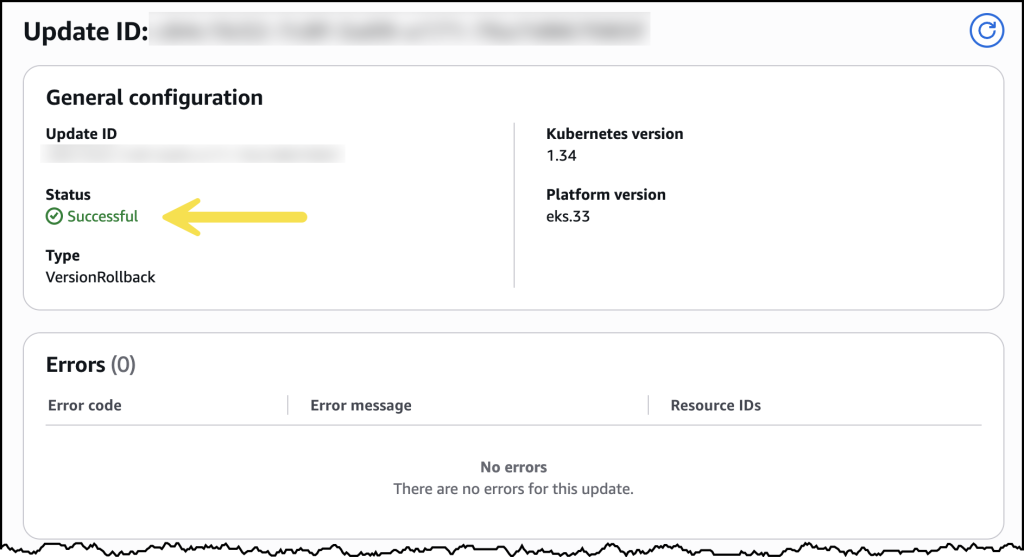
After confirming, the rollback began. My cluster remained functional throughout the process. The control plane rollback took about 20 minutes, similar to a standard upgrade. For my EKS Auto Mode cluster, the nodes rolled back gracefully according to my disruption budget settings.

Once complete, my cluster was back on the previous Kubernetes version, running as expected.

Now available
Kubernetes version rollbacks for Amazon EKS are available today at no additional cost in all commercial AWS Regions where Amazon EKS is available. You pay only for the standard EKS and compute costs you would normally incur. There are no extra charges for using the rollback capability.

Control plane rollbacks are available for all EKS clusters, and node rollbacks are available for clusters running EKS Auto Mode. Version rollbacks support clusters running Kubernetes versions available in EKS standard support and extended support.

To get started, visit the Amazon EKS documentation or try it out directly in the Amazon EKS console.

  •  

AWS Weekly Roundup: Agentic CX designer for Amazon Connect Customer, EC2 AMI Watermarks, Open Governance for MySQL, and more (June 29, 2026)

It has been a busy stretch on the AWS Summit circuit. At the New York City Summit, I delivered a workshop called Building AI architectures with AWS Serverless, and it was a lot of fun watching builders wire up agents and serverless services to solve real problems in a single afternoon. This week I am heading down to the Washington, DC Summit, which always puts a spotlight on innovation in the public sector. If you are going to be there, come say hello.
A question I hear a lot at these events is how teams can put AI to work without waiting on a long engineering backlog, and this week’s biggest launch speaks directly to that, with Amazon Connect Customer introducing a no-code way for business teams to design AI powered customer experiences themselves. Now, let’s get into this week’s AWS news.

Headlines
Amazon Connect Customer launched the Agentic CX designer (NLX) in preview, a no-code canvas for designing and deploying AI powered self service experiences. Business teams can build and launch voice and digital experiences that bring agentic and deterministic AI together in one governed flow, going from design to testing and simulation to production ready experiences in weeks rather than months. The launch also includes Live Sync in preview, a patented technology that drives a customer’s web or mobile experience in real time as they speak or type. A caller can complete a form or pull up the right product page without ever leaving the conversation. To see how this reshapes who designs customer experience, read the blog post on how the business user is the new architect of customer experience.

Last week’s launches
Here are some launches and updates from this past week that caught my attention:

  • AWS Lambda MicroVMs – A new serverless compute primitive that gives each user or job VM level isolation with near instant launch and resume speeds, plus the ability to suspend and resume execution for up to 8 hours. Built on Firecracker, it is made for running user or AI generated code in multi-tenant applications without managing virtualization infrastructure or trading off isolation, speed, and state.
  • Amazon EC2 AMI Watermarks – Lets you embed custom identifiers in your private AMIs that automatically carry forward to every derived AMI across copies, Regions, and account shares. You can combine watermarks with Allowed AMIs and Declarative Policies to restrict launches to approved images, available at no additional cost in all AWS Regions.
  • AWS Outposts self-service lifecycle management – Adds self service configuration, quoting, ordering, subscription management, renewal, and decommissioning directly from the console, CLI, and API. A new quoting tool generates real time cost estimates in seconds and surfaces account and regional constraints before you submit an order.
  • Amazon MSK AI Agent Skills – Gives AI coding assistants like Kiro, Claude Code, and Cursor expert, up-to-date guidance for operating Amazon MSK, covering troubleshooting, sizing, configuring, monitoring, and migrating external Kafka clusters to MSK Express. Tasks that once required specialized knowledge become a guided experience developers can complete on their own.
  • Amazon OpenSearch Service AI-assisted migrations – Migration Assistant now includes an agent guided experience that helps you move self managed Apache Solr, Elasticsearch, or OpenSearch deployments to OpenSearch Serverless or Managed Clusters using tools like Kiro and Claude Code, with new live traffic capture and replay support for Solr.
  • Amazon GuardDuty AI-powered investigations (preview) – Automatically analyzes findings and accounts to help you separate true threats from benign activity, examining context and related activity from the last 90 days with knowledge graphs and threat intelligence. Each investigation returns a disposition assessment with confidence scoring, MITRE ATT&CK classification, and actionable recommendations in minutes.

For a full list of AWS announcements, be sure to keep an eye on the What’s New with AWS page.

Other AWS news
Here are some additional posts and resources that you might find interesting:

  • Open Governance for MySQL – Oracle announced a community governance model for MySQL that gives organizations outside Oracle a defined role in the project, including four non Oracle seats on a new Steering Committee and a public GitHub presence. AWS holds a seat and shares why it supports the move and how it already contributes fixes upstream for everyone running MySQL.
  • A new way to keep your AWS Certification current -You can now maintain an eligible AWS Certification for an additional year by completing curated training and hands on labs on AWS Skill Builder instead of retaking a full exam. The option is available today in open beta for several Associate and Professional certifications, with more coming later this year.
  • The All Builders Welcome Grant insider’s guide for 2026 applicants – A community guide on AWS Builder Center that walks early career builders through applying for the grant, which covers a full conference pass, airfare, and hotel for AWS re:Invent 2026. Applications are open now and close on July 14.

For a full list of AWS blog posts, be sure to keep an eye on the AWS Blogs page.

Looking for ways to connect with builders in person? Check out the AWS Summits coming to a city near you, find a local AWS Community Day led by user groups around the world, and explore tutorials, community content, and ways to grow your skills over at the AWS Builder Center.

That’s all for this week. Check back next Monday for another Weekly Roundup!

-Micah

  •  

Run isolated sandboxes with full lifecycle control: AWS Lambda introduces MicroVMs

Today, we are announcing AWS Lambda MicroVMs, a new serverless compute primitive within AWS Lambda that lets you run code generated by users or AI in isolated, stateful execution environments. You get virtual machine level isolation, near-instant launch and resume, and direct control over environment lifecycle and state, all without managing infrastructure or building expertise in complex virtualization technologies. Lambda MicroVMs are powered by Firecracker, the same lightweight virtualization technology that has powered over 15 trillions of monthly Lambda function invocations.

Why customers need this
Over the past few years a new class of multi-tenant applications has emerged that all share the need to hand each end user their own dedicated execution environment in which to safely run code that the application developer did not write. AI coding assistants, interactive code environments, data analytics platforms, vulnerability scanners, and game servers that run user-supplied scripts all fit this pattern. Building that capability today means making a difficult choice. Virtual machines deliver strong isolation but take minutes to start. Containers launch in seconds, yet their shared-kernel architecture requires significant custom hardening to safely contain untrusted code. Functions as a service are optimized for event-driven, request-response workloads, but are not designed for long-running interactive sessions that need to retain environment state across user interactions. That leaves developers either accepting tradeoffs between performance and isolation, or investing significant engineering resources to build and operate custom virtualization infrastructure to achieve isolated execution while delivering low-latency experiences to end-users. This presents an effort that demands deep expertise and pulls engineering time away from the product they are actually trying to build.

Lambda MicroVMs is purpose-built for exactly this gap. Each MicroVM gives a single end user or session its own isolated environment that launches rapidly, retains memory and disk state for the length of the session, and pauses to a low idle cost when the user steps away. Because the same Firecracker technology already underpins AWS Lambda Functions, you inherit the operational maturity of a service that has been running this stack at scale.

Let’s try it out
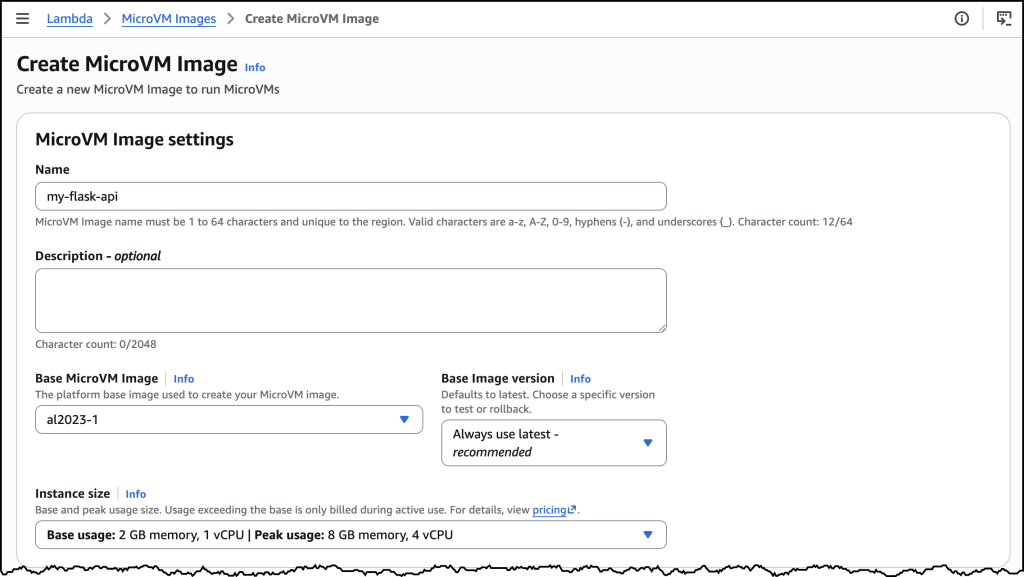
To get started, I navigated to the AWS Lambda console, where Lambda MicroVMs now appears in the left-hand navigation menu. I first need to create a MicroVM Image.

I packaged a Flask web app and its Dockerfile into a zip file, uploaded it to an Amazon Simple Storage Service (Amazon S3) bucket.

My Flask API – app.py

import logging

from flask import Flask, jsonify

app = Flask(__name__)
logging.basicConfig(level=logging.INFO)


@app.route("/")
def hello():
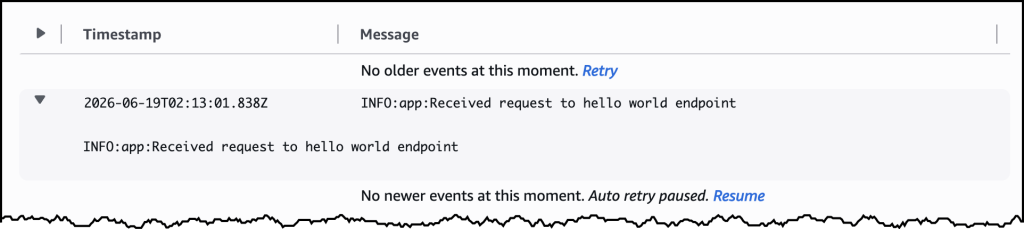
    app.logger.info("Received request to hello world endpoint")
    return jsonify(message="Hello, World!")


if __name__ == "__main__":
    app.run(host="0.0.0.0", port=5000)

My Dockerfile


FROM public.ecr.aws/lambda/microvms:al2023-minimal
RUN dnf install -y python3 python3-pip && dnf clean all

WORKDIR /app

COPY requirements.txt .
RUN pip install --no-cache-dir -r requirements.txt

COPY app.py .

EXPOSE 5000

CMD ["gunicorn", "--bind", "0.0.0.0:5000", "app:app"]

I used the following command to create my MicroVM Image.

aws lambda-microvms create-microvm-image \
--code-artifact uri=<path/to/s3/artifact.zip> --name <VM_image_name> \
--base-image-arn arn:aws:lambda:us-east-1:aws:microvm-image:al2023-1 \
--build-role-arn <IAM role ARN>

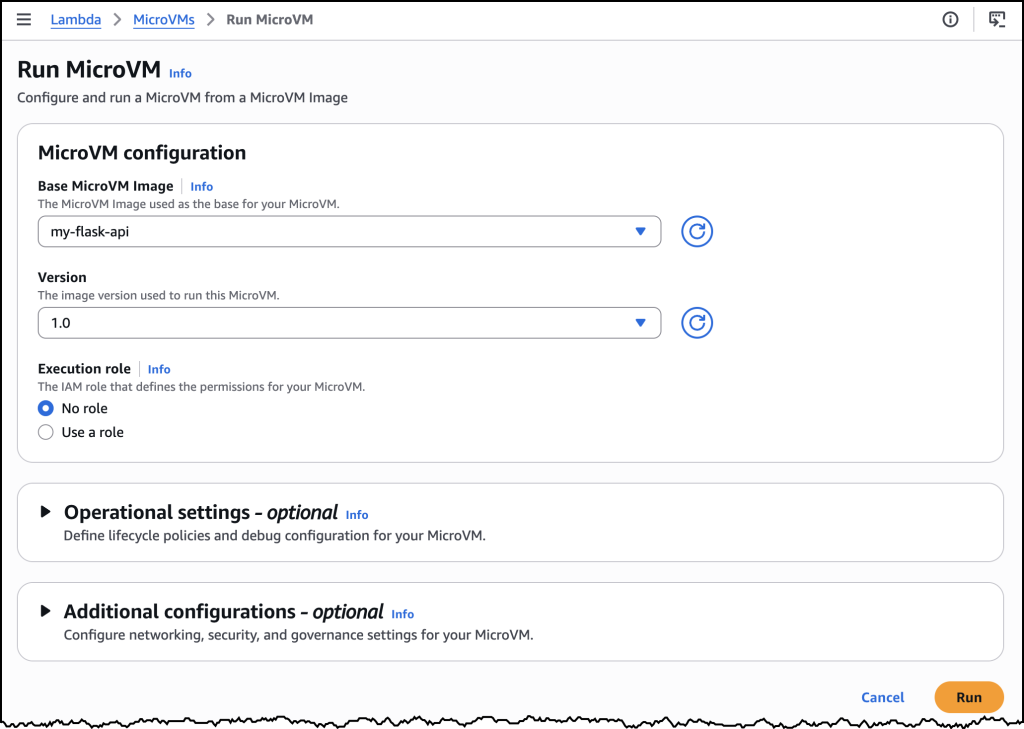
You can also create the MicroVM Image in the AWS Console as in the image above. Once I ran the command, Lambda retrieved the zip, ran the Dockerfile, initialized the application, and took a Firecracker snapshot of the running disk and memory state. Build logs streamed in real time to Amazon CloudWatch under /aws/lambda/microvms/<image-name>, and when the image was ready it appeared in the console with its Amazon Resource Name (ARN) and version number.

aws lambda-microvms run-microvm \
--image-identifier arn:aws:lambda:<region>:<acct>:microvm-image:my-image \
--execution-role-arn arn:aws:iam::<acct>:role/MicroVMExecutionRole \
--idle-policy '{"maxIdleDurationSeconds":900,"suspendedDurationSeconds":300,"autoResumeEnabled":true}'

Launching can also be done via the AWS Console or the CLI. I passed the image ARN and an idle policy configured to auto-suspend after 15 minutes of inactivity and auto-resume on the next incoming request. No networking setup was required. Lambda assigned the MicroVM a unique ID, returned a dedicated endpoint URL, and started a new MicroVM with my Flask app already running, since it was resumed from a snapshot. My Flask app was already running the moment the launch completed. One API call to get a fully initialized, bootstrapped compute environment.

To send traffic, I generated a short-lived auth token with the CLI and attached it to a plain HTTPS request using the X-aws-proxy-auth header. The request landed on my Flask app immediately. I then let the MicroVM sit idle past the suspend threshold, at which point the MicroVM was suspended, with its memory and disk state snapshotted and stored. I then sent another request, and it resumed with the application state fully intact. From the client side, the pause never happened.

How it works
Under the covers, Lambda MicroVMs delivers three capabilities that, until today, no single AWS compute service offered together. The first is virtual machine level isolation, which comes from Firecracker. Each session runs in its own dedicated MicroVM with no shared kernel and no shared resources between users, so untrusted code supplied by one user is contained to their execution environment, without access to other environments or the underlying system. The second is rapid launch and resume. The model is image-then-launch: you create a MicroVM Image by supplying a Dockerfile and code packaged as a zip artifact in Amazon S3, and Lambda runs your Dockerfile, initializes your application, and takes a Firecracker snapshot of the running environment’s memory and disk state. Every subsequent MicroVM launched from that image resumes from the pre-initialized snapshot rather than booting cold, which means launches and idle resumes both achieve near-instant startup latency. Even a multi-gigabyte interactive session comes back online quickly enough to feel responsive to the end user. The third is stateful execution. A running MicroVM retains memory, disk, and running processes across the user’s session. During idle periods, a MicroVM can be suspended – with memory and disk state intact – and resumed when traffic arrives. Installed packages, loaded models, and working filesets are readily available when the user resumes their session. MicroVMs support up to 8 hours of total runtime and can be suspended automatically after a configurable idle window, which makes it straightforward to build products as varied as software vulnerability scans that complete in minutes, data analytics applications that run for hours, and interactive coding sessions with extended idle periods. As Lambda MicroVMs are started from pre-initialized snapshots, applications generating unique content, establishing network connections, or loading ephemeral data during initialization may need to integrate with service-provided hooks for compatibility.

Lambda MicroVMs is a new resource within AWS Lambda, with a distinct API surface. Lambda Functions remain the right choice for event-driven, request-response workloads, and Lambda MicroVMs is purpose-built for multi-tenant applications that need to hand each end user or session their own isolated environment to execute user- or AI-generated code. The two complement each other. An application using Lambda Functions for its event-driven backbone can call into Lambda MicroVMs for the steps that need to run untrusted code in isolation. You bring the application, and the service delivers the execution environment.

Now available
AWS Lambda MicroVMs is available today in the US East (N. Virginia, Ohio), US West (Oregon), Europe (Ireland) and Asia Pacific (Tokyo) Regions, on the ARM64 architecture, with up to 16 vCPUs, 32 GB of memory, and 32 GB of disk per MicroVM. Idle MicroVMs can be suspended explicitly through an API call or automatically through a lifecycle policy, which reduces the running cost while preserving full state for fast resume. Pricing details can be found on the AWS Lambda pricing page.

To get started, visit the AWS Lambda console, or learn more on the Lambda MicroVMs product page. For documentation, see the Lambda MicroVMs Developer Guide.

  •  

Proactively reduce tech debt autonomously with AWS Transform – continuous modernization (preview)

Today, we’re announcing AWS Transform – continuous modernization (preview), a new capability of AWS Transform for continuous, autonomous tech debt analysis and remediation at scale. AWS Transform already helps enterprises migrate out of data centers, modernize mainframe and Windows applications, and handle the undifferentiated work of software maintenance: upgrading Java versions, swapping deprecated frameworks, and updating AWS Lambda runtimes before they reach end of life. This new experience builds on this. Customers get full visibility into the state of their codebase across thousands of repositories, prioritized findings, and the pull requests that make the fixes.

Engineering organizations typically consume up to 30% of IT budgets. Customers stitch together point tools: one to detect dependency issues, another to flag vulnerabilities, another for code quality. But no existing tool detects, prioritizes, and remediates tech debt continuously and at scale. The result is a manual, app-by-app cycle that drains engineering capacity. Leaders fall back on self-reported team status that lags reality and hides regressions. AI-assisted development makes this worse: as coding agents accelerate the pace of change, tech debt accumulates faster than developers can keep up. Customers need a capability that detects, prioritizes, and remediates tech debt continuously, autonomously, and at scale.

Continuous analysis
To address the visibility challenge, this new capability within AWS Transform automatically scans your code repositories against configurable baselines and generates findings in hours, not weeks. Out of the box, AWS Transform – continuous modernization includes policies for detecting end of life dependencies, deprecated frameworks, and other common sources of technical debt. You can also extend these with your own remediation patterns specific to your organization, including approved libraries, internal coding standards, or tech debt policies your platform team already enforces. For example, if your team has deprecated an internal library or prefers a particular logging pattern, you can codify that as a policy and run it across all your repositories continuously.

Unlike periodic manual efforts, continuous analysis provides ground truth directly from your code. When a repository falls behind your baseline, you know immediately, showing which components are behind and by how much, regardless of how the team chooses to address it. This eliminates the need for status check-ins and manual compliance tracking, giving platform teams an always current view of their technical debt landscape.

Autonomous remediation at scale
Once you’ve identified and prioritized findings, you can configure autonomous remediations that generate pull requests for affected repositories automatically. This new AWS Transform capability provides out-of-the-box remediation transformations for common scenarios such as Java version upgrades, SDK migrations, and library updates. You can also create custom transformations for organization-specific patterns.

When you launch a remediation, the continuous modernization capability creates pull requests for each affected repository, notifying the owning team with a message like: “This repository is behind on your organization’s baseline for this dependency. Here’s a PR that resolves it.” Teams can review and merge the PR, or choose to remediate using their own approach. Either way, continuous analysis detects when the fix is in place, providing ground truth without requiring manual confirmation.

AWS Transform – continuous modernization integrates with AWS Security Agent to detect and remediate security vulnerabilities at the source-code level, so security findings flow into the same prioritized list and pull-request workflow as other tech debt.

Let’s try it out
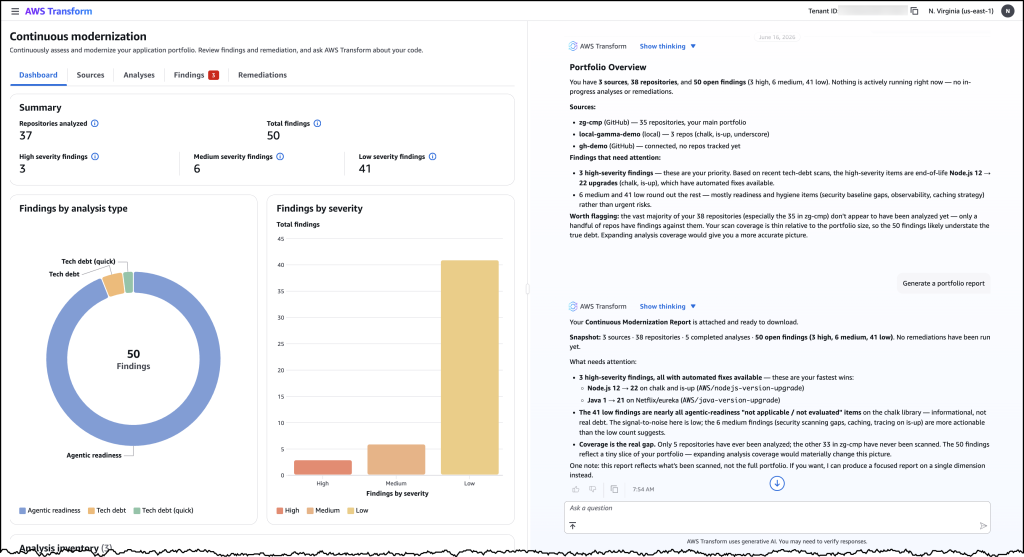
To get started with, I navigated to the AWS Transform web application. From the dashboard, I can see an overview of my organization’s repositories and their current status against my configured baselines.

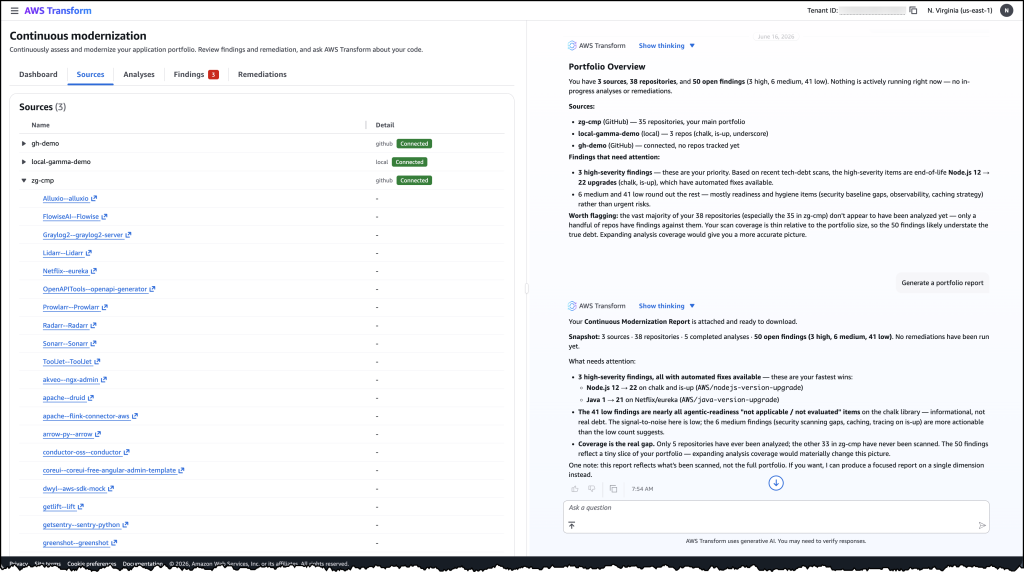
First, I connected my source control system and initiated an analysis against my specified policies. Within hours, the analysis returned findings across my repositories, showing which ones were behind the baseline and by how much. I could see the severity, the number of affected files, and the specific tech debt patterns detected.

From here, I selected a group of high-priority findings and launched a remediation campaign. AWS Transform – continuous modernization generated pull requests for each affected repository. I could monitor the campaign’s progress in real time, seeing which PRs were created, which were merged, and which repositories returned to compliance.

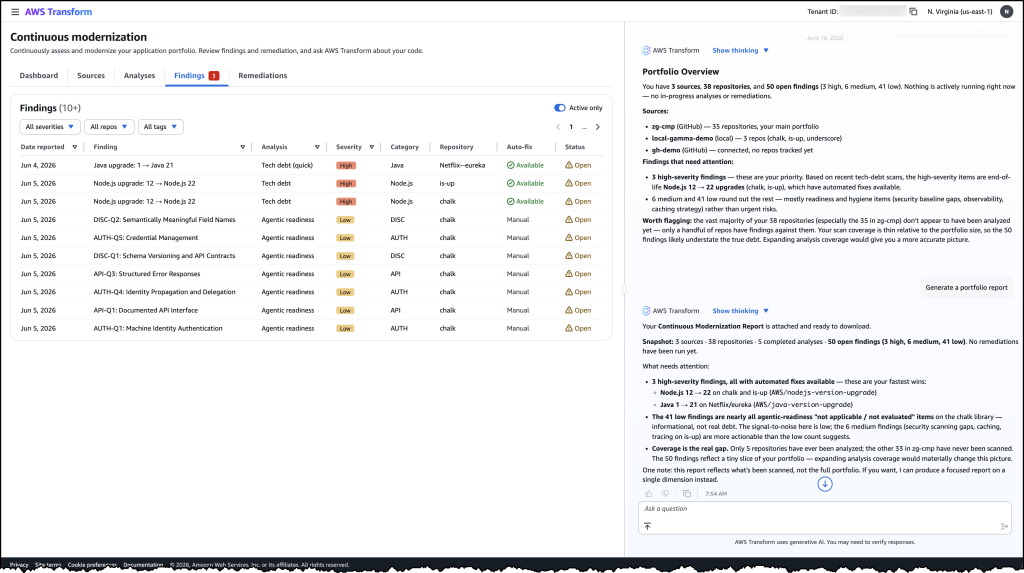
Image 1: AWS Transform – continuous modernization dashboard showing a portfolio overview of your technical debt findings across all connected repositories.

Image 2: The detailed findings view listing individual tech debt items by severity, category, and repository with their available remediation options.

Image 3: The sources view showing connected repositories from GitHub and local environments that continuous modernization is tracking for analysis.

Faster ways to modernize
These capabilities support two distinct approaches to code modernization. In continuous mode, you can use continuous modernization to keep your codebases current as baselines evolve. Think of this as the day-to-day work of upgrading libraries, applying security patches, and enforcing coding standards across your organization.

For larger modernization projects, such as migrating from one framework to another or upgrading a major runtime version across hundreds of applications, you can use campaign mode for targeted, project-based modernization. AWS Transform custom continues to provide the flexible primitive for these larger efforts. AWS Transform – continuous modernization is purpose-built for the recurring, high-volume work that platform teams manage every day.

Now available
AWS Transform – continuous modernization (preview) is available today. You can get started through the AWS Transform web application, via the AWS Transform Kiro Power, or through MCP and skills for integration with your existing coding agents. To learn more, visit the AWS Transform documentation.

  •  

AWS Weekly Roundup: Claude Opus 4.8 on AWS, Aurora MySQL with Kiro Powers, and more (June 1, 2026)

In my last Week in Review post, I shared what I’d been hearing from customers in the AI-Driven Development Lifecycle (AI-DLC) workshops I’ve been delivering. Last week I was back at it, this time in Denver for a two-day AI-DLC workshop, where I helped facilitate 17 teams to deliver nearly 20 separate use cases in just two days. The pace of acceleration that AI-DLC unlocks—especially when paired with tools like Claude Code on Amazon Bedrock—is fundamentally changing how businesses operate. Traditional roles within software development teams are collapsing into smaller, AI-augmented squads, and the paradigm shift is beginning to take place right in front of us. To learn more about how to utilize various AI tools, visit the GitHub repository of AI-DLC workflow.

This shift is also reshaping how AWS account teams (solutions architects, customer solutions managers, and technical account managers) collaborate with customers. It’s becoming less about handing off advisory design documents and more about building alongside them in real time. It’s a genuinely exciting moment to be in the middle of the change, and this week’s headline launch — Anthropic’s most capable model yet, now on AWS, is going to push that pace even further.

Now, let’s get into this week’s AWS news…

Headlines
Claude Opus 4.8 on AWS – Anthropic’s most capable generally available model is now accessible through both Amazon Bedrock and the Claude Platform on AWS. Opus 4.8 is built for agentic coding, knowledge work, and extended autonomous task execution — it sustains longer autonomous sessions with deeper reasoning, recovers from errors, and synthesizes information across lengthy documents. For coding workloads, it reads codebases like an engineer, plans before it edits, and holds context across long sessions. On Amazon Bedrock, you get AWS-managed features like Guardrails, Knowledge Bases, and data residency; on the Claude Platform on AWS, you get Anthropic’s native APIs unified with AWS billing. To learn more, visit the deep-dive blog post.

Last week’s launches
Here are some launches and updates from this past week that caught my attention:

  • Introducing the next generation of AWS Resilience Hub – A reimagined Resilience Hub gives SREs and developers a unified framework to define resilience standards, evaluate applications against them, and demonstrate compliance across an entire portfolio. It introduces modular resilience policies (covering service-level objectives (SLOs), multi-AZ/Region DR, and data recovery), business-oriented application modeling, generative AI-powered assessments aligned with the Well-Architected and Resilience Analysis Frameworks, and automatic dependency discovery via DNS query log analysis. Integration with AWS Organizations enables organization-wide resilience management from a single delegated administrator account.
  • Introducing the next generation of Amazon OpenSearch Serverless for building agentic AI applications – Amazon OpenSearch Serverless is now a fully managed search and vector engine purpose-built for agentic AI applications. It scales from zero to thousands of requests per second—roughly 20x faster than the prior generation—delivers up to 60% cost savings versus peak-provisioned clusters, and adds GPU acceleration plus new SEARCH and VECTORSEARCH collection types. Native integrations with Vercel, Kiro, Claude Code, and Cursor through OpenSearch Agent Skills make it straightforward to plug into your agent stack.
  • New assessment capabilities in AWS Transform – AWS Transform expands with new tools to help you build migration business cases and evaluate TCO before moving workloads to AWS. You can ingest data from RVTools exports, CMDB data, the AWS Transform discovery tool, and third-party discovery tools, then run what-if scenarios across region, utilization, and service mapping for EC2, FSx, S3, SQL Server on EC2, and virtual desktops. The release also adds Agentic Readiness Analysis (ARA) and Modernization Analysis (MODA), which scan code repositories in 5 to 30 minutes per repo to surface severity-tagged findings with file-level evidence and AWS-mapped remediation guidance.
  • Amazon Aurora MySQL with Kiro Powers — Aurora MySQL now integrates with Kiro Powers, drawing from a curated repository of pre-packaged MCP servers, steering files, and hooks validated by Kiro partners. Developers can execute both data plane tasks (queries, schema management) and control plane tasks (cluster management) in natural language, with dynamic guidance for Aurora MySQL Serverless scaling, RDS-to-Aurora migration, and replication setup. The companion Database Blog post explains how the agent produces the API calls, SQL, and configuration for you to review and run — available via one-click install from the Kiro IDE or webpage.
  • Amazon WorkSpaces Applications now supports Windows Desktop OS – You can now bring your own Windows Desktop licenses to Amazon WorkSpaces Applications and stream full Windows desktops and applications from AWS-hosted dedicated hardware. BYOL eliminates OS fees (you pay only for compute and streaming infrastructure), supports eligible Microsoft 365 Apps for enterprise, and gives users a matching experience between local and remote environments — same workflows, shortcuts, and navigation in both.

For a full list of AWS announcements, be sure to keep an eye on the What’s New with AWS page.

Other AWS news
Here are some additional posts and resources that you might find interesting:

For a full list of AWS blog posts, be sure to keep an eye on the AWS Blogs page.

Learn more about AWS, browse and join upcoming AWS-led in-person and virtual events, startup events, and developer-focused events as well as AWS Summits and AWS Community Days. Join the AWS Builder Center to connect with builders, share solutions, and access content that supports your development.

That’s all for this week. Check back next Monday for another Weekly Roundup!

-Micah

  •